Qwen-Image-Edit-Plus (2509) is 20B MMDiT image-to-image editor supporting multi-image edits, single-image consistency, and native ControlNet. Ready-to-use REST inference API, best performance, no coldstarts, affordable pricing.
निष्क्रिय

$0.025प्रति रन·~40 / $1
उदाहरणसभी देखें
Turn the camera to a close-up.

chibi,simple art,bold stroke, full body, Based on the woman in Figure 2 and the man in Figure 1, generate a wedding photo set, following these descriptions: The groom wears a red Chinese-style tunic, and the bride wears an exquisite Xiuhe dress, with a golden phoenix coronet on her head. They stand side by side in front of an ancient vermilion palace wall, with carved wooden windows in the background. The lighting is bright and soft, the composition is symmetrical, and the atmosphere is festive and solemn.

The couple from Figure 1 are holding the doll from Figure 2 together.
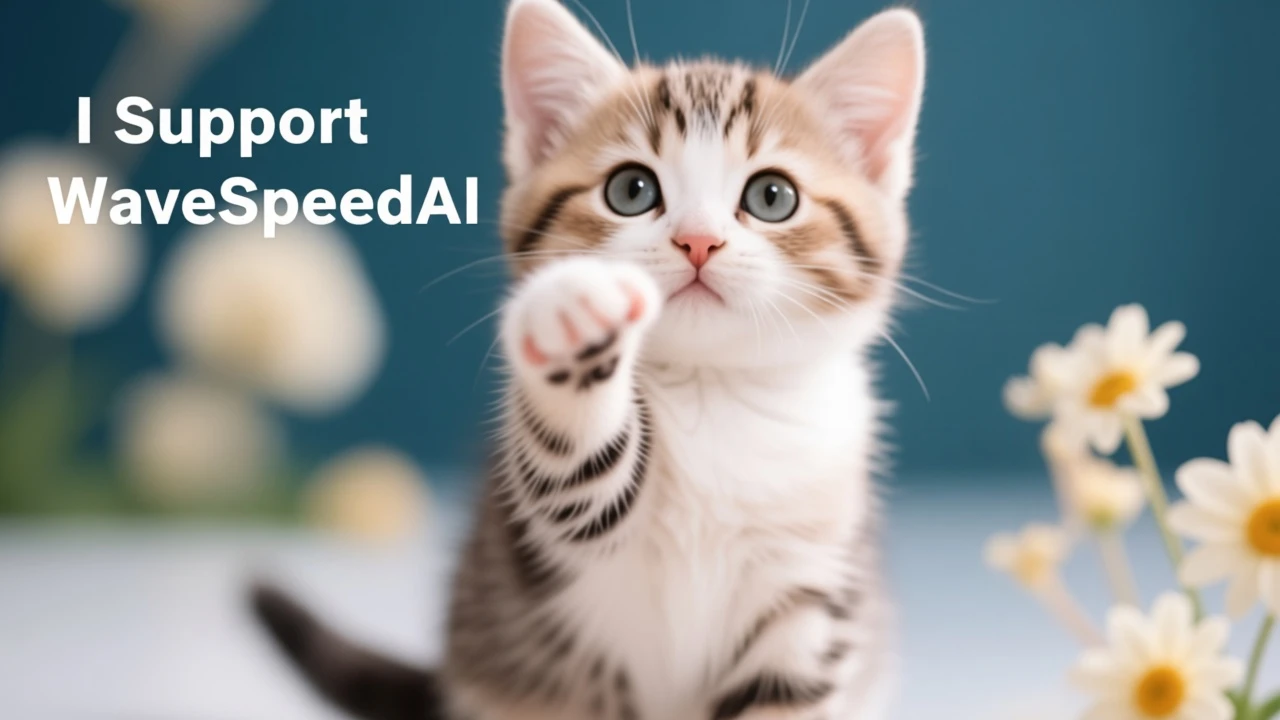
The kitten raised one leg and pointed it at the screen with the text: I support WaveSpeedAI
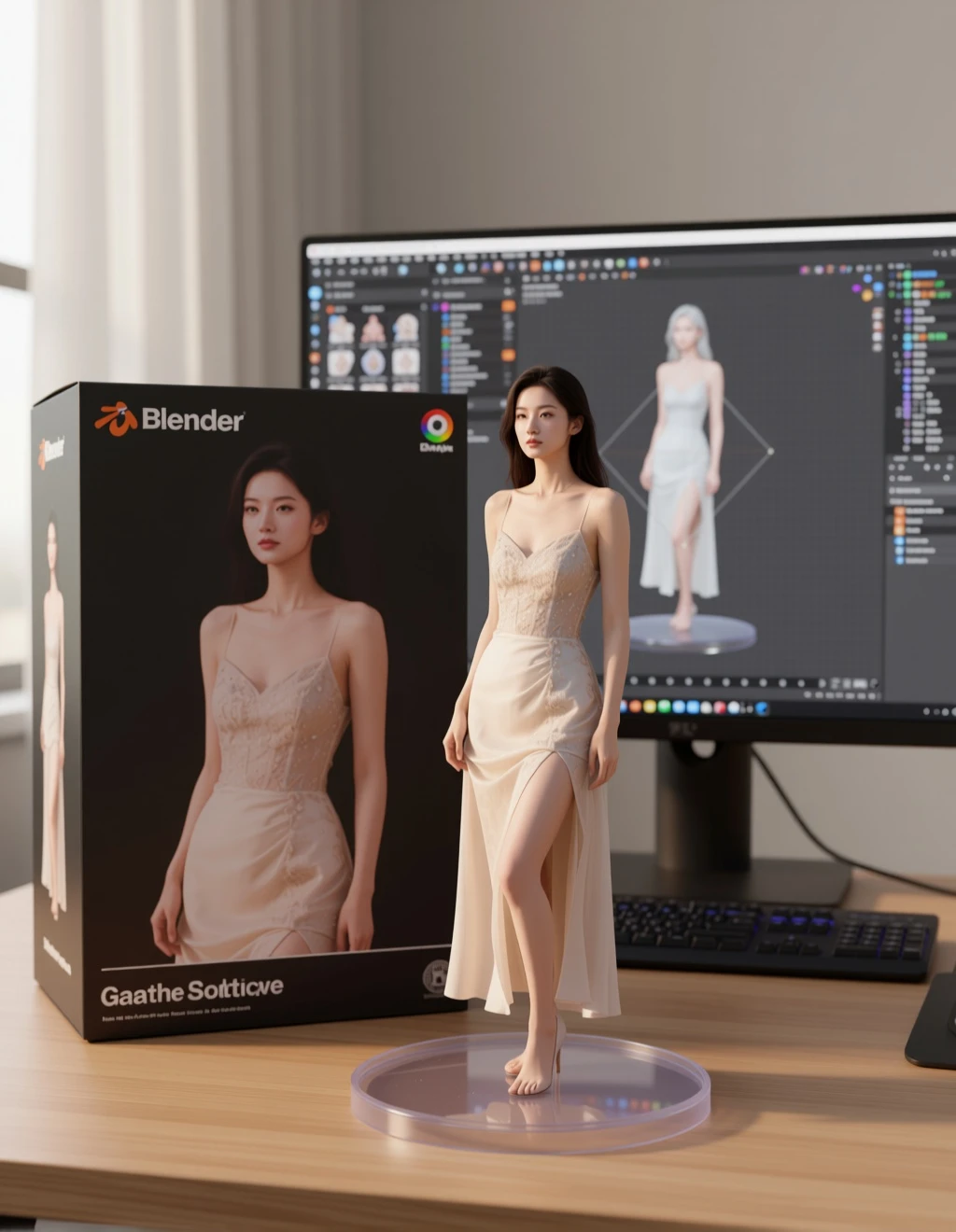
Turn this photo into a character figure. Behind it, place a box with the character's image printed on it, and a computer showing the Blender modeling process on its screen. In front of the box, add a round plastic base with the character figure standing on it .set the scene indoors if possible.

Place the woman from Figure 1 into the background of Figure 2.

The man from Figure 1 and the woman from Figure 2 are hugging each other.

Generate a girl in a finger heart pose, using the line art from Figure 2 as a reference.

Put this air conditioner in the living room next to the sofa.

The girl in Figure 1 sits in the pose of Figure 3 wearing the black dress from Figure 2.

The girl in Figure 1 is sitting in the studio in Figure 2, speaking into the microphone.
संबंधित मॉडल






README
Qwen-Image-Edit-Plus-LoRA
A next-gen image editing model built on Qwen-Image 20B. It delivers precise bilingual (Chinese & English) text editing, supports both appearance-level and semantic-level edits, and preserves the original style.
Why choose this?
-
Dual-mode editing
-
Appearance editing: add/remove/modify elements while keeping all other regions pixel-accurate and unchanged.
-
Semantic editing: higher-level changes—IP creation, pose/rotation, style transfer—allow global pixel updates while keeping semantic intent.
-
Precise text editing (CN/EN) Edit on-image text directly (add/delete/replace) while retaining the original font, size, kerning, and style.
-
Style preservation Maintains palette, lighting, brushwork, and overall look even under substantial edits.
-
Strong benchmark results Evaluated across multiple public editing benchmarks with state-of-the-art performance.
Designed for
- Design & Marketing teams – Rapid visual iterations, brand-safe edits, and multilingual comps.
- E-commerce & Social – Clean product touch-ups, quick hero swaps, localized text.
- Creators & Studios – Concepting, IP style moves, pose/angle changes without repainting.
Pricing
Just $0.025 per image !!!
How to use
- Enter a prompt (supports detailed narrative & embedded text).
- Upload images. (Up to 3 images)
- Set size (width & height, up to 1536×1536).
- Add one or more LoRAs (Up to 3):
- Paste the path/URL of the LoRA.safetensors file.
- Adjust the scale (e.g., 0.5 for subtle effect, 1.0 for full strength).
- (Optional) Set seed for reproducibility.
- Choose output format (JPEG / PNG / WEBP).
- Run → preview results → iterate with different LoRA scales.
How to use LoRA?
Note
If you did not upload the image locally, please ensure that the image URL is accessible! A successfully accessible image will display a preview in the interface.
Qwen Image Edit Plus Lora API — Quick start
Grab a WaveSpeedAI API key, then call POST https://api.wavespeed.ai/api/v3/wavespeed-ai/qwen-image/edit-plus-lora with your input as JSON. The endpoint returns a prediction id. Start polling the result endpoint around every 2 seconds, increase the interval for long-running tasks, and stop on any terminal status. On completed, read output values from data.outputs. Examples for Qwen Image Edit Plus Lora below.
HTTP example
set -euo pipefail

: "${WAVESPEED_API_KEY:?Set WAVESPEED_API_KEY}"

REQUEST_BODY=$(cat <<'JSON'
{
    "prompt": "A cinematic shot of a city at sunset, soft golden light",
    "images": [
        "https://interactive-examples.mdn.mozilla.net/media/cc0-images/painted-hand-298-332.jpg"
    ],
    "seed": -1,
    "output_format": "jpeg"
}
JSON
)

# 1. Submit the prediction.
SUBMIT_RESPONSE=$(curl --silent --show-error --fail-with-body \
  -X POST "https://api.wavespeed.ai/api/v3/wavespeed-ai/qwen-image/edit-plus-lora" \
  -H "Content-Type: application/json" \
  -H "Authorization: Bearer $WAVESPEED_API_KEY" \
  -d "$REQUEST_BODY")

TASK=$(printf '%s' "$SUBMIT_RESPONSE" | jq 'if has("data") then .data else . end')
PREDICTION_ID=$(printf '%s' "$TASK" | jq -r '.id')
if [ -z "$PREDICTION_ID" ] || [ "$PREDICTION_ID" = "null" ]; then
  printf 'Submission response did not contain a prediction id
' >&2
  exit 1
fi
RESULT_URL=$(printf '%s' "$TASK" | jq -r '.urls.get // empty')
if [ -z "$RESULT_URL" ]; then
  RESULT_URL="https://api.wavespeed.ai/api/v3/predictions/$PREDICTION_ID/result"
fi

# 2. Poll until the prediction finishes.
while true; do
  RESPONSE=$(curl --silent --show-error --fail-with-body "$RESULT_URL" \
    -H "Authorization: Bearer $WAVESPEED_API_KEY")
  RESULT=$(printf '%s' "$RESPONSE" | jq 'if has("data") then .data else . end')
  STATUS=$(printf '%s' "$RESULT" | jq -r '.status')
  case "$STATUS" in
    completed) printf '%s\n' "$RESULT" | jq '.outputs'; break ;;
    failed|cancelled|timeout) printf '%s\n' "$RESULT" | jq . >&2; exit 1 ;;
    created|processing) sleep 2 ;;
    *) printf 'Unexpected status: %s
' "$STATUS" >&2; exit 1 ;;
  esac
done
Node.js example
const submitUrl = "https://api.wavespeed.ai/api/v3/wavespeed-ai/qwen-image/edit-plus-lora";
const apiKey = process.env.WAVESPEED_API_KEY;
if (!apiKey) throw new Error('Set WAVESPEED_API_KEY');

async function requestJson(url, options = {}) {
  const response = await fetch(url, options);
  if (!response.ok) throw new Error(await response.text());
  return response.json();
}

// 1. Submit the prediction.
const body = await requestJson(submitUrl, {
  method: "POST",
  headers: {
    "Authorization": `Bearer ${apiKey}`,
    "Content-Type": "application/json",
  },
  body: JSON.stringify({
        "prompt": "A cinematic shot of a city at sunset, soft golden light",
        "images": [
                "https://interactive-examples.mdn.mozilla.net/media/cc0-images/painted-hand-298-332.jpg"
        ],
        "seed": -1,
        "output_format": "jpeg"
}),
});
const task = body.data ?? body;
if (!task.id) throw new Error("Submission response did not contain a prediction id");
const resultUrl = task.urls?.get ||
  `https://api.wavespeed.ai/api/v3/predictions/${task.id}/result`;

// 2. Poll until the prediction finishes.
while (true) {
  const resultBody = await requestJson(resultUrl, {
    headers: { "Authorization": `Bearer ${apiKey}` },
  });
  const result = resultBody.data ?? resultBody;
  if (result.status === "completed") {
    console.log(result.outputs);
    break;
  }
  if (["failed", "cancelled", "timeout"].includes(result.status)) throw new Error(JSON.stringify(result));
  if (!["created", "processing"].includes(result.status)) throw new Error("Unexpected status: " + result.status);
  await new Promise(resolve => setTimeout(resolve, 2000));
}
Python example
import json
import os
import time
from urllib.request import Request, urlopen

api_key = os.environ["WAVESPEED_API_KEY"]
headers = {"Authorization": f"Bearer {api_key}", "Content-Type": "application/json"}
payload = {
    "prompt": "A cinematic shot of a city at sunset, soft golden light",
    "images": [
        "https://interactive-examples.mdn.mozilla.net/media/cc0-images/painted-hand-298-332.jpg"
    ],
    "seed": -1,
    "output_format": "jpeg"
}

def request_json(url, data=None):
    request = Request(url, data=data, headers=headers, method="POST" if data else "GET")
    with urlopen(request) as response:
        return json.load(response)

# 1. Submit the prediction.
body = request_json("https://api.wavespeed.ai/api/v3/wavespeed-ai/qwen-image/edit-plus-lora", json.dumps(payload).encode())
task = body.get("data", body)
if not task.get("id"):
    raise RuntimeError("Submission response did not contain a prediction id")
result_url = task.get("urls", {}).get("get") or f"https://api.wavespeed.ai/api/v3/predictions/{task['id']}/result"

# 2. Poll until the prediction finishes.
while True:
    result_body = request_json(result_url)
    result = result_body.get("data", result_body)
    status = result.get("status")
    if status == "completed":
        print(result.get("outputs", []))
        break
    if status in {"failed", "cancelled", "timeout"}:
        raise RuntimeError(result)
    if status not in {"created", "processing"}:
        raise RuntimeError(f"Unexpected status: {status}")
    time.sleep(2)
Qwen Image Edit Plus Lora API — Frequently asked questions
What is the Qwen Image Edit Plus Lora API?
Qwen Image Edit Plus Lora is a WaveSpeedAI model for AI inference, exposed as a REST API on WaveSpeedAI. Qwen-Image-Edit-Plus (2509) is 20B MMDiT image-to-image editor supporting multi-image edits, single-image consistency, and native ControlNet. Ready-to-use REST inference API, best performance, no coldstarts, affordable pricing. You can call it programmatically or try it from the playground above.
How do I call the Qwen Image Edit Plus Lora API?
POST your input parameters to the model's REST endpoint (shown in the API tab of this playground) with your WaveSpeedAI API key in the Authorization header. Submission returns a prediction ID. Poll the result endpoint starting around every 2 seconds, increase the interval for long-running tasks, and stop on any terminal status. The playground generates production-oriented Python, JavaScript, and cURL examples with timeouts, transient-error handling, and safe GET retries. Full request/response shape is documented at https://wavespeed.ai/docs/docs-api/wavespeed-ai/qwen-image-edit-plus-lora.
How much does Qwen Image Edit Plus Lora cost per run?
Qwen Image Edit Plus Lora starts at $0.025 per run. That figure is the base price — the final charge scales with the parameters you set in the form (output size, length, count, references, or whatever knobs this model exposes), so a higher-quality or larger output costs more than a minimal one. The exact cost for your current input is shown live next to the Generate button before you submit, and the actual per-call charge is recorded on the prediction afterwards.
What inputs does Qwen Image Edit Plus Lora accept?
Key inputs: `prompt`, `images`, `size`, `seed`, `enable_base64_output`, `enable_sync_mode`. The full JSON schema (types, defaults, allowed values) is rendered above the Generate button and mirrored in the API reference at https://wavespeed.ai/docs/docs-api/wavespeed-ai/qwen-image-edit-plus-lora.
How long does Qwen Image Edit Plus Lora take to generate?
Median end-to-end generation time on WaveSpeedAI is around 13 seconds per request, based on recent successful runs. Queue time varies with global demand; live status is visible in the prediction record.
Can I use Qwen Image Edit Plus Lora outputs commercially?
Commercial usage rights depend on the model's license, set by its provider (WaveSpeedAI). The license summary appears on the model card above; see WaveSpeedAI's Terms of Service for platform-level conditions.