Open your invoices
Drop PDF invoices, scans or photos of receipts, as many as you like. Text in PDFs is read directly; photos and scans are read with text recognition on your device.
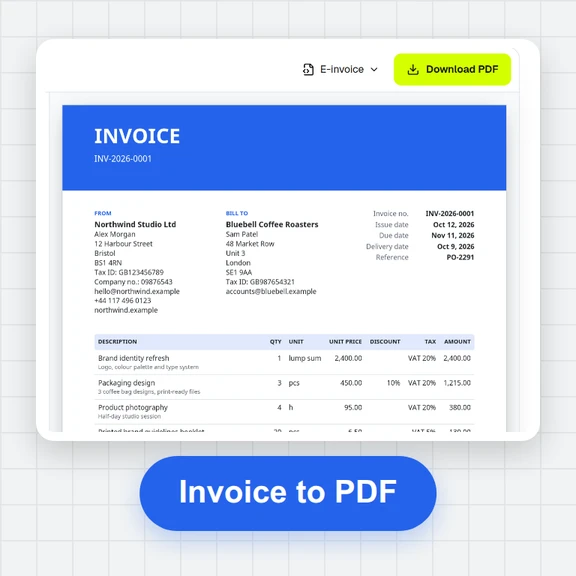
Drop a pile of PDF invoices or photos of receipts and get the vendor, VAT number, invoice number, dates, subtotal, tax, total and line items of each one. Every field shows where it was read on the page and how sure the reading is.
Totals and line items are checked against each other, so you see what needs a look before it goes into your books.
Loading the invoice scanner…
Drop PDF invoices, scans or photos of receipts, as many as you like. Text in PDFs is read directly; photos and scans are read with text recognition on your device.
Each field is highlighted on the page with its confidence. Fix one by typing, or select the right text on the page and assign it. Totals that don’t add up are marked.
Download one Excel file with an invoices sheet and a line items sheet, a CSV for your accounting software, or JSON.
Create product photos, illustrations and short videos from a prompt with WaveSpeed AI.
Make product photos and graphics for your shop and social posts.
Turn a product photo into a short video clip.
Turn a product picture into a 3D model.
$1 in free credits for eligible new accounts. No card needed. Generators have separate account and credit requirements. The invoice scanner is free.
Yes. Scan as many invoices and receipts as you like, with no account, no monthly document limit and no watermark.
No. PDFs and photos are read in your browser and never leave your device. For photos and scans the page downloads the text recognition engine and a language file once; your images are read on your device.
Vendor name, vendor tax or VAT number, invoice number, invoice date, due date, payment terms, buyer, currency, subtotal, tax amount and rates, total, and the line items with description, quantity, unit price and amount.
Labels in English, German, French, Spanish, Italian, Dutch and Portuguese, with values next to or below their labels, several tax rates, tables that continue over several pages, and till receipts. Dates and amounts are read in the formats those countries use.
Subtotal plus tax must equal the total, the line items must add up to the subtotal (or to the total on receipts that print prices with tax), and each line’s quantity times unit price must equal its amount. Anything that doesn’t add up, is missing or was read with low confidence is marked.
Type the right value, or press the target button next to the field and select the text on the page. You can also select text first and choose which field it belongs to. Undo and redo work for every change.
Yes. Photos are straightened and cleaned up before the text is read. Sharp, evenly lit photos read best; check the fields marked in amber or red, since faded thermal paper can be misread.
It reads printed invoices with rules, not handwriting. One file is one invoice: split PDFs that hold several invoices first. Very unusual layouts may need a few fields picked by hand.
One workbook with an Invoices sheet (one row per document, with real dates and numbers and the check result) and a Line items sheet (one row per item, with the file, vendor and invoice number it belongs to).
Free, private and without limits.
/filters:quality(82)/media/images/1791123751656780930_IfFPY7R0.webp)
/filters:quality(82)/media/images/1791123737177812425_RjKT3cku.webp)
/filters:quality(82)/media/images/1791123748309870128_xlkNgK8N.webp)
/filters:quality(82)/media/images/1791123738630744263_oR09R0aj.webp)
/filters:quality(82)/media/images/1791177033162457776_uQ09OY7g.webp)
/filters:quality(82)/media/images/1791123734319125607_JdnwGPY7.webp)
/filters:quality(82)/media/images/1791123746355630206_udnxGPY7.webp)
/filters:quality(82)/media/images/1791123744771362580_yC0sPezZ.webp)
/filters:quality(82)/media/images/1791123738606970169_5KIR1ais.webp)
/filters:quality(82)/media/images/1791123748197655725_EUmuFNW6.webp)