
Video Face Swap Online Free: Best Tools
Learn which free online video face swap tools are worth trying, what results to expect, and how to avoid the most obvious output issues.
Hello, everyone, I’m Dora. I’ve been casually testing AI video tools for the past year — not to chase hype, but to understand what’s actually usable in real workflows. So when a friend asked me which free video face swap tool online she should try for a short meme clip, I realized I didn’t have a clean answer.
So I made one. You can also explore how newer AI video models compare in real workflows — this breakdown of how Seedance, Kling, and Sora differ in AI video generation is a useful starting point.
I ran the same test clip through several tools, tracked how each handled motion, lighting variation, and off-angle shots — and documented where things broke down. Here’s what I found. No “everything works perfectly.” No hidden upsells dressed up as reviews.

What Free Online Video Face Swap Tools Are Good For
Let’s start here, because most articles skip the honest framing.
Casual edits and meme content
Short clips with forward-facing subjects, decent lighting, and minimal camera movement? If you’re experimenting with AI video tools beyond face swaps, this guide explains what the SkyReels V4 video generation model is and what creators are using it for. Free tools handle these better than I expected. If you’re swapping a face in a 5–10 second clip for a meme or social post — someone walking toward the camera, a talking head shot, a reaction clip — the output is often clean enough to post.
Processing is fast too. Most browser-based tools return results in under 60 seconds for short clips. No software to install, no queue if you’re not on a paid tier. That’s genuinely convenient.
Where they are not reliable enough
The gap shows up fast with complexity. Side profiles, fast head movement, and dramatic lighting shifts are all hard for free-tier models. I tested each tool with a clip where the subject turns roughly 45 degrees mid-shot. Most produced a noticeable pop — the swapped face either lagged, smeared, or briefly reverted to the source face during the turn.
Compressed output quality, obvious artifacts, and random glitches are real at the free tier. Not deal-breakers for casual content, but very obvious in anything intended to look professional.
What to Check Before Uploading a Video
This is the part I wish someone had told me first. Three test clips that failed could have been fixed at this stage.
Face angle and lighting
Front-facing, evenly lit source photos give the best results — across all tools, not just one. I tried uploading a reference photo with side shadows and the face blend was noticeably off on every tool I tested. For best results, use a clear, front-facing face photo with good lighting, and avoid heavily filtered or low-resolution files.
The target video matters too. A face that’s partially in shadow or frequently moves out of frame is going to give the AI inconsistent reference points, and that shows in the output.
Clip length and export limits
Most free tiers cap usable clip length at 10–60 seconds. Free tier output is typically capped at 576p, and outputs are kept for only 1 day before deletion. For quick social use, that’s often fine. For anything longer or higher-resolution, you’ll hit a wall before you’ve finished your second test clip.
Best Free Video Face Swap Tools Online
Easiest tool for beginners: Magic Hour
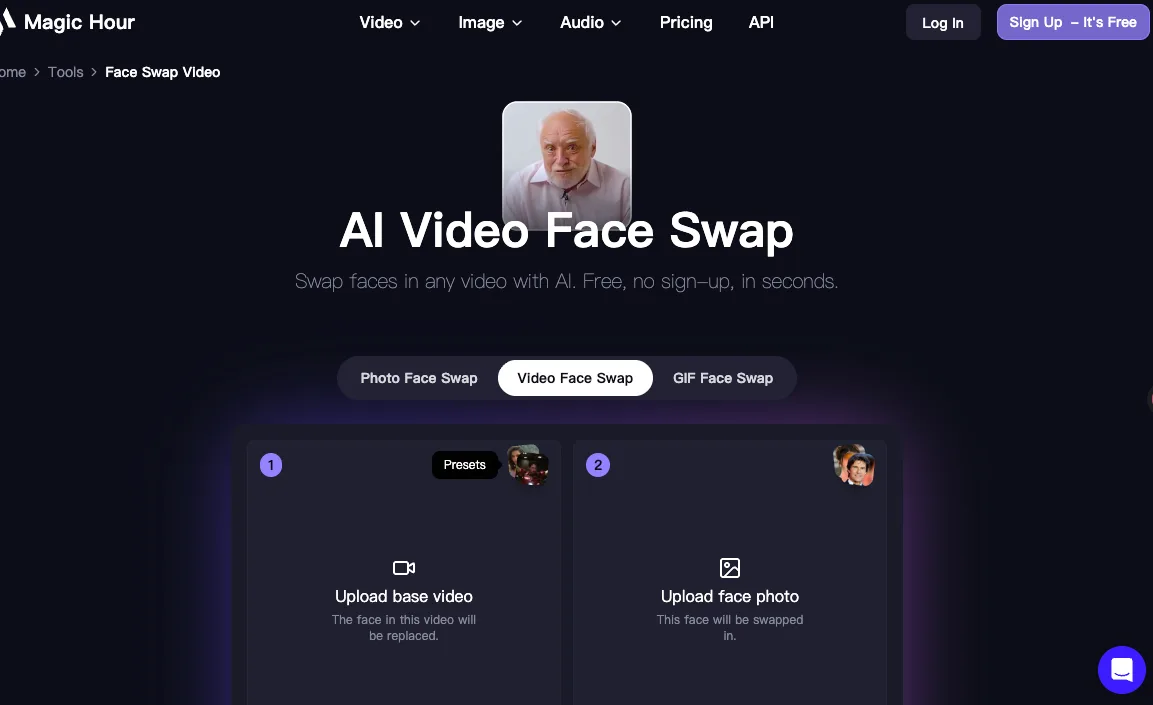
Magic Hour’s video face swap tool is as frictionless as any tool I’ve used. No account required to start — you get three free video face swaps without even signing in. Upload your clip, upload a reference photo, select the face, done.
The output quality on a well-lit forward-facing clip was the cleanest I saw across my tests. Automatic lighting adaptation reduces the manual blending work noticeably. The free tier adds a watermark and caps video length at 10 seconds, so it’s clearly a try-before-you-buy setup — but those three free swaps are real, usable credits, not a five-second demo.
Best free output quality: Vidwud
Vidwud is a free, watermark-free online service with 2025 updates improving its handling of side profiles — results are now more natural, though complex angled shots may still have minor imperfections. That matches what I saw in testing. On straightforward clips it delivered the sharpest output of any free tool — genuinely clean edge blending around the hairline, which is usually where things fall apart.
The downside: no stated credit limit, but processing queues during peak hours get long. I waited about 8 minutes for one clip on a Tuesday afternoon. For a free service with no watermark, that’s a tradeoff I’d accept.
Best for quick testing: Reface
If you just want to confirm an idea works before committing to anything, Reface’s mobile app is the fastest loop. Upload, select a template or your own clip, preview in under 30 seconds. The output leans entertainment-grade rather than polished — Reface excels at creating shareable content quickly, with template quality varying significantly between older and newer additions.
I wouldn’t use it for client work. But for checking whether a face swap concept lands? It’s genuinely useful as a scratchpad.
Comparison Table
| Tool | Upload limit (free) | Output quality | Watermark | Signup required | Moving faces |
|---|---|---|---|---|---|
| Magic Hour | 10 sec clip | Good (576p) | ✅ Yes | ❌ No | ✅ Good tracking |
| Vidwud | Standard video | Very good | ❌ None | ❌ No | ⚠️ Struggles on angles |
| Reface | Short clips | Moderate | ✅ Yes | ✅ Required | ⚠️ Template-dependent |
| Vidnoz | MP4/MOV | Good | ⚠️ Varies | ✅ Required | ⚠️ Moderate |
| VideoFaceSwap.io | Daily credits | Moderate | ❌ None | ✅ Required | ⚠️ Partial |
One thing worth noting: “no watermark” doesn’t always mean better. Vidwud’s output quality is genuinely good, but the queue wait is unpredictable. Magic Hour adds a watermark on free tier but processes faster and more consistently. Pick based on what matters more for your use case. Some creators skip face swaps entirely and generate full clips from images instead — this tutorial shows how to turn product photos into ad-ready videos with Seedance 2.0.
The Biggest Problems With Free Face Swap Tools
I want to be specific here, because “artifacts happen” isn’t useful. Here’s what actually appeared across my test clips.
Motion glitches
This was the most consistent failure. Any clip where the subject’s face moved significantly between frames showed one of two issues: a brief “snap” where the swapped face suddenly jumps back to the original, or a drag effect where the swap lags the actual face movement by a few frames. On clips under 5 seconds with limited movement, neither problem appeared. On anything longer than 8 seconds with natural head movement, at least one occurred on every free tool I tested.
Identity drift
This surprised me. On longer clips, two tools gradually shifted the swapped face’s skin tone and face shape — almost imperceptibly at first, but obvious by the final frames. The AI was seemingly recalibrating its reference mid-video. This didn’t happen on paid tiers in my limited comparisons, which suggests the model quality difference is real.
Lighting mismatch
Moving from a bright frame to a shadowed frame created a visible inconsistency on three of the five tools. The swapped face retained its original lighting rather than adapting to the new scene. Magic Hour’s automatic lighting adaptation helped the most here, but even it had a slight mismatch when the lighting change was sudden.
Before You Use Any of These: A Quick Reality Check
Face swap tools sit in a genuinely regulated space now — not just ethically, but legally. In May 2025, the TAKE IT DOWN Act was signed into law in the US, marking the first federal law directly restricting harmful deepfakes, focusing on non-consensual intimate imagery and AI-generated content that falsely depicts real people.
That’s for the obvious bad uses. But even for casual content, it’s worth knowing where the line is. Under the EU AI Act’s Article 50, AI systems that create synthetic content must mark their outputs as artificially generated, and users must disclose when content has been manipulated. If you’re in the EU and posting face-swapped content publicly, labeling it as AI-generated isn’t optional — it’s a legal requirement.
The tools listed in this article are for consensual creative use with your own likeness or content you have rights to. The EU AI Act’s transparency obligations are a useful read if you’re unsure where the boundary sits.
My Verdict: What Free Tools Are Actually Good Enough For
Good enough for social content
For memes, short-form comedy, reaction clips, and personal creative projects under 10 seconds? The free tier of Magic Hour or Vidwud is genuinely useful. The output is clean enough for Instagram Reels or TikTok, especially if you’re not promising photorealism. The limits are real but manageable if you plan around them.
Not good enough for polished work
Anything going into a formal edit, client deliverable, or longer video needs more than what free tools offer. Resolution caps, watermarks, motion glitches, and identity drift are all consistent enough at the free tier that you’d spend more time fixing problems than the tool saved you. At that point, a paid tool or a different production approach is the honest answer.
Maybe I’m overthinking this for most use cases — but the tools that market themselves as “unlimited” and “perfect” on the free tier are the ones where I saw the worst artifacts in testing. Manage expectations going in and you’ll actually find the good ones useful.
/filters:quality(82)/media/images/5f15570a-6a68-432e-a6f1-1dcbf799ba81.webp)
/filters:quality(82)/media/images/b73c2438-6bdd-4b80-a229-8d71d8f819cf.webp)
/filters:quality(82)/media/images/427fd9f2-347d-4f86-a2d5-aee110cda01d.webp)
/filters:quality(82)/media/images/1773962750383987480_n3hqzHRZ.webp)
/filters:quality(82)/media/images/43fa0e7f-a0db-48d7-9bab-921d1225db30.webp)
/filters:quality(82)/media/images/5799ff56-3a73-40ca-a666-e4965d878496.webp)