What Is SkyReels V4? The First Unified Video-Audio AI Model Explained
Hello, I’m Dora. I generated my first SkyReels V4 video that day. Fifteen seconds of a cat walking through a rain-soaked alley at dusk. The video looked good — 1080p, smooth motion, nice lighting. But what made me pause was the audio. Footsteps splashing in puddles. Distant traffic. The faint echo of the alley walls. All of it generated together, synchronized perfectly, without me touching a single audio editing tool.
That’s the part that felt different.
The Problem Every Video AI Tool Had Before V4
Why video-only generation always felt incomplete
Most video AI tools generate silent clips**. **Runway, Pika, even the earlier SkyReels versions — they produce visuals and stop there. You get a beautiful 10-second shot of waves crashing on a beach, but it’s completely silent. The waves don’t crash. The wind doesn’t blow. There’s no ambient sound at all.
This isn’t a technical oversight. Generating synchronized audio alongside video is genuinely hard. The audio needs to match not just the general scene but specific visual events — footsteps landing when feet touch ground, doors closing when they swing shut, voices syncing to lip movements.
The “add audio in post” bottleneck
The standard workflow became: generate video, export it, open an audio editor, add sound effects or music manually, sync everything by hand, export again. For a 15-second clip, this could take 20-30 minutes.
I tried this with Pika outputs last month. The video looked professional. But finding the right ambient sounds, timing them to match visual cues, and avoiding that “obviously added later” feel consumed more time than generating the video itself. The workflow felt broken — like buying a car but having to install the engine separately.
What SkyReels V4 Actually Is
Built by SkyworkAI (the V1/V2/V3 lineage explained)
SkyworkAI released SkyReels V1 in early 2025 as a basic text-to-video model. V2 followed with diffusion forcing architecture that enabled infinite-length generation through autoregressive sequences. V3 launched in January 2026 with multimodal in-context learning — you could feed it reference images, audio clips, or existing video and it would generate coherent continuations.
V4, which went live February 25, 2026, represents a different kind of leap. Where V3 added features, V4 restructured the entire architecture around a dual-stream system that generates video and audio simultaneously.
What “unified video-audio foundation model” really means
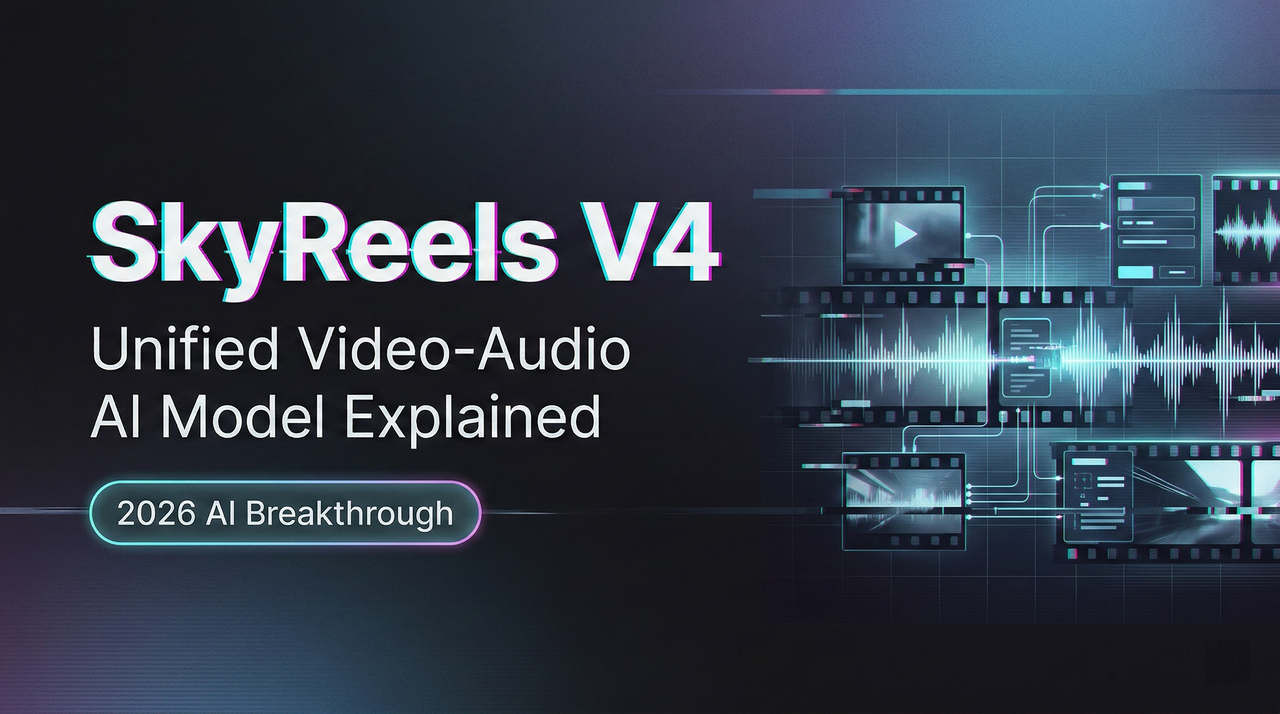
The technical paper describes V4 as using a Multimodal Diffusion Transformer (MMDiT) with two parallel branches. One branch synthesizes video frames. The other generates temporally aligned audio. Both branches share a text encoder based on multimodal large language models, which means they process the same semantic understanding of your prompt and maintain synchronization throughout generation.
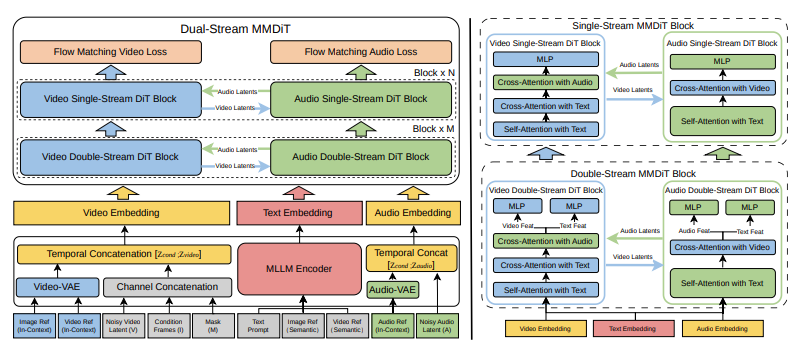
This isn’t video generation with audio bolted on. It’s a single model that treats sight and sound as equally important outputs, generated together from the same latent understanding of the scene.
In practice, this means when you prompt “a woman speaking at a podium,” the model generates both the visual of her lips moving and the actual speech audio, synchronized at the frame level. When you generate “heavy rain on a metal roof,” you get both the visual of rain streaking down and the characteristic metallic drumming sound — not approximately matched, but generated as a unified audiovisual event.
Key Capabilities at a Glance
Joint video + audio generation from one prompt
Single-prompt generation is the core capability. You write “thunder rolling across a desert landscape” and V4 produces 15 seconds of clouds gathering, lightning flashing, and synchronized thunder rumbling that matches the visual timing. No separate audio generation step. No manual sync work.
I tested this with dialogue scenes. Prompted “two people arguing in a busy café” and got not just the visual of the conversation but background chatter, clinking dishes, and the speakers’ voices rising and falling with the intensity of their gestures. The lip sync wasn’t perfect — I noticed a few moments where timing drifted slightly — but it was better than anything I’d manually synced.
1080p / 32FPS / 15-second output
Technical specifications: up to 1080p resolution, 32 frames per second, maximum 15-second duration. For context, most competing tools max out at 720p or require significantly longer generation times for HD output.
The 15-second limit matters more than it sounds. Most social media content lives in 10-15 second chunks. YouTube Shorts caps at 60 seconds. Instagram Reels at 90. For that use case, 15 seconds with synchronized audio is more useful than 30 seconds of silent video that needs post-production.
Multi-modal inputs: text, image, video, mask, audio reference
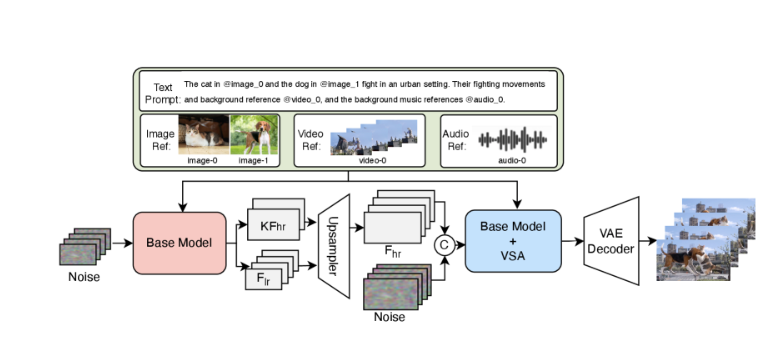
V4 accepts five input types: text prompts, reference images, video clips, binary masks for inpainting, and audio references. You can combine them — upload an image of a specific person, provide an audio sample of footsteps on gravel, and prompt “walking through a forest at dawn.” The model uses all three inputs to guide generation.
I tested multi-modal prompting with a reference image of a specific architectural style and an audio clip of street ambience. The generated video maintained the architectural details from the image while layering in the ambient sounds from the audio reference. Not perfectly — some audio elements felt generic — but the capability worked.
Three tasks in one: generate, inpaint, edit
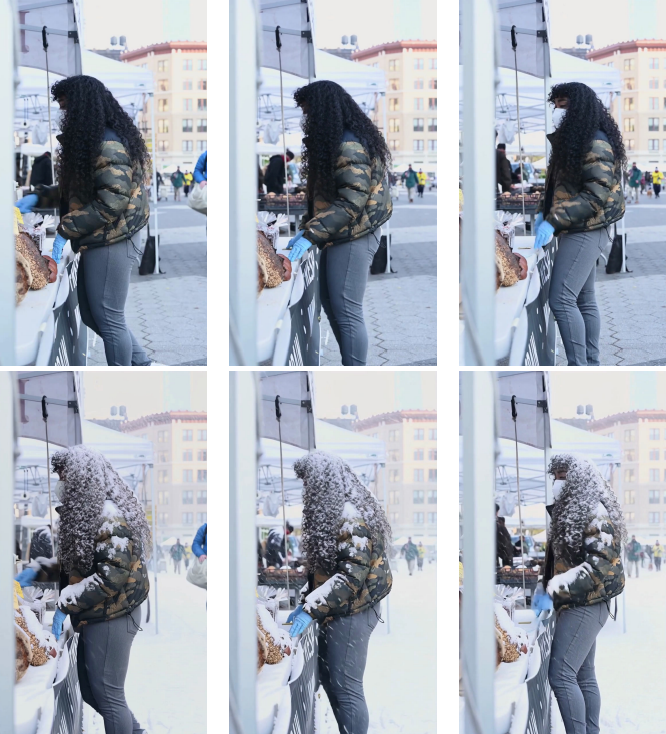
Beyond generation, V4 handles inpainting and editing through channel concatenation. Provide a video and a mask indicating which regions to modify, and the model regenerates only those areas while preserving the rest. This enables tasks like removing objects, changing backgrounds, or replacing specific elements without regenerating the entire clip.
How V4 Compares to What Came Before
V4 vs SkyReels V1/V2/V3 evolution
V1 was text-to-video only. V2 added length through diffusion forcing. V3 introduced multimodal inputs but still generated video without native audio. V4 is the first to treat audio as a first-class output generated simultaneously with video.
Who Should Pay Attention to SkyReels V4?
Content creators and filmmakers
Anyone producing short-form content for social platforms benefits immediately. The workflow compression — prompt to finished audiovisual clip — removes the bottleneck that made AI video tools feel like they created more work than they saved.
I watched a filmmaker friend use V4 to generate B-roll for a documentary. Prompts like “time-lapse of city lights coming on at dusk” or “close-up of rain on window glass” with appropriate ambient sounds. The outputs weren’t indistinguishable from real footage, but they were good enough for background shots, and they were ready in under 60 seconds each instead of requiring location shoots or stock footage licensing.
Developers building video pipelines
If you’re building applications that generate or manipulate video, V4’s unified interface for generation, inpainting, and editing simplifies the stack. Instead of chaining separate models for video generation, audio synthesis, and sync correction, one API call handles the entire flow.
The model architecture is documented in detail, and SkyworkAI has a history of open-sourcing previous versions, which suggests developer access will expand. V3 weights are already available on Hugging Face and GitHub.
Current Access Status & What’s Coming
As of March 2, 2026, V4 is in limited preview. The official site offers a free tier with daily generation limits, but no API access yet. Based on V3’s timeline — which went from paper release to public API in about two weeks — I’d expect broader availability by mid-March.
The technical paper notes that future work includes extending beyond 15 seconds and improving fine-grained audio control. Those limitations feel significant right now, especially the duration cap. But for the specific problem V4 solves — generating short, synchronized audiovisual clips without post-production — it works better than anything else I’ve tested.
I’ve kept V4 in my workflow since that first test. Not for everything — there are still tasks where filmed footage or stock video makes more sense. But for quick B-roll, ambient scenes, or social media snippets where synchronized audio matters, V4 removed enough friction that I reach for it first now.
The unified architecture feels less like an incremental feature and more like fixing something that should have worked this way from the start.
Related Articles
DeepSeek V4 Cost per Million Tokens: Full Calculator

What Is MaxClaw? MiniMax's Cloud AI Agent Explained

How to Use Seedance 2.0 via API: Async Jobs, Retries, and Result Handling

Qwen Image 2.0 Is Coming to WaveSpeed
How to Set Up MaxClaw: Step-by-Step Beginner Guide (2026)