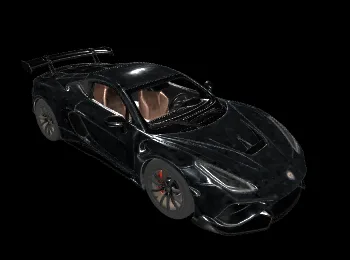
Introducing Tripo3D H3.1 Multiview-to-3D on WaveSpeedAI
Tripo3D H3.1 Multiview-to-3D — generate high-quality 3D models from 2-4 multi-angle images. HD textures, PBR materials, detailed geometry, quad topology. Now live on WaveSpeedAI.
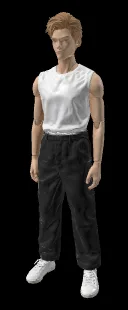
Four Angles, One 3D Model — With Textures and PBR
Single-image 3D is powerful but constrained — the model has to guess the back half of the asset. When you have multiple reference angles, you can skip the guessing and get a much more faithful 3D reconstruction. That’s what Tripo3D’s multiview pipeline delivers. We’re excited to announce that Tripo3D H3.1 Multiview-to-3D is now live on WaveSpeedAI.
What Is Tripo3D H3.1 Multiview-to-3D?
Tripo3D H3.1 Multiview-to-3D is a multi-image 3D reconstruction model. You upload 2 to 4 reference images from different angles, and it produces a textured 3D mesh with PBR materials — closer to the true subject than any single-image approach can deliver.
Configuration options:
- Texture on/off — geometry-only or fully textured.
- Texture quality — standard or HD (detailed).
- Geometry quality — standard or detailed.
- Quad mesh topology — animation-ready retopology.
- Texture alignment and orientation — consistent axis conventions for your DCC tool.
Key Features
2–4 Input Views Front, back, and side reference images dramatically improve reconstruction fidelity vs. single-image pipelines. More views = more accurate geometry.
HD Texture Quality Detailed mode produces textures suitable for close-up hero shots.
Detailed Geometry Mode Substantially higher vertex density for cleaner silhouettes and finer surface detail.
Quad Mesh Topology Retopologized output ready for rigging and animation.
PBR Material Support Full basecolor, normal, roughness, metalness — drop into any PBR renderer without remapping.
Texture and Orientation Alignment Consistent import behavior across Unreal, Unity, Blender, Maya, and other DCC tools.
Real-World Use Cases
Product Digitization for E-Commerce and AR
Capture a product from front/back/left/right; get a production-quality 3D model for AR try-on, 360 viewers, and interactive product pages.
Character / Figure Reconstruction
Concept art sheets usually come with multiple views. Feed them in; get a cohesive 3D character that actually matches the concept.
Faithful Prop Reconstruction
When the back matters — signage, furniture, vehicles — multiview beats single-image every time.
3D Scanning Alternative
No rig, no photogrammetry software, no alignment pass. Four photos, one API call.
Digital Twin Creation
Build 3D counterparts of physical objects for cataloging, archival, and AR experiences.
Game and Film Asset Sheets
Turnaround sheets (typical concept-art deliverable) can be fed directly into this model to produce usable 3D hero assets.
Getting Started on WaveSpeedAI
- Upload 2–4 reference images from different angles — ideally orthographic-ish front, back, sides.
- Configure output — texture, texture quality, geometry detail, quad.
- Submit — production REST API, no cold starts.
- Download the mesh + PBR textures — drop into your DCC or engine.
Full schema on the model page.
Pricing
Pricing mirrors the text-to-3D variant — modular by feature:
- Base (geometry only): $0.10
- Texture enabled: 2× base ($0.20)
- Texture HD (detailed): 3× base ($0.30)
- Detailed geometry: +2× base ($0.20)
- Quad topology: +0.5× base ($0.05)
Fully-loaded (HD texture + detailed geometry + quad): $0.55.
Why Run Tripo3D H3.1 Multiview-to-3D on WaveSpeedAI
- One API across the 3D stack. Pair with Tripo3D H3.1 Image-to-3D, Text-to-3D, and PATINA Material for end-to-end 3D content creation.
- No cold starts. Consistent latency even under concurrent load.
- Feature-modular pricing. Predictable per-asset cost.
- Production-grade uptime. Suitable for consumer-facing and enterprise pipelines.
Pro Tips
- Four views beats two. If you have front/back/left/right, use all four — the reconstruction quality improves noticeably.
- Match view framing. Keep the subject at similar scale and center across input images.
- Prefer orthographic-ish angles. Heavy perspective distortion in the reference set hurts reconstruction accuracy.
- Consistent lighting across views. If lighting direction changes radically per view, the texture can inherit those inconsistencies.
- Use for hero assets. When fidelity matters, multiview is the tool. For filler props, single-image or text-to-3D is cheaper.
Start Creating Today
Tripo3D H3.1 Multiview-to-3D is the highest-fidelity path in the Tripo3D H-series — ideal when you have multiple reference angles and want the 3D output to actually match the subject.
Try Tripo3D H3.1 Multiview-to-3D now on WaveSpeedAI and turn multi-angle references into faithful 3D assets.
Related Articles
Claude Fable 5 Just Shipped: 80.3% on SWE-Bench Pro, 2× Opus 4.8 Pricing, Free Through June 22
Claude Sonnet 4.8: What the Leak Actually Says, and Why the Pattern Doesn't Fit
Seedance 2.1 and Seedance 2.0 Mini Are Coming: Quality Bump, Lower Price Tier
GPT-5.6 Just Showed Up in OpenAI's Codex Logs — Here's What That Actually Means
HiDream-O1-Image-Dev: The 8B Pixel-Native Model That Beat 56B FLUX.2