
8 Best Free AI Avatar Generators in 2026 (Free Plans Checked)
Free AI avatar generators compared: HeyGen, Google Vids, Synthesia, Vidnoz, D-ID, WaveSpeedAI and more, with free-plan limits, watermarks and sign-up rules.
The best free AI avatar generator depends on what you start with. If you have a photo and a voice recording, WaveSpeedAI’s free Talking Photo makes it speak with no account and no watermark, and its Avatar Generator handles longer, more realistic clips on free starter credits. If you want a stock presenter reading a script, HeyGen (3 free videos a month) and Google Vids (included with a personal Google account) are the strongest free plans. Synthesia, Vidnoz and DeepBrain AI Studios are good free trials of a full presenter-video editor.
Most people searching for an “AI avatar generator” today want a talking avatar: a face that speaks a script or a voice clip. That is the focus of this list. If you want a still profile picture or a cartoon version of yourself, skip to the profile-picture section near the end.
How we picked
We read each tool’s own pricing and help pages in November 2026 and recorded what the free tier actually includes. Where a vendor’s page did not render its numbers, we say so and name the source we used instead. We did not run paid generations for this article, so there are no quality scores here; we compare free-tier terms and features.
The criteria:
- Real free access: a recurring free plan scores higher than a one-time trial, and a trial scores higher than “free to try, pay to download”.
- Watermark and download: can you get a file without a logo, or at all?
- Sign-up: does it need an account or a card?
- Input fit: can you use your own photo and your own voice, or only stock presenters and text-to-speech?
- Path beyond free: what it costs once you outgrow the free tier, and whether there is an API.
1. WaveSpeedAI: free on-device talking photo, plus pay-per-clip avatar models
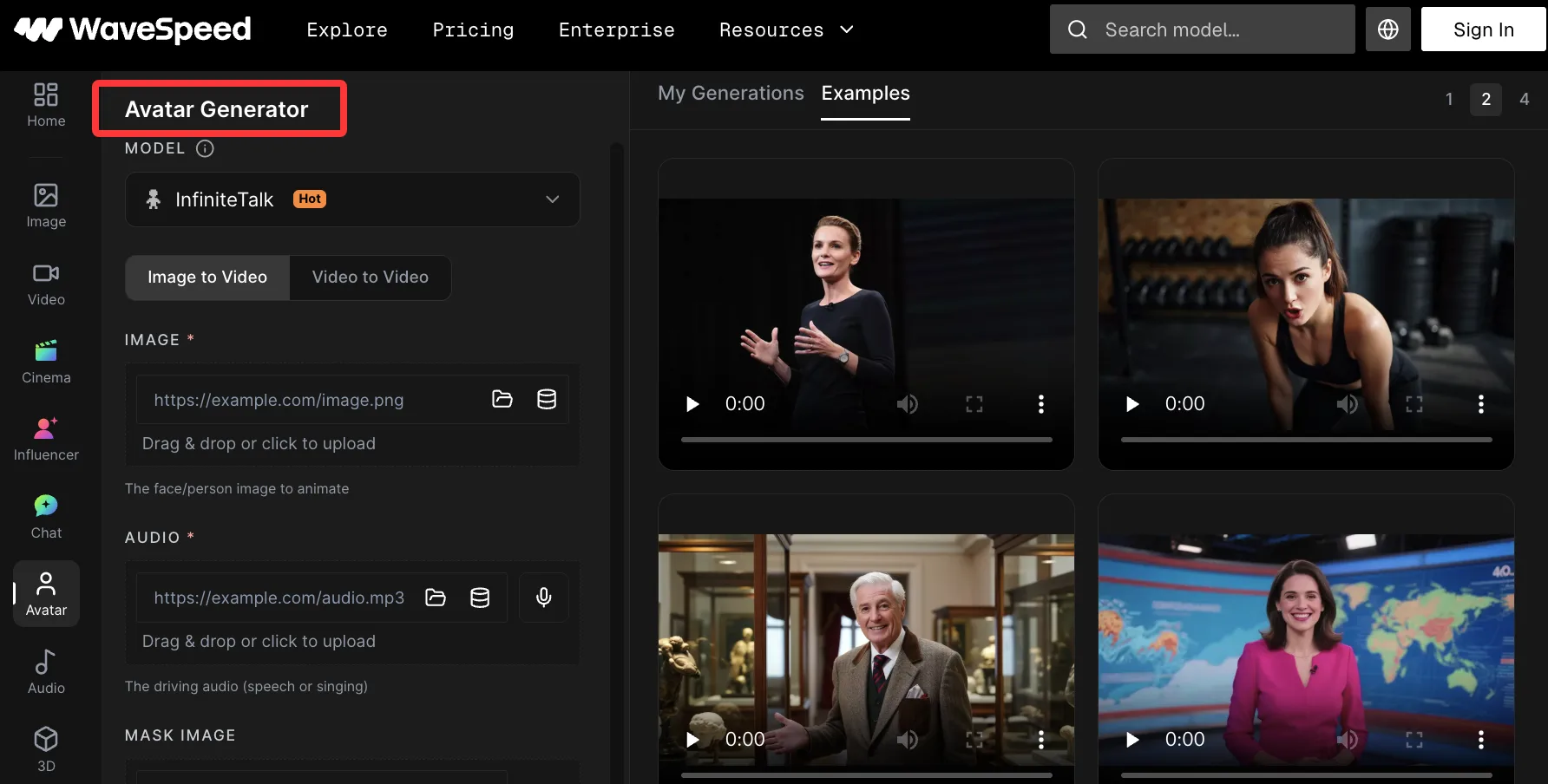
WaveSpeedAI has two separate routes, and it helps to know which one you are using.
The free tools. Talking Photo takes one portrait and a voice clip (or a video, whose sound it uses) and returns an MP4 as long as the audio, up to 30 seconds. There is no sign-up, no watermark and no daily limit, and the photo and voice are processed in your browser rather than uploaded. The trade-off is stated plainly on the page: only the mouth and jaw move, while the head, eyes and expression stay as they were. It is a fun effect, not a realistic presenter video. A Fast mode works on any device; a Detailed mode sharpens the mouth but needs a graphics card your browser can use. Its sibling, Animate Photo, gives a portrait a 2-5 second blink, smile, laugh or head turn (10 ready-made motions, or copy the motion from your own short video), also free and in-browser.
The Avatar Generator. wavespeed.ai/avatar-generator runs full talking-avatar models on a photo plus audio, lip-sync on an existing video plus new audio, and motion transfer from a reference video. New accounts get free starter credits, no card required. After that it is pay per generation, with list prices such as:
- InfiniteTalk: $0.03 per second at 480p, $0.06 at 720p, clips up to 10 minutes.
- LongCat Avatar 1.5: $0.04 per second at 480p, $0.08 at 720p, up to 64 seconds.
- Seedance 2.5 Flash Talking Avatar: $0.15 per second at 480p, $0.30 at 720p, up to 120 seconds.
- HeyGen Avatar IV: $0.045 per second at any resolution up to 1080p, up to 10 minutes.
A one-minute InfiniteTalk clip at 480p is $1.80 at list price.
- Best for: making your own photo speak your own audio, testing several avatar models side by side, and calling the same models from an API.
- Free tier: free tools are unlimited and need no account; the Avatar Generator uses free starter credits.
- Limits: there are no stock presenters, script editor, scene templates or built-in text-to-speech inside the Avatar Generator; you bring the face and the voice (WaveSpeedAI’s audio generator can make the voice track separately). It is not a subscription video editor.
- Skip it if: you want to type a script, pick a stock presenter and get a finished video with captions in one editor.
2. HeyGen: best recurring free plan for scripted presenter videos
HeyGen is the tool most people mean by “AI avatar video”: pick a presenter (or create one), paste a script, choose a voice, and export.
- Free plan: 3 videos a month, each up to 1 minute, watermarked. It includes 500+ stock avatars, 1 custom video avatar, up to 3 photo avatars and 1 voice clone.
- Paid: Creator is $29 a month ($24 a month billed annually), Pro $49 a month, Business $149 a month plus $20 per seat.
- Strengths: a large stock avatar library, a custom avatar and voice clone even on the free plan, and a complete editor.
- Limits: three one-minute videos is enough to evaluate, not to publish regularly, and the free videos carry a watermark.
- Skip it if: you need watermark-free output without a subscription.
If you like HeyGen’s Avatar IV model but not the subscription, the same model is available per second on WaveSpeedAI (see above), and our HeyGen alternative page compares the two.
3. Google Vids: free avatars inside a Google account
Google Vids is Google’s video editor, built around slides-style scenes. AI avatars are now available to personal Google accounts, which makes it one of the few free options from a large platform.
- Free access: Google’s help page lists 6 AI avatar generations a month for a personal Google account. Each avatar video can be up to 60 seconds. Avatars can speak 23 languages.
- Paid: higher monthly limits come with Google AI plans (for example, 25 avatar generations a month on Google AI Pro, per the same help page).
- Strengths: no separate sign-up if you already use Google; avatars sit inside a full editor with scenes, media and voiceover.
- Limits: six generations a month is small; Google notes that personal accounts may have restrictions on AI video editing, and the limits have changed several times in 2026.
- Skip it if: you need your own face or your own recorded voice driving the avatar.
4. Synthesia: free plan for training-style videos (share link, no download)
Synthesia is built for training, onboarding and internal communications videos with stock presenters.
- Free (Basic) plan: $0, 10 minutes of video creation or dubbing a month (500 credits), 9 AI avatars. Videos carry a Synthesia watermark. The Basic feature list does not include downloading; “download your content” starts on the Starter plan.
- Paid: Starter is $19 a month billed monthly, or $14 a month billed yearly ($168).
- Strengths: a generous 10 free minutes a month, a polished editor for structured, multi-scene videos.
- Limits: only 9 avatars on the free plan, watermark, and no file download until you pay.
- Skip it if: you need an MP4 to hand to someone today.
For a closer look at the two big presenter platforms, see our HeyGen vs Synthesia comparison and the Synthesia alternative page.
5. Vidnoz: longest free videos and a free talking photo
Vidnoz offers both studio avatars and a talking-photo tool that turns an uploaded portrait into a speaking video.
- Free plan: up to 3 minutes per video, 720p export, 1,800+ AI avatars. The site advertises daily free credits; the exact daily figure did not render on its pricing page when we checked.
- Talking photo: upload a clear front-facing photo (up to 10 MB), then type a script (300 characters) or upload audio (up to 1 minute). Downloading the MP4 requires sign-up, and watermark removal is listed as a Pro feature.
- Paid: the page lists Starter and Business plans but did not render their monthly prices; check its pricing page.
- Strengths: the longest per-video length among the free plans here, and a large stock avatar library.
- Limits: free output is 720p, watermark removal is a paid feature, and daily credits cap how much you can make.
- Skip it if: you need 1080p or watermark-free files.
6. DeepBrain AI Studios: small free plan with a custom avatar slot
DeepBrain’s avatar video product is now AI Studios (deepbrain.io redirects to aistudios.com).
- Free plan: up to 3 AI videos, each up to 1 minute, 720p export, 1 avatar slot, and 12 one-time credits that do not renew. Exports include a watermark.
- Paid: Personal is $24 a month billed yearly ($29 monthly); Team is $55 per seat a month billed yearly ($69 monthly).
- Strengths: a custom avatar slot on the free plan; a business-focused editor.
- Limits: the free credits are one-time, so this is effectively a trial.
- Skip it if: you want something you can keep using for free every month.
7. Magic Hour: quickest no-account test
Magic Hour is a general AI video tool with a talking-photo feature that works from a photo plus a voice clip or text-to-speech, and accepts cartoons and animal images as well as people.
- Free access: without an account you can make talking-photo videos up to 3 seconds long; the three daily generations are shared with its other video tools. A free account adds 400 signup credits, and Basic accounts can claim 100 credits a day, up to 7 times in total.
- Paid: Creator €17 a month or €129 a year; Pro €36 a month or €276 a year; Business €84 a month or €672 a year (prices as shown on its page, in EUR).
- Strengths: the fastest way to see a photo talk without signing up.
- Limits: free results may include a watermark, and without a paid plan, output is for personal, non-commercial use only.
- Skip it if: you need more than a few seconds or plan any commercial use on the free tier.
8. D-ID: talking portrait trial
D-ID is one of the original “make a photo talk” tools: upload a portrait, then type a script or add audio.
- Free access: a time-limited trial, not a recurring free plan. D-ID’s own pricing FAQ says a full-screen watermark appears for trial users. Its pricing tables did not render for us, so the trial size comes from third-party pricing trackers that cite D-ID’s page: a 14-day trial with about 3 minutes of video for personal use.
- Paid: the same trackers list Lite, Pro and Advanced plans; check D-ID’s pricing page for current prices, as we could not read them first-hand.
- Strengths: a simple photo-to-talking-video workflow with an API on the same account.
- Limits: the full-screen trial watermark makes trial output unusable for publishing.
- Skip it if: you want an ongoing free option.
Comparison table
| Tool | Free type | Free allowance | Watermark on free | Own photo + own voice | Sign-up |
|---|---|---|---|---|---|
| WaveSpeedAI Talking Photo | Free tool | No daily limit, audio up to 30 s | No | Yes | Not needed |
| WaveSpeedAI Avatar Generator | Starter credits | Free starter credits, then from $0.03/s | Not stated | Yes | Required |
| HeyGen | Recurring plan | 3 videos/month, 1 min each | Yes | Yes (1 custom avatar, 1 voice clone) | Required |
| Google Vids | Recurring plan | 6 avatar generations/month, up to 60 s | Not stated | No (preset avatars) | Google account |
| Synthesia | Recurring plan | 10 min/month, 9 avatars | Yes, no download | No | Required |
| Vidnoz | Daily credits | Up to 3 min/video, 720p | Removal is paid | Photo yes, audio up to 1 min | Required to download |
| DeepBrain AI Studios | One-time credits | 3 videos, 1 min each, 720p | Yes | 1 avatar slot | Required |
| Magic Hour | No-account + credits | 3 s talking photo; 400 signup credits | May include | Yes | Optional for 3 s clips |
| D-ID | 14-day trial | About 3 min (third-party figure) | Full-screen | Yes | Required |
If you want a profile picture, not a video
Some searches for “AI avatar” mean a still image: a stylized headshot, anime portrait or cartoon version of yourself for a profile. These tools fit better than any of the video tools above:
- WaveSpeedAI Photo to Cartoon: converts up to 20 photos at a time into Anime, Pastel, Comic or Sketch styles, in your browser, with no sign-up and no watermark. Downloads go up to about 2,000 pixels on the long side. There is also a photo to anime shortcut, and the Creator Banner Maker sizes the result for profile slots.
- Fotor AI Avatar Generator: upload a photo and pick a style (realistic, anime, cyberpunk, watercolor, sketch and more); Fotor’s page says downloads are watermark-free. It does not state free limits on that page.
- Recraft: generate avatars from a prompt or a portrait, up to 30 free generations a day according to its avatar page. Note that Recraft’s pricing page says free-plan images are owned by Recraft, are not licensed for commercial use, and appear in its public community gallery.
For a fully custom portrait from a prompt, WaveSpeedAI’s image generator is another route, on the same free starter credits.
Which should you pick?
- Make your own photo talk, free, today: WaveSpeedAI Talking Photo for a no-account, no-watermark clip up to 30 seconds; Magic Hour if 3 seconds is enough to test.
- A realistic talking avatar from your photo and recording: WaveSpeedAI Avatar Generator, starting with free credits. InfiniteTalk is the low-cost option for long clips.
- A scripted presenter video with a stock avatar: HeyGen for a recurring free allowance; Google Vids if you already live in Google Workspace tools.
- Training or onboarding videos: Synthesia’s 10 free minutes are enough to build a full draft, but plan to pay to download.
- Longer free videos with a stock presenter: Vidnoz, up to 3 minutes each at 720p.
- Many clips from code: WaveSpeedAI, since the same avatar models are available through its REST API and billed per second. Our guide to talking head video APIs goes deeper.
- A profile picture: WaveSpeedAI Photo to Cartoon or Fotor.
A practical test before you commit: make one 20-30 second clip from the same photo and audio in two tools, then check the exported file (not the editor preview) for lip-sync, teeth and edge artifacts, watermark, and whether you can actually download it.
Tools we left out
- Hedra: its pricing page lists paid plans from $20 a month and no free plan.
- Fliki: it has a free plan, but its pricing table marks AI avatars as unavailable on it.
FAQ
Q: Is there a completely free AI avatar generator with no watermark?
Yes, for short talking photos. WaveSpeedAI’s Talking Photo and Animate Photo are free, need no account and add no watermark, because they run in your browser. The trade-off is realism: Talking Photo moves only the mouth and jaw. Full presenter-video tools (HeyGen, Synthesia, Vidnoz, DeepBrain, D-ID) all watermark their free output.
Q: Which free AI avatar generator lets me use my own face and voice?
WaveSpeedAI (free tool and Avatar Generator), HeyGen (1 custom avatar and 1 voice clone on its free plan), Magic Hour, Vidnoz’s talking photo and D-ID’s trial all accept your own photo. Google Vids’ personal accounts and Synthesia’s free plan are built around preset avatars.
Q: How long can a free AI avatar video be?
It varies a lot: 3 seconds on Magic Hour without an account, 30 seconds of audio on WaveSpeedAI Talking Photo, 1 minute per video on HeyGen and DeepBrain, up to 60 seconds per avatar video on Google Vids, and up to 3 minutes per video on Vidnoz. Synthesia’s free plan gives 10 minutes a month in total.
Q: Can I use free AI avatar videos commercially?
Check each tool’s terms. Magic Hour states that without a paid plan, output is for personal, non-commercial use only, and third-party trackers describe D-ID’s trial as personal use. Watermarked output from any tool is rarely suitable for a client or an ad. Whatever the tool, only animate faces and voices you have the right to use.
Q: What does a talking avatar cost after the free tier?
Subscription tools start around $19-$29 a month (Synthesia Starter $19, HeyGen Creator $29, both billed monthly). Pay-per-use is cheaper for occasional clips: on WaveSpeedAI, InfiniteTalk costs $0.03 per second at 480p, so a one-minute clip is $1.80, with no monthly fee.
Related Articles

A2E AI Pricing 2026: Plans, Credits, Free Tier and Limits
Akool Pricing 2026: Plans, Credits, Free Plan and Limits
DreamFace Pricing 2026: Plans, Free Tier, Credits and Limits
Vidnoz AI Pricing 2026: Plans, Credits, Free Tier and Limits
9 Best A2E Alternatives in 2026 (Avatars, Lip-Sync, Free & API)