Qwen-Image-2512 LoRA is an enhanced 20B MMDiT text-to-image model with LoRA support for fast customization and refined image generation. Ready-to-use REST inference API, best performance, no cold starts, affordable pricing.
就緒
$0.025每次運行·~40 / $1
示例查看全部
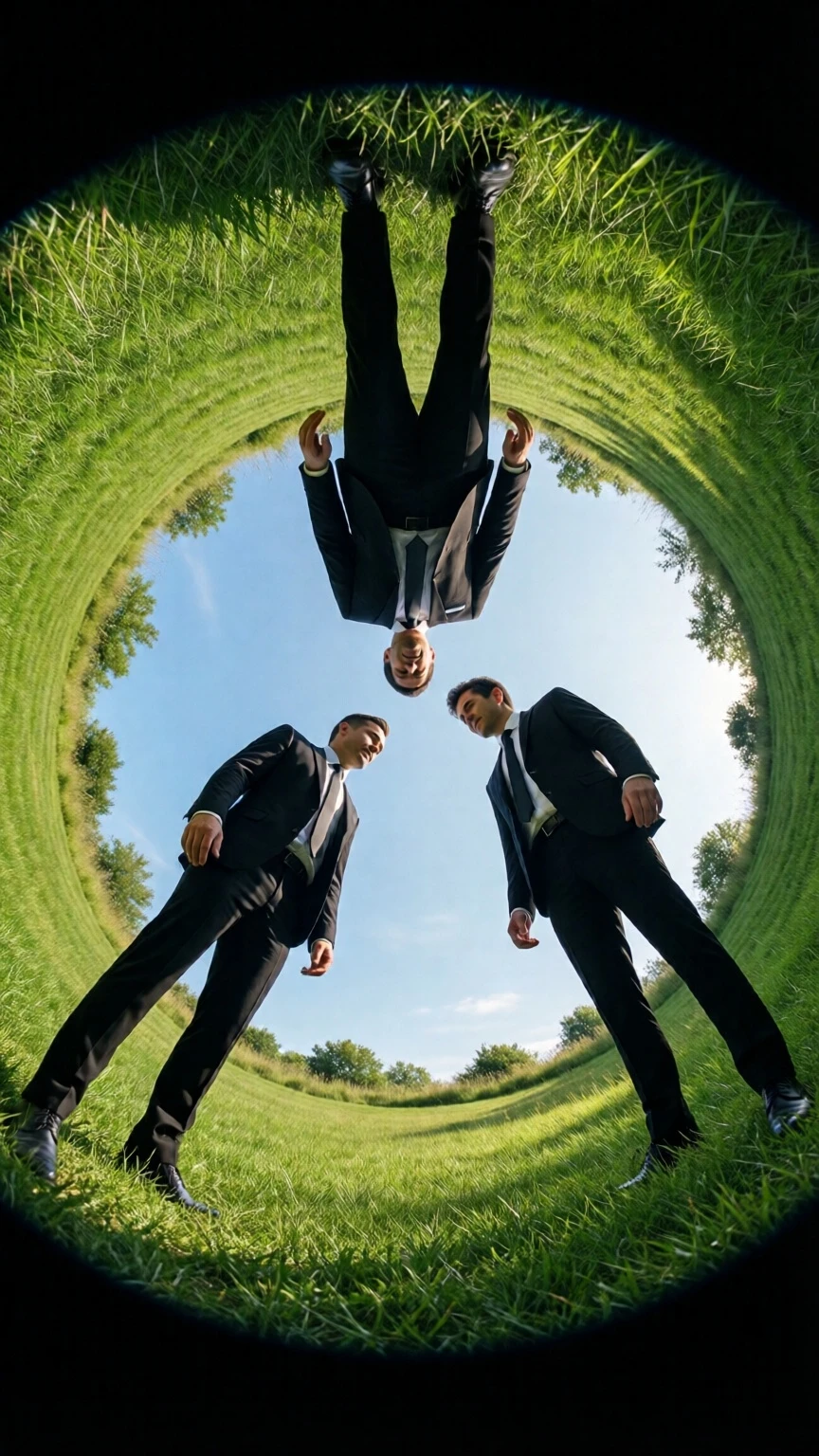
three people in black suits floating above the grassy ground, looking down at each other from different angles, seen through a circular hole in the top of a green lawn, with a blue sky and a symmetrical composition, captured with a fisheye lens in high resolution, resulting in a hyper-realistic, cinematic photographic style reminiscent of kodak film stock.
相關模型





README
Qwen Image 2512 LoRA
Qwen Image 2512 LoRA is an enhanced version of the 20B MMDiT text-to-image model with LoRA support for fine-tuned control over style, characters, or artistic domains. Combine world-class text rendering with personalized generation through custom LoRA weights.
Why Choose This?
-
LoRA integration Import external.safetensors LoRA weights and control blending strength via scale parameter. Stack up to 3 LoRAs for hybrid results.
-
Superior text rendering Rivals GPT-4o in English and is best-in-class for Chinese typography. Text is seamlessly integrated into images, not overlaid.
-
Bilingual support Handles Chinese and English with diverse fonts and complex layouts.
-
Style versatility Photorealistic, anime, impressionist, or minimalist styles — all supported with consistent quality.
-
Reproducible results Lock the seed to maintain subject consistency when experimenting with different LoRAs.
Parameters
| Parameter | Required | Description |
|---|---|---|
| prompt | Yes | Describe the image you want to create |
| width | No | Image width in pixels (up to 1536) |
| height | No | Image height in pixels (up to 1536) |
| lora_path | No | LoRA path (owner/model-name) or external.safetensors URL |
| lora_scale | No | LoRA strength (default: 1.0) |
| seed | No | Random seed for reproducible results (-1 for random) |
| output_format | No | Output format: jpeg, png, or webp |
How to Use
- Enter your prompt — describe the image with detailed narrative and any embedded text.
- Set size — adjust width and height up to 1536x1536 pixels.
- Add LoRAs — paste the path or URL of the LoRA.safetensors file (maximum 3 LoRAs).
- Adjust scale — set LoRA strength (0.5 for subtle, 1.0 for full effect).
- Set seed (optional) — use -1 for random, or specify a number for reproducibility.
- Choose output format — select jpeg, png, or webp.
- Run — preview results and iterate with different LoRA scales.
Pricing
| Item | Cost |
|---|---|
| Per image | $0.025 |
Simple flat-rate pricing regardless of image size or LoRA count.
Best Use Cases
- Character Consistency — Use character LoRAs to maintain identity across multiple generations.
- Style Transfer — Apply specific art style LoRAs for consistent visual branding.
- IP Creation — Combine multiple LoRAs for unique hybrid aesthetics.
- Marketing Materials — Create on-brand visuals with custom trained styles.
- Typography Design — Generate posters, logos, and signage with readable bilingual text.
Pro Tips
- Use specific LoRAs for characters, art styles, or IP consistency.
- Combine multiple LoRAs for hybrid results (e.g., anime + steampunk).
- Adjust scale carefully — too high may distort, too low may fade.
- Lock the seed to maintain subject consistency when swapping LoRAs.
Notes
- Use Qwen Image LoRA Trainer to create compatible LoRAs for this model.
- LoRAs from official platforms (Civitai or Hugging Face) are also supported.
- Processing speed is approximately 6-10 seconds per image.
Related Models
- Qwen Image 2512 — Base text-to-image model without LoRA support.
- Qwen Image Edit 2511 — Image editing model for precise visual modifications.
- Qwen Image Edit Plus — Enhanced editing with dual-mode and bilingual text editing.
Reference
Qwen Image Text To Image 2512 Lora API — Quick start
Grab a WaveSpeedAI API key, then call POST https://api.wavespeed.ai/api/v3/wavespeed-ai/qwen-image/text-to-image-2512-lora with your input as JSON. The endpoint returns a prediction id; poll the prediction endpoint until status flips to completed, then read the output URL from data.outputs[0]. Examples for Qwen Image Text To Image 2512 Lora below.
HTTP example
# Submit the prediction
curl -X POST "https://api.wavespeed.ai/api/v3/wavespeed-ai/qwen-image/text-to-image-2512-lora" \
  -H "Content-Type: application/json" \
  -H "Authorization: Bearer $WAVESPEED_API_KEY" \
  -d '{
    "prompt": "A cinematic shot of a city at sunset, soft golden light",
    "size": "1024*1024",
    "seed": -1,
    "output_format": "jpeg",
    "enable_sync_mode": false,
    "enable_base64_output": false
}'

# Response includes a prediction id. Poll for the result:
curl -X GET "https://api.wavespeed.ai/api/v3/predictions/{request_id}/result" \
  -H "Authorization: Bearer $WAVESPEED_API_KEY"

# When status is "completed", read the output from data.outputs[0].
Node.js example
// npm install wavespeed
const WaveSpeed = require('wavespeed');

const client = new WaveSpeed(); // reads WAVESPEED_API_KEY from env

const result = await client.run("wavespeed-ai/qwen-image/text-to-image-2512-lora", {
        "prompt": "A cinematic shot of a city at sunset, soft golden light",
        "size": "1024*1024",
        "seed": -1,
        "output_format": "jpeg",
        "enable_sync_mode": false,
        "enable_base64_output": false
});

console.log(result.outputs[0]); // → URL of the generated output
Python example
# pip install wavespeed
import wavespeed

output = wavespeed.run(
    "wavespeed-ai/qwen-image/text-to-image-2512-lora",
    {
    "prompt": "A cinematic shot of a city at sunset, soft golden light",
    "size": "1024*1024",
    "seed": -1,
    "output_format": "jpeg",
    "enable_sync_mode": false,
    "enable_base64_output": false
}
)

print(output["outputs"][0])  # → URL of the generated output
Qwen Image Text To Image 2512 Lora API — Frequently asked questions
What is the Qwen Image Text To Image 2512 Lora API?
Qwen Image Text To Image 2512 Lora is a WaveSpeedAI model for AI inference, exposed as a REST API on WaveSpeedAI. Qwen-Image-2512 LoRA is an enhanced 20B MMDiT text-to-image model with LoRA support for fast customization and refined image generation. Ready-to-use REST inference API, best performance, no cold starts, affordable pricing. You can call it programmatically or try it from the playground above.
How do I call the Qwen Image Text To Image 2512 Lora API?
POST your input parameters to the model's REST endpoint (shown in the API tab of this playground) with your WaveSpeedAI API key in the Authorization header. Submission returns a prediction ID; poll the prediction endpoint until status flips to "completed", then read the output URL from the result. The playground generates a ready-to-paste code sample in Python, JavaScript, or cURL for whatever inputs you've set. Full request/response shape is documented at https://wavespeed.ai/docs/docs-api/wavespeed-ai/qwen-image-text-to-image-2512-lora.
How much does Qwen Image Text To Image 2512 Lora cost per run?
Qwen Image Text To Image 2512 Lora starts at $0.025 per run. That figure is the base price — the final charge scales with the parameters you set in the form (output size, length, count, references, or whatever knobs this model exposes), so a higher-quality or larger output costs more than a minimal one. The exact cost for your current input is shown live next to the Generate button before you submit, and the actual per-call charge is recorded on the prediction afterwards.
What inputs does Qwen Image Text To Image 2512 Lora accept?
Key inputs: `prompt`, `size`, `seed`, `enable_base64_output`, `enable_sync_mode`, `loras`. The full JSON schema (types, defaults, allowed values) is rendered above the Generate button and mirrored in the API reference at https://wavespeed.ai/docs/docs-api/wavespeed-ai/qwen-image-text-to-image-2512-lora.
How long does Qwen Image Text To Image 2512 Lora take to generate?
Average end-to-end generation time on WaveSpeedAI is around 9 seconds per request — measured across recent runs. Queue time scales with global demand; live status is visible in the prediction record.
Can I use Qwen Image Text To Image 2512 Lora outputs commercially?
Commercial usage rights depend on the model's license, set by its provider (WaveSpeedAI). The license summary appears on the model card above; see WaveSpeedAI's Terms of Service for platform-level conditions.