FLUX.2 [dev] with LoRA support delivers fast, studio-quality text-to-image generation with enhanced realism, crisper text rendering, and personalized styles via custom LoRA adapters. Extends FLUX.2 [dev] with up to 4 LoRAs for brand-specific outputs. Ready-to-use REST inference API, best performance, no cold starts, affordable pricing.
Chờ

$0.018cho mỗi lần chạy·~55 / $1
Ví dụXem tất cả
A colossal porcelain mask suspended above a velvet baroque table, soft pastel dreamcore lighting, floating dust particles, DV film softness, faint golden glow, vintage floral wallpaper, surreal quiet atmosphere, intricate porcelain cracks, shadows gently swaying, cinematic 16:9 composition, highly detailed, clean edges.
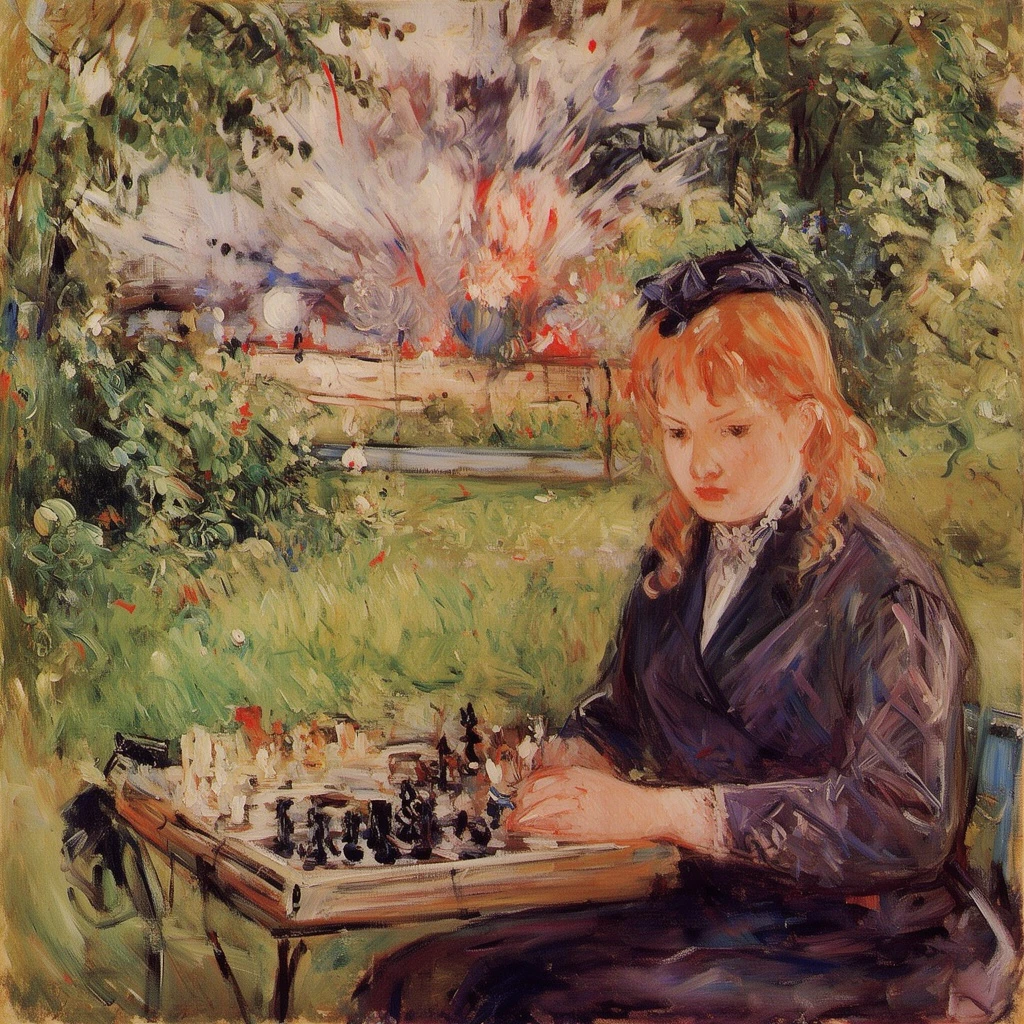
berthe_morisot style, woman with red hair, playing chess at the park, bomb going off in the background
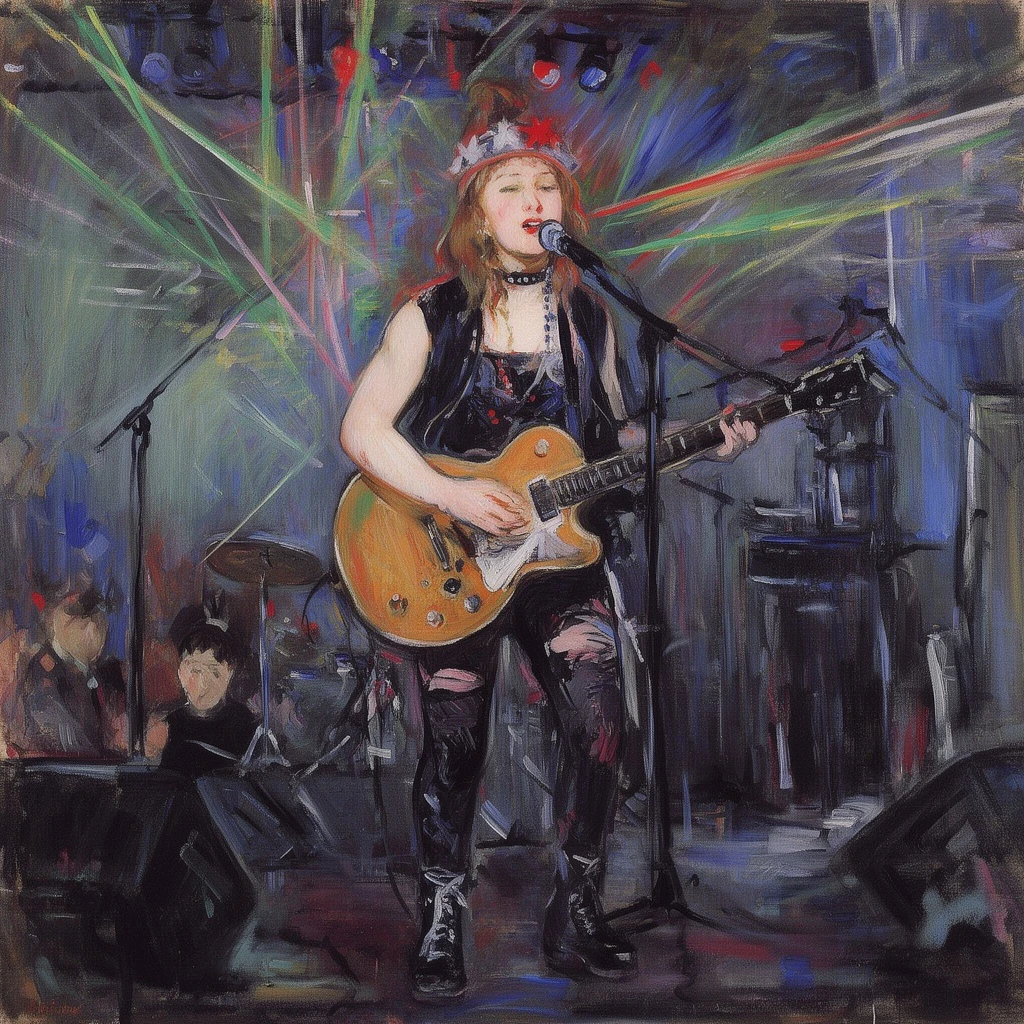
berthe_morisot style, woman playing the guitar, on stage, singing a song, laser lights, punk rocker

A wooden chair floating gently in a fog-tinted living room, pastel blue haze, warped perspective, nostalgic dreamcore mood, soft light beams through curtains, grainy DV aesthetic, drifting shadows, surreal calm atmosphere, highly detailed textures.

A hyper-realistic glass perfume bottle on a marble surface, dramatic hard light, crisp shadows, soft reflections, luxury product photography style.
Mô hình liên quan





README
FLUX.2 [dev] — Text-to-Image with LoRA
FLUX.2 [dev] with LoRA support is the personalised version of the lean FLUX.2 [dev] Text-to-Image model. It keeps the fast, stable base behaviour, while letting you plug in up to 4 custom LoRA adapters to inject your own styles, characters, or brand identity into each generation.
Good for
- Rapid prototyping with personalised visual styles
- Brand-specific image generation at scale
- Character-consistent content (mascots, VTubers, OCs, etc.)
- Custom training workflows based on LoRA fine-tuning
- Teams that need both speed and fine-grained style control
LoRA-powered personalisation on a lean base
FLUX.2 [dev] + LoRA starts from the same lightweight, production-friendly dev model and adds adapter hooks for your own LoRAs. You can mix several adapters in one request, control their strengths independently, and still get the fast turnaround and predictable behaviour that make dev a good “default” engine.
Why Choose this
• Familiar dev behaviour, with extra style control
You get the same quick, reliable generations as FLUX.2 [dev] Text-to-Image, plus the ability to load custom LoRAs for specific art styles, brand looks, or recurring characters.
• Up to 4 LoRAs in a single run
Attach as many as four adapters at once and give each one its own strength (0–4). Combine, for example, a character LoRA, a lighting/style LoRA, and a brand-colour LoRA in one prompt to keep everything consistent across outputs.
• Style-consistent batches
Generate 1–4 images per request with the same LoRA stack, making it easy to produce A/B variants, campaign sets, or social content packs that share a coherent visual identity.
• Open, transparent foundation
Built on the same open FLUX.2 stack as the base dev model, so integrating with your own LoRA training, management, and deployment tooling is straightforward.
• Cost-effective customisation
LoRA adapters add only a small overhead compared with full fine-tuning, which keeps per-image costs low even when you apply several custom styles.
Pricing
Simple per-image billing:
- $0.018 per generated image
FLUX.2 [dev] family on WaveSpeedAI
- FLUX.2 [dev] Text-to-Image – base model without LoRA for the fastest, most lightweight generation.
- FLUX.2 [dev] Edit – refine and update existing images with prompt-based edits.
- FLUX.2 [dev] Edit LoRA – image editing that also supports LoRA-based personalisation.
More LoRA Support Image Tools
- qwen-image/edit-plus-lora – combines Qwen’s strong semantic understanding with LoRA-based style control for precise, localised edits that still preserve overall composition.
- FLUX Kontext LoRA – a FLUX.2 dev LoRA stack optimised for cleaner prompts, better context handling, and more coherent, production-friendly generations.
- SDXL-LoRA – a collection of SDXL LoRAs offering a wide range of ready-made styles and subjects, ideal for fast customisation without full fine-tuning.
LoRA resources
Flux 2 Dev Text To Image Lora API — Quick start
Grab a WaveSpeedAI API key, then call POST https://api.wavespeed.ai/api/v3/wavespeed-ai/flux-2-dev/text-to-image-lora with your input as JSON. The endpoint returns a prediction id. Start polling the result endpoint around every 2 seconds, increase the interval for long-running tasks, and stop on any terminal status. On completed, read output values from data.outputs. Examples for Flux 2 Dev Text To Image Lora below.
HTTP example
set -euo pipefail

: "${WAVESPEED_API_KEY:?Set WAVESPEED_API_KEY}"

REQUEST_BODY=$(cat <<'JSON'
{
    "prompt": "A cinematic shot of a city at sunset, soft golden light",
    "size": "1024*1024",
    "seed": -1
}
JSON
)

# 1. Submit the prediction.
SUBMIT_RESPONSE=$(curl --silent --show-error --fail-with-body \
  -X POST "https://api.wavespeed.ai/api/v3/wavespeed-ai/flux-2-dev/text-to-image-lora" \
  -H "Content-Type: application/json" \
  -H "Authorization: Bearer $WAVESPEED_API_KEY" \
  -d "$REQUEST_BODY")

TASK=$(printf '%s' "$SUBMIT_RESPONSE" | jq 'if has("data") then .data else . end')
PREDICTION_ID=$(printf '%s' "$TASK" | jq -r '.id')
if [ -z "$PREDICTION_ID" ] || [ "$PREDICTION_ID" = "null" ]; then
  printf 'Submission response did not contain a prediction id
' >&2
  exit 1
fi
RESULT_URL=$(printf '%s' "$TASK" | jq -r '.urls.get // empty')
if [ -z "$RESULT_URL" ]; then
  RESULT_URL="https://api.wavespeed.ai/api/v3/predictions/$PREDICTION_ID/result"
fi

# 2. Poll until the prediction finishes.
while true; do
  RESPONSE=$(curl --silent --show-error --fail-with-body "$RESULT_URL" \
    -H "Authorization: Bearer $WAVESPEED_API_KEY")
  RESULT=$(printf '%s' "$RESPONSE" | jq 'if has("data") then .data else . end')
  STATUS=$(printf '%s' "$RESULT" | jq -r '.status')
  case "$STATUS" in
    completed) printf '%s\n' "$RESULT" | jq '.outputs'; break ;;
    failed|cancelled|timeout) printf '%s\n' "$RESULT" | jq . >&2; exit 1 ;;
    created|processing) sleep 2 ;;
    *) printf 'Unexpected status: %s
' "$STATUS" >&2; exit 1 ;;
  esac
done
Node.js example
const submitUrl = "https://api.wavespeed.ai/api/v3/wavespeed-ai/flux-2-dev/text-to-image-lora";
const apiKey = process.env.WAVESPEED_API_KEY;
if (!apiKey) throw new Error('Set WAVESPEED_API_KEY');

async function requestJson(url, options = {}) {
  const response = await fetch(url, options);
  if (!response.ok) throw new Error(await response.text());
  return response.json();
}

// 1. Submit the prediction.
const body = await requestJson(submitUrl, {
  method: "POST",
  headers: {
    "Authorization": `Bearer ${apiKey}`,
    "Content-Type": "application/json",
  },
  body: JSON.stringify({
        "prompt": "A cinematic shot of a city at sunset, soft golden light",
        "size": "1024*1024",
        "seed": -1
}),
});
const task = body.data ?? body;
if (!task.id) throw new Error("Submission response did not contain a prediction id");
const resultUrl = task.urls?.get ||
  `https://api.wavespeed.ai/api/v3/predictions/${task.id}/result`;

// 2. Poll until the prediction finishes.
while (true) {
  const resultBody = await requestJson(resultUrl, {
    headers: { "Authorization": `Bearer ${apiKey}` },
  });
  const result = resultBody.data ?? resultBody;
  if (result.status === "completed") {
    console.log(result.outputs);
    break;
  }
  if (["failed", "cancelled", "timeout"].includes(result.status)) throw new Error(JSON.stringify(result));
  if (!["created", "processing"].includes(result.status)) throw new Error("Unexpected status: " + result.status);
  await new Promise(resolve => setTimeout(resolve, 2000));
}
Python example
import json
import os
import time
from urllib.request import Request, urlopen

api_key = os.environ["WAVESPEED_API_KEY"]
headers = {"Authorization": f"Bearer {api_key}", "Content-Type": "application/json"}
payload = {
    "prompt": "A cinematic shot of a city at sunset, soft golden light",
    "size": "1024*1024",
    "seed": -1
}

def request_json(url, data=None):
    request = Request(url, data=data, headers=headers, method="POST" if data else "GET")
    with urlopen(request) as response:
        return json.load(response)

# 1. Submit the prediction.
body = request_json("https://api.wavespeed.ai/api/v3/wavespeed-ai/flux-2-dev/text-to-image-lora", json.dumps(payload).encode())
task = body.get("data", body)
if not task.get("id"):
    raise RuntimeError("Submission response did not contain a prediction id")
result_url = task.get("urls", {}).get("get") or f"https://api.wavespeed.ai/api/v3/predictions/{task['id']}/result"

# 2. Poll until the prediction finishes.
while True:
    result_body = request_json(result_url)
    result = result_body.get("data", result_body)
    status = result.get("status")
    if status == "completed":
        print(result.get("outputs", []))
        break
    if status in {"failed", "cancelled", "timeout"}:
        raise RuntimeError(result)
    if status not in {"created", "processing"}:
        raise RuntimeError(f"Unexpected status: {status}")
    time.sleep(2)
Flux 2 Dev Text To Image Lora API — Frequently asked questions
What is the Flux 2 Dev Text To Image Lora API?
Flux 2 Dev Text To Image Lora is a WaveSpeedAI model for AI inference, exposed as a REST API on WaveSpeedAI. FLUX.2 [dev] with LoRA support delivers fast, studio-quality text-to-image generation with enhanced realism, crisper text rendering, and personalized styles via custom LoRA adapters. Extends FLUX.2 [dev] with up to 4 LoRAs for brand-specific outputs. Ready-to-use REST inference API, best performance, no cold starts, affordable pricing. You can call it programmatically or try it from the playground above.
How do I call the Flux 2 Dev Text To Image Lora API?
POST your input parameters to the model's REST endpoint (shown in the API tab of this playground) with your WaveSpeedAI API key in the Authorization header. Submission returns a prediction ID. Poll the result endpoint starting around every 2 seconds, increase the interval for long-running tasks, and stop on any terminal status. The playground generates production-oriented Python, JavaScript, and cURL examples with timeouts, transient-error handling, and safe GET retries. Full request/response shape is documented at https://wavespeed.ai/docs/docs-api/wavespeed-ai/flux-2-dev-text-to-image-lora.
How much does Flux 2 Dev Text To Image Lora cost per run?
Flux 2 Dev Text To Image Lora starts at $0.018 per run. That figure is the base price — the final charge scales with the parameters you set in the form (output size, length, count, references, or whatever knobs this model exposes), so a higher-quality or larger output costs more than a minimal one. The exact cost for your current input is shown live next to the Generate button before you submit, and the actual per-call charge is recorded on the prediction afterwards.
What inputs does Flux 2 Dev Text To Image Lora accept?
Key inputs: `prompt`, `size`, `seed`, `enable_base64_output`, `enable_sync_mode`, `loras`. The full JSON schema (types, defaults, allowed values) is rendered above the Generate button and mirrored in the API reference at https://wavespeed.ai/docs/docs-api/wavespeed-ai/flux-2-dev-text-to-image-lora.
How long does Flux 2 Dev Text To Image Lora take to generate?
Median end-to-end generation time on WaveSpeedAI is around 13 seconds per request, based on recent successful runs. Queue time varies with global demand; live status is visible in the prediction record.
Can I use Flux 2 Dev Text To Image Lora outputs commercially?
Commercial usage rights depend on the model's license, set by its provider (WaveSpeedAI). The license summary appears on the model card above; see WaveSpeedAI's Terms of Service for platform-level conditions.