Phota Edit transforms existing images using natural language instructions. Supports up to 10 reference images, 1K and 4K resolutions, and batch output up to 4 images. Ready-to-use REST inference API, best performance, no coldstarts, affordable pricing.
Idle
$0.09per run·~11 / $1
ExamplesView all
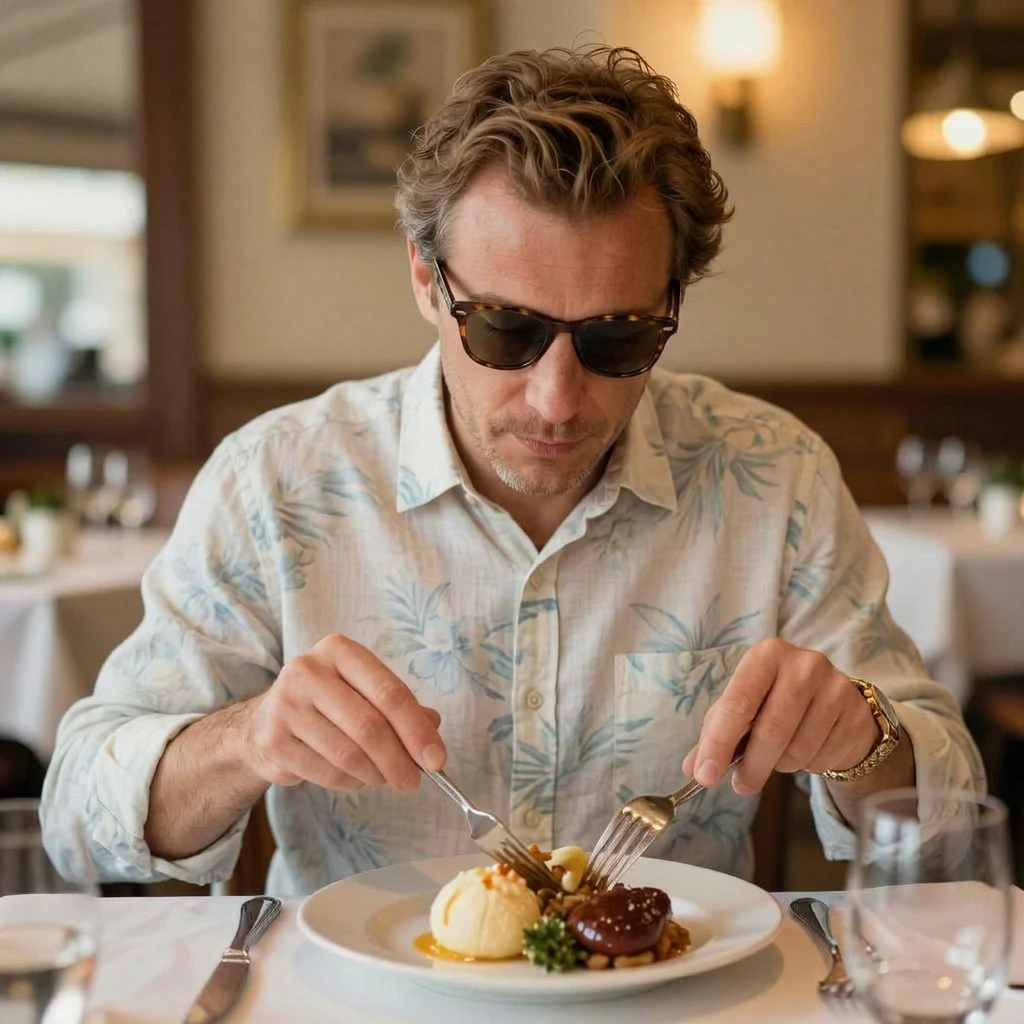
Change the man's clothes in the picture to beach casual wear and put on sunglasses.
Related Models
/filters:quality(82)/media/images/1788941905586203566_DzViKczP.webp)
/filters:quality(82)/media/images/1788932339711919494_vrbhE9lL.webp)
/filters:quality(82)/media/images/1788941885532951956_ciRgxR5Q.webp)
/filters:quality(82)/media/images/1788932462559654416_SrQZ8hrB.webp)
/filters:quality(82)/examples/f9e4c8d5eba443b7b269d5c8feab11b5/1789548333697258598_LfuDNX6L-a00648583629.webp)
/filters:quality(82)/media/images/1786122164333718452_ueCMW5CM.webp)
README
Phota Edit
Phota Edit is an AI-powered image editing model that transforms photos using natural language instructions. Describe the change you want — swap clothing, alter backgrounds, adjust styles, add or remove objects — and the model applies precise, context-aware edits while preserving the rest of the image. Supports multiple input images, batch output, and flexible aspect ratio control.
Why Choose This?
-
Natural-language editing Describe your edit in plain text — no masks, no manual selections, no technical knowledge required.
-
Multi-image input Upload multiple reference images to provide richer visual context for complex edits.
-
4K output support Generate high-resolution edited results for print, production, or archival use.
-
Flexible aspect ratio control Output in auto, 1:1, 16:9, 4:3, 3:4, or 9:16 to match your target platform.
-
Multiple output formats Export in JPEG, PNG, or WebP for any downstream workflow.
-
Batch output Generate multiple edited variations in a single run using the num_images parameter.
Parameters
| Parameter | Required | Description |
|---|---|---|
| prompt | Yes | Text description of the desired edit. |
| images | No | One or more source images to edit (URL or file upload). Click Add Item for more. |
| resolution | No | Output resolution: 1K (default) or 4K. |
| num_images | No | Number of edited output variations to generate per run. Default: 1. |
| aspect_ratio | No | Output aspect ratio: auto (default), 1:1, 16:9, 4:3, 3:4, 9:16. |
| output_format | No | Output file format: jpeg (default), png, or webp. |
How to Use
- Write your prompt — describe exactly what should change in the image (e.g., "Change the man's clothes to beach casual wear and put on sunglasses.").
- Upload your image(s) — provide one or more source images via URL or drag-and-drop. Click Add Item to add more.
- Select resolution — 1K for standard output, 4K for high-resolution results.
- Set num_images (optional) — generate multiple variations in one run.
- Choose aspect ratio — use auto to preserve the source ratio, or select a specific format.
- Choose output format — jpeg, png, or webp based on your delivery needs.
- Submit — generate and download your edited image.
Pricing
| Resolution | Cost per Image |
|---|---|
| 1K | $0.09 |
| 4K | $0.18 |
Billing Rules
- 1K: $0.09 per image
- 4K: $0.18 per image (2× base price)
- Total cost = cost per image × num_images
Best Use Cases
- Fashion & Apparel — Swap clothing, accessories, or outfit styles on model photos without reshooting.
- E-commerce — Edit product images to showcase different colors, settings, or variants from a single source.
- Marketing & Advertising — Update visual assets quickly — change backgrounds, props, or styling to match campaign needs.
- Portrait Retouching — Make targeted appearance changes while preserving the overall look and feel.
- Creative Concepting — Rapidly iterate on visual ideas and styling directions for client review.
Pro Tips
- Be specific and descriptive in your prompt — the more detail you provide, the more accurate the edit.
- Upload multiple images when you want the model to reference additional context, such as a target style or specific elements.
- Use 4K output for final production assets and 1K for rapid iteration and testing.
- Use PNG output for lossless results when editing images with text, graphics, or sharp edges.
- Enable sync mode in API workflows where you need the result returned directly without polling.
Notes
- Only prompt is required; all other parameters are optional.
- Ensure image URLs are publicly accessible if using links rather than direct uploads.
- Please ensure your content complies with WaveSpeed AI's usage policies.
Related Models
- Phota Enhance — Restore and upscale images without editing using AI-powered detail reconstruction.
Phota Edit API — Quick start
Grab a WaveSpeedAI API key, then call POST https://api.wavespeed.ai/api/v3/wavespeed-ai/phota/edit with your input as JSON. The endpoint returns a prediction id. Start polling the result endpoint around every 2 seconds, increase the interval for long-running tasks, and stop on any terminal status. On completed, read output values from data.outputs. Examples for Phota Edit below.
HTTP example
set -euo pipefail

: "${WAVESPEED_API_KEY:?Set WAVESPEED_API_KEY}"

REQUEST_BODY=$(cat <<'JSON'
{
    "prompt": "A cinematic shot of a city at sunset, soft golden light",
    "resolution": "1K",
    "num_images": 1,
    "aspect_ratio": "auto",
    "output_format": "jpeg"
}
JSON
)

# 1. Submit the prediction.
SUBMIT_RESPONSE=$(curl --silent --show-error --fail-with-body \
  -X POST "https://api.wavespeed.ai/api/v3/wavespeed-ai/phota/edit" \
  -H "Content-Type: application/json" \
  -H "Authorization: Bearer $WAVESPEED_API_KEY" \
  -d "$REQUEST_BODY")

TASK=$(printf '%s' "$SUBMIT_RESPONSE" | jq 'if has("data") then .data else . end')
PREDICTION_ID=$(printf '%s' "$TASK" | jq -r '.id')
if [ -z "$PREDICTION_ID" ] || [ "$PREDICTION_ID" = "null" ]; then
  printf 'Submission response did not contain a prediction id
' >&2
  exit 1
fi
RESULT_URL="https://api.wavespeed.ai/api/v3/predictions/$PREDICTION_ID/result"

# 2. Poll until the prediction finishes.
while true; do
  RESPONSE=$(curl --silent --show-error --fail-with-body "$RESULT_URL" \
    -H "Authorization: Bearer $WAVESPEED_API_KEY")
  RESULT=$(printf '%s' "$RESPONSE" | jq 'if has("data") then .data else . end')
  STATUS=$(printf '%s' "$RESULT" | jq -r '.status')
  case "$STATUS" in
    completed) printf '%s\n' "$RESULT" | jq '.outputs'; break ;;
    failed|cancelled|timeout|deleted) printf '%s\n' "$RESULT" | jq . >&2; exit 1 ;;
    *) sleep 2 ;;
  esac
done
Node.js example
const submitUrl = "https://api.wavespeed.ai/api/v3/wavespeed-ai/phota/edit";
const apiKey = process.env.WAVESPEED_API_KEY;
if (!apiKey) throw new Error('Set WAVESPEED_API_KEY');

async function requestJson(url, options = {}) {
  const response = await fetch(url, options);
  if (!response.ok) throw new Error(await response.text());
  return response.json();
}

// 1. Submit the prediction.
const body = await requestJson(submitUrl, {
  method: "POST",
  headers: {
    "Authorization": `Bearer ${apiKey}`,
    "Content-Type": "application/json",
  },
  body: JSON.stringify({
        "prompt": "A cinematic shot of a city at sunset, soft golden light",
        "resolution": "1K",
        "num_images": 1,
        "aspect_ratio": "auto",
        "output_format": "jpeg"
}),
});
const task = body.data ?? body;
if (!task.id) throw new Error("Submission response did not contain a prediction id");
const resultUrl = `https://api.wavespeed.ai/api/v3/predictions/${task.id}/result`;

// 2. Poll until the prediction finishes.
while (true) {
  const resultBody = await requestJson(resultUrl, {
    headers: { "Authorization": `Bearer ${apiKey}` },
  });
  const result = resultBody.data ?? resultBody;
  if (result.status === "completed") {
    console.log(result.outputs);
    break;
  }
  if (["failed", "cancelled", "timeout", "deleted"].includes(result.status)) throw new Error(JSON.stringify(result));
  await new Promise(resolve => setTimeout(resolve, 2000));
}
Python example
import json
import os
import time
from urllib.request import Request, urlopen

api_key = os.environ["WAVESPEED_API_KEY"]
headers = {"Authorization": f"Bearer {api_key}", "Content-Type": "application/json"}
payload = {
    "prompt": "A cinematic shot of a city at sunset, soft golden light",
    "resolution": "1K",
    "num_images": 1,
    "aspect_ratio": "auto",
    "output_format": "jpeg"
}

def request_json(url, data=None):
    request = Request(url, data=data, headers=headers, method="POST" if data else "GET")
    with urlopen(request) as response:
        return json.load(response)

# 1. Submit the prediction.
body = request_json("https://api.wavespeed.ai/api/v3/wavespeed-ai/phota/edit", json.dumps(payload).encode())
task = body.get("data", body)
if not task.get("id"):
    raise RuntimeError("Submission response did not contain a prediction id")
result_url = f"https://api.wavespeed.ai/api/v3/predictions/{task['id']}/result"

# 2. Poll until the prediction finishes.
while True:
    result_body = request_json(result_url)
    result = result_body.get("data", result_body)
    status = result.get("status")
    if status == "completed":
        print(result.get("outputs", []))
        break
    if status in {"failed", "cancelled", "timeout", "deleted"}:
        raise RuntimeError(result)
    time.sleep(2)
Phota Edit API — Frequently asked questions
What is the Phota Edit API?
Phota Edit is a WaveSpeedAI model for image editing, exposed as a REST API on WaveSpeedAI. Phota Edit transforms existing images using natural language instructions. Supports up to 10 reference images, 1K and 4K resolutions, and batch output up to 4 images. Ready-to-use REST inference API, best performance, no coldstarts, affordable pricing. You can call it programmatically or try it from the playground above.
How do I call the Phota Edit API?
POST your input parameters to the model's REST endpoint (shown in the API tab of this playground) with your WaveSpeedAI API key in the Authorization header. Submission returns a prediction ID. Poll the result endpoint starting around every 2 seconds, increase the interval for long-running tasks, and stop on any terminal status. The playground generates Python, JavaScript, and cURL examples for submitting requests and polling results. Full request/response shape is documented at https://wavespeed.ai/docs/docs-api/wavespeed-ai/phota-edit.
How much does Phota Edit cost per run?
Phota Edit starts at $0.09 per run. That figure is the base price — the final charge scales with the parameters you set in the form (output size, length, count, references, or whatever knobs this model exposes), so a higher-quality or larger output costs more than a minimal one. The exact cost for your current input is shown live next to the Generate button before you submit, and the actual per-call charge is recorded on the prediction afterwards.
What inputs does Phota Edit accept?
Key inputs: `prompt`, `images`, `aspect_ratio`, `resolution`, `enable_base64_output`, `enable_sync_mode`. The full JSON schema (types, defaults, allowed values) is rendered above the Generate button and mirrored in the API reference at https://wavespeed.ai/docs/docs-api/wavespeed-ai/phota-edit.
How long does Phota Edit take to generate?
Reported generation time on WaveSpeedAI is around 20 seconds per request. This is an estimate, not a latency guarantee; queue time and input settings can change the total wait. live status is visible in the prediction record.
Can I use Phota Edit outputs commercially?
Commercial usage rights depend on the model's license, set by its provider (WaveSpeedAI). Check the provider's applicable terms and WaveSpeedAI's Terms of Service before commercial use.
More from WaveSpeed
View all- wavespeed-ai/ace-stepText to Audio
- wavespeed-ai/ace-step-1.5Text to Audio
- wavespeed-ai/ace-step/audio-inpaintAudio to Audio
- wavespeed-ai/ace-step/audio-outpaintAudio to Audio
- wavespeed-ai/ace-step/audio-to-audioAudio to Audio
- wavespeed-ai/ace-step/prompt-to-audioText to Audio
- wavespeed-ai/ai-age-filterImage to Image
- wavespeed-ai/ai-breast-expansionImage to Image
More Image to Image models
View all- bytedance/seedream-v5.0-pro/editImage to Image
- bytedance/seedream-v4.5/editImage to Image
- google/nano-banana-pro/editImage to Image
- alibaba/wan-2.7/image-editImage to Image
- openai/gpt-image-2/editImage to Image
- google/nano-banana-2/editImage to Image
- alibaba/qwen-image-3.0/editImage to Image
- alibaba/wan-2.7/image-edit-proImage to Image