JoyAI Image Edit transforms images based on text instructions, allowing you to modify backgrounds, adjust colors, add or remove elements, and more. Ready-to-use REST inference API, best performance, no cold starts, affordable pricing.
Idle

$0.3per run·~33 / $10
ExamplesView all
Transform this forest into a magical fantasy realm. Trees become ancient luminescent entities with glowing bark, leaves shimmer with bioluminescent blue and violet light, small fairies drift between the branches, mysterious floating orbs light the path, mushrooms with soft pink glow line the edges. Maintain the original path composition and tree structure. Epic fantasy illustration style, rich and otherworldly.
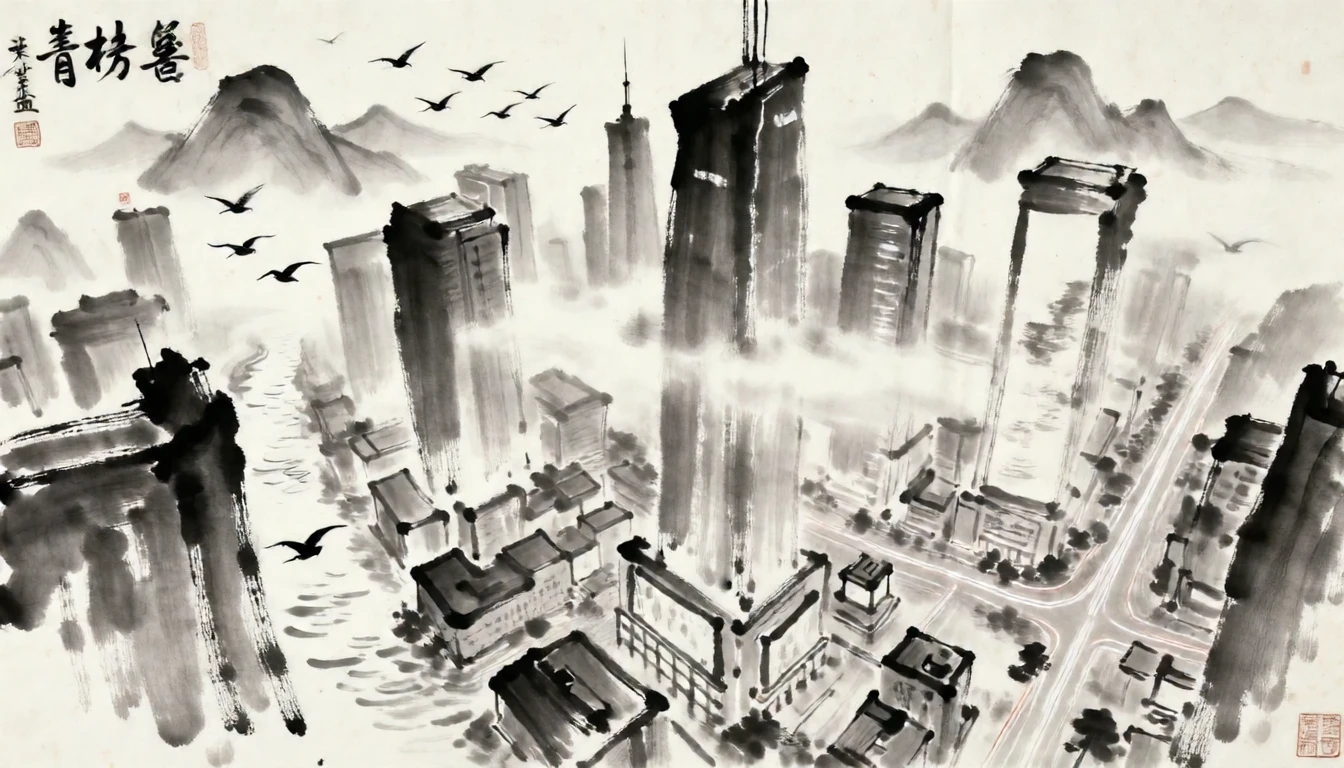
Transform this cyberpunk cityscape into a traditional Chinese ink wash painting. The skyscrapers become misty mountain peaks, neon reflections become river surfaces, light trails become birds in flight. Monochromatic ink tones, rice paper texture, loose expressive brushstrokes, Song Dynasty aesthetic. Preserve the original composition and spatial depth.
Related Models
/filters:quality(82)/media/images/1791312805430502065_dlG47iBV.webp)
/filters:quality(82)/media/images/1791312803887061677_SluDNW5I.webp)
/filters:quality(82)/media/images/1788941905586203566_DzViKczP.webp)
/filters:quality(82)/media/images/1788932339711919494_vrbhE9lL.webp)
/filters:quality(82)/media/images/1788941885532951956_ciRgxR5Q.webp)
/filters:quality(82)/media/images/1788932462559654416_SrQZ8hrB.webp)
README
JoyAI Image Edit
JoyAI Image Edit transforms any photo with natural language instructions. Describe the change you want — alter styles, shift environments, add fantastical elements, change lighting or atmosphere — and the model applies a rich, imaginative edit while preserving the core structure of your original image.
Why Choose This?
-
Creative, imagination-driven edits Goes beyond simple adjustments — transforms scenes, applies artistic styles, and reimagines environments with vivid, detailed results.
-
Natural-language control Describe the transformation in plain text. The more descriptive your prompt, the richer the output.
-
Preserves original structure Maintains the core composition, subject placement, and spatial layout of your source image while applying the requested transformation.
-
Prompt Enhancer Built-in tool to automatically improve your edit descriptions for richer, more imaginative results.
Parameters
| Parameter | Required | Description |
|---|---|---|
| prompt | Yes | Text description of the desired transformation or edit. |
| image | Yes | Source image to edit (URL or file upload). |
How to Use
- Upload your image — provide the source photo via URL or drag-and-drop.
- Write your prompt — describe the transformation you want in vivid detail. Use the Prompt Enhancer for richer results.
- Submit — download your transformed image.
Pricing
Just $0.30 per image.
Best Use Cases
- Fantasy & world-building — Transform real environments into magical, surreal, or sci-fi scenes.
- Style transfer — Reimagine photos in watercolor, oil painting, neon, or any artistic style.
- Seasonal & atmospheric changes — Shift environments between seasons, times of day, or weather conditions.
- Creative content — Generate visually striking images for social media, storytelling, and artistic projects.
- Concept visualization — Quickly explore visual directions and alternative treatments of a scene.
Pro Tips
- The more descriptive your prompt, the richer the transformation — include specific colors, textures, lighting, and visual elements you want to see.
- Describe both what should change and what the overall mood or atmosphere should feel like.
- Use the Prompt Enhancer to expand a simple idea into a detailed, evocative edit instruction.
Notes
- Both prompt and image are required fields.
- Ensure image URLs are publicly accessible if using a link rather than a direct upload.
- Please ensure your content complies with WaveSpeed AI's usage policies.
Joyai Image Edit API — Quick start
Grab a WaveSpeedAI API key, then call POST https://api.wavespeed.ai/api/v3/wavespeed-ai/joyai-image/edit with your input as JSON. The endpoint returns a prediction id. Start polling the result endpoint around every 2 seconds, increase the interval for long-running tasks, and stop on any terminal status. On completed, read output values from data.outputs. Examples for Joyai Image Edit below.
HTTP example
set -euo pipefail

: "${WAVESPEED_API_KEY:?Set WAVESPEED_API_KEY}"

REQUEST_BODY=$(cat <<'JSON'
{
    "prompt": "A cinematic shot of a city at sunset, soft golden light",
    "image": "https://interactive-examples.mdn.mozilla.net/media/cc0-images/painted-hand-298-332.jpg"
}
JSON
)

# 1. Submit the prediction.
SUBMIT_RESPONSE=$(curl --silent --show-error --fail-with-body \
  -X POST "https://api.wavespeed.ai/api/v3/wavespeed-ai/joyai-image/edit" \
  -H "Content-Type: application/json" \
  -H "Authorization: Bearer $WAVESPEED_API_KEY" \
  -d "$REQUEST_BODY")

TASK=$(printf '%s' "$SUBMIT_RESPONSE" | jq 'if has("data") then .data else . end')
PREDICTION_ID=$(printf '%s' "$TASK" | jq -r '.id')
if [ -z "$PREDICTION_ID" ] || [ "$PREDICTION_ID" = "null" ]; then
  printf 'Submission response did not contain a prediction id
' >&2
  exit 1
fi
RESULT_URL="https://api.wavespeed.ai/api/v3/predictions/$PREDICTION_ID/result"

# 2. Poll until the prediction finishes.
while true; do
  RESPONSE=$(curl --silent --show-error --fail-with-body "$RESULT_URL" \
    -H "Authorization: Bearer $WAVESPEED_API_KEY")
  RESULT=$(printf '%s' "$RESPONSE" | jq 'if has("data") then .data else . end')
  STATUS=$(printf '%s' "$RESULT" | jq -r '.status')
  case "$STATUS" in
    completed) printf '%s\n' "$RESULT" | jq '.outputs'; break ;;
    failed|cancelled|timeout|deleted) printf '%s\n' "$RESULT" | jq . >&2; exit 1 ;;
    *) sleep 2 ;;
  esac
done
Node.js example
const submitUrl = "https://api.wavespeed.ai/api/v3/wavespeed-ai/joyai-image/edit";
const apiKey = process.env.WAVESPEED_API_KEY;
if (!apiKey) throw new Error('Set WAVESPEED_API_KEY');

async function requestJson(url, options = {}) {
  const response = await fetch(url, options);
  if (!response.ok) throw new Error(await response.text());
  return response.json();
}

// 1. Submit the prediction.
const body = await requestJson(submitUrl, {
  method: "POST",
  headers: {
    "Authorization": `Bearer ${apiKey}`,
    "Content-Type": "application/json",
  },
  body: JSON.stringify({
        "prompt": "A cinematic shot of a city at sunset, soft golden light",
        "image": "https://interactive-examples.mdn.mozilla.net/media/cc0-images/painted-hand-298-332.jpg"
}),
});
const task = body.data ?? body;
if (!task.id) throw new Error("Submission response did not contain a prediction id");
const resultUrl = `https://api.wavespeed.ai/api/v3/predictions/${task.id}/result`;

// 2. Poll until the prediction finishes.
while (true) {
  const resultBody = await requestJson(resultUrl, {
    headers: { "Authorization": `Bearer ${apiKey}` },
  });
  const result = resultBody.data ?? resultBody;
  if (result.status === "completed") {
    console.log(result.outputs);
    break;
  }
  if (["failed", "cancelled", "timeout", "deleted"].includes(result.status)) throw new Error(JSON.stringify(result));
  await new Promise(resolve => setTimeout(resolve, 2000));
}
Python example
import json
import os
import time
from urllib.request import Request, urlopen

api_key = os.environ["WAVESPEED_API_KEY"]
headers = {"Authorization": f"Bearer {api_key}", "Content-Type": "application/json"}
payload = {
    "prompt": "A cinematic shot of a city at sunset, soft golden light",
    "image": "https://interactive-examples.mdn.mozilla.net/media/cc0-images/painted-hand-298-332.jpg"
}

def request_json(url, data=None):
    request = Request(url, data=data, headers=headers, method="POST" if data else "GET")
    with urlopen(request) as response:
        return json.load(response)

# 1. Submit the prediction.
body = request_json("https://api.wavespeed.ai/api/v3/wavespeed-ai/joyai-image/edit", json.dumps(payload).encode())
task = body.get("data", body)
if not task.get("id"):
    raise RuntimeError("Submission response did not contain a prediction id")
result_url = f"https://api.wavespeed.ai/api/v3/predictions/{task['id']}/result"

# 2. Poll until the prediction finishes.
while True:
    result_body = request_json(result_url)
    result = result_body.get("data", result_body)
    status = result.get("status")
    if status == "completed":
        print(result.get("outputs", []))
        break
    if status in {"failed", "cancelled", "timeout", "deleted"}:
        raise RuntimeError(result)
    time.sleep(2)
Joyai Image Edit API — Frequently asked questions
What is the Joyai Image Edit API?
Joyai Image Edit is a WaveSpeedAI model for image editing, exposed as a REST API on WaveSpeedAI. JoyAI Image Edit transforms images based on text instructions, allowing you to modify backgrounds, adjust colors, add or remove elements, and more. Ready-to-use REST inference API, best performance, no cold starts, affordable pricing. You can call it programmatically or try it from the playground above.
How do I call the Joyai Image Edit API?
POST your input parameters to the model's REST endpoint (shown in the API tab of this playground) with your WaveSpeedAI API key in the Authorization header. Submission returns a prediction ID. Poll the result endpoint starting around every 2 seconds, increase the interval for long-running tasks, and stop on any terminal status. The playground generates Python, JavaScript, and cURL examples for submitting requests and polling results. Full request/response shape is documented at https://wavespeed.ai/docs/docs-api/wavespeed-ai/joyai-image-edit.
How much does Joyai Image Edit cost per run?
Joyai Image Edit starts at $0.3 per run. That figure is the base price — the final charge scales with the parameters you set in the form (output size, length, count, references, or whatever knobs this model exposes), so a higher-quality or larger output costs more than a minimal one. The exact cost for your current input is shown live next to the Generate button before you submit, and the actual per-call charge is recorded on the prediction afterwards.
What inputs does Joyai Image Edit accept?
Key inputs: `prompt`, `image`. The full JSON schema (types, defaults, allowed values) is rendered above the Generate button and mirrored in the API reference at https://wavespeed.ai/docs/docs-api/wavespeed-ai/joyai-image-edit.
How long does Joyai Image Edit take to generate?
Reported generation time on WaveSpeedAI is around 324 seconds per request. This is an estimate, not a latency guarantee; queue time and input settings can change the total wait. live status is visible in the prediction record.
Can I use Joyai Image Edit outputs commercially?
Commercial usage rights depend on the model's license, set by its provider (WaveSpeedAI). Check the provider's applicable terms and WaveSpeedAI's Terms of Service before commercial use.
More from WaveSpeed
View all- wavespeed-ai/ace-stepAI Music Generation
- wavespeed-ai/ace-step-1.5AI Music Generation
- wavespeed-ai/ace-step/audio-inpaintMusic Editing
- wavespeed-ai/ace-step/audio-outpaintMusic Editing
- wavespeed-ai/ace-step/audio-to-audioMusic Editing
- wavespeed-ai/ace-step/prompt-to-audioAI Music Generation
- wavespeed-ai/ai-age-filterImage Editing
- wavespeed-ai/ai-breast-expansionImage Editing
More Image Editing models
View all- bytedance/seedream-v5.0-pro/editImage Editing
- bytedance/seedream-v4.5/editImage Editing
- google/nano-banana-pro/editImage Editing
- alibaba/wan-2.7/image-editImage Editing
- openai/gpt-image-2/editImage Editing
- google/nano-banana-2/editImage Editing
- alibaba/qwen-image-3.0/editImage Editing
- alibaba/wan-2.7/image-edit-proImage Editing