Z-Image-Base LoRA (6B) enables high-quality text-to-image generation with full CFG support and external LoRA support. Supports applying up to 3 LoRAs for custom styles. Ready-to-use REST inference API, best performance, no coldstarts, affordable pricing.
待機中
$0.0121回あたり·~83 / $1
サンプルすべて表示
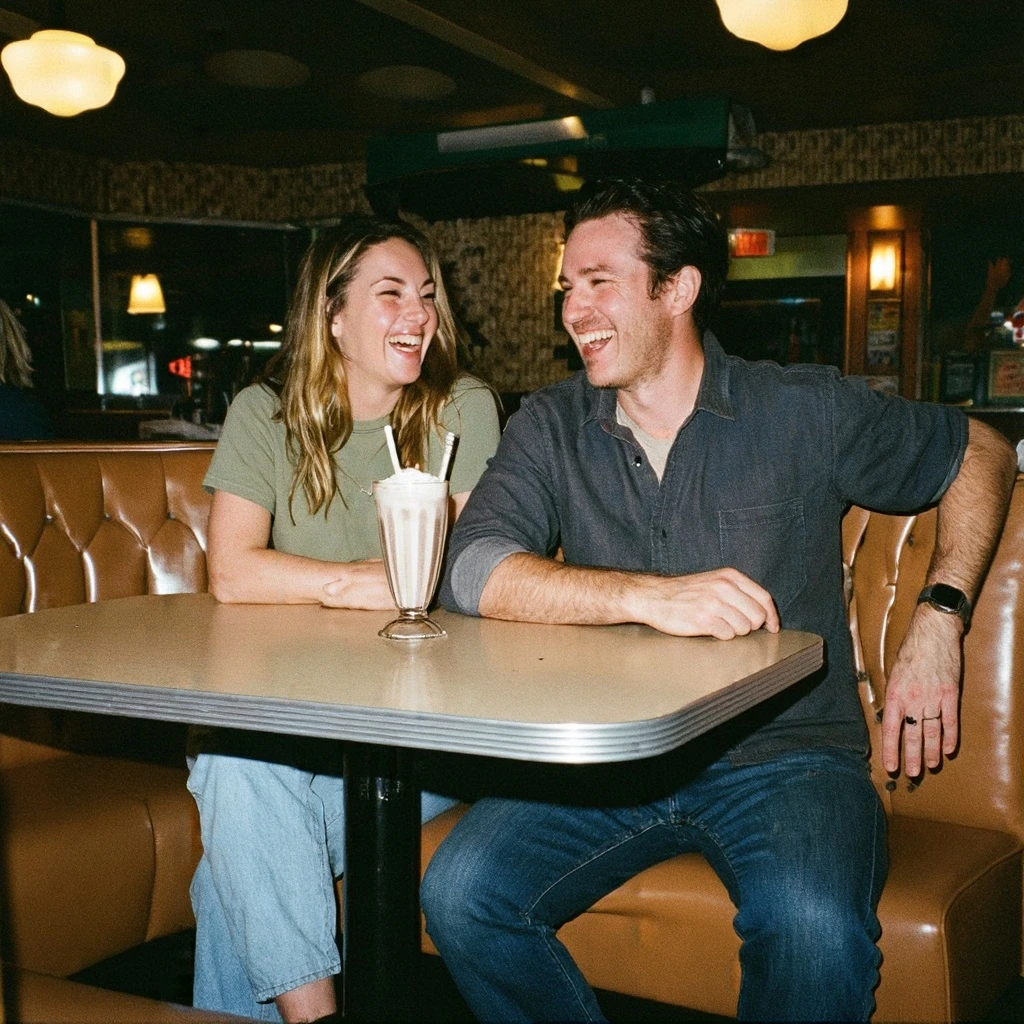
A vintage-style 35mm film photograph of a smiling couple sitting in a retro diner. Warm, golden indoor lighting. They are laughing, not looking at the camera. Flash photography aesthetic, slightly harsh shadow behind them, but the skin looks glowing and warm. Grainy, imperfect, nostalgic vibe. Details of the retro leather seats and milkshake on the table. Candid moment, pure joy.
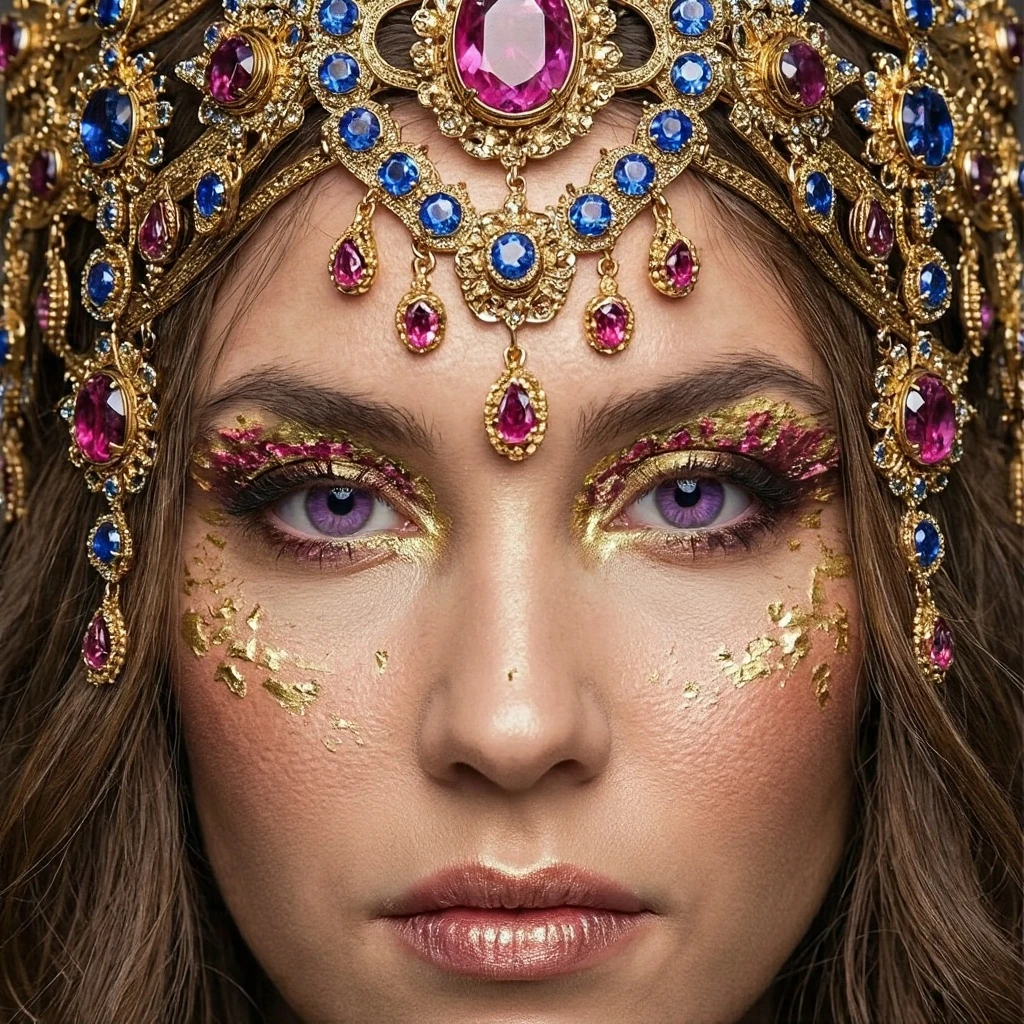
Close-up of a fantasy queen wearing an elaborate, intricate gold headpiece encrusted with rubies and sapphires. The jewelry has filigree details and hangs over her forehead. Her makeup is gold leaf avant-garde style. Intense gaze, purple irises. Macro shot showing the facets of the gemstones and the texture of the gold metal. Royal atmosphere, symmetrical composition, sharp depth of field, opulence, photorealistic.
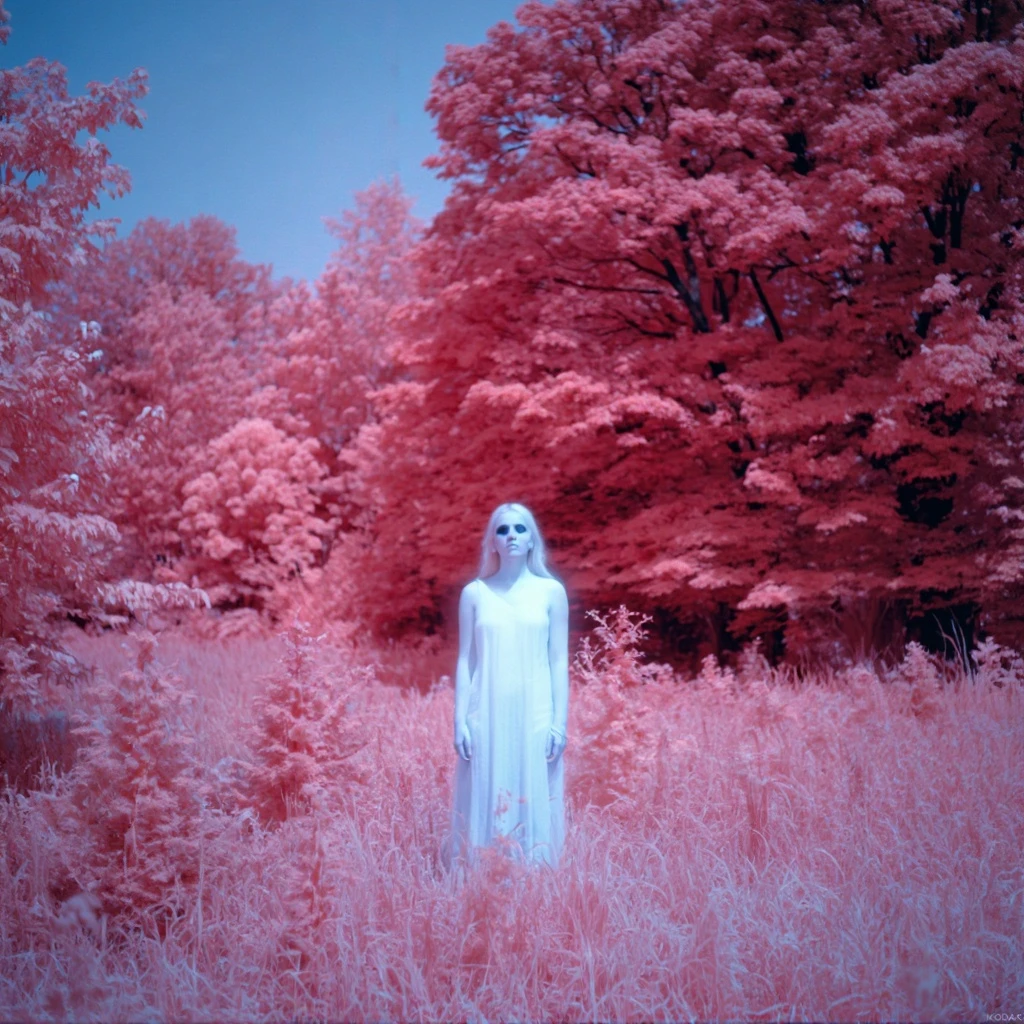
Surreal infrared portrait photography, Kodak Aerochrome film style. A young woman stands in a landscape where all foliage (trees, grass) is rendered in deep crimson and pink tones. Her skin appears pale, almost porcelain white and smooth, contrasting with dark, intense eyes. Grainy analog film texture, ethereal atmosphere, dreamlike colors, color shift, unique aesthetic.

A cinematic photograph of identical adult twin sisters interacting. They are sitting on a vintage sofa. Twin A on the left is laughing joyfully, head thrown back. Twin B on the right is looking at her sister with a serious, contemplative expression. They share the exact same facial features but different emotions. Warm afternoon light fills the bohemian room. The challenge is maintaining perfect facial likeness consistency. 35mm film photograph.
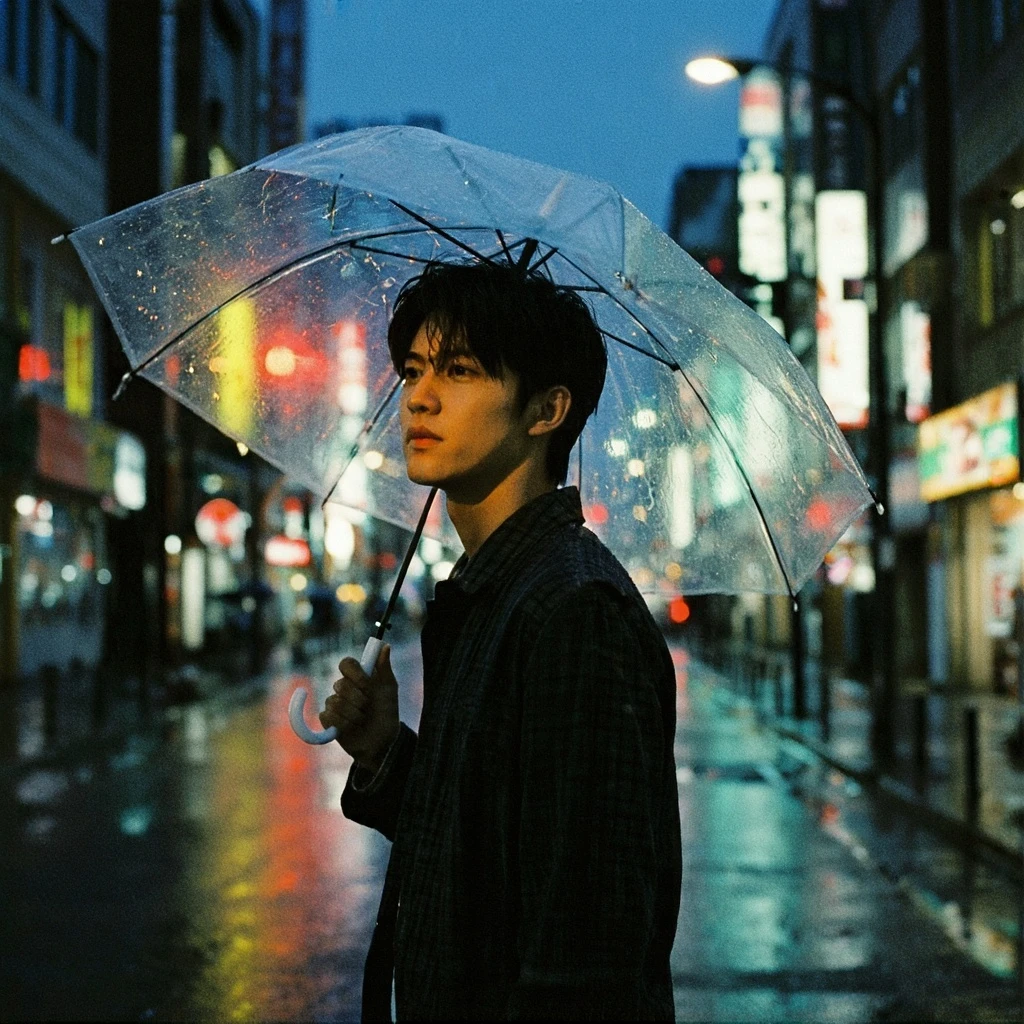
A moody cinematic street portrait at night in a rainy city. A handsome young man stands under a transparent umbrella. The background is a blur of vibrant city traffic lights and neon signs (beautiful bokeh). Raindrops are illuminated by the streetlights. He looks to the side with a thoughtful expression. Shot on Kodak Portra 800, high contrast, grainy texture, wet asphalt reflection, emotional storytelling, 85mm lens.
関連モデル




README
Z-Image Base LoRA
Z-Image Base LoRA is a 6-billion parameter text-to-image model from Tongyi-MAI with full LoRA support. Apply up to 3 custom LoRA adapters simultaneously to generate images with personalized styles, characters, or brand aesthetics — all while maintaining fast generation speeds.
Why Choose This?
-
Triple LoRA support Apply up to 3 custom LoRA adapters at once for layered style control — combine character, style, and aesthetic LoRAs in a single generation.
-
Flexible output sizing Customize width and height up to 1024px for any aspect ratio you need.
-
Prompt Enhancer Built-in tool to automatically improve your prompts for better results.
-
LoRA ecosystem compatibility Load LoRA weights from popular sources like Civitai and Hugging Face, or train your own custom LoRAs.
-
Affordable pricing Just $0.012 per image — perfect for high-volume generation with custom styles.
Parameters
| Parameter | Required | Description |
|---|---|---|
| prompt | Yes | Text description of the image you want to generate |
| loras | No | Up to 3 LoRA adapters to apply (click "+ Add Item") |
| size | No | Preset size options |
| width | No | Output width in pixels (default: 1024) |
| height | No | Output height in pixels (default: 1024) |
| seed | No | Random seed for reproducibility (default: -1 for random) |
| output_format | No | Output format: jpeg, png (default: jpeg) |
| enable_sync_mode | No | API only: wait for result before returning response |
How to Use
- Write your prompt — describe the image you want to create, including your LoRA trigger words.
- Add LoRAs — click "+ Add Item" to add up to 3 LoRA adapters with their weights.
- Set dimensions — adjust width and height for your needs.
- Run — submit and download your image.
Pricing
| Output | Cost |
|---|---|
| Per image | $0.012 |
Best Use Cases
- Character Consistency — Use character LoRAs to maintain identity across multiple generations.
- Brand Aesthetics — Apply brand-specific style LoRAs for consistent marketing visuals.
- Art Style Transfer — Generate images in specific artistic styles trained into LoRAs.
- Combined Styles — Layer multiple LoRAs for unique style combinations.
- Rapid Iteration — Test different LoRA combinations quickly at low cost.
Pro Tips
- Include your LoRA trigger words in the prompt for best activation.
- Start with LoRA weight around 0.7-1.0, then adjust based on results.
- Combine complementary LoRAs (e.g., character + style + lighting) for richer outputs.
- Use the Prompt Enhancer to automatically improve your descriptions.
- Keep the same seed when comparing different LoRA combinations.
Train Your Own LoRA
Want to create custom LoRAs for Z-Image? Use the Z-Image LoRA Trainer:
- Z-Image LoRA Trainer — Train custom LoRAs with your own images.
Guidance
Related Models
- Z-Image Base — Base model without LoRA support at $0.01 per image.
- Z-Image Turbo — Faster generation optimized for sub-second inference.
Notes
- Maximum of 3 LoRAs can be applied per generation.
- LoRA weights typically range from 0.5 to 1.0 for best results.
- enable_sync_mode is only available through the API, not in the web interface.
Z Image Base Lora API — Quick start
Grab a WaveSpeedAI API key, then call POST https://api.wavespeed.ai/api/v3/wavespeed-ai/z-image/base-lora with your input as JSON. The endpoint returns a prediction id. Start polling the result endpoint around every 2 seconds, increase the interval for long-running tasks, and stop on any terminal status. On completed, read output values from data.outputs. Examples for Z Image Base Lora below.
HTTP example
set -euo pipefail

: "${WAVESPEED_API_KEY:?Set WAVESPEED_API_KEY}"

REQUEST_BODY=$(cat <<'JSON'
{
    "prompt": "A cinematic shot of a city at sunset, soft golden light",
    "size": "1024*1024",
    "strength": 0.6,
    "seed": -1,
    "output_format": "jpeg"
}
JSON
)

# 1. Submit the prediction.
SUBMIT_RESPONSE=$(curl --silent --show-error --fail-with-body \
  -X POST "https://api.wavespeed.ai/api/v3/wavespeed-ai/z-image/base-lora" \
  -H "Content-Type: application/json" \
  -H "Authorization: Bearer $WAVESPEED_API_KEY" \
  -d "$REQUEST_BODY")

TASK=$(printf '%s' "$SUBMIT_RESPONSE" | jq 'if has("data") then .data else . end')
PREDICTION_ID=$(printf '%s' "$TASK" | jq -r '.id')
if [ -z "$PREDICTION_ID" ] || [ "$PREDICTION_ID" = "null" ]; then
  printf 'Submission response did not contain a prediction id
' >&2
  exit 1
fi
RESULT_URL=$(printf '%s' "$TASK" | jq -r '.urls.get // empty')
if [ -z "$RESULT_URL" ]; then
  RESULT_URL="https://api.wavespeed.ai/api/v3/predictions/$PREDICTION_ID/result"
fi

# 2. Poll until the prediction finishes.
while true; do
  RESPONSE=$(curl --silent --show-error --fail-with-body "$RESULT_URL" \
    -H "Authorization: Bearer $WAVESPEED_API_KEY")
  RESULT=$(printf '%s' "$RESPONSE" | jq 'if has("data") then .data else . end')
  STATUS=$(printf '%s' "$RESULT" | jq -r '.status')
  case "$STATUS" in
    completed) printf '%s\n' "$RESULT" | jq '.outputs'; break ;;
    failed|cancelled|timeout) printf '%s\n' "$RESULT" | jq . >&2; exit 1 ;;
    created|processing) sleep 2 ;;
    *) printf 'Unexpected status: %s
' "$STATUS" >&2; exit 1 ;;
  esac
done
Node.js example
const submitUrl = "https://api.wavespeed.ai/api/v3/wavespeed-ai/z-image/base-lora";
const apiKey = process.env.WAVESPEED_API_KEY;
if (!apiKey) throw new Error('Set WAVESPEED_API_KEY');

async function requestJson(url, options = {}) {
  const response = await fetch(url, options);
  if (!response.ok) throw new Error(await response.text());
  return response.json();
}

// 1. Submit the prediction.
const body = await requestJson(submitUrl, {
  method: "POST",
  headers: {
    "Authorization": `Bearer ${apiKey}`,
    "Content-Type": "application/json",
  },
  body: JSON.stringify({
        "prompt": "A cinematic shot of a city at sunset, soft golden light",
        "size": "1024*1024",
        "strength": 0.6,
        "seed": -1,
        "output_format": "jpeg"
}),
});
const task = body.data ?? body;
if (!task.id) throw new Error("Submission response did not contain a prediction id");
const resultUrl = task.urls?.get ||
  `https://api.wavespeed.ai/api/v3/predictions/${task.id}/result`;

// 2. Poll until the prediction finishes.
while (true) {
  const resultBody = await requestJson(resultUrl, {
    headers: { "Authorization": `Bearer ${apiKey}` },
  });
  const result = resultBody.data ?? resultBody;
  if (result.status === "completed") {
    console.log(result.outputs);
    break;
  }
  if (["failed", "cancelled", "timeout"].includes(result.status)) throw new Error(JSON.stringify(result));
  if (!["created", "processing"].includes(result.status)) throw new Error("Unexpected status: " + result.status);
  await new Promise(resolve => setTimeout(resolve, 2000));
}
Python example
import json
import os
import time
from urllib.request import Request, urlopen

api_key = os.environ["WAVESPEED_API_KEY"]
headers = {"Authorization": f"Bearer {api_key}", "Content-Type": "application/json"}
payload = {
    "prompt": "A cinematic shot of a city at sunset, soft golden light",
    "size": "1024*1024",
    "strength": 0.6,
    "seed": -1,
    "output_format": "jpeg"
}

def request_json(url, data=None):
    request = Request(url, data=data, headers=headers, method="POST" if data else "GET")
    with urlopen(request) as response:
        return json.load(response)

# 1. Submit the prediction.
body = request_json("https://api.wavespeed.ai/api/v3/wavespeed-ai/z-image/base-lora", json.dumps(payload).encode())
task = body.get("data", body)
if not task.get("id"):
    raise RuntimeError("Submission response did not contain a prediction id")
result_url = task.get("urls", {}).get("get") or f"https://api.wavespeed.ai/api/v3/predictions/{task['id']}/result"

# 2. Poll until the prediction finishes.
while True:
    result_body = request_json(result_url)
    result = result_body.get("data", result_body)
    status = result.get("status")
    if status == "completed":
        print(result.get("outputs", []))
        break
    if status in {"failed", "cancelled", "timeout"}:
        raise RuntimeError(result)
    if status not in {"created", "processing"}:
        raise RuntimeError(f"Unexpected status: {status}")
    time.sleep(2)
Z Image Base Lora API — Frequently asked questions
What is the Z Image Base Lora API?
Z Image Base Lora is a WaveSpeedAI model for AI inference, exposed as a REST API on WaveSpeedAI. Z-Image-Base LoRA (6B) enables high-quality text-to-image generation with full CFG support and external LoRA support. Supports applying up to 3 LoRAs for custom styles. Ready-to-use REST inference API, best performance, no coldstarts, affordable pricing. You can call it programmatically or try it from the playground above.
How do I call the Z Image Base Lora API?
POST your input parameters to the model's REST endpoint (shown in the API tab of this playground) with your WaveSpeedAI API key in the Authorization header. Submission returns a prediction ID. Poll the result endpoint starting around every 2 seconds, increase the interval for long-running tasks, and stop on any terminal status. The playground generates production-oriented Python, JavaScript, and cURL examples with timeouts, transient-error handling, and safe GET retries. Full request/response shape is documented at https://wavespeed.ai/docs/docs-api/wavespeed-ai/z-image-base-lora.
How much does Z Image Base Lora cost per run?
Z Image Base Lora starts at $0.012 per run. That figure is the base price — the final charge scales with the parameters you set in the form (output size, length, count, references, or whatever knobs this model exposes), so a higher-quality or larger output costs more than a minimal one. The exact cost for your current input is shown live next to the Generate button before you submit, and the actual per-call charge is recorded on the prediction afterwards.
What inputs does Z Image Base Lora accept?
Key inputs: `prompt`, `image`, `size`, `seed`, `enable_base64_output`, `enable_sync_mode`. The full JSON schema (types, defaults, allowed values) is rendered above the Generate button and mirrored in the API reference at https://wavespeed.ai/docs/docs-api/wavespeed-ai/z-image-base-lora.
How long does Z Image Base Lora take to generate?
Median end-to-end generation time on WaveSpeedAI is around 15 seconds per request, based on recent successful runs. Queue time varies with global demand; live status is visible in the prediction record.
Can I use Z Image Base Lora outputs commercially?
Commercial usage rights depend on the model's license, set by its provider (WaveSpeedAI). The license summary appears on the model card above; see WaveSpeedAI's Terms of Service for platform-level conditions.