
How to Use DeepSeek V4: Day-1 Quick Start for API and Chat
Get started with DeepSeek V4 the moment it launches. Quick start guide for API access, chat interface, and first code generation.
Long time no see! My friends. I’m Dora. I hit a small snag on a Tuesday morning: I needed to turn a messy set of notes into something shippable, and my usual model kept drifting into cheerful fluff. I wanted straight answers, fewer nudges. That’s what pushed me to try DeepSeek V4. I tested it in January 2026 across the web chat and the API. What follows isn’t a feature tour. It’s how I got it working, where it felt solid, and where I still hesitate.
Access Options at Launch
Use DeepSeek today on WaveSpeedAI — V3.2 and R1 with the OpenAI SDK and transparent per-token pricing. DeepSeek V3.2 API → · DeepSeek R1 API →
I started simple: no code, just the web chat. Then I moved to the API when I needed repeatable runs. If you prefer to play with prompts first and wire things up later, this path is steady and low-friction.
Web Chat Interface
I signed in through the main site and picked V4 from the model list. If you’ve used other chat-style UIs, this will feel familiar: system message up top, chat turns below, parameters tucked away.
What helped:
- I wrote a short system message that mirrored how I think: “Be direct. Cite assumptions. If you’re guessing, say so.” That stopped the model from over-explaining.
- I kept temperature low (around 0.2) for drafting specs or code comments. When I wanted alternatives for wording or naming, I nudged it to 0.5.
- I used a simple ritual before each new thread: paste a tiny context block. Two lines. “Project: internal doc cleanup. Voice: plain, concise, no metaphors.” It kept V4 from wandering, and it also kept me honest about what I actually needed.
Friction:
- Long chats sometimes grew vague. Resetting the thread and pasting a fresh context fixed that more reliably than trying to wrangle it midstream.
- Copy/paste formatting was fine, but I still prefer grabbing outputs in code via the API for anything I need to run more than once.
If you only need occasional help, cleaner drafts, quick refactors, tighter emails, the web interface is enough. But if you want consistency across tasks (same style, same structure, no surprises), the API is where it steadies out.
API Access
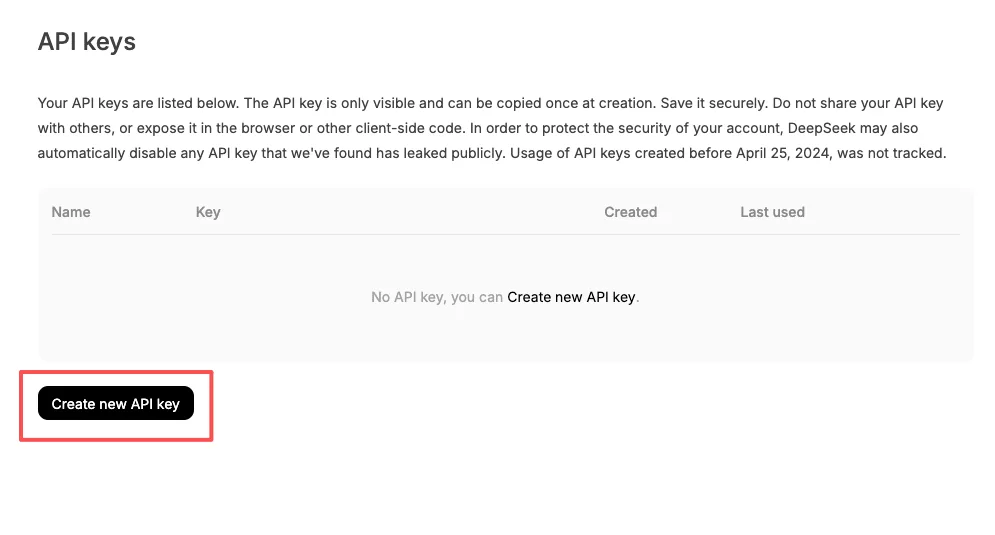
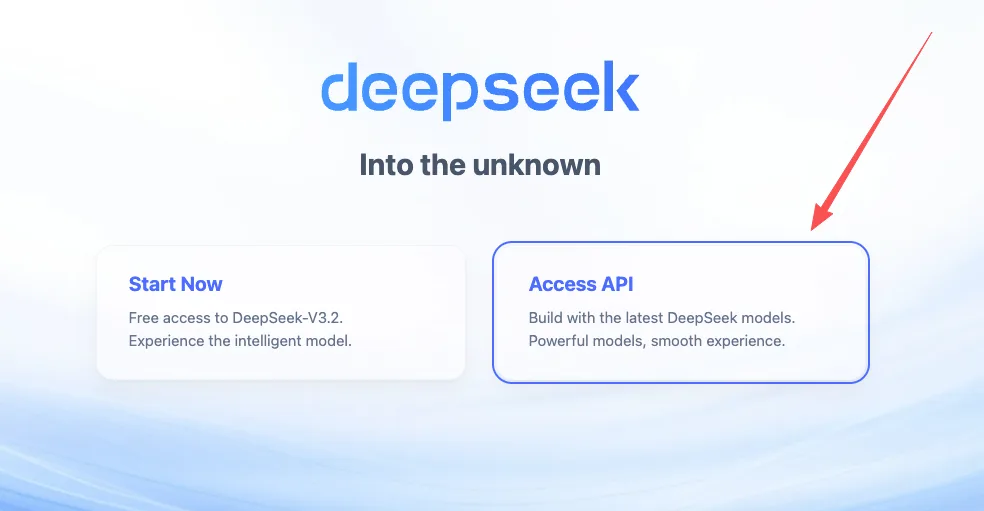 I created an API key from my account dashboard and tucked it into my environment. Nothing fancy:
- macOS/Linux: export DEEPSEEK_API_KEY=”…” in your shell profile.
- Windows PowerShell: setx DEEPSEEK_API_KEY ”…” and restart the terminal.
DeepSeek’s API follows the now-familiar chat-completions shape. If you’ve used OpenAI-compatible clients, it’s pretty much plug-and-go. The main thing to watch is the model name, V4 is available, but the exact identifier can change. I double-checked the current model string from the dashboard before making calls.
For privacy: I avoid sending secrets or customer data unless I’ve confirmed the retention policy. I also mask IDs and use fake values in prompts. It takes 30 seconds and prevents future headaches.
If you want the official starting point, the safest doorway is the main site’s docs link: DeepSeek. The account area usually has the current endpoints, model names, and rate limits.
Your First API Call
I like to make one small, boring request first. It tells me if auth is wired up, the model name is valid, and responses look like I expect. After that, I fold it into a script.
Authentication
I used a Bearer token in the Authorization header and kept the key in an env variable. It reduces the chance I’ll accidentally commit it or drop it into a shared snippet. Here’s the shape I tested in January 2026:
- Header: Authorization: Bearer $DEEPSEEK_API_KEY
- Endpoint: the chat-completions path shown in your account docs
- Model: check the exact string for V4 in the dashboard (e.g., “deepseek-v4”), since naming can change
A small note: if your organization routes requests through a proxy, test with curl first. It’s easier to see what’s actually going over the wire.
Basic Request
My first call asks the model to summarize a short text with a strict format. If a model follows formatting on the first try, I trust it more with structured tasks later.
Curl (compact, easy to diff later):
curl -s https://api.your-deepseek-endpoint/v1/chat/completions \
-H "Content-Type: application/json" \
-H "Authorization: Bearer $DEEPSEEK_API_KEY" \
-d '{

"model": "deepseek-v4",

"temperature": 0.2,

"messages": [

{"role": "system", "content": "You are concise. Use the requested format exactly."},

{"role": "user", "content": "Text: 'Roadmap shifted to Q2: need a two-sentence summary and three bullet risks.'\nFormat:\nSummary: <two sentences>\nRisks:\n- <risk>\n- <risk>\n- <risk>"}

]

}'
Python (using a generic OpenAI-style client):
from os import getenv

import requests


API_KEY = getenv("DEEPSEEK_API_KEY")

URL = "https://api.your-deepseek-endpoint/v1/chat/completions"


payload = {

"model": "deepseek-v4",

"temperature": 0.2,

"messages": [

{"role": "system", "content": "You are concise. Use the requested format exactly."},

{"role": "user", "content": (

"Text: 'Roadmap shifted to Q2: need a two-sentence summary and three bullet risks.'\n"

"Format:\nSummary: <two sentences>\nRisks:\n- <risk>\n- <risk>\n- <risk>"

)},

],

}


resp = requests.post(

URL,

headers={

"Authorization": f"Bearer {API_KEY}",

"Content-Type": "application/json",

},

json=payload,

timeout=30,

)

resp.raise_for_status()

print(resp.json()["choices"][0]["message"]["content"])
What I look for in the output:
- Did it keep the exact structure (Summary line, then Risks bullets)?
- Are there hedges or filler words I didn’t ask for?
- If I rerun with the same prompt at temperature 0, do I get the same format?
My runs were clean: V4 followed the format without drifting and handled terse instructions well. That’s usually a good sign for downstream tasks like changelog drafting or code comments. The main gotcha was token budgeting, responses that include long quoted input can spill over. I fixed it by trimming inputs and asking for shorter outputs first, then expanding as needed.
First Coding Task to Try
I like small automations that pay rent right away. The first thing I tried was a tiny helper that renames screenshot files into readable titles. Not glamorous. Very useful.
 Setup I used (January 2026)
- A folder full of images like Screenshot 2026-01-18 at 11.02.31.png
- A YAML file with a few rules (project name, date format)
- A prompt that asks V4 to produce a script and a dry-run plan before touching files
Prompt I sent via the API
You are helping me write a safe file-renamer. Requirements:
- Input: directory of PNG/JPG screenshots.
- Output: dry-run first: then rename.
- Pattern: {project}-{short-title}-{YYYYMMDD}.{ext}
- Short titles: extract from on-screen window titles if present: otherwise infer 2–4 words from file metadata: avoid stop words.
- Constraints: no overwrites: lowercase: hyphens only: log actions.

Return:
1) Risks (3 bullets)
2) Plan (numbered steps)
3) Python script (<= 120 lines)
4) One test case (pytest-style) using a temp directory.
What happened:
First attempt: the script looked fine but skipped the dry-run flag. I asked it to insert a “—dry-run” CLI option with a default of true. It complied and kept the code under the line limit.
Second attempt: it guessed at EXIF parsing. I nudged it to gate that behind a try/except and continue without failing. After that, it ran cleanly.
Why this is a good first task:
It forces careful formatting and simple I/O.
You can validate correctness without reading every line, just run with a dummy folder and see the log.
It exposes edge cases quickly (spaces, collisions, long names).
What I noticed about V4 here:
It responds well to constraints in plain language. “No overwrites: lowercase: hyphens only” worked better than a long template.
It stayed grounded when I asked for a plan before code. That small pause helped both of us. I could catch missing steps before it produced anything dangerous.
Limits and trade-offs:
It’s not a substitute for reading the code. I still skim for insecure file operations and unexpected imports.
For longer scripts, I split the task: plan → core functions → CLI wrapper → tests. V4 respected the sequence more than some models I’ve used, but it can still blend steps if I’m vague.
Who this helps:
Makers who want quick, safe utilities.
Teams who prefer consistent structure across prompts.
Folks who value predictable formatting over flashy creativity.
Who might be frustrated:
Anyone expecting a model to intuit business rules without writing them down.
People who want one-shot, long outputs. Smaller loops work better here.
Why this matters to me:
Once a model gets the simple things reliably right, formatting, short plans, low temperature, the rest of my workflow gets lighter. I think of V4 as a steady pair of hands. Not magic. Just steady.
If you’re curious, try the same pattern with a different task tomorrow: generate a changelog from commit messages, or produce migration steps from a schema diff. Keep the plan-first constraint, and see if your mental load drops a notch. Mine did.
I’ll keep testing V4 with longer documents next week. I’m wondering how it handles cited summaries without bloating the output. Quietly hopeful, but I’ll let the runs tell me.
Frequently Asked Questions
What’s the quickest way to start with DeepSeek V4: web chat or API?
Start in the web chat to iterate on prompts with minimal setup, then move to the API for consistency and repeatable runs. The chat works well for cleaner drafts or quick refactors. For stable style, strict formatting, and automation, the API provides steadier, predictable outputs.
How do I use DeepSeek V4 through the API?
Create an API key, store it in an environment variable, and send a chat-completions request with Authorization: Bearer . Verify the exact model name (e.g., deepseek-v4) in your dashboard. Begin with a small, structured test prompt at low temperature to confirm auth, formatting, and deterministic behavior.
How to use DeepSeek V4 to keep responses concise and on-format?
Set a short system message stating style rules (e.g., be direct, state assumptions). Keep temperature low (around 0–0.2) for specs and structured outputs. Provide a tiny context block at the start of each thread, and request a plan before code. This reduces drift and improves format adherence.
/filters:quality(82)/media/images/1790240939998654116_NCZsTmK4.webp)
/filters:quality(82)/media/images/1790241317253627358_t5i2bksC.webp)
/filters:quality(82)/media/images/1790241738172419156_FluDNW6f.webp)
/filters:quality(82)/media/images/1790150005225762446_uXlW6foy.webp)
/filters:quality(82)/media/images/1790151481694108732_ue3huIS4.webp)
/filters:quality(82)/media/images/1790150837930531307_Ol2bowGP.webp)