DeepSeek V4 API Python: Minimal Code Examples with Streaming
Hello guys! Dora is here. It started with a small irritation: I kept copying the same chat-completion boilerplate between projects, swapping base URLs and model names like labels on jars. Not hard work, just the kind that adds grit to your day. I’d been seeing DeepSeek pop up enough to get curious, so I set aside a few mornings in late January 2026 to wire their “V4” API into my Python stack and see how it felt in real use.
I wasn’t chasing benchmarks. I wanted to know: does the client stay out of my way, can I stream reliably, and do errors fail in a way that’s easy to reason about? Here’s what I tried, what tripped me up, and what quietly worked. Let’s go!
Environment Setup
Dependencies
I kept the setup simple on macOS with Python 3.11. You can do this with the standard library, but three small packages made life easier:
- requests (straightforward HTTP: good enough for most cases)
- httpx (async and timeouts that behave well)
- python-dotenv (so I don’t paste keys around)
 If you plan to stream with Server-Sent Events, you can use requests and parse lines yourself (what I did), or bring in a helper like sseclient-py. I stuck to requests, fewer moving parts.
Install
pip install requests httpx python-dotenvI also created a minimal virtual environment per project. It’s boring advice, but it saves you from dependency drift when you revisit this in three months.
API Key Configuration
I stored the key in an environment variable. Nothing fancy:
# .env
DEEPSEEK_API_KEY=your_key_here
Then in Python:
from dotenv import load_dotenv
import os

load_dotenv()

API_KEY = os.getenv("DEEPSEEK_API_KEY")

if not API_KEY:
    raise RuntimeError("Missing DEEPSEEK_API_KEY")
Two small notes from setup:
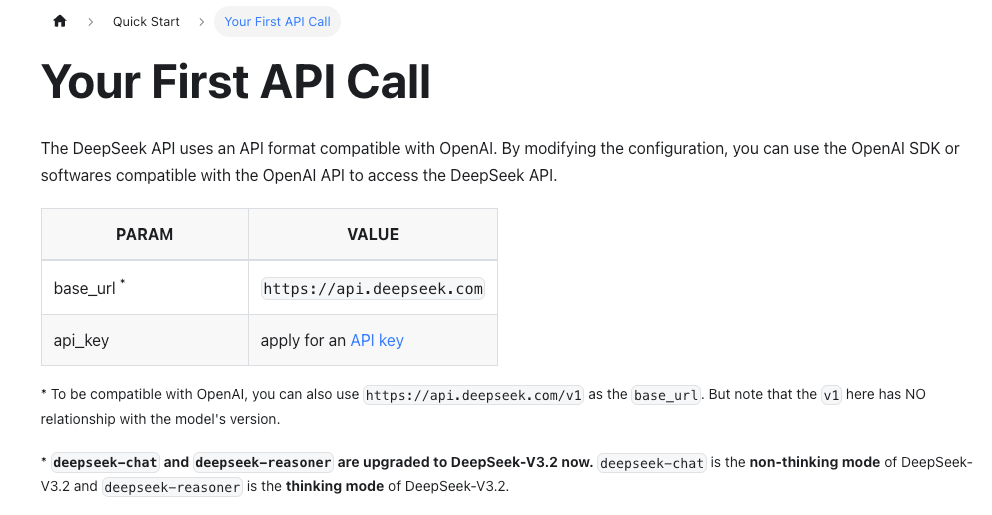
- The base URL and model names change more often than you think. I checked the official DeepSeek API docs before each run to confirm paths and available models.
- I kept timeouts explicit. It’s a habit that pays off once you hit rate limits or network noise.
Basic Chat Request
The mental model is familiar if you’ve used chat-completions elsewhere. DeepSeek exposes a chat endpoint with messages=[{"role": "...", "content": "..."}]. That’s helpful because I didn’t have to reframe my prompts.
Here’s the minimal request I used with requests. Model names vary by account and region, during my tests I saw references like deepseek-chat and deepseek-reasoner. If your docs mention a “V4” model string, use that. Otherwise, pick the closest general-purpose chat model listed in your console.
import os
import requests

API_KEY = os.environ["DEEPSEEK_API_KEY"]
BASE_URL = "https://api.deepseek.com/v1/chat/completions"

payload = {
    "model": "deepseek-chat", # check docs/console for the exact model
    "messages": [
        {"role": "system", "content": "You are a concise assistant."},
        {"role": "user", "content": "Give me two bullet points on the value of clear commit messages."}
    ],
    "temperature": 0.3,
    "max_tokens": 200
}

resp = requests.post(
    BASE_URL,
    headers={
        "Authorization": f"Bearer {API_KEY}",
        "Content-Type": "application/json"
    },
    json=payload,
    timeout=30
)

resp.raise_for_status()

data = resp.json()
content = data["choices"][0]["message"]["content"]
print(content)
Field notes
- First run was uneventful (a relief). The structure matched what I expected, which made migrating a small prompt library fast.
- I kept temperature low for repeatable answers. That sounds obvious, but I still forget when I’m troubleshooting.
- If you need deterministic runs, also pin top_p and seed if the API supports it. When the docs are silent, I assume non-deterministic.
If you’re comparing providers, the upside here is low friction. The downside is that differences hide in the edges, error payloads, token accounting, and streaming shape. Those edges are where your integration either feels sturdy or annoying.
Code Generation Example
I don’t ask models to write full modules. It becomes a clean-up job. But for small helpers, like “parse this timestamp format” or “draft the SQL with placeholders,” it’s handy.
I used a narrow prompt, a clear contract, and small output limits. That kept the model from wandering and made diffs easy to review.
import requests, os

API_KEY = os.environ["DEEPSEEK_API_KEY"]
BASE_URL = "https://api.deepseek.com/v1/chat/completions"

messages = [
    {"role": "system", "content": (
        "You generate small, safe Python helpers. "
        "Return only code inside one block."
    )},
    {"role": "user", "content": (
        "Write a Python function `parse_yyyymmdd` that takes a string like '2026-01-31' "
        "and returns a datetime.date. If invalid, return None. No external deps."
    )}
]

resp = requests.post(
    BASE_URL,
    headers={
        "Authorization": f"Bearer {API_KEY}",
        "Content-Type": "application/json"
    },
    json={
        "model": "deepseek-chat", # or your V4-capable model
        "messages": messages,
        "temperature": 0,
        "max_tokens": 250
    },
    timeout=30
)

resp.raise_for_status()
code = resp.json()["choices"][0]["message"]["content"]
print(code)
What helped in practice
- I always tell it to return only code. If I skip that, I get wrap-up sentences I don’t need.
- Temperature 0 reduces fiddly edits.
- I read through the logic anyway. In my run it handled ValueError, but I still added an extra test for whitespace. Two extra minutes now saves hours of surprise later.
This didn’t save time on the first shot. After three or four small helpers, I noticed it reduced mental effort: fewer tab switches, fewer “what’s the exact strptime code again?” moments. That’s enough for me.
Streaming Responses
I like streaming for any prompt that could grow. It lets me bail early if the answer is drifting, and it makes long responses feel less heavy.
DeepSeek’s streaming used the usual pattern in my tests: set stream=true and read data lines until [DONE]. I didn’t need a special client, requests with iter_lines was fine.
import os, json, requests

API_KEY = os.environ["DEEPSEEK_API_KEY"]
BASE_URL = "https://api.deepseek.com/v1/chat/completions"

payload = {
    "model": "deepseek-chat",
    "messages": [
        {"role": "system", "content": "Be brief."},
        {"role": "user", "content": "Summarize this: Streaming keeps the UI responsive and lets me stop early."}
    ],
    "stream": True,
    "temperature": 0.2,
}

with requests.post(
    BASE_URL,
    headers={
        "Authorization": f"Bearer {API_KEY}",
        "Content-Type": "application/json"
    },
    json=payload,
    stream=True,
    timeout=60
) as r:
    r.raise_for_status()
    for line in r.iter_lines(decode_unicode=True):
        if not line:
            continue
        if line.startswith("data: "):
            chunk = line[len("data: "):]
            if chunk == "[DONE]":
                break
            try:
                obj = json.loads(chunk)
                delta = obj["choices"][0]["delta"].get("content", "")
                if delta:
                    print(delta, end="", flush=True)
            except json.JSONDecodeError:
                # I keep a small log when this happens: usually network blips
                pass

print()
Two small behaviors I liked:
- Early tokens arrived quickly (a second or two on a clean connection). Not scientific, just enough to feel snappy when I wired it into a CLI tool.
- The
[DONE]marker showed up reliably. It sounds trivial until it doesn’t, missing terminators make UIs hang.
If you need to stream into a web app, I’d put a thin server layer in between to normalize events. It’s one extra step, but it keeps your frontend simple.
Server-Sent Events
Under the hood, you’re effectively reading Server-Sent Events. If you prefer a helper, sseclient-py works, but rolling your own here is fine as long as you guard against partial lines and timeouts. The docs page on streaming in the DeepSeek API docs was enough to get this running without surprises.
Error Handling
 Most of my errors were predictable: missing key, bad model name, or timeouts when I throttled my network to simulate travel Wi‑Fi.
A small pattern I reuse:
import httpx, time, os

API_KEY = os.environ["DEEPSEEK_API_KEY"]
BASE_URL = "https://api.deepseek.com/v1/chat/completions"

RETRIABLE = {408, 409, 425, 429, 500, 502, 503, 504}

async def chat_once(client, messages):
    resp = await client.post(
        BASE_URL,
        headers={"Authorization": f"Bearer {API_KEY}"},
        json={
            "model": "deepseek-chat",
            "messages": messages,
            "temperature": 0.2,
            "max_tokens": 300,
        },
        timeout=30,
    )
    if resp.status_code == 401:
        raise RuntimeError("Unauthorized. Check DEEPSEEK_API_KEY and account access.")
    if resp.status_code == 404:
        raise RuntimeError("Endpoint or model not found. Confirm model name in console/docs.")
    if resp.status_code in RETRIABLE:
        raise RuntimeError(f"Retryable status: {resp.status_code}")
    resp.raise_for_status()
    return resp.json()

async def chat_with_retries(messages, attempts=4):
    backoff = 0.5
    async with httpx.AsyncClient() as client:
        for i in range(attempts):
            try:
                return await chat_once(client, messages)
            except RuntimeError as e:
                msg = str(e)
                if "Retryable status" in msg and i < attempts - 1:
                    time.sleep(backoff)
                    backoff *= 2
                    continue
                raise
A few practical notes:
- Rate limits: I saw 429 when I fired parallel tests. Exponential backoff helped, but I also added small jitter (random 50–150ms) to avoid thundering herds.
- Timeout hygiene: I set shorter connect/read timeouts for quick checks (5–10s) and longer ones for big prompts. Timeouts shouldn’t all be 30s by default: it hides problems.
- Error payloads: When things failed, the JSON body included a message I could surface to a log. I still wrap it in my own exceptions so I control what reaches the UI.
If your codebase already speaks the OpenAI-style schema, this is manageable: same message shape, slightly different edges. The main thing is to be strict about model names and to log the full response body on non-2xx so you don’t guess.
Documentation-wise, I leaned on the official DeepSeek API docs for parameter names and streaming shape. Whenever a provider uses familiar endpoints, it’s tempting to assume parity. I’ve learned to check the docs first and copy less between clients than I think I can.
Who might like this

- If you’ve got an existing Python wrapper for chat completions, the migration path is gentle.
- If you care about streaming and simple retries, it behaves predictably.
- If you need very specific tooling (function-calling schemas, reasoning tokens, or batch jobs), you’ll want to read the docs closely and prototype with one narrow task before you commit.
I didn’t try to orchestrate long, multi-step agents here. I focused on small, daily-use prompts, the kind that chip away at friction. That’s where the DeepSeek V4 API with Python felt steady enough to keep.
Related Articles
Introducing AI Vocal Remover on WaveSpeedAI
WAN 2.7 vs WAN 2.6: Feature Diff & Upgrade Decision
WAN 2.7 First & Last Frame Control: Builder Guide

Best AI People Remover From Photos in 2026: Remove Unwanted People Instantly

Best Fotor Alternative in 2026: WaveSpeedAI for AI Image Generation & Editing