
Generate Fast, Deliver in 4K: Upscale AI Video with Ultimate Video Upscaler
Draft AI video at 480p or 720p to iterate quickly, then turn the take you love into crisp 4K with Ultimate Video Upscaler. Real before-and-after examples, pricing and a step-by-step workflow on WaveSpeedAI.
Generate Fast, Deliver in 4K: Upscale AI Video with Ultimate Video Upscaler
Finding the right AI video shot usually takes several tries: a different camera move, another lighting setup, a tweak to the prompt. Running every attempt at full resolution is slow and adds up. A better workflow is to draft at 480p or 720p, pick the take you love, then upscale only that one to 4K with Ultimate Video Upscaler, our highest-quality video upscaler.
A Real Example: 480p to 4K
We made this 5-second shot in AI Cinema Studio at 480p (Noir look, Practicals lighting, Crane up camera move):
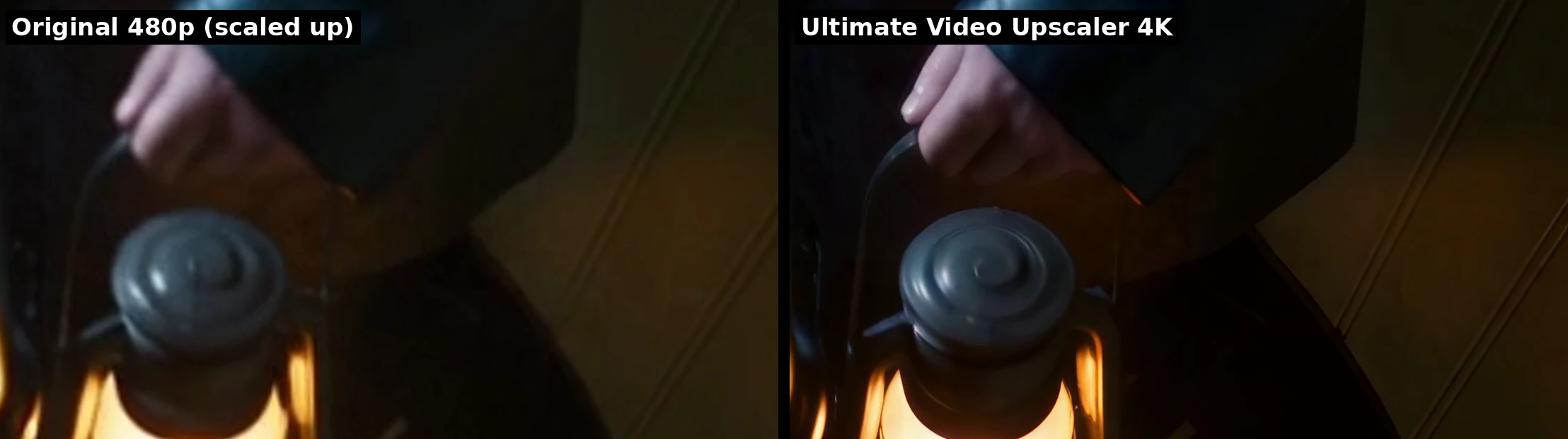
Then we ran it through Ultimate Video Upscaler with the target resolution set to 4K. The result is a 3840 × 2160 video at the same 24 fps, with the original soundtrack kept. Here are the same regions of one frame side by side. The left side is the 480p original simply enlarged to 4K; the right side is the upscaler’s output:
The fingers, the swirl on the lantern cap and the seams in the wooden wall come back as real detail.
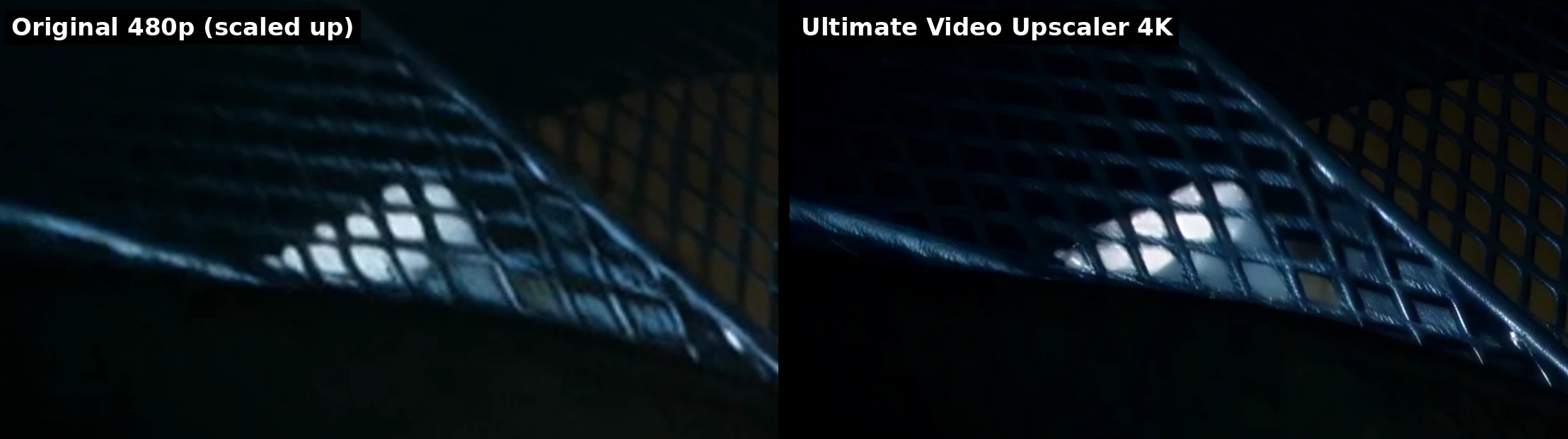
The diamond pattern of the stair mesh goes from a blur to clean, sharp metal.
Ultimate Video Upscaler is built for frame-to-frame consistency, so the restored detail holds steady as the video plays rather than shimmering from one frame to the next.
Why Draft Low and Upscale Later
- Iterate faster. Low-resolution generations finish sooner, so you can try more camera moves, looks and prompts in the same time.
- Spend where it matters. Most drafts are thrown away. Paying 4K prices only for the final take keeps costs down.
- Deliver any size. Choose 1080p for social media, 2K for presentations, or 4K for big screens and client masters from the same draft.
Pricing
You pay per second of video, by target resolution:
| Target resolution | Price per 5 seconds |
|---|---|
| 720p | $0.10 |
| 1080p | $0.20 |
| 2K | $0.30 |
| 4K | $0.40 |
Clips shorter than 3 seconds are billed as 3 seconds. The 5-second example above cost $0.40 to upscale to 4K, and a 30-second clip at 1080p costs $1.20. The exact price is always shown before you start.
How to Upscale Your Video
- Open Ultimate Video Upscaler.
- Upload your video. Any clip works, including videos made in AI Cinema Studio, the Video Generator or AI Chat, as well as your own footage.
- Pick the target resolution: 720p, 1080p, 2K or 4K.
- Press Generate and download the result.
Developers can call the same model through the WaveSpeedAI API as wavespeed-ai/ultimate-video-upscaler, with two inputs: video and target_resolution.
Tips for the Best Results
- Start from your best take. The upscaler adds resolution and fine detail; it keeps the composition, motion and lighting of the original.
- Match the target to the screen. 1080p is plenty for phones and social feeds; save 4K for large displays and final masters.
- Upscale the edit, not every clip. If you are cutting several shots together, upscale the clips that make the final cut.
Related Articles
/filters:quality(82)/media/images/1790879706333726948_TmjHVhrF.webp)
Introducing AI Cinema Studio on WaveSpeedAI: Direct Cinematic AI Video Shots
/filters:quality(82)/media/images/1773962750383987480_n3hqzHRZ.webp)
Kling 4.0 vs Kling 3.0: What Is Expected to Change and How to Upgrade
Kling 4.0 vs Seedance 2.5: How to Choose for Commercial Video
Kling 4.0 vs Veo 3.1 vs Seedance 2.5: Choosing a Flagship Video Model
Kling 4.0 vs WAN 3.0: Which Video Model Fits Your Pipeline