AI Image Translator that extracts text from images and translates it into 30+ languages while perfectly preserving font, style, spacing, and layout. The output image retains the original look and feel with extremely high visual fidelity. Ready-to-use REST inference API, best performance, no coldstarts, affordable pricing.
Boşta

$0.15çalıştırma başına·~66 / $10
ÖrneklerTümünü görüntüle



İlgili Modeller






README
WaveSpeedAI Image Translator
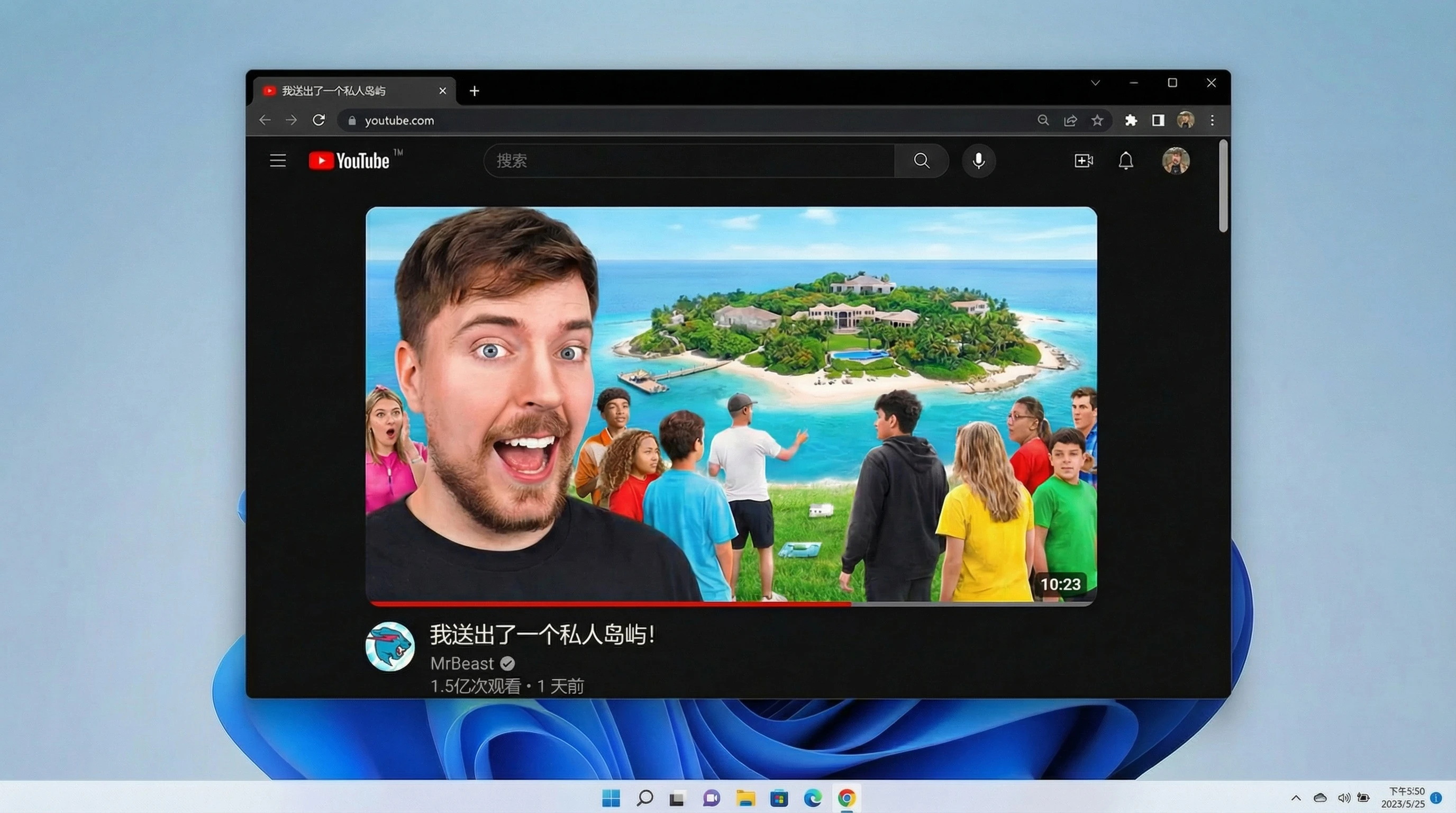
Turn any image into a multilingual asset in seconds. WaveSpeedAI Image Translator detects on-image text, translates it into your target language, and regenerates a clean image while preserving layout, fonts, and graphics.
What is it?
WaveSpeedAI Image Translator is an end-to-end image translation tool:
- Input: an image (upload or URL)
- Output: a translated image in JPEG, PNG, or WEBP format
- Workflow: OCR → translation → layout-aware text rendering
It is ideal for localizing posters, flyers, infographics, game UI, social posts, and product screenshots.
Why it stands out
-
Multilingual support Translate on-image text into many languages, including English, Spanish, French, Arabic, Hindi, Bengali, Portuguese, Russian, Japanese, Korean, German, and more.
-
Layout-aware rendering Replaces text while keeping the original composition, spacing, and overall visual style as intact as possible.
-
Image format flexibility Choose your preferred output_format: JPEG and PNG, matching your downstream pipeline or platform requirements.
-
Simple “upload and choose language” UX Just provide the image, select target_language from the dropdown, and click run—no manual masking or Photoshop skills required.
-
API-friendly Designed for batch localization and integration into design, marketing, or product tooling.
Limits and Performance
- Input: standard web image formats (JPEG, PNG, WEBP)
- Output: JPEG / PNG / WEBP (selectable in the interface)
- Typical processing time: a few seconds per image, depending on image size and queue load
- Best results with clear, non-blurred text and good contrast between text and background
Pricing
Every translated image costs only $0.15.
| Item type | Cost |
|---|---|
| 1 translated image | $0.15 |
How to Use
- Upload an image or paste a publicly accessible image URL.
- Choose the target_language from the dropdown list.
- Select your preferred output_format (JPEG, PNG, or WEBP).
- Submit the job.
- Download the translated image once processing finishes.
Pro Tips for Best Quality
- Use high-resolution images where text is sharp and not heavily compressed.
- Avoid very decorative or highly distorted fonts if you need precise readability.
- Keep important text away from extremely busy backgrounds for cleaner rendering.
- For multi-language campaigns, reuse the same source image and only change target_language to keep layout consistent across markets.
Notes
- If you provide an image URL instead of uploading, make sure it is publicly accessible; otherwise the preview and translation will fail.
- Extremely small text or heavily stylized lettering may not be recognized perfectly—consider simplifying those elements or increasing resolution before upload.
Multiple text support tools
- Qwen-Image-Translator: Qwen Vision is a multimodal AI model that integrates OCR (optical character recognition) and multilingual translation. Built on Cloud’s DashScope, it can extract text from images and translate it into multiple languages quickly and accurately.
- Seedream: A text-to-image model from, optimized for multi-panel/tiled posters, concept designs with copy, series KV, and social media assets. It excels at grid-based layouts, whitespace planning, and type readability.
Image Translator API — Quick start
Grab a WaveSpeedAI API key, then call POST https://api.wavespeed.ai/api/v3/wavespeed-ai/image-translator with your input as JSON. The endpoint returns a prediction id; poll the prediction endpoint until status flips to completed, then read the output URL from data.outputs[0]. Examples for Image Translator below.
HTTP example
# Submit the prediction
curl -X POST "https://api.wavespeed.ai/api/v3/wavespeed-ai/image-translator" \
  -H "Content-Type: application/json" \
  -H "Authorization: Bearer $WAVESPEED_API_KEY" \
  -d '{
    "image": "https://example.com/your-input.jpg",
    "target_language": "english",
    "output_format": "jpeg",
    "enable_base64_output": false,
    "enable_sync_mode": false
}'

# Response includes a prediction id. Poll for the result:
curl -X GET "https://api.wavespeed.ai/api/v3/predictions/{request_id}/result" \
  -H "Authorization: Bearer $WAVESPEED_API_KEY"

# When status is "completed", read the output from data.outputs[0].
Node.js example
// npm install wavespeed
const WaveSpeed = require('wavespeed');

const client = new WaveSpeed(); // reads WAVESPEED_API_KEY from env

const result = await client.run("wavespeed-ai/image-translator", {
        "image": "https://example.com/your-input.jpg",
        "target_language": "english",
        "output_format": "jpeg",
        "enable_base64_output": false,
        "enable_sync_mode": false
});

console.log(result.outputs[0]); // → URL of the generated output
Python example
# pip install wavespeed
import wavespeed

output = wavespeed.run(
    "wavespeed-ai/image-translator",
    {
    "image": "https://example.com/your-input.jpg",
    "target_language": "english",
    "output_format": "jpeg",
    "enable_base64_output": false,
    "enable_sync_mode": false
}
)

print(output["outputs"][0])  # → URL of the generated output
Image Translator API — Frequently asked questions
What is the Image Translator API?
Image Translator is a WaveSpeedAI model for image editing, exposed as a REST API on WaveSpeedAI. AI Image Translator that extracts text from images and translates it into 30+ languages while perfectly preserving font, style, spacing, and layout. The output image retains the original look and feel with extremely high visual fidelity. Ready-to-use REST inference API, best performance, no coldstarts, affordable pricing. You can call it programmatically or try it from the playground above.
How do I call the Image Translator API?
POST your input parameters to the model's REST endpoint (shown in the API tab of this playground) with your WaveSpeedAI API key in the Authorization header. Submission returns a prediction ID; poll the prediction endpoint until status flips to "completed", then read the output URL from the result. The playground generates a ready-to-paste code sample in Python, JavaScript, or cURL for whatever inputs you've set. Full request/response shape is documented at https://wavespeed.ai/docs/docs-api/wavespeed-ai/image-translator.
How much does Image Translator cost per run?
Image Translator starts at $0.15 per run. That figure is the base price — the final charge scales with the parameters you set in the form (output size, length, count, references, or whatever knobs this model exposes), so a higher-quality or larger output costs more than a minimal one. The exact cost for your current input is shown live next to the Generate button before you submit, and the actual per-call charge is recorded on the prediction afterwards.
What inputs does Image Translator accept?
Key inputs: `image`, `enable_base64_output`, `enable_sync_mode`, `output_format`, `target_language`. The full JSON schema (types, defaults, allowed values) is rendered above the Generate button and mirrored in the API reference at https://wavespeed.ai/docs/docs-api/wavespeed-ai/image-translator.
How long does Image Translator take to generate?
Average end-to-end generation time on WaveSpeedAI is around 129 seconds per request — measured across recent runs. Queue time scales with global demand; live status is visible in the prediction record.
Can I use Image Translator outputs commercially?
Commercial usage rights depend on the model's license, set by its provider (WaveSpeedAI). The license summary appears on the model card above; see WaveSpeedAI's Terms of Service for platform-level conditions.