Kling V3 Edit is an AI model for editing and transforming images via text prompts, enabling precise modifications with natural-language instructions. Ready-to-use REST inference API, best performance, no coldstarts, affordable pricing.
निष्क्रिय
$0.028प्रति रन·~35 / $1
उदाहरणसभी देखें
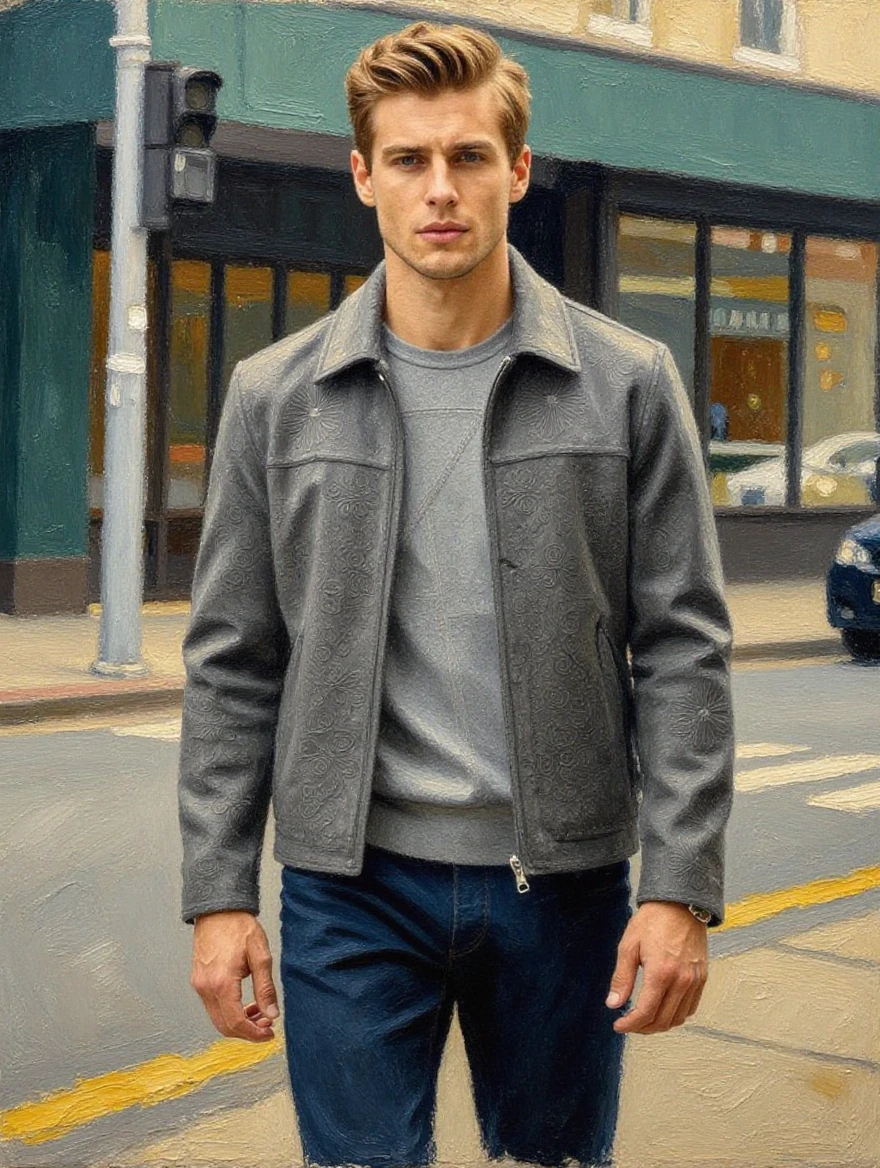
A young man with swept-back golden hair and angular jawline striding through a moody metropolitan street, wearing an intricately patterned gray suede jacket over a tonal gray top and dark trousers, painted in a contemporary hyperrealistic oil painting style with visible brushstrokes on the clothing texture and background architecture while maintaining photographic precision on the face and hair, the embossed floral pattern on the jacket rendered with thick impasto technique adding three-dimensional texture, background dissolving into impressionistic smears of urban gray and muted green suggesting storefronts and vehicles, warm undertone in the skin against the cool gray palette of the wardrobe, dramatic gallery-worthy portrait composition, inspired by the figurative realism of Jeremy Mann and Casey Baugh, museum-quality fine art
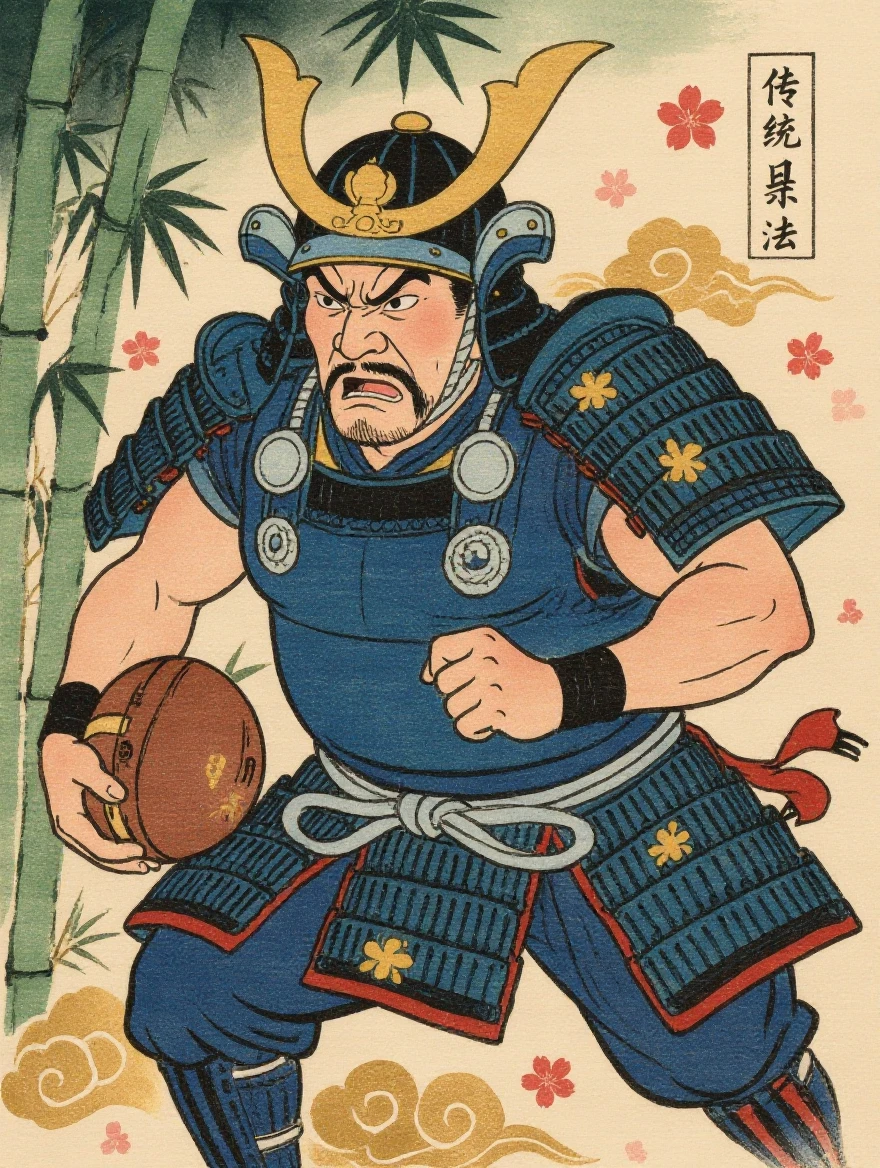
A powerful sumo-built samurai warrior running through a bamboo forest carrying a war drum under his right arm, rendered in authentic Edo-period ukiyo-e woodblock print style with bold black outlines and flat color fills, wearing an indigo blue yoroi armor with silver lacing and a kabuto helmet with golden crescent moon crest, his face showing fierce determination with an exaggerated kabuki theater expression, the background composed of stylized bamboo stalks in graduated green ink washes with decorative cloud patterns in gold leaf, cherry blossom petals scattered throughout the composition, traditional Japanese calligraphy text block in the upper right corner, washi paper texture visible throughout, Hokusai and Kuniyoshi inspired, authentic Edo period color palette of indigo prussian blue vermillion and saffron yellow, horizontal scroll composition
संबंधित मॉडल




README
Kling Image V3 Edit
Kling Image V3 Edit is Kuaishou's image editing model that transforms existing images based on text instructions. Upload a reference image and describe the changes you want — the model applies edits while preserving the original style, structure, and identity. Supports flexible aspect ratios, resolution options, and batch generation.
Why Choose This?
-
Text-guided editing Describe changes in natural language — no manual masking or layer editing required.
-
Style preservation Maintains the original image's composition, lighting, and aesthetic while applying your edits.
-
Flexible aspect ratios Multiple options including 1:1, 3:4, 4:3, 9:16, 16:9 and more to fit any use case.
-
Resolution control Choose output resolution (1k and above) based on your quality and speed requirements.
-
Batch generation Generate multiple variations in a single request for rapid iteration and comparison.
-
Prompt Enhancer Built-in tool to automatically improve your edit descriptions for better results.
Parameters
| Parameter | Required | Description |
|---|---|---|
| prompt | Yes | Text description of the desired edit |
| image | Yes | Reference image to edit (URL or upload) |
| aspect_ratio | No | Output aspect ratio (default: 3:4) |
| resolution | No | Output resolution (default: 1k) |
| num_images | No | Number of images to generate (default: 1) |
| output_format | No | Output format: png or jpeg (default: png) |
How to Use
- Upload your image — provide the reference image you want to edit.
- Write your prompt — describe the changes you want (e.g., "Change the jacket to red leather").
- Choose aspect ratio — select the output format that fits your use case.
- Set resolution — choose 1k for speed or higher for more detail.
- Set num_images — generate multiple variations if needed.
- Run — submit and download your edited images.
Pricing
| Images | Cost |
|---|---|
| 1 | $0.028 |
| 2 | $0.056 |
| 4 | $0.112 |
| 10 | $0.280 |
Billing Rules
- Rate: $0.028 per image
- Total cost = num_images × $0.028
Best Use Cases
- Fashion & E-commerce — Change clothing colors, styles, or patterns on product images.
- Creative Iteration — Explore variations of a concept without starting from scratch.
- Marketing & Ads — Adapt visuals for different campaigns while maintaining brand consistency.
- Portrait Editing — Adjust styling, backgrounds, or accessories in portrait photos.
- Content Repurposing — Transform existing images for new contexts or platforms.
Pro Tips
- Be specific about what should change and what should stay the same.
- Use the Prompt Enhancer to refine vague instructions into detailed edit commands.
- Generate multiple images (num_images > 1) to explore different interpretations of your edit.
- Higher quality source images yield better editing results.
- Use png format when you need lossless quality output.
Notes
- Both prompt and image are required fields.
- Ensure uploaded image URLs are publicly accessible.
- Higher resolution may slightly increase processing time.
Related Models
- Kling Image V3 Text-to-Image — Generate images from text prompts.
- Kling Image O3 Text-to-Image — Next-generation O3 architecture for text-to-image.
- Kling Video O3 Pro Image-to-Video — Animate edited images into video.
Kling Image v3 Edit API — Quick start
Grab a WaveSpeedAI API key, then call POST https://api.wavespeed.ai/api/v3/kwaivgi/kling-image-v3/edit with your input as JSON. The endpoint returns a prediction id. Start polling the result endpoint around every 2 seconds, increase the interval for long-running tasks, and stop on any terminal status. On completed, read output values from data.outputs. Examples for Kling Image v3 Edit below.
HTTP example
set -euo pipefail

: "${WAVESPEED_API_KEY:?Set WAVESPEED_API_KEY}"

REQUEST_BODY=$(cat <<'JSON'
{
    "prompt": "A cinematic shot of a city at sunset, soft golden light",
    "image": "https://interactive-examples.mdn.mozilla.net/media/cc0-images/painted-hand-298-332.jpg",
    "aspect_ratio": "16:9",
    "resolution": "1k",
    "num_images": 1,
    "output_format": "png",
    "shot_type": "customize"
}
JSON
)

# 1. Submit the prediction.
SUBMIT_RESPONSE=$(curl --silent --show-error --fail-with-body \
  -X POST "https://api.wavespeed.ai/api/v3/kwaivgi/kling-image-v3/edit" \
  -H "Content-Type: application/json" \
  -H "Authorization: Bearer $WAVESPEED_API_KEY" \
  -d "$REQUEST_BODY")

TASK=$(printf '%s' "$SUBMIT_RESPONSE" | jq 'if has("data") then .data else . end')
PREDICTION_ID=$(printf '%s' "$TASK" | jq -r '.id')
if [ -z "$PREDICTION_ID" ] || [ "$PREDICTION_ID" = "null" ]; then
  printf 'Submission response did not contain a prediction id
' >&2
  exit 1
fi
RESULT_URL=$(printf '%s' "$TASK" | jq -r '.urls.get // empty')
if [ -z "$RESULT_URL" ]; then
  RESULT_URL="https://api.wavespeed.ai/api/v3/predictions/$PREDICTION_ID/result"
fi

# 2. Poll until the prediction finishes.
while true; do
  RESPONSE=$(curl --silent --show-error --fail-with-body "$RESULT_URL" \
    -H "Authorization: Bearer $WAVESPEED_API_KEY")
  RESULT=$(printf '%s' "$RESPONSE" | jq 'if has("data") then .data else . end')
  STATUS=$(printf '%s' "$RESULT" | jq -r '.status')
  case "$STATUS" in
    completed) printf '%s\n' "$RESULT" | jq '.outputs'; break ;;
    failed|cancelled|timeout) printf '%s\n' "$RESULT" | jq . >&2; exit 1 ;;
    created|processing) sleep 2 ;;
    *) printf 'Unexpected status: %s
' "$STATUS" >&2; exit 1 ;;
  esac
done
Node.js example
const submitUrl = "https://api.wavespeed.ai/api/v3/kwaivgi/kling-image-v3/edit";
const apiKey = process.env.WAVESPEED_API_KEY;
if (!apiKey) throw new Error('Set WAVESPEED_API_KEY');

async function requestJson(url, options = {}) {
  const response = await fetch(url, options);
  if (!response.ok) throw new Error(await response.text());
  return response.json();
}

// 1. Submit the prediction.
const body = await requestJson(submitUrl, {
  method: "POST",
  headers: {
    "Authorization": `Bearer ${apiKey}`,
    "Content-Type": "application/json",
  },
  body: JSON.stringify({
        "prompt": "A cinematic shot of a city at sunset, soft golden light",
        "image": "https://interactive-examples.mdn.mozilla.net/media/cc0-images/painted-hand-298-332.jpg",
        "aspect_ratio": "16:9",
        "resolution": "1k",
        "num_images": 1,
        "output_format": "png",
        "shot_type": "customize"
}),
});
const task = body.data ?? body;
if (!task.id) throw new Error("Submission response did not contain a prediction id");
const resultUrl = task.urls?.get ||
  `https://api.wavespeed.ai/api/v3/predictions/${task.id}/result`;

// 2. Poll until the prediction finishes.
while (true) {
  const resultBody = await requestJson(resultUrl, {
    headers: { "Authorization": `Bearer ${apiKey}` },
  });
  const result = resultBody.data ?? resultBody;
  if (result.status === "completed") {
    console.log(result.outputs);
    break;
  }
  if (["failed", "cancelled", "timeout"].includes(result.status)) throw new Error(JSON.stringify(result));
  if (!["created", "processing"].includes(result.status)) throw new Error("Unexpected status: " + result.status);
  await new Promise(resolve => setTimeout(resolve, 2000));
}
Python example
import json
import os
import time
from urllib.request import Request, urlopen

api_key = os.environ["WAVESPEED_API_KEY"]
headers = {"Authorization": f"Bearer {api_key}", "Content-Type": "application/json"}
payload = {
    "prompt": "A cinematic shot of a city at sunset, soft golden light",
    "image": "https://interactive-examples.mdn.mozilla.net/media/cc0-images/painted-hand-298-332.jpg",
    "aspect_ratio": "16:9",
    "resolution": "1k",
    "num_images": 1,
    "output_format": "png",
    "shot_type": "customize"
}

def request_json(url, data=None):
    request = Request(url, data=data, headers=headers, method="POST" if data else "GET")
    with urlopen(request) as response:
        return json.load(response)

# 1. Submit the prediction.
body = request_json("https://api.wavespeed.ai/api/v3/kwaivgi/kling-image-v3/edit", json.dumps(payload).encode())
task = body.get("data", body)
if not task.get("id"):
    raise RuntimeError("Submission response did not contain a prediction id")
result_url = task.get("urls", {}).get("get") or f"https://api.wavespeed.ai/api/v3/predictions/{task['id']}/result"

# 2. Poll until the prediction finishes.
while True:
    result_body = request_json(result_url)
    result = result_body.get("data", result_body)
    status = result.get("status")
    if status == "completed":
        print(result.get("outputs", []))
        break
    if status in {"failed", "cancelled", "timeout"}:
        raise RuntimeError(result)
    if status not in {"created", "processing"}:
        raise RuntimeError(f"Unexpected status: {status}")
    time.sleep(2)
Kling Image v3 Edit API — Frequently asked questions
What is the Kling Image v3 Edit API?
Kling Image v3 Edit is a Kuaishou model for image editing, exposed as a REST API on WaveSpeedAI. Kling V3 Edit is an AI model for editing and transforming images via text prompts, enabling precise modifications with natural-language instructions. Ready-to-use REST inference API, best performance, no coldstarts, affordable pricing. You can call it programmatically or try it from the playground above.
How do I call the Kling Image v3 Edit API?
POST your input parameters to the model's REST endpoint (shown in the API tab of this playground) with your WaveSpeedAI API key in the Authorization header. Submission returns a prediction ID. Poll the result endpoint starting around every 2 seconds, increase the interval for long-running tasks, and stop on any terminal status. The playground generates production-oriented Python, JavaScript, and cURL examples with timeouts, transient-error handling, and safe GET retries. Full request/response shape is documented at https://wavespeed.ai/docs/docs-api/kwaivgi/kwaivgi-kling-image-v3-edit.
How much does Kling Image v3 Edit cost per run?
Kling Image v3 Edit starts at $0.028 per run. That figure is the base price — the final charge scales with the parameters you set in the form (output size, length, count, references, or whatever knobs this model exposes), so a higher-quality or larger output costs more than a minimal one. The exact cost for your current input is shown live next to the Generate button before you submit, and the actual per-call charge is recorded on the prediction afterwards.
What inputs does Kling Image v3 Edit accept?
Key inputs: `prompt`, `image`, `aspect_ratio`, `resolution`, `num_images`, `output_format`. The full JSON schema (types, defaults, allowed values) is rendered above the Generate button and mirrored in the API reference at https://wavespeed.ai/docs/docs-api/kwaivgi/kwaivgi-kling-image-v3-edit.
How long does Kling Image v3 Edit take to generate?
Median end-to-end generation time on WaveSpeedAI is around 37 seconds per request, based on recent successful runs. Queue time varies with global demand; live status is visible in the prediction record.
Can I use Kling Image v3 Edit outputs commercially?
Commercial usage rights depend on the model's license, set by its provider (Kuaishou). The license summary appears on the model card above; see WaveSpeedAI's Terms of Service for platform-level conditions.