Nano-Banana is an advanced image generation and editing model that produces photorealistic or stylized visuals and performs precise inpainting, outpainting, and background replacement. Ready-to-use REST inference API, best performance, no coldstarts, affordable pricing.
Inactivo

$0.038por ejecución·~26 / $1
EjemplosVer todo
Change the background to the moon, and the boy is holding a round ball in his hand.

Create a professional e-commerce fashion photo. Select the blue floral dress from the first image and have the woman in the second image wear it. Generate a realistic full-body photo of the woman wearing the dress, with a yellow-tinted background scattered with bananas, and adjust the lighting and shadows to match the background.

A natural spa-inspired skincare ad featuring Skin Formula Vitamin C Serum bottle placed on smooth stacked stones, soft mist in the background, sunlight streaming through tropical leaves, peaceful wellness aesthetic.
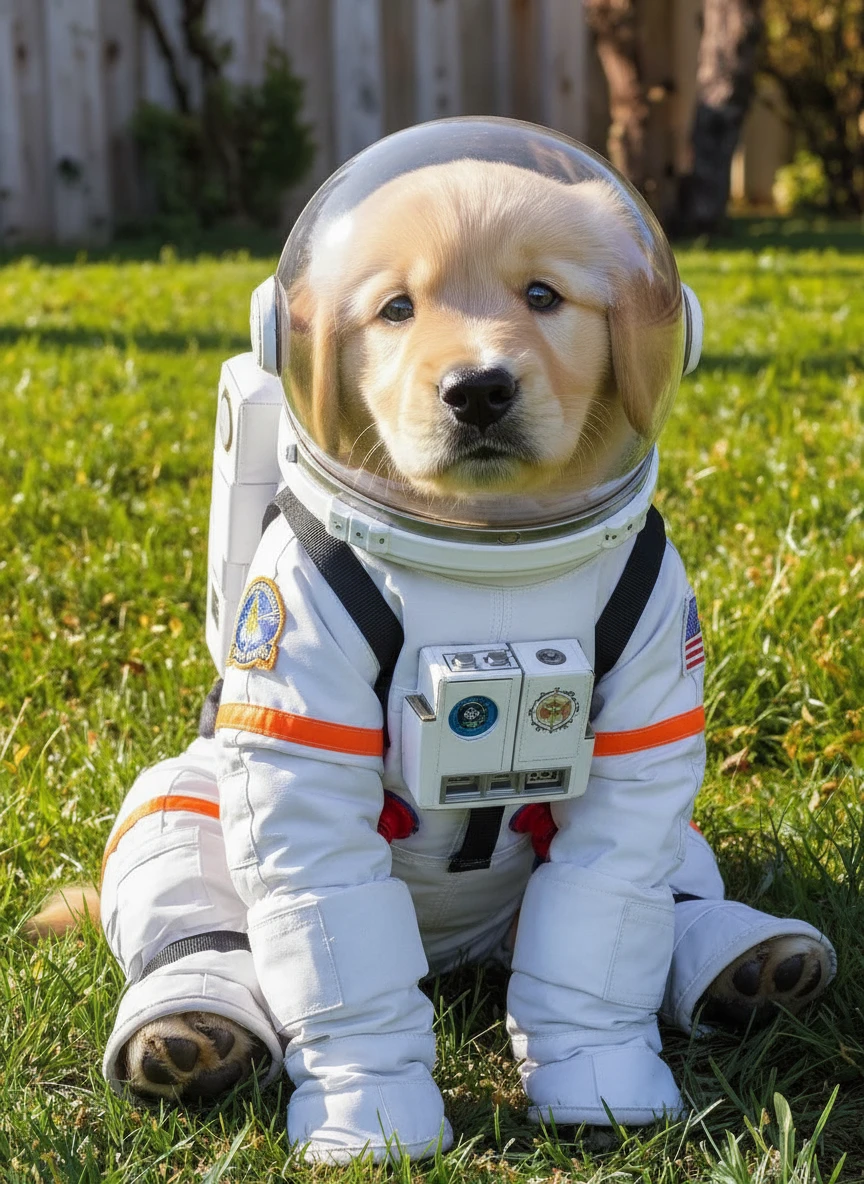
Dress the puppy in an astronaut's suit
Modelos relacionados






README
Google Nano-Banana Edit
Nano-Banana Edit is Google’s advanced AI-powered image editing and generation model, designed to make visual transformation as intuitive as describing it in words. Built on Google’s cutting-edge computer vision and generative research, it combines precision, flexibility, and semantic awareness for professional-grade editing.
Try the New Version of Nano Banana!
- Nano Banana Pro
- Nano Banana Pro edit
- Nano Banana Pro Ultra
- Nano Banana Pro Edit Ultra
- Nano Banana Pro Multi
🌟 Why it stands out
- Natural Language Editing Modify images using simple text instructions — no masking, layering, or manual tools required.
- Context-Aware Understanding Accurately interprets scene structure, spatial relationships, and object semantics for realistic results.
- Style and Tone Preservation Keeps lighting, shadows, and texture consistent with the original image while applying changes seamlessly.
- High Precision Control Excels at fine-grained edits such as color adjustments, object replacement, or composition shifts with minimal distortion.
- Creative Versatility Suitable for concept art, photography, advertising design, and everyday content creation.
⚙️ How to use
-
Input: existing image + text prompt
-
Output: edited image (JPEG/PNG/WEBP)
-
Size: 1:1, 4:3, 16:9, 21:9, and so on.
-
Supports style transfer, relighting, background replacement, and object modification
-
Works with natural prompts like:
-
“Replace the cloudy sky with a clear sunset.”
-
“Add soft studio lighting and a modern background.”
-
“Turn the model’s outfit into a formal business suit.”
💰 Pricing
-
$0.038 per image
-
Commercial use allowed
💡 Best Use Cases
- Marketing & Branding — Update campaign visuals without reshooting.
- Product Photography — Adjust materials, lighting, or layout instantly.
- Social Media & Content Creation — Generate multiple variations with minimal effort.
- Artistic Design — Experiment with colors, styles, and compositions effortlessly.
📝 Notes
Please ensure your prompts comply with Google’s Safety Guidelines. If an error occurs, review your prompt for restricted content, adjust it, and try again.
Nano Banana Edit API — Quick start
Grab a WaveSpeedAI API key, then call POST https://api.wavespeed.ai/api/v3/google/nano-banana/edit with your input as JSON. The endpoint returns a prediction id. Start polling the result endpoint around every 2 seconds, increase the interval for long-running tasks, and stop on any terminal status. On completed, read output values from data.outputs. Examples for Nano Banana Edit below.
HTTP example
set -euo pipefail

: "${WAVESPEED_API_KEY:?Set WAVESPEED_API_KEY}"

REQUEST_BODY=$(cat <<'JSON'
{
    "prompt": "A cinematic shot of a city at sunset, soft golden light",
    "images": [
        "https://interactive-examples.mdn.mozilla.net/media/cc0-images/painted-hand-298-332.jpg"
    ],
    "aspect_ratio": "1:1",
    "output_format": "png"
}
JSON
)

# 1. Submit the prediction.
SUBMIT_RESPONSE=$(curl --silent --show-error --fail-with-body \
  -X POST "https://api.wavespeed.ai/api/v3/google/nano-banana/edit" \
  -H "Content-Type: application/json" \
  -H "Authorization: Bearer $WAVESPEED_API_KEY" \
  -d "$REQUEST_BODY")

TASK=$(printf '%s' "$SUBMIT_RESPONSE" | jq 'if has("data") then .data else . end')
PREDICTION_ID=$(printf '%s' "$TASK" | jq -r '.id')
if [ -z "$PREDICTION_ID" ] || [ "$PREDICTION_ID" = "null" ]; then
  printf 'Submission response did not contain a prediction id
' >&2
  exit 1
fi
RESULT_URL=$(printf '%s' "$TASK" | jq -r '.urls.get // empty')
if [ -z "$RESULT_URL" ]; then
  RESULT_URL="https://api.wavespeed.ai/api/v3/predictions/$PREDICTION_ID/result"
fi

# 2. Poll until the prediction finishes.
while true; do
  RESPONSE=$(curl --silent --show-error --fail-with-body "$RESULT_URL" \
    -H "Authorization: Bearer $WAVESPEED_API_KEY")
  RESULT=$(printf '%s' "$RESPONSE" | jq 'if has("data") then .data else . end')
  STATUS=$(printf '%s' "$RESULT" | jq -r '.status')
  case "$STATUS" in
    completed) printf '%s\n' "$RESULT" | jq '.outputs'; break ;;
    failed|cancelled|timeout) printf '%s\n' "$RESULT" | jq . >&2; exit 1 ;;
    created|processing) sleep 2 ;;
    *) printf 'Unexpected status: %s
' "$STATUS" >&2; exit 1 ;;
  esac
done
Node.js example
const submitUrl = "https://api.wavespeed.ai/api/v3/google/nano-banana/edit";
const apiKey = process.env.WAVESPEED_API_KEY;
if (!apiKey) throw new Error('Set WAVESPEED_API_KEY');

async function requestJson(url, options = {}) {
  const response = await fetch(url, options);
  if (!response.ok) throw new Error(await response.text());
  return response.json();
}

// 1. Submit the prediction.
const body = await requestJson(submitUrl, {
  method: "POST",
  headers: {
    "Authorization": `Bearer ${apiKey}`,
    "Content-Type": "application/json",
  },
  body: JSON.stringify({
        "prompt": "A cinematic shot of a city at sunset, soft golden light",
        "images": [
                "https://interactive-examples.mdn.mozilla.net/media/cc0-images/painted-hand-298-332.jpg"
        ],
        "aspect_ratio": "1:1",
        "output_format": "png"
}),
});
const task = body.data ?? body;
if (!task.id) throw new Error("Submission response did not contain a prediction id");
const resultUrl = task.urls?.get ||
  `https://api.wavespeed.ai/api/v3/predictions/${task.id}/result`;

// 2. Poll until the prediction finishes.
while (true) {
  const resultBody = await requestJson(resultUrl, {
    headers: { "Authorization": `Bearer ${apiKey}` },
  });
  const result = resultBody.data ?? resultBody;
  if (result.status === "completed") {
    console.log(result.outputs);
    break;
  }
  if (["failed", "cancelled", "timeout"].includes(result.status)) throw new Error(JSON.stringify(result));
  if (!["created", "processing"].includes(result.status)) throw new Error("Unexpected status: " + result.status);
  await new Promise(resolve => setTimeout(resolve, 2000));
}
Python example
import json
import os
import time
from urllib.request import Request, urlopen

api_key = os.environ["WAVESPEED_API_KEY"]
headers = {"Authorization": f"Bearer {api_key}", "Content-Type": "application/json"}
payload = {
    "prompt": "A cinematic shot of a city at sunset, soft golden light",
    "images": [
        "https://interactive-examples.mdn.mozilla.net/media/cc0-images/painted-hand-298-332.jpg"
    ],
    "aspect_ratio": "1:1",
    "output_format": "png"
}

def request_json(url, data=None):
    request = Request(url, data=data, headers=headers, method="POST" if data else "GET")
    with urlopen(request) as response:
        return json.load(response)

# 1. Submit the prediction.
body = request_json("https://api.wavespeed.ai/api/v3/google/nano-banana/edit", json.dumps(payload).encode())
task = body.get("data", body)
if not task.get("id"):
    raise RuntimeError("Submission response did not contain a prediction id")
result_url = task.get("urls", {}).get("get") or f"https://api.wavespeed.ai/api/v3/predictions/{task['id']}/result"

# 2. Poll until the prediction finishes.
while True:
    result_body = request_json(result_url)
    result = result_body.get("data", result_body)
    status = result.get("status")
    if status == "completed":
        print(result.get("outputs", []))
        break
    if status in {"failed", "cancelled", "timeout"}:
        raise RuntimeError(result)
    if status not in {"created", "processing"}:
        raise RuntimeError(f"Unexpected status: {status}")
    time.sleep(2)
Nano Banana Edit API — Frequently asked questions
What is the Nano Banana Edit API?
Nano Banana Edit is a Google model for image editing, exposed as a REST API on WaveSpeedAI. Nano-Banana is an advanced image generation and editing model that produces photorealistic or stylized visuals and performs precise inpainting, outpainting, and background replacement. Ready-to-use REST inference API, best performance, no coldstarts, affordable pricing. You can call it programmatically or try it from the playground above.
How do I call the Nano Banana Edit API?
POST your input parameters to the model's REST endpoint (shown in the API tab of this playground) with your WaveSpeedAI API key in the Authorization header. Submission returns a prediction ID. Poll the result endpoint starting around every 2 seconds, increase the interval for long-running tasks, and stop on any terminal status. The playground generates production-oriented Python, JavaScript, and cURL examples with timeouts, transient-error handling, and safe GET retries. Full request/response shape is documented at https://wavespeed.ai/docs/docs-api/google/google-nano-banana-edit.
How much does Nano Banana Edit cost per run?
Nano Banana Edit starts at $0.038 per run. That figure is the base price — the final charge scales with the parameters you set in the form (output size, length, count, references, or whatever knobs this model exposes), so a higher-quality or larger output costs more than a minimal one. The exact cost for your current input is shown live next to the Generate button before you submit, and the actual per-call charge is recorded on the prediction afterwards.
What inputs does Nano Banana Edit accept?
Key inputs: `prompt`, `images`, `aspect_ratio`, `enable_base64_output`, `enable_sync_mode`, `output_format`. The full JSON schema (types, defaults, allowed values) is rendered above the Generate button and mirrored in the API reference at https://wavespeed.ai/docs/docs-api/google/google-nano-banana-edit.
How long does Nano Banana Edit take to generate?
Median end-to-end generation time on WaveSpeedAI is around 22 seconds per request, based on recent successful runs. Queue time varies with global demand; live status is visible in the prediction record.
Can I use Nano Banana Edit outputs commercially?
Commercial usage rights depend on the model's license, set by its provider (Google). The license summary appears on the model card above; see WaveSpeedAI's Terms of Service for platform-level conditions.