
Opus 4.8 Token Usage: How 1M & Fast Affect Cost
Estimate Opus 4.8 token costs: input/output tokens, prompt caching, long sessions, the new tokenizer, and Fast mode impact.

The rate card for Claude Opus 4.8 looks identical to 4.7. The bill probably won’t.
I pulled our last two weeks of Opus 4.8 usage and compared it line by line against the 4.7 baseline. Same workloads. Same average prompt length, measured in characters. The dollar number moved anyway. If you’ve migrated and noticed the same drift, this piece is about why — and what to actually look at when estimating Opus 4.8 token usage for a real workload, instead of treating the price page as the whole story.
This isn’t a model review. It’s a billing note. Four things drive the number on your invoice: how many tokens your text becomes, whether you cache the repeatable parts, whether long sessions are using context as a budget or as headroom, and whether you flipped Fast Mode on. I’ll go through each.
What Drives Your Opus 4.8 Bill

Input vs output tokens
Standard pricing is $5 per million input tokens and $25 per million output tokens. Per Anthropic’s launch post for Opus 4.8, the rate is unchanged from 4.7. The 1:5 ratio is the part most people underweight. Output is the expensive side, and thinking tokens count as output. A response that displays as 200 words can bill for several thousand tokens if the model reasoned at length first.
This is where effort controls matter for the budget, not just the result. Default high lands close to 4.7’s token count. extra and max will spend more tokens on harder problems. low cuts both ways. If you flipped to max globally because it sounded safer, that’s not a price change — that’s a token-count change, and it shows up on the bill the same way.
The new tokenizer (~35% more tokens)
This is the one that surprises teams skipping straight from 4.6 to 4.8. Per the note on Anthropic’s pricing page, Opus 4.7 and later use a new tokenizer. For the same input text, it can produce up to ~35% more tokens than 4.6’s tokenizer.
Per-token rates didn’t move. Token counts did.
If you migrated 4.6 → 4.7 already, you’ve absorbed this. If you’re going 4.6 → 4.8 in one jump, expect the effective cost per request to land somewhere between the old number and ~1.35× the old number, depending on your text. 4.7 → 4.8 is config-only on the tokenizer — no second penalty there.
The practical move: don’t estimate Opus 4.8 token usage from a 4.6 token count. Re-measure with the actual model, or you’re budgeting against the wrong denominator.
Prompt Caching
Cache hit vs write costs
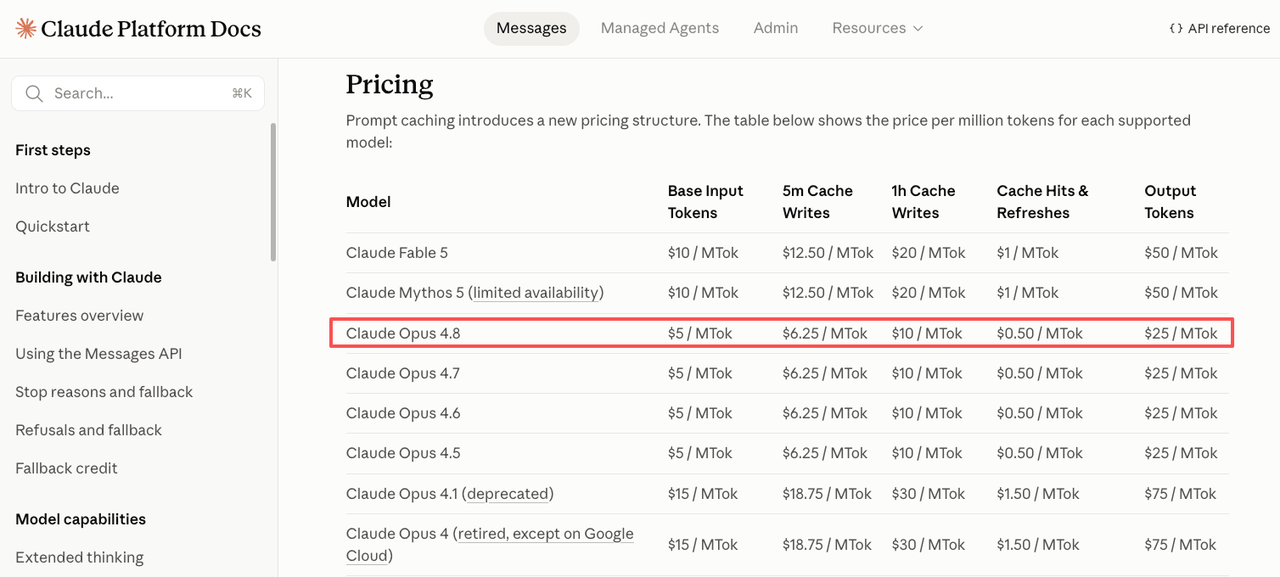
This is the lever with the most room. Anthropic’s prompt caching docs describe the mechanism, but the numbers are what matter for a Claude API pricing estimate:
- Cache reads: ~10% of the base input rate (~90% off).
- Cache writes: 1.25× base input for 5-minute TTL, 2× for 1-hour TTL.
Translated to Opus 4.8 at $5/MTok input:
| Token type | Effective rate |
|---|---|
| Standard input | $5.00 / MTok |
| 5-min cache write | $6.25 / MTok |
| 1-hour cache write | $10.00 / MTok |
| Cache read | $0.50 / MTok |
The break-even is fast. A 5-minute cache pays for its write surcharge after roughly one read. A 1-hour cache pays off after two. If your prefix is reused more than that within the TTL, caching wins on the math.
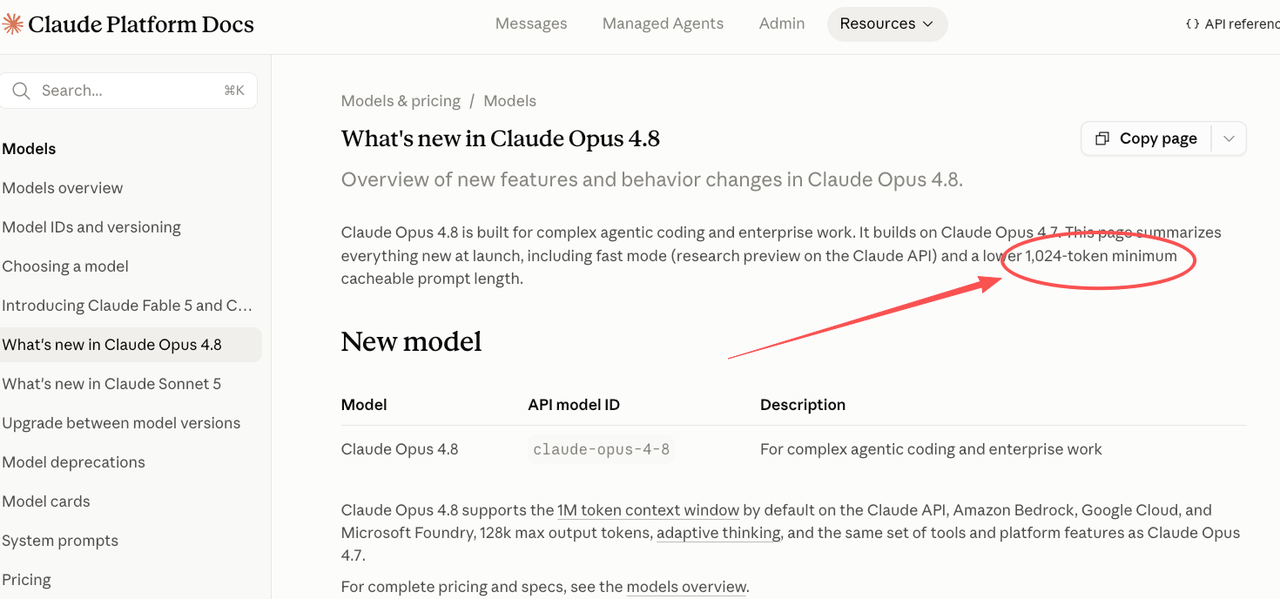
One small thing worth knowing: per the official 4.8 release notes, the minimum cacheable prompt on Opus 4.8 is 1,024 tokens, down from 4.7’s threshold. Prompts that were too short to cache before may now qualify with no code changes.
Stable prefixes for agent loops
The caching mechanism only helps if your prefix is actually stable. The order matters — tools → system → messages — and any change near the front invalidates everything downstream. I’ve seen teams cache nothing on long agent loops because they were injecting a timestamp into the system prompt. One variable byte at position 12 kills the rest of the prefix.
If you want this to pay off: put everything stable at the front (tool definitions, instructions, few-shot examples), put everything that changes at the back, and set the cache breakpoint at the boundary. That’s the whole pattern. The savings show up immediately if the prefix actually repeats. If your agent loop runs once a day, the 5-minute TTL expires between turns and you pay the write cost every time. In that case, caching is the wrong tool, not the wrong configuration.
Long Sessions & 1M Context
Headroom is not a budget
Opus 4.8 supports the full 1M context window at flat rates — a 900K-token request bills at the same per-token rate as a 9K one, no long-context surcharge. That’s a real upgrade. It’s also the place where I’ve watched bills drift the most quietly.
The 1M context window is headroom. Not a budget. Every token you stuff in there is billed as input, and at $5/MTok that adds up if you treat “more context = better” as a default.
A 500K-token prompt run a hundred times in a session is 50M input tokens. At standard rates that’s $250 before you count output, before you count thinking. The model didn’t ask you to send all that. You did.
Retrieval vs full-window stuffing
The decision worth making is whether you actually need the whole document in context, or whether you need a retrieval step that surfaces the relevant 20K. Long-context performance on Opus 4.8 is strong, so it’ll often work either way. The cost difference is roughly 25×.
My rule for myself: if the question is “what does this codebase do,” I’ll load broadly and use caching on the prefix. If the question is “what does this one function do,” I’ll retrieve. The 1M window makes the first option viable. It doesn’t make it the default.
Fast Mode’s Cost Effect
When 2× rate is justified
Opus 4.8 Fast Mode runs at roughly 2.5× the standard speed. The Opus 4.8 fast mode price is $10/$50 per MTok — input and output both at 2× the standard rate. That’s 3× cheaper than the same option on 4.7, but it’s still a premium.
So when is the opus 4.8 1m fast configuration justified? When latency is the constraint. Interactive coding assistants where the user is waiting. Real-time agent steps where a slow turn breaks the UX. Production traffic where p95 latency is a hard SLO.
When isn’t it justified? Asynchronous workloads. Batch jobs. Anything where a 2.5× speedup doesn’t change a user-facing number. You’d be paying double for an outcome that doesn’t show up downstream.
Fast Mode doesn’t change how tokens are counted. Same tokenizer, same counts. It only changes the per-token rate.
Estimating a Real Workload
A working estimate needs five inputs: number of requests, average input tokens per request, average output tokens per request, cache hit rate, and Fast Mode share. Multiply through:
monthly_cost ≈
  N * (
    (input_tokens  * (1 - cache_hit_rate) * $5    +
     input_tokens  * cache_hit_rate       * $0.50 +
     output_tokens                        * $25) / 1_000_000
  )
For Fast Mode traffic, double the per-MTok rates in the formula. For batch-eligible work, halve them. Standard discounts from the Opus product page — up to 90% on cached input, 50% on batch — stack against the rate card the way you’d expect.
Two things this formula won’t catch, and you should sanity-check by hand: thinking tokens (billed as output, can be the dominant cost on extra/max effort), and long-tail high-input requests that pull the average up. A real production trace usually has both. I run the formula on the median request and then add a 15–25% headroom for the long tail. Your own data will tell you the right number after one billing cycle.
One thing I’d flag: rates on this page are accurate as of publication. Anthropic has held the Opus rate card stable across recent generations, but always check the pricing page before signing off on a quarterly forecast.
FAQ
Why did my Opus 4.8 bill go up even though the rates didn’t change?
Most often it’s the tokenizer. Opus 4.7 and 4.8 share a tokenizer that produces up to ~35% more tokens than 4.6’s for the same text. The other usual suspects: effort level pushed to extra or max, thinking tokens accumulating on output, or a cache that’s no longer being hit because something in the prefix changed.
How much can prompt caching actually save me on long agent sessions?
On a multi-turn agent loop with a stable 10K-token prefix, expect roughly 5–10× reduction on input cost for the cached portion once the cache is warm. The exact number depends on hit rate, which depends on how stable your prefix actually is. Measure cache_read_input_tokens versus input_tokens to get the real ratio. Don’t trust a projection — measure.
Does using the full 1M context window add extra charges on Opus 4.8?
No. Opus 4.8 bills the 1M window at the same per-token input rate as a short prompt. The cost comes from the token count, not from a long-context surcharge. A 900K-token request is just 900K tokens at $5/MTok.
How do I properly estimate token usage for real production workloads with Opus 4.8?
Sample your actual traffic for a few days. Pull median input tokens, median output tokens, the share of requests that hit cache, and the share running Fast Mode. Plug those into the formula above. Don’t estimate from 4.6 numbers — the tokenizer change makes them low.
Does Fast Mode change how tokens are counted or just the price per token?
Just the price. Token counts are identical between standard and Fast Mode. You’re paying 2× per token for ~2.5× speed.
Conclusion
The Opus 4.8 rate card is the same as 4.7’s. The bill rarely is, because the bill is a function of tokens × rate × caching × mode — and three of those four can move without anyone touching the pricing page.
The work isn’t memorizing the dollar numbers. It’s knowing which lever you’re pulling when you change a config. Effort, cache, context size, mode. Each one has a measurable effect on Opus 4.8 token usage, and each one is something you control.
That’s where my data ends. Run the formula on your own traffic before the next billing cycle. The number it returns is the only one that matters.
Previous posts: