Sourceful Riverflow 2.0 Pro is an agentic image model optimized for robust, high-precision text-to-image generations. Ready-to-use REST inference API, best performance, no cold starts, affordable pricing.
Chờ

$0.135cho mỗi lần chạy·~74 / $10
Ví dụXem tất cả
A street portrait of a teenage skateboarder. Sitting on graffiti-covered steps holding his board, clothes slightly dirty, rebellious expression. Urban concrete buildings in the background. Late afternoon sunlight, raw photo style, authentic, gritty.

A candid street photograph of rainy Tokyo night in Shinjuku, wet asphalt reflecting neon signs. A pedestrian holding a clear umbrella walks by, cinematic bokeh in background, film grain, Kodachrome film stock, natural light, highly detailed, 8k.
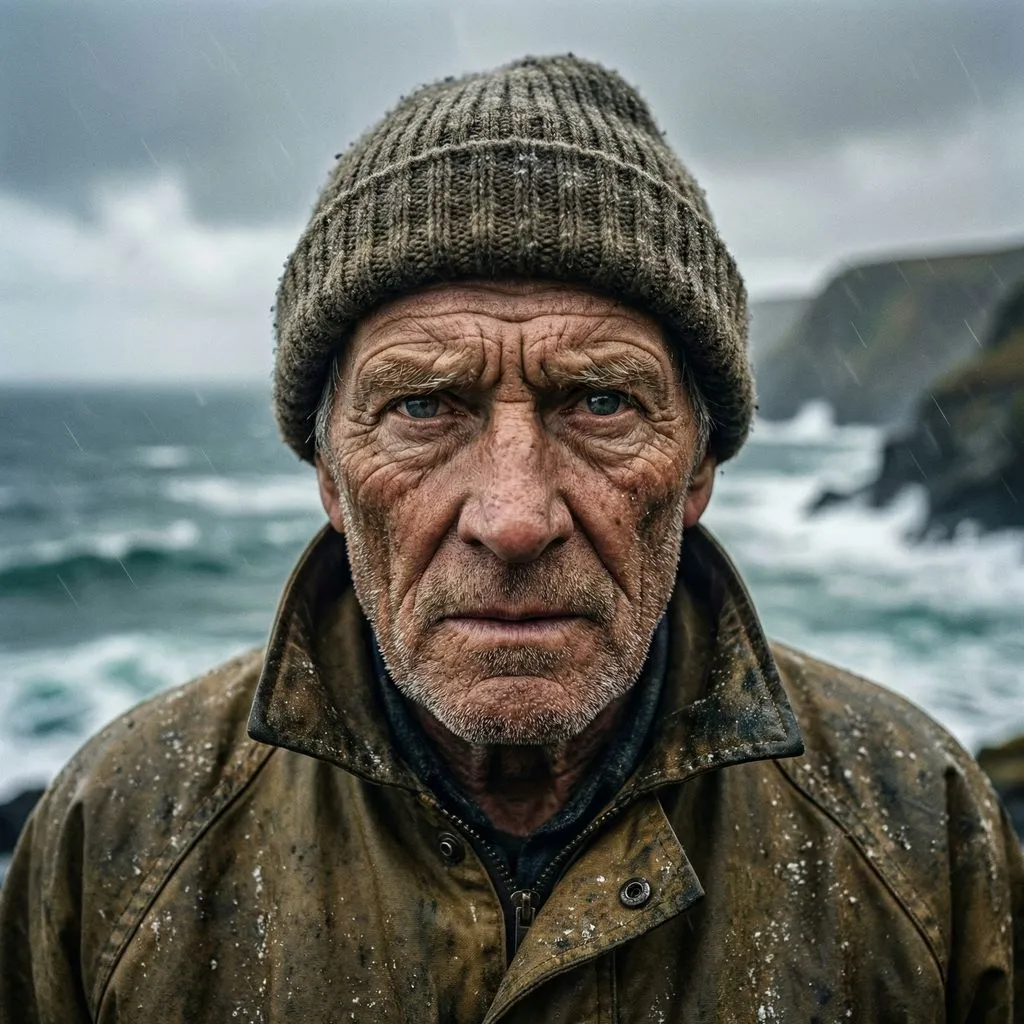
A detailed close-up portrait of an old fisherman with weathered, wrinkled skin and determined eyes. Wearing a worn wool beanie and oilskin jacket. Stormy sea and overcast sky in the background. Natural light, National Geographic photography style, raw texture, sharp focus.

Studio Ghibli inspired anime illustration. Green rolling hills with tall grass blowing in the gentle breeze. A small house with a red roof, massive cumulonimbus clouds in a blue sky. Watercolor texture, hand-drawn feel, soothing pastel colors, peaceful atmosphere.
Mô hình liên quan



README
Riverflow 2.0 Pro Text-to-Image
Riverflow 2.0 Pro is a premium text-to-image generation model that creates photorealistic and highly detailed images from text descriptions. With resolution options up to 4K, extensive aspect ratio support, and optional transparent background, it delivers professional-grade visuals for demanding creative workflows.
Why Choose This?
-
Ultra-high resolution Generate images at 1K, 2K, or 4K for stunning clarity and detail.
-
Extensive aspect ratios 10 preset options including ultra-wide 21:9, standard 16:9, square 1:1, and portrait 9:16.
-
Transparent background Optional transparency support for compositing and design workflows.
-
Photorealistic quality Excels at natural textures, lighting, and National Geographic-level photography.
-
Prompt Enhancer Built-in tool to automatically improve your image descriptions.
Parameters
| Parameter | Required | Description |
|---|---|---|
| prompt | Yes | Text description of the image you want to generate |
| resolution | No | Output resolution: 1K (default), 2K, 4K |
| aspect_ratio | No | Output ratio: 1:1, 21:9, 16:9, 3:2, 4:3, 5:4, 4:5, 3:4, 2:3, 9:16 |
| transparency | No | Enable transparent background (default: disabled) |
How to Use
- Write your prompt — describe the image in detail, including style, lighting, and composition.
- Select resolution — 1K for fast generation, 2K for balanced quality, 4K for maximum detail.
- Choose aspect ratio — select based on your target use case.
- Enable transparency (optional) — check if you need a transparent background.
- Run — submit and download your image.
Pricing
| Resolution | Cost per image |
|---|---|
| 1K | $0.135 |
| 2K | $0.135 |
| 4K | $0.297 |
Best Use Cases
- Professional Photography — Generate photorealistic portraits and landscapes.
- Marketing & Advertising — Create high-resolution visuals for campaigns and print.
- Editorial & Magazine — Produce National Geographic-style imagery.
- Product Visualization — Generate detailed product and lifestyle images.
- Design & Compositing — Use transparency for layered design workflows.
Pro Tips
- Use the Prompt Enhancer to refine your descriptions automatically.
- Include specific photography terms (natural light, sharp focus, raw texture) for more realistic results.
- 1K and 2K share the same price — choose 2K for better quality at no extra cost.
- Enable transparency when creating assets for compositing or layered designs.
- Use ultra-wide 21:9 for cinematic banners, 9:16 for mobile-first content.
- Describe lighting conditions and camera style for more precise outputs.
Notes
- Only prompt is required; other parameters have defaults.
- Transparent background works best when the generated content has a clear subject.
- 4K images take longer to generate but provide maximum detail.
- For best results, write detailed prompts with style, mood, and technical attributes.
Riverflow 2.0 Pro Text To Image API — Quick start
Grab a WaveSpeedAI API key, then call POST https://api.wavespeed.ai/api/v3/sourceful/riverflow-2.0-pro/text-to-image with your input as JSON. The endpoint returns a prediction id. Start polling the result endpoint around every 2 seconds, increase the interval for long-running tasks, and stop on any terminal status. On completed, read output values from data.outputs. Examples for Riverflow 2.0 Pro Text To Image below.
HTTP example
set -euo pipefail

: "${WAVESPEED_API_KEY:?Set WAVESPEED_API_KEY}"

REQUEST_BODY=$(cat <<'JSON'
{
    "prompt": "A cinematic shot of a city at sunset, soft golden light",
    "resolution": "1k",
    "aspect_ratio": "1:1",
    "transparency": false
}
JSON
)

# 1. Submit the prediction.
SUBMIT_RESPONSE=$(curl --silent --show-error --fail-with-body \
  -X POST "https://api.wavespeed.ai/api/v3/sourceful/riverflow-2.0-pro/text-to-image" \
  -H "Content-Type: application/json" \
  -H "Authorization: Bearer $WAVESPEED_API_KEY" \
  -d "$REQUEST_BODY")

TASK=$(printf '%s' "$SUBMIT_RESPONSE" | jq 'if has("data") then .data else . end')
PREDICTION_ID=$(printf '%s' "$TASK" | jq -r '.id')
if [ -z "$PREDICTION_ID" ] || [ "$PREDICTION_ID" = "null" ]; then
  printf 'Submission response did not contain a prediction id
' >&2
  exit 1
fi
RESULT_URL=$(printf '%s' "$TASK" | jq -r '.urls.get // empty')
if [ -z "$RESULT_URL" ]; then
  RESULT_URL="https://api.wavespeed.ai/api/v3/predictions/$PREDICTION_ID/result"
fi

# 2. Poll until the prediction finishes.
while true; do
  RESPONSE=$(curl --silent --show-error --fail-with-body "$RESULT_URL" \
    -H "Authorization: Bearer $WAVESPEED_API_KEY")
  RESULT=$(printf '%s' "$RESPONSE" | jq 'if has("data") then .data else . end')
  STATUS=$(printf '%s' "$RESULT" | jq -r '.status')
  case "$STATUS" in
    completed) printf '%s\n' "$RESULT" | jq '.outputs'; break ;;
    failed|cancelled|timeout) printf '%s\n' "$RESULT" | jq . >&2; exit 1 ;;
    created|processing) sleep 2 ;;
    *) printf 'Unexpected status: %s
' "$STATUS" >&2; exit 1 ;;
  esac
done
Node.js example
const submitUrl = "https://api.wavespeed.ai/api/v3/sourceful/riverflow-2.0-pro/text-to-image";
const apiKey = process.env.WAVESPEED_API_KEY;
if (!apiKey) throw new Error('Set WAVESPEED_API_KEY');

async function requestJson(url, options = {}) {
  const response = await fetch(url, options);
  if (!response.ok) throw new Error(await response.text());
  return response.json();
}

// 1. Submit the prediction.
const body = await requestJson(submitUrl, {
  method: "POST",
  headers: {
    "Authorization": `Bearer ${apiKey}`,
    "Content-Type": "application/json",
  },
  body: JSON.stringify({
        "prompt": "A cinematic shot of a city at sunset, soft golden light",
        "resolution": "1k",
        "aspect_ratio": "1:1",
        "transparency": false
}),
});
const task = body.data ?? body;
if (!task.id) throw new Error("Submission response did not contain a prediction id");
const resultUrl = task.urls?.get ||
  `https://api.wavespeed.ai/api/v3/predictions/${task.id}/result`;

// 2. Poll until the prediction finishes.
while (true) {
  const resultBody = await requestJson(resultUrl, {
    headers: { "Authorization": `Bearer ${apiKey}` },
  });
  const result = resultBody.data ?? resultBody;
  if (result.status === "completed") {
    console.log(result.outputs);
    break;
  }
  if (["failed", "cancelled", "timeout"].includes(result.status)) throw new Error(JSON.stringify(result));
  if (!["created", "processing"].includes(result.status)) throw new Error("Unexpected status: " + result.status);
  await new Promise(resolve => setTimeout(resolve, 2000));
}
Python example
import json
import os
import time
from urllib.request import Request, urlopen

api_key = os.environ["WAVESPEED_API_KEY"]
headers = {"Authorization": f"Bearer {api_key}", "Content-Type": "application/json"}
payload = {
    "prompt": "A cinematic shot of a city at sunset, soft golden light",
    "resolution": "1k",
    "aspect_ratio": "1:1",
    "transparency": False
}

def request_json(url, data=None):
    request = Request(url, data=data, headers=headers, method="POST" if data else "GET")
    with urlopen(request) as response:
        return json.load(response)

# 1. Submit the prediction.
body = request_json("https://api.wavespeed.ai/api/v3/sourceful/riverflow-2.0-pro/text-to-image", json.dumps(payload).encode())
task = body.get("data", body)
if not task.get("id"):
    raise RuntimeError("Submission response did not contain a prediction id")
result_url = task.get("urls", {}).get("get") or f"https://api.wavespeed.ai/api/v3/predictions/{task['id']}/result"

# 2. Poll until the prediction finishes.
while True:
    result_body = request_json(result_url)
    result = result_body.get("data", result_body)
    status = result.get("status")
    if status == "completed":
        print(result.get("outputs", []))
        break
    if status in {"failed", "cancelled", "timeout"}:
        raise RuntimeError(result)
    if status not in {"created", "processing"}:
        raise RuntimeError(f"Unexpected status: {status}")
    time.sleep(2)
Riverflow 2.0 Pro Text To Image API — Frequently asked questions
What is the Riverflow 2.0 Pro Text To Image API?
Riverflow 2.0 Pro Text To Image is a Sourceful model for image generation, exposed as a REST API on WaveSpeedAI. Sourceful Riverflow 2.0 Pro is an agentic image model optimized for robust, high-precision text-to-image generations. Ready-to-use REST inference API, best performance, no cold starts, affordable pricing. You can call it programmatically or try it from the playground above.
How do I call the Riverflow 2.0 Pro Text To Image API?
POST your input parameters to the model's REST endpoint (shown in the API tab of this playground) with your WaveSpeedAI API key in the Authorization header. Submission returns a prediction ID. Poll the result endpoint starting around every 2 seconds, increase the interval for long-running tasks, and stop on any terminal status. The playground generates production-oriented Python, JavaScript, and cURL examples with timeouts, transient-error handling, and safe GET retries. Full request/response shape is documented at https://wavespeed.ai/docs/docs-api/sourceful/sourceful-riverflow-2.0-pro-text-to-image.
How much does Riverflow 2.0 Pro Text To Image cost per run?
Riverflow 2.0 Pro Text To Image starts at $0.14 per run. That figure is the base price — the final charge scales with the parameters you set in the form (output size, length, count, references, or whatever knobs this model exposes), so a higher-quality or larger output costs more than a minimal one. The exact cost for your current input is shown live next to the Generate button before you submit, and the actual per-call charge is recorded on the prediction afterwards.
What inputs does Riverflow 2.0 Pro Text To Image accept?
Key inputs: `prompt`, `aspect_ratio`, `resolution`, `transparency`. The full JSON schema (types, defaults, allowed values) is rendered above the Generate button and mirrored in the API reference at https://wavespeed.ai/docs/docs-api/sourceful/sourceful-riverflow-2.0-pro-text-to-image.
How long does Riverflow 2.0 Pro Text To Image take to generate?
Median end-to-end generation time on WaveSpeedAI is around 182 seconds per request, based on recent successful runs. Queue time varies with global demand; live status is visible in the prediction record.
Can I use Riverflow 2.0 Pro Text To Image outputs commercially?
Commercial usage rights depend on the model's license, set by its provider (Sourceful). The license summary appears on the model card above; see WaveSpeedAI's Terms of Service for platform-level conditions.