Instant Character transforms an uploaded character image and a text prompt into styled, action- and mood-driven character renders. Ready-to-use REST inference API, best performance, no coldstarts, affordable pricing.
Bezczynny
$0.1za uruchomienie·~10 / $1
PrzykładyZobacz wszystkie
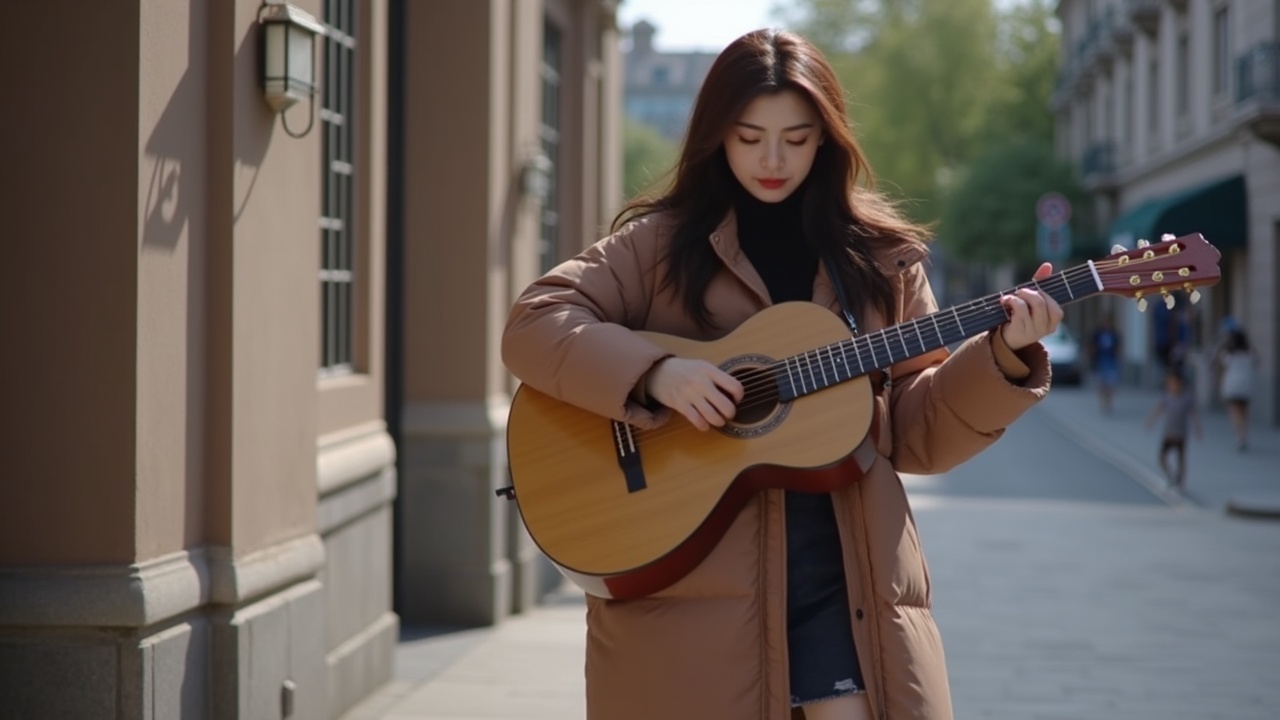
A girl is playing a guitar in street

A boy is riding a bike in snow

a girl, turning her head slightly to the side, curious expression, detailed hair

Little girl playing the piano

The girl is blowing bubbles

a man, leaning against a plain wall, one hand in his pocket, relaxed posture

a man with stylish headphones around his neck, urban minimalist style

a man, double exposure effect, his portrait blended with a cityscape at night

This woman is walking on the runway

This man is cooking and smiling at the camera
Powiązane modele






README
Instant Character — wavespeed-ai/instant-character
Instant Character is an image-guided character generation model that uses a reference image to keep a subject’s identity consistent while you place them into new scenes with a text prompt. Upload a character image, describe what the character is doing and where the scene takes place, and the model generates a new image that preserves the look while adapting pose, clothing details, and environment to match your prompt. It’s especially useful for character consistency across multiple creative iterations.
Key capabilities
- Reference-image guided character consistency (identity and overall look)
- Prompt-driven scene creation (action, environment, styling)
- Works well for generating multiple variations of the same character
- Custom output size (set width/height directly)
- Seed control for reproducible outputs
Use cases
- Create a consistent character for storyboards, comics, or visual novels
- Generate marketing/lifestyle scenes with the same model/character
- Outfit, pose, and background variations while keeping identity stable
- Rapid creative iteration by changing prompt or seed
- Building character packs for downstream video or design workflows
Pricing
| Output | Price |
|---|---|
| Per image | $0.10 |
Inputs
- prompt (required): what the character should do and the scene context
- image (required): reference character image
Parameters
- prompt: text instruction (subject action + scene + style)
- image: reference image (upload or URL)
- width / height: output size (e.g., 1280×720)
- seed: random seed (-1 for random; fixed for reproducible results)
Prompting guide
For best consistency, be explicit about “who stays the same” and “what changes”:
Template: Use the same character from the reference image. Place her in [scene]. She is [action]. Style: [photorealistic/cinematic/etc.]. Keep identity consistent.
Example prompts
- Use the same girl from the reference image. She is playing a guitar on a city street, candid street photography style, warm afternoon light, shallow depth of field, realistic details.
- Same character, standing in a rainy alley under neon lights, cinematic mood, wet reflections on the ground, subtle fog, 35mm lens look.
- Same character, sitting in a cozy café reading a book, soft window light, natural colors, calm atmosphere.
Instant Character API — Quick start
Grab a WaveSpeedAI API key, then call POST https://api.wavespeed.ai/api/v3/wavespeed-ai/instant-character with your input as JSON. The endpoint returns a prediction id; poll the prediction endpoint until status flips to completed, then read the output URL from data.outputs[0]. Examples for Instant Character below.
HTTP example
# Submit the prediction
curl -X POST "https://api.wavespeed.ai/api/v3/wavespeed-ai/instant-character" \
  -H "Content-Type: application/json" \
  -H "Authorization: Bearer $WAVESPEED_API_KEY" \
  -d '{
    "prompt": "A cinematic shot of a city at sunset, soft golden light",
    "image": "https://example.com/your-input.jpg",
    "size": "1024*1024",
    "seed": 0
}'

# Response includes a prediction id. Poll for the result:
curl -X GET "https://api.wavespeed.ai/api/v3/predictions/{request_id}/result" \
  -H "Authorization: Bearer $WAVESPEED_API_KEY"

# When status is "completed", read the output from data.outputs[0].
Node.js example
// npm install wavespeed
const WaveSpeed = require('wavespeed');

const client = new WaveSpeed(); // reads WAVESPEED_API_KEY from env

const result = await client.run("wavespeed-ai/instant-character", {
        "prompt": "A cinematic shot of a city at sunset, soft golden light",
        "image": "https://example.com/your-input.jpg",
        "size": "1024*1024",
        "seed": 0
});

console.log(result.outputs[0]); // → URL of the generated output
Python example
# pip install wavespeed
import wavespeed

output = wavespeed.run(
    "wavespeed-ai/instant-character",
    {
    "prompt": "A cinematic shot of a city at sunset, soft golden light",
    "image": "https://example.com/your-input.jpg",
    "size": "1024*1024",
    "seed": 0
}
)

print(output["outputs"][0])  # → URL of the generated output
Instant Character API — Frequently asked questions
What is the Instant Character API?
Instant Character is a WaveSpeedAI model for image editing, exposed as a REST API on WaveSpeedAI. Instant Character transforms an uploaded character image and a text prompt into styled, action- and mood-driven character renders. Ready-to-use REST inference API, best performance, no coldstarts, affordable pricing. You can call it programmatically or try it from the playground above.
How do I call the Instant Character API?
POST your input parameters to the model's REST endpoint (shown in the API tab of this playground) with your WaveSpeedAI API key in the Authorization header. Submission returns a prediction ID; poll the prediction endpoint until status flips to "completed", then read the output URL from the result. The playground generates a ready-to-paste code sample in Python, JavaScript, or cURL for whatever inputs you've set. Full request/response shape is documented at https://wavespeed.ai/docs/docs-api/wavespeed-ai/instant-character.
How much does Instant Character cost per run?
Instant Character starts at $0.10 per run. That figure is the base price — the final charge scales with the parameters you set in the form (output size, length, count, references, or whatever knobs this model exposes), so a higher-quality or larger output costs more than a minimal one. The exact cost for your current input is shown live next to the Generate button before you submit, and the actual per-call charge is recorded on the prediction afterwards.
What inputs does Instant Character accept?
Key inputs: `prompt`, `image`, `size`, `seed`. The full JSON schema (types, defaults, allowed values) is rendered above the Generate button and mirrored in the API reference at https://wavespeed.ai/docs/docs-api/wavespeed-ai/instant-character.
How long does Instant Character take to generate?
Average end-to-end generation time on WaveSpeedAI is around 101 seconds per request — measured across recent runs. Queue time scales with global demand; live status is visible in the prediction record.
Can I use Instant Character outputs commercially?
Commercial usage rights depend on the model's license, set by its provider (WaveSpeedAI). The license summary appears on the model card above; see WaveSpeedAI's Terms of Service for platform-level conditions.