OpenAI's GPT Image 2 Edit enables image editing from natural-language instructions with one or more reference images. Ready-to-use REST inference API, best performance, no coldstarts, affordable pricing.
Idle
$0.06per run·~16 / $1
ExamplesView all
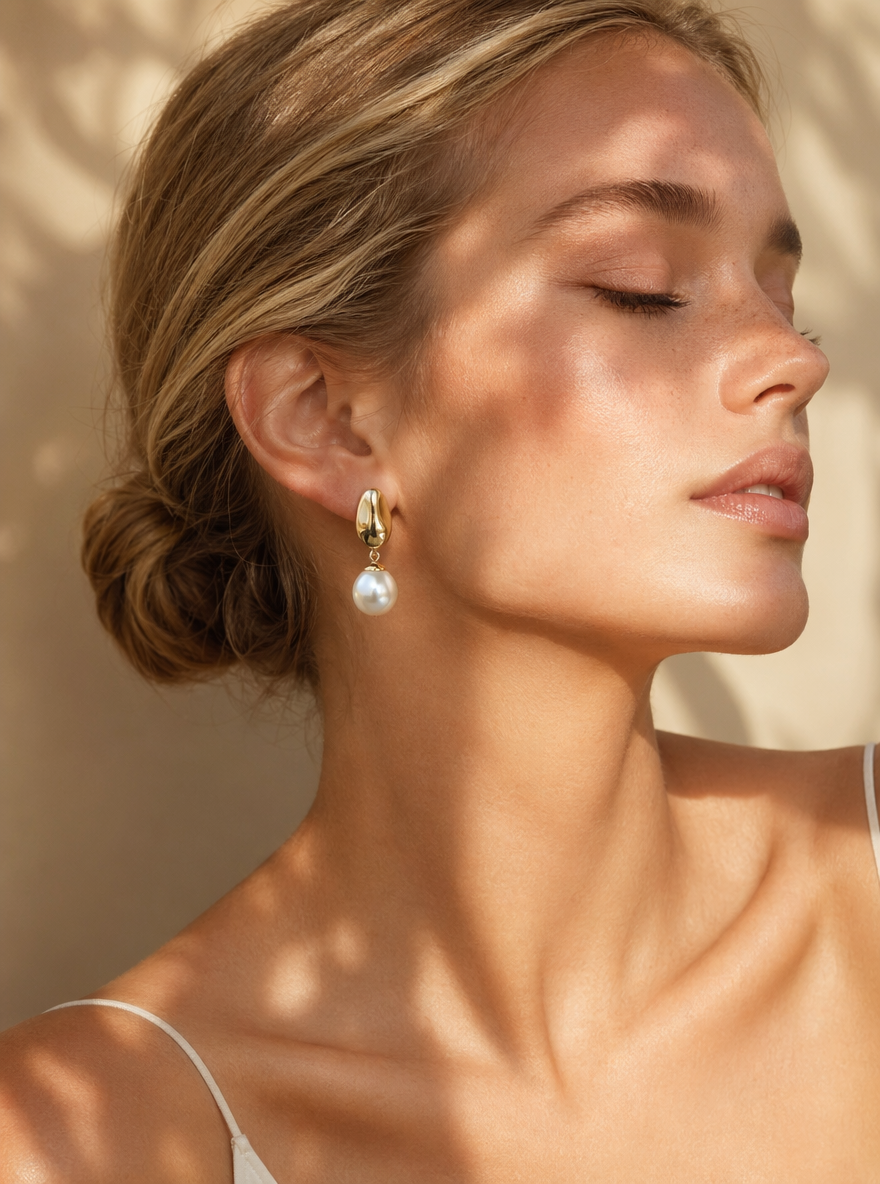
A high-end fashion editorial portrait of a blonde Western female model wearing the earrings shown in the image. The model is in her early 20s, with flawless, radiant skin and subtle freckles. She wears natural, dewy makeup with a soft blush and nude glossy lips. Her features are refined, with high cheekbones and a well-defined jawline. Her blonde hair is styled in a sleek low bun, neatly tucked behind her ears to fully showcase the earrings. She is posed in an elegant side profile, with her eyes gently closed, conveying a calm, graceful, and serene expression. The lighting is warm natural light, with soft botanical shadows cast across her face and shoulders, creating a soft yet high-contrast editorial atmosphere. The light enhances the texture of her skin as well as the reflective shine of the gold and pearl. The background is minimal, in warm beige tones, softly blurred, presenting a premium lifestyle aesthetic. Shot in an ultra-realistic style with fashion magazine quality, using an 85mm lens and shallow depth of field. The earrings are in sharp focus, with soft cinematic lighting, high detail, and a luxurious jewelry advertisement style, in 8K resolution.
Related Models



README
OpenAI GPT Image 2 Edit
OpenAI GPT Image 2 Edit transforms one or more reference images using natural-language instructions. Upload your image, describe the changes you want, and the model generates a polished edited result with strong prompt alignment and production-ready quality.
- Need to generate a new image from scratch instead? Try OpenAI GPT Image 2 Text-to-Image.
Why Choose This?
-
Natural-language image editing Edit images by simply describing the changes you want in plain language — no manual masking or complex editing workflow required.
-
Works with reference images Use one or more input images as the visual source for edits, transformations, or style adjustments.
-
Flexible aspect ratios Generate edited outputs in square, portrait, or landscape formats for different publishing and design needs.
-
Production-ready API Access the model through a ready-to-use REST inference API for easy integration into apps, tools, and creative pipelines.
-
Fast and affordable Get high-quality image edits with simple usage-based pricing and no cold-start friction.
Parameters
| Parameter | Required | Description |
|---|---|---|
| images | Yes | Reference images to edit |
| prompt | Yes | Text description of the desired edit |
| aspect_ratio | No | Aspect ratio: 1:1, 3:2, 2:3, 3:4, 4:3, 4:5, 5:4, 9:16, 16:9, 21:9. Auto-detected from input image if not specified. |
| resolution | No | Output resolution: 1k (default), 2k, or 4k. |
| quality | No | Image quality: low, medium (default), or high. |
How to Use
- Upload reference images — add one or more images you want to edit.
- Write your prompt — clearly describe the changes, style adjustments, or composition edits you want.
- Choose aspect ratio (optional) — use
1:1for square,2:3or9:16for portrait,3:2or16:9for landscape, etc. Auto-detected from input image if not specified. - Submit — run the model and download your edited image.
Example Prompt
Turn this product photo into a premium studio advertisement with soft cinematic lighting, a clean beige background, subtle shadows, realistic reflections, and luxury brand aesthetics
Pricing
Pricing varies by quality and resolution.
| Quality | 1k | 2k | 4k |
|---|---|---|---|
| low | $0.030 | $0.060 | $0.090 |
| medium | $0.060 | $0.120 | $0.180 |
| high | $0.220 | $0.440 | $0.660 |
Best Use Cases
- Product photo enhancement — Upgrade basic product shots into premium marketing visuals.
- Creative retouching — Change backgrounds, lighting, styling, or composition with natural-language instructions.
- Marketing adaptation — Rework existing brand assets into new campaign visuals without recreating them from scratch.
- Social media content — Quickly edit images into platform-ready formats for posts, ads, and promos.
- Design iteration — Explore multiple visual directions from the same base image with different prompts.
- E-commerce optimization — Improve product presentation for listings, hero banners, and promotional creatives.
Pro Tips
- Be specific about what should stay unchanged and what should be modified.
- Mention visual style clearly, such as photorealistic, luxury editorial, minimal, cinematic, or flat lay.
- Describe lighting, background, framing, and mood for more controllable results.
- Use concise but precise prompts instead of overly vague instructions like “make it better.”
- Try multiple aspect ratios when adapting the same edit for different placements.
- If using multiple reference images, make sure they are visually clear and relevant to the intended output.
Notes
- Both
imagesandpromptare required fields. - Supported aspect ratios are
1:1,3:2,2:3,3:4,4:3,4:5,5:4,9:16,16:9, and21:9. Auto-detected from input image if not specified. - This model is intended for image editing based on reference images and natural-language instructions.
Related Models
- OpenAI GPT Image 2 Text-to-Image — Generate new images directly from natural-language prompts.
Gpt Image 2 Edit API — Quick start
Grab a WaveSpeedAI API key, then call POST https://api.wavespeed.ai/api/v3/openai/gpt-image-2/edit with your input as JSON. The endpoint returns a prediction id; poll the prediction endpoint until status flips to completed, then read the output URL from data.outputs[0]. Examples for Gpt Image 2 Edit below.
HTTP example
# Submit the prediction
curl -X POST "https://api.wavespeed.ai/api/v3/openai/gpt-image-2/edit" \
  -H "Content-Type: application/json" \
  -H "Authorization: Bearer $WAVESPEED_API_KEY" \
  -d '{
    "prompt": "A cinematic shot of a city at sunset, soft golden light",
    "aspect_ratio": "1:1",
    "resolution": "1k",
    "quality": "medium",
    "output_format": "png",
    "enable_sync_mode": false,
    "enable_base64_output": false
}'

# Response includes a prediction id. Poll for the result:
curl -X GET "https://api.wavespeed.ai/api/v3/predictions/{request_id}/result" \
  -H "Authorization: Bearer $WAVESPEED_API_KEY"

# When status is "completed", read the output from data.outputs[0].
Node.js example
// npm install wavespeed
const WaveSpeed = require('wavespeed');

const client = new WaveSpeed(); // reads WAVESPEED_API_KEY from env

const result = await client.run("openai/gpt-image-2/edit", {
        "prompt": "A cinematic shot of a city at sunset, soft golden light",
        "aspect_ratio": "1:1",
        "resolution": "1k",
        "quality": "medium",
        "output_format": "png",
        "enable_sync_mode": false,
        "enable_base64_output": false
});

console.log(result.outputs[0]); // → URL of the generated output
Python example
# pip install wavespeed
import wavespeed

output = wavespeed.run(
    "openai/gpt-image-2/edit",
    {
    "prompt": "A cinematic shot of a city at sunset, soft golden light",
    "aspect_ratio": "1:1",
    "resolution": "1k",
    "quality": "medium",
    "output_format": "png",
    "enable_sync_mode": false,
    "enable_base64_output": false
}
)

print(output["outputs"][0])  # → URL of the generated output
Gpt Image 2 Edit API — Frequently asked questions
What is the Gpt Image 2 Edit API?
Gpt Image 2 Edit is a OpenAI model for image editing, exposed as a REST API on WaveSpeedAI. OpenAI's GPT Image 2 Edit enables image editing from natural-language instructions with one or more reference images. Ready-to-use REST inference API, best performance, no coldstarts, affordable pricing. You can call it programmatically or try it from the playground above.
How do I call the Gpt Image 2 Edit API?
POST your input parameters to the model's REST endpoint (shown in the API tab of this playground) with your WaveSpeedAI API key in the Authorization header. Submission returns a prediction ID; poll the prediction endpoint until status flips to "completed", then read the output URL from the result. The playground generates a ready-to-paste code sample in Python, JavaScript, or cURL for whatever inputs you've set. Full request/response shape is documented at https://wavespeed.ai/docs/docs-api/openai/openai-gpt-image-2-edit.
How much does Gpt Image 2 Edit cost per run?
Gpt Image 2 Edit starts at $0.060 per run. That figure is the base price — the final charge scales with the parameters you set in the form (output size, length, count, references, or whatever knobs this model exposes), so a higher-quality or larger output costs more than a minimal one. The exact cost for your current input is shown live next to the Generate button before you submit, and the actual per-call charge is recorded on the prediction afterwards.
What inputs does Gpt Image 2 Edit accept?
Key inputs: `prompt`, `images`, `aspect_ratio`, `resolution`, `enable_base64_output`, `enable_sync_mode`. The full JSON schema (types, defaults, allowed values) is rendered above the Generate button and mirrored in the API reference at https://wavespeed.ai/docs/docs-api/openai/openai-gpt-image-2-edit.
How do I get started with the Gpt Image 2 Edit API?
Sign up for a free WaveSpeedAI account to claim starter credits, copy your API key from /accesskey, then call the endpoint shown in the API tab of the playground. The playground also auto-generates a code sample in Python, JavaScript, or cURL for the parameters you've set.
Can I use Gpt Image 2 Edit outputs commercially?
Commercial usage rights depend on the model's license, set by its provider (OpenAI). The license summary appears on the model card above; see WaveSpeedAI's Terms of Service for platform-level conditions.