JoyAI Image Edit transforms images based on text instructions, allowing you to modify backgrounds, adjust colors, add or remove elements, and more. Ready-to-use REST inference API, best performance, no cold starts, affordable pricing.
대기 중

$0.3실행당·~33 / $10
예시전체 보기
Transform this forest into a magical fantasy realm. Trees become ancient luminescent entities with glowing bark, leaves shimmer with bioluminescent blue and violet light, small fairies drift between the branches, mysterious floating orbs light the path, mushrooms with soft pink glow line the edges. Maintain the original path composition and tree structure. Epic fantasy illustration style, rich and otherworldly.
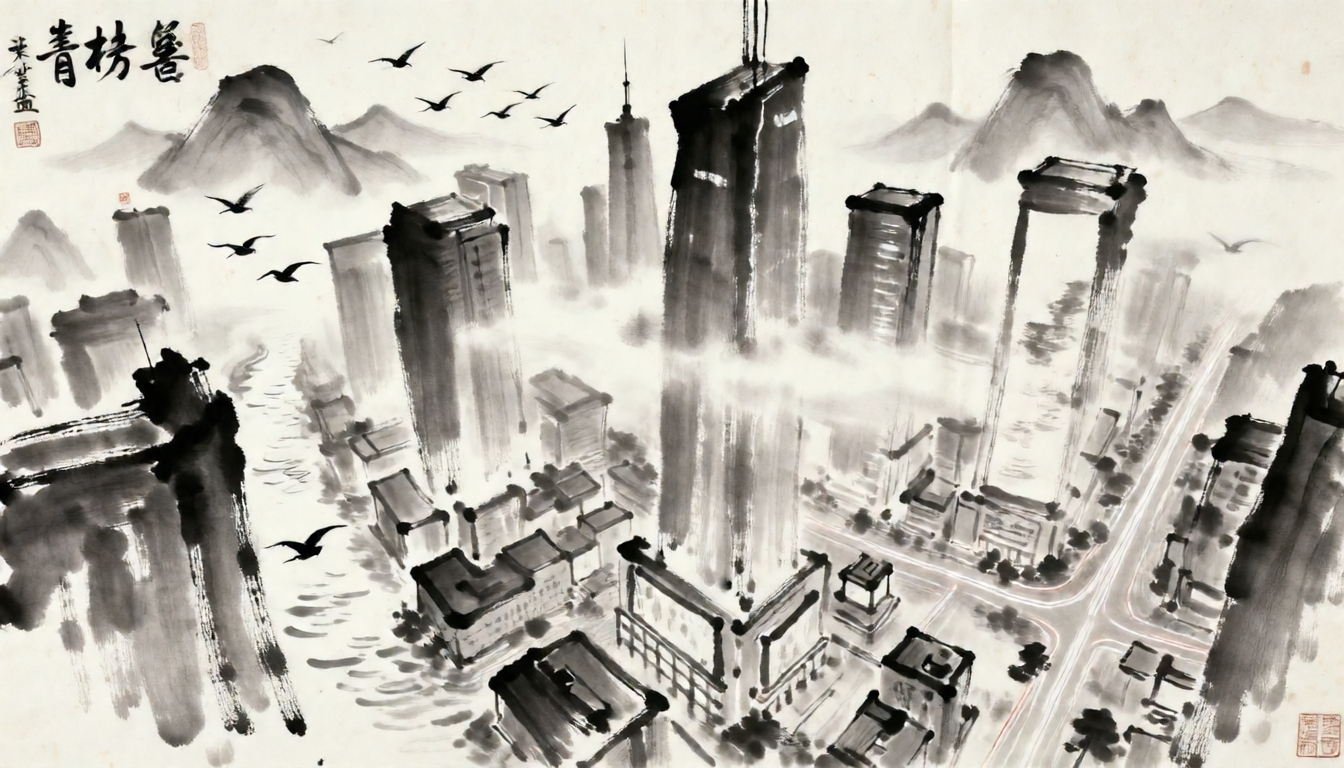
Transform this cyberpunk cityscape into a traditional Chinese ink wash painting. The skyscrapers become misty mountain peaks, neon reflections become river surfaces, light trails become birds in flight. Monochromatic ink tones, rice paper texture, loose expressive brushstrokes, Song Dynasty aesthetic. Preserve the original composition and spatial depth.
관련 모델






README
JoyAI Image Edit
JoyAI Image Edit transforms any photo with natural language instructions. Describe the change you want — alter styles, shift environments, add fantastical elements, change lighting or atmosphere — and the model applies a rich, imaginative edit while preserving the core structure of your original image.
Why Choose This?
-
Creative, imagination-driven edits Goes beyond simple adjustments — transforms scenes, applies artistic styles, and reimagines environments with vivid, detailed results.
-
Natural-language control Describe the transformation in plain text. The more descriptive your prompt, the richer the output.
-
Preserves original structure Maintains the core composition, subject placement, and spatial layout of your source image while applying the requested transformation.
-
Prompt Enhancer Built-in tool to automatically improve your edit descriptions for richer, more imaginative results.
Parameters
| Parameter | Required | Description |
|---|---|---|
| prompt | Yes | Text description of the desired transformation or edit. |
| image | Yes | Source image to edit (URL or file upload). |
How to Use
- Upload your image — provide the source photo via URL or drag-and-drop.
- Write your prompt — describe the transformation you want in vivid detail. Use the Prompt Enhancer for richer results.
- Submit — download your transformed image.
Pricing
Just $0.30 per image.
Best Use Cases
- Fantasy & world-building — Transform real environments into magical, surreal, or sci-fi scenes.
- Style transfer — Reimagine photos in watercolor, oil painting, neon, or any artistic style.
- Seasonal & atmospheric changes — Shift environments between seasons, times of day, or weather conditions.
- Creative content — Generate visually striking images for social media, storytelling, and artistic projects.
- Concept visualization — Quickly explore visual directions and alternative treatments of a scene.
Pro Tips
- The more descriptive your prompt, the richer the transformation — include specific colors, textures, lighting, and visual elements you want to see.
- Describe both what should change and what the overall mood or atmosphere should feel like.
- Use the Prompt Enhancer to expand a simple idea into a detailed, evocative edit instruction.
Notes
- Both prompt and image are required fields.
- Ensure image URLs are publicly accessible if using a link rather than a direct upload.
- Please ensure your content complies with WaveSpeed AI's usage policies.
Joyai Image Edit API — Quick start
Grab a WaveSpeedAI API key, then call POST https://api.wavespeed.ai/api/v3/wavespeed-ai/joyai-image/edit with your input as JSON. The endpoint returns a prediction id; poll the prediction endpoint until status flips to completed, then read the output URL from data.outputs[0]. Examples for Joyai Image Edit below.
HTTP example
# Submit the prediction
curl -X POST "https://api.wavespeed.ai/api/v3/wavespeed-ai/joyai-image/edit" \
  -H "Content-Type: application/json" \
  -H "Authorization: Bearer $WAVESPEED_API_KEY" \
  -d '{
    "prompt": "A cinematic shot of a city at sunset, soft golden light",
    "image": "https://example.com/your-input.jpg"
}'

# Response includes a prediction id. Poll for the result:
curl -X GET "https://api.wavespeed.ai/api/v3/predictions/{request_id}/result" \
  -H "Authorization: Bearer $WAVESPEED_API_KEY"

# When status is "completed", read the output from data.outputs[0].
Node.js example
// npm install wavespeed
const WaveSpeed = require('wavespeed');

const client = new WaveSpeed(); // reads WAVESPEED_API_KEY from env

const result = await client.run("wavespeed-ai/joyai-image/edit", {
        "prompt": "A cinematic shot of a city at sunset, soft golden light",
        "image": "https://example.com/your-input.jpg"
});

console.log(result.outputs[0]); // → URL of the generated output
Python example
# pip install wavespeed
import wavespeed

output = wavespeed.run(
    "wavespeed-ai/joyai-image/edit",
    {
    "prompt": "A cinematic shot of a city at sunset, soft golden light",
    "image": "https://example.com/your-input.jpg"
}
)

print(output["outputs"][0])  # → URL of the generated output
Joyai Image Edit API — Frequently asked questions
What is the Joyai Image Edit API?
Joyai Image Edit is a WaveSpeedAI model for image editing, exposed as a REST API on WaveSpeedAI. JoyAI Image Edit transforms images based on text instructions, allowing you to modify backgrounds, adjust colors, add or remove elements, and more. Ready-to-use REST inference API, best performance, no cold starts, affordable pricing. You can call it programmatically or try it from the playground above.
How do I call the Joyai Image Edit API?
POST your input parameters to the model's REST endpoint (shown in the API tab of this playground) with your WaveSpeedAI API key in the Authorization header. Submission returns a prediction ID; poll the prediction endpoint until status flips to "completed", then read the output URL from the result. The playground generates a ready-to-paste code sample in Python, JavaScript, or cURL for whatever inputs you've set. Full request/response shape is documented at https://wavespeed.ai/docs/docs-api/wavespeed-ai/joyai-image-edit.
How much does Joyai Image Edit cost per run?
Joyai Image Edit starts at $0.30 per run. That figure is the base price — the final charge scales with the parameters you set in the form (output size, length, count, references, or whatever knobs this model exposes), so a higher-quality or larger output costs more than a minimal one. The exact cost for your current input is shown live next to the Generate button before you submit, and the actual per-call charge is recorded on the prediction afterwards.
What inputs does Joyai Image Edit accept?
Key inputs: `prompt`, `image`. The full JSON schema (types, defaults, allowed values) is rendered above the Generate button and mirrored in the API reference at https://wavespeed.ai/docs/docs-api/wavespeed-ai/joyai-image-edit.
How do I get started with the Joyai Image Edit API?
Sign up for a free WaveSpeedAI account to claim starter credits, copy your API key from /accesskey, then call the endpoint shown in the API tab of the playground. The playground also auto-generates a code sample in Python, JavaScript, or cURL for the parameters you've set.
Can I use Joyai Image Edit outputs commercially?
Commercial usage rights depend on the model's license, set by its provider (WaveSpeedAI). The license summary appears on the model card above; see WaveSpeedAI's Terms of Service for platform-level conditions.