Qwen Image 2.0 Pro Edit is a professional-grade image editing model with superior quality and advanced instruction understanding. Up to 2k. Ready-to-use REST inference API, best performance, no coldstarts, affordable pricing.
Inattivo

$0.07per esecuzione·~14 / $1
EsempiVedi tutto
"Photorealistic cinematic shot, Figure 1’s character is now fully dressed in the attire from Figure 2, with meticulous attention to fabric texture, fit, and detail. The lighting is soft and natural, mimicking daylight with shallow depth of field to emphasize the clothing’s craftsmanship. Camera angle is medium close-up, focusing on the character’s upper body and face, capturing subtle expressions and the way the garments drape. Background is blurred to maintain focus on the outfit transformation, with realistic shadows and reflections enhancing realism. Style: High-definition photographic realism with professional studio lighting and cinematic composition."
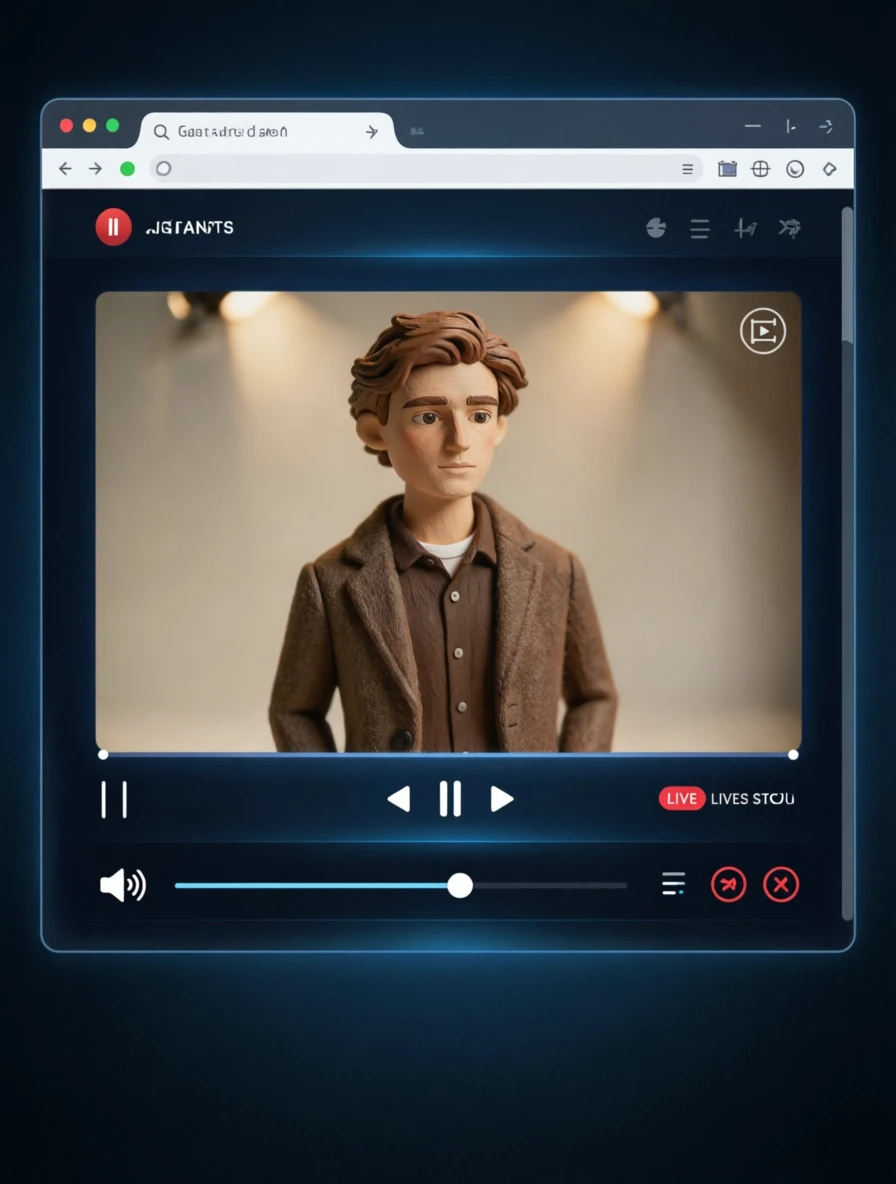
Render the image as if displayed inside a modern web browser’s live streaming software interface — with a realistic browser window frame, visible address bar, tabs, and system UI elements. The image appears embedded in a central video player area, surrounded by typical streaming platform controls: volume slider, playback buttons, full-screen toggle, and a live status indicator. The background should resemble a clean, dark-themed streaming dashboard with subtle UI glow effects. Ensure the image is centered, framed naturally within the browser window, and rendered with high fidelity to simulate real-time streaming.
Modelli correlati






README
Qwen Image 2.0 Pro Edit
Qwen Image 2.0 Pro Edit is an image-editing model for transforming existing images with natural-language instructions. Upload 1 to 3 reference images, describe the edit you want, and generate a refined image while preserving the visual context from your inputs.
Why Choose This?
-
Instruction-based image editing Modify, restyle, or enhance uploaded images using a simple text prompt.
-
Multi-image input Supports up to 3 input images for edits, references, or visual context.
-
Strong prompt understanding Follows detailed Chinese or English editing instructions for targeted changes.
-
High-resolution workflow Supports images from 384 to 3072 pixels on each dimension, with output up to 2k.
-
Reproducible results Set a seed when you need repeatable generations.
Parameters
| Parameter | Required | Description |
|---|---|---|
| prompt | Yes | Text instruction describing the desired edit. Supports Chinese and English, up to 800 characters. |
| images | Yes | Input images for editing. Upload 1 to 3 images, each 384-3072px per dimension. |
| seed | No | Random seed for reproducibility (-1 for random, 0-2147483647 for a fixed seed). |
How to Use
- Upload your image inputs - add 1 to 3 images to edit or use as references.
- Write your prompt - describe the change, style, object, background, or composition you want.
- Set seed (optional) - use a fixed seed for reproducible results.
- Run - submit the request and download the generated image.
Pricing
| Output | Cost |
|---|---|
| Per image edit | $0.07 |
Best Use Cases
- Photo retouching - Adjust appearance, lighting, composition, or scene details.
- Creative edits - Transform style, mood, clothing, backgrounds, or objects.
- Product visuals - Refine product shots or create alternate presentation styles.
- Character and portrait edits - Preserve identity while changing details or aesthetics.
- Reference-guided edits - Use multiple images to provide context for the final output.
Pro Tips
- Use clear, specific edit instructions instead of broad prompts.
- Upload only the images needed for the edit; the model supports a maximum of 3 input images.
- Mention what should stay unchanged when preservation matters.
- Use a fixed seed when comparing prompt variations.
- For final production quality, use the Pro model; for lower-cost iteration, use the standard model.
Notes
promptandimagesare required.imagesaccepts 1 to 3 images.- Each input image should be 384-3072px on each dimension.
- Ensure image URLs are publicly accessible when using URL inputs.
- Ensure your prompts and images comply with content guidelines.
Related Models
- Qwen Image 2.0 Text-to-Image - Standard text-to-image generation.
- Qwen Image 2.0 Pro Text-to-Image - Pro text-to-image generation.
- Qwen Image Edit Plus - Image editing with text instructions.
Qwen Image 2.0 Pro Edit API — Quick start
Grab a WaveSpeedAI API key, then call POST https://api.wavespeed.ai/api/v3/wavespeed-ai/qwen-image-2.0-pro/edit with your input as JSON. The endpoint returns a prediction id. Start polling the result endpoint around every 2 seconds, increase the interval for long-running tasks, and stop on any terminal status. On completed, read output values from data.outputs. Examples for Qwen Image 2.0 Pro Edit below.
HTTP example
set -euo pipefail

: "${WAVESPEED_API_KEY:?Set WAVESPEED_API_KEY}"

REQUEST_BODY=$(cat <<'JSON'
{
    "prompt": "A cinematic shot of a city at sunset, soft golden light",
    "images": [
        "https://interactive-examples.mdn.mozilla.net/media/cc0-images/painted-hand-298-332.jpg"
    ],
    "seed": -1
}
JSON
)

# 1. Submit the prediction.
SUBMIT_RESPONSE=$(curl --silent --show-error --fail-with-body \
  -X POST "https://api.wavespeed.ai/api/v3/wavespeed-ai/qwen-image-2.0-pro/edit" \
  -H "Content-Type: application/json" \
  -H "Authorization: Bearer $WAVESPEED_API_KEY" \
  -d "$REQUEST_BODY")

TASK=$(printf '%s' "$SUBMIT_RESPONSE" | jq 'if has("data") then .data else . end')
PREDICTION_ID=$(printf '%s' "$TASK" | jq -r '.id')
if [ -z "$PREDICTION_ID" ] || [ "$PREDICTION_ID" = "null" ]; then
  printf 'Submission response did not contain a prediction id
' >&2
  exit 1
fi
RESULT_URL=$(printf '%s' "$TASK" | jq -r '.urls.get // empty')
if [ -z "$RESULT_URL" ]; then
  RESULT_URL="https://api.wavespeed.ai/api/v3/predictions/$PREDICTION_ID/result"
fi

# 2. Poll until the prediction finishes.
while true; do
  RESPONSE=$(curl --silent --show-error --fail-with-body "$RESULT_URL" \
    -H "Authorization: Bearer $WAVESPEED_API_KEY")
  RESULT=$(printf '%s' "$RESPONSE" | jq 'if has("data") then .data else . end')
  STATUS=$(printf '%s' "$RESULT" | jq -r '.status')
  case "$STATUS" in
    completed) printf '%s\n' "$RESULT" | jq '.outputs'; break ;;
    failed|cancelled|timeout) printf '%s\n' "$RESULT" | jq . >&2; exit 1 ;;
    created|processing) sleep 2 ;;
    *) printf 'Unexpected status: %s
' "$STATUS" >&2; exit 1 ;;
  esac
done
Node.js example
const submitUrl = "https://api.wavespeed.ai/api/v3/wavespeed-ai/qwen-image-2.0-pro/edit";
const apiKey = process.env.WAVESPEED_API_KEY;
if (!apiKey) throw new Error('Set WAVESPEED_API_KEY');

async function requestJson(url, options = {}) {
  const response = await fetch(url, options);
  if (!response.ok) throw new Error(await response.text());
  return response.json();
}

// 1. Submit the prediction.
const body = await requestJson(submitUrl, {
  method: "POST",
  headers: {
    "Authorization": `Bearer ${apiKey}`,
    "Content-Type": "application/json",
  },
  body: JSON.stringify({
        "prompt": "A cinematic shot of a city at sunset, soft golden light",
        "images": [
                "https://interactive-examples.mdn.mozilla.net/media/cc0-images/painted-hand-298-332.jpg"
        ],
        "seed": -1
}),
});
const task = body.data ?? body;
if (!task.id) throw new Error("Submission response did not contain a prediction id");
const resultUrl = task.urls?.get ||
  `https://api.wavespeed.ai/api/v3/predictions/${task.id}/result`;

// 2. Poll until the prediction finishes.
while (true) {
  const resultBody = await requestJson(resultUrl, {
    headers: { "Authorization": `Bearer ${apiKey}` },
  });
  const result = resultBody.data ?? resultBody;
  if (result.status === "completed") {
    console.log(result.outputs);
    break;
  }
  if (["failed", "cancelled", "timeout"].includes(result.status)) throw new Error(JSON.stringify(result));
  if (!["created", "processing"].includes(result.status)) throw new Error("Unexpected status: " + result.status);
  await new Promise(resolve => setTimeout(resolve, 2000));
}
Python example
import json
import os
import time
from urllib.request import Request, urlopen

api_key = os.environ["WAVESPEED_API_KEY"]
headers = {"Authorization": f"Bearer {api_key}", "Content-Type": "application/json"}
payload = {
    "prompt": "A cinematic shot of a city at sunset, soft golden light",
    "images": [
        "https://interactive-examples.mdn.mozilla.net/media/cc0-images/painted-hand-298-332.jpg"
    ],
    "seed": -1
}

def request_json(url, data=None):
    request = Request(url, data=data, headers=headers, method="POST" if data else "GET")
    with urlopen(request) as response:
        return json.load(response)

# 1. Submit the prediction.
body = request_json("https://api.wavespeed.ai/api/v3/wavespeed-ai/qwen-image-2.0-pro/edit", json.dumps(payload).encode())
task = body.get("data", body)
if not task.get("id"):
    raise RuntimeError("Submission response did not contain a prediction id")
result_url = task.get("urls", {}).get("get") or f"https://api.wavespeed.ai/api/v3/predictions/{task['id']}/result"

# 2. Poll until the prediction finishes.
while True:
    result_body = request_json(result_url)
    result = result_body.get("data", result_body)
    status = result.get("status")
    if status == "completed":
        print(result.get("outputs", []))
        break
    if status in {"failed", "cancelled", "timeout"}:
        raise RuntimeError(result)
    if status not in {"created", "processing"}:
        raise RuntimeError(f"Unexpected status: {status}")
    time.sleep(2)
Qwen Image 2.0 Pro Edit API — Frequently asked questions
What is the Qwen Image 2.0 Pro Edit API?
Qwen Image 2.0 Pro Edit is a WaveSpeedAI model for image editing, exposed as a REST API on WaveSpeedAI. Qwen Image 2.0 Pro Edit is a professional-grade image editing model with superior quality and advanced instruction understanding. Up to 2k. Ready-to-use REST inference API, best performance, no coldstarts, affordable pricing. You can call it programmatically or try it from the playground above.
How do I call the Qwen Image 2.0 Pro Edit API?
POST your input parameters to the model's REST endpoint (shown in the API tab of this playground) with your WaveSpeedAI API key in the Authorization header. Submission returns a prediction ID. Poll the result endpoint starting around every 2 seconds, increase the interval for long-running tasks, and stop on any terminal status. The playground generates production-oriented Python, JavaScript, and cURL examples with timeouts, transient-error handling, and safe GET retries. Full request/response shape is documented at https://wavespeed.ai/docs/docs-api/wavespeed-ai/qwen-image-2.0-pro-edit.
How much does Qwen Image 2.0 Pro Edit cost per run?
Qwen Image 2.0 Pro Edit starts at $0.070 per run. That figure is the base price — the final charge scales with the parameters you set in the form (output size, length, count, references, or whatever knobs this model exposes), so a higher-quality or larger output costs more than a minimal one. The exact cost for your current input is shown live next to the Generate button before you submit, and the actual per-call charge is recorded on the prediction afterwards.
What inputs does Qwen Image 2.0 Pro Edit accept?
Key inputs: `prompt`, `images`, `seed`. The full JSON schema (types, defaults, allowed values) is rendered above the Generate button and mirrored in the API reference at https://wavespeed.ai/docs/docs-api/wavespeed-ai/qwen-image-2.0-pro-edit.
How long does Qwen Image 2.0 Pro Edit take to generate?
Average end-to-end generation time on WaveSpeedAI is around 50 seconds per request — measured across recent runs. Queue time scales with global demand; live status is visible in the prediction record.
Can I use Qwen Image 2.0 Pro Edit outputs commercially?
Commercial usage rights depend on the model's license, set by its provider (WaveSpeedAI). The license summary appears on the model card above; see WaveSpeedAI's Terms of Service for platform-level conditions.