FLUX.1 Krea [dev] is the open-weights Krea 1 model with LoRA support, delivering distinctive, realistic outputs for creative projects. Ready-to-use REST API, best performance, no coldstarts, affordable pricing.
Siap

$0.02per run·~50 / $1
ContohLihat semua
A young woman sitting on a rooftop at golden hour, wearing an oversized denim jacket, white headphones around her neck, sipping iced coffee from a clear plastic cup. Her short curly hair blows slightly in the wind as city lights begin to glow in the distance.

An elderly man reading a book under a tree in autumn park, gentle expression, crisp leaf detail, dappled sunlight and long shadows.

A middle-aged man reading a newspaper at a corner café in Paris, wearing a tan trench coat, round glasses, and brown leather shoes. His coffee cup is half full, a croissant sits beside it. Natural morning light filters through the window behind him.

An elderly man sitting alone on a wooden bench in a quiet park at sunrise. He wears a wool cardigan over a flannel shirt, a knit beanie, and holds a paper cup of coffee. Fallen autumn leaves surround his feet, soft morning light on his face.

A man in his 20s sitting on a messy art studio floor, surrounded by unfinished canvases and paint tubes. He wears a white tank top stained with color, and ripped jeans. Sunlight pours through a dusty window, casting shadows across the floor.

A young mother adjusting her baby’s beanie while seated on a picnic blanket. She wears a cream sweater and long corduroy skirt, barefoot on the grass. Toys and snacks are scattered nearby, and her phone lies face down next to her coffee cup.

A fashion-forward teen leaning against a brick wall in a back alley, scrolling on their phone. They wear a neon green windbreaker, oversized cargo pants, and chunky sneakers. Graffiti and old posters decorate the background.

A barista behind the counter pouring latte art in a quiet café, wearing a dark apron over a mustard t-shirt. The espresso machine steams in the background, and sunlight catches the floating dust particles in the warm, cozy space.

A middle-aged woman hanging laundry on a rooftop clothesline under a bright blue sky. She wears a loose linen shirt and culottes, hair tied up with a scarf. Towels flutter in the breeze, casting soft shadows on the concrete floor.
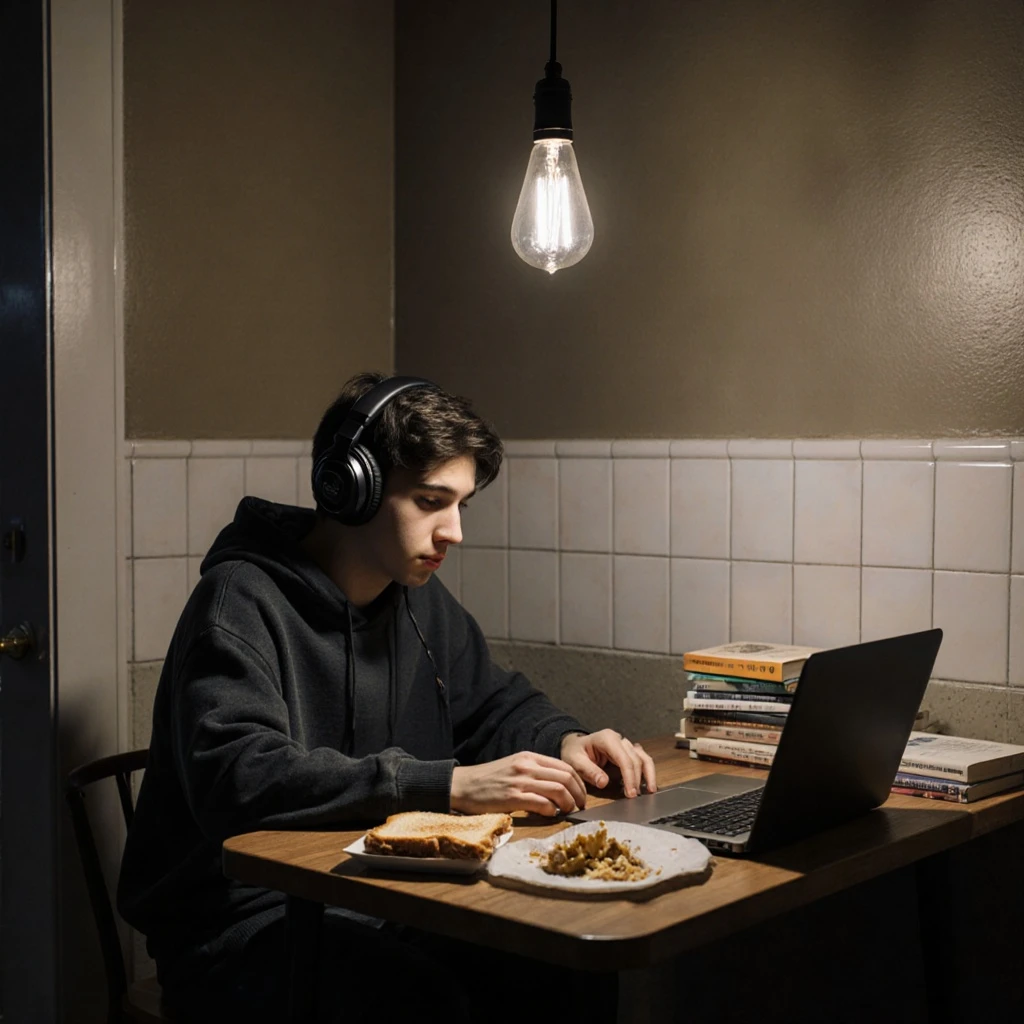
A student working late at a small kitchen table under a hanging bulb. Books, a half-eaten sandwich, and a laptop are scattered in front of him. He wears headphones and a hoodie, surrounded by the quiet hum of night.

A cyclist resting on a curbside with a reusable water bottle and helmet beside him. Sweat on his brow, spandex gear catching the evening sun, and passing traffic slightly blurred in the background.

A woman taking a mirror selfie in a vintage thrift store. She's wearing a layered outfit: a corduroy jacket, striped turtleneck, and long plaid skirt. The mirror is slightly dusty and surrounded by mismatched lamps and colorful scarves.
Model Terkait




README
FLUX Krea Dev LoRA
FLUX Krea Dev LoRA is a versatile text-to-image and image-to-image generation model with full LoRA support. Generate stunning images with custom styles, apply artistic effects, or transform existing images — all with fine-tuned control over the output.
Why It Stands Out
- Dual mode support: Works as both text-to-image and image-to-image generator.
- LoRA support: Apply custom LoRA models for specific styles, characters, or aesthetics.
- Prompt Enhancer: Built-in AI-powered prompt optimization for better results.
- Flexible resolution: Customize width and height independently for any aspect ratio.
- Fine-tuned control: Adjust strength, guidance scale for precise results.
- Multiple output formats: Export as JPEG or PNG based on your needs.
- Affordable pricing: High-quality generation at just $0.02 per image.
- Reproducibility: Use the seed parameter to recreate exact results.
Parameters
| Parameter | Required | Description |
|---|---|---|
| prompt | Yes | Text description of the image you want to generate. |
| image | No | Source image for image-to-image transformation. |
| width | No | Output width in pixels (default: 1024). |
| height | No | Output height in pixels (default: 1024). |
| loras | No | LoRA models to apply for custom styles. |
| strength | No | Transformation intensity for I2I (0.0–1.0, default: 0.8). |
| guidance_scale | No | Prompt adherence strength (default: 3.5). |
| seed | No | Set for reproducibility; -1 for random. |
| output_format | No | Output format: jpeg or png (default: jpeg). |
| enable_base64_output | No | Return base64 string instead of URL (API only). |
| enable_sync_mode | No | Wait for result before returning response (API only). |
How to Use
Text-to-Image:
- Write a prompt describing the image you want. Use the Prompt Enhancer for AI-assisted optimization.
- Set dimensions — adjust width and height for your desired aspect ratio.
- Add LoRAs (optional) — apply custom style models.
- Click Run and download your image.
Image-to-Image:
- Upload a source image.
- Write a prompt describing the transformation.
- Adjust strength — lower values preserve more of the original.
- Add LoRAs (optional) for style transfer.
- Click Run and download your image.
Best Use Cases
- Portrait Photography — Generate photorealistic portraits with custom styles.
- Style Transfer — Apply LoRA styles to existing images.
- Creative Projects — Generate unique images with specific aesthetics.
- Character Consistency — Use LoRAs for consistent character appearances.
- Product Visualization — Create stylized product concepts.
Pricing
| Output | Price |
|---|---|
| Per image | $0.02 |
Pro Tips for Best Quality
- Be detailed in your prompt — include subject, style, lighting, mood, and technical details.
- Use LoRAs to apply consistent styles across multiple generations.
- For image-to-image, use lower strength (0.3–0.5) to preserve more of the original.
- Use higher strength (0.7–0.9) for more dramatic transformations.
- Fix the seed when iterating to compare different LoRA or parameter combinations.
Notes
- Ensure uploaded image URLs are publicly accessible.
- Processing time varies based on resolution and current queue load.
- Please ensure your prompts comply with content guidelines.
Flux Krea Dev Lora API — Quick start
Grab a WaveSpeedAI API key, then call POST https://api.wavespeed.ai/api/v3/wavespeed-ai/flux-krea-dev-lora with your input as JSON. The endpoint returns a prediction id. Start polling the result endpoint around every 2 seconds, increase the interval for long-running tasks, and stop on any terminal status. On completed, read output values from data.outputs. Examples for Flux Krea Dev Lora below.
HTTP example
set -euo pipefail

: "${WAVESPEED_API_KEY:?Set WAVESPEED_API_KEY}"

REQUEST_BODY=$(cat <<'JSON'
{
    "prompt": "A cinematic shot of a city at sunset, soft golden light",
    "size": "1024*1024",
    "strength": 0.8,
    "guidance_scale": 3.5,
    "seed": -1,
    "output_format": "jpeg"
}
JSON
)

# 1. Submit the prediction.
SUBMIT_RESPONSE=$(curl --silent --show-error --fail-with-body \
  -X POST "https://api.wavespeed.ai/api/v3/wavespeed-ai/flux-krea-dev-lora" \
  -H "Content-Type: application/json" \
  -H "Authorization: Bearer $WAVESPEED_API_KEY" \
  -d "$REQUEST_BODY")

TASK=$(printf '%s' "$SUBMIT_RESPONSE" | jq 'if has("data") then .data else . end')
PREDICTION_ID=$(printf '%s' "$TASK" | jq -r '.id')
if [ -z "$PREDICTION_ID" ] || [ "$PREDICTION_ID" = "null" ]; then
  printf 'Submission response did not contain a prediction id
' >&2
  exit 1
fi
RESULT_URL=$(printf '%s' "$TASK" | jq -r '.urls.get // empty')
if [ -z "$RESULT_URL" ]; then
  RESULT_URL="https://api.wavespeed.ai/api/v3/predictions/$PREDICTION_ID/result"
fi

# 2. Poll until the prediction finishes.
while true; do
  RESPONSE=$(curl --silent --show-error --fail-with-body "$RESULT_URL" \
    -H "Authorization: Bearer $WAVESPEED_API_KEY")
  RESULT=$(printf '%s' "$RESPONSE" | jq 'if has("data") then .data else . end')
  STATUS=$(printf '%s' "$RESULT" | jq -r '.status')
  case "$STATUS" in
    completed) printf '%s\n' "$RESULT" | jq '.outputs'; break ;;
    failed|cancelled|timeout) printf '%s\n' "$RESULT" | jq . >&2; exit 1 ;;
    created|processing) sleep 2 ;;
    *) printf 'Unexpected status: %s
' "$STATUS" >&2; exit 1 ;;
  esac
done
Node.js example
const submitUrl = "https://api.wavespeed.ai/api/v3/wavespeed-ai/flux-krea-dev-lora";
const apiKey = process.env.WAVESPEED_API_KEY;
if (!apiKey) throw new Error('Set WAVESPEED_API_KEY');

async function requestJson(url, options = {}) {
  const response = await fetch(url, options);
  if (!response.ok) throw new Error(await response.text());
  return response.json();
}

// 1. Submit the prediction.
const body = await requestJson(submitUrl, {
  method: "POST",
  headers: {
    "Authorization": `Bearer ${apiKey}`,
    "Content-Type": "application/json",
  },
  body: JSON.stringify({
        "prompt": "A cinematic shot of a city at sunset, soft golden light",
        "size": "1024*1024",
        "strength": 0.8,
        "guidance_scale": 3.5,
        "seed": -1,
        "output_format": "jpeg"
}),
});
const task = body.data ?? body;
if (!task.id) throw new Error("Submission response did not contain a prediction id");
const resultUrl = task.urls?.get ||
  `https://api.wavespeed.ai/api/v3/predictions/${task.id}/result`;

// 2. Poll until the prediction finishes.
while (true) {
  const resultBody = await requestJson(resultUrl, {
    headers: { "Authorization": `Bearer ${apiKey}` },
  });
  const result = resultBody.data ?? resultBody;
  if (result.status === "completed") {
    console.log(result.outputs);
    break;
  }
  if (["failed", "cancelled", "timeout"].includes(result.status)) throw new Error(JSON.stringify(result));
  if (!["created", "processing"].includes(result.status)) throw new Error("Unexpected status: " + result.status);
  await new Promise(resolve => setTimeout(resolve, 2000));
}
Python example
import json
import os
import time
from urllib.request import Request, urlopen

api_key = os.environ["WAVESPEED_API_KEY"]
headers = {"Authorization": f"Bearer {api_key}", "Content-Type": "application/json"}
payload = {
    "prompt": "A cinematic shot of a city at sunset, soft golden light",
    "size": "1024*1024",
    "strength": 0.8,
    "guidance_scale": 3.5,
    "seed": -1,
    "output_format": "jpeg"
}

def request_json(url, data=None):
    request = Request(url, data=data, headers=headers, method="POST" if data else "GET")
    with urlopen(request) as response:
        return json.load(response)

# 1. Submit the prediction.
body = request_json("https://api.wavespeed.ai/api/v3/wavespeed-ai/flux-krea-dev-lora", json.dumps(payload).encode())
task = body.get("data", body)
if not task.get("id"):
    raise RuntimeError("Submission response did not contain a prediction id")
result_url = task.get("urls", {}).get("get") or f"https://api.wavespeed.ai/api/v3/predictions/{task['id']}/result"

# 2. Poll until the prediction finishes.
while True:
    result_body = request_json(result_url)
    result = result_body.get("data", result_body)
    status = result.get("status")
    if status == "completed":
        print(result.get("outputs", []))
        break
    if status in {"failed", "cancelled", "timeout"}:
        raise RuntimeError(result)
    if status not in {"created", "processing"}:
        raise RuntimeError(f"Unexpected status: {status}")
    time.sleep(2)
Flux Krea Dev Lora API — Frequently asked questions
What is the Flux Krea Dev Lora API?
Flux Krea Dev Lora is a WaveSpeedAI model for AI inference, exposed as a REST API on WaveSpeedAI. FLUX.1 Krea [dev] is the open-weights Krea 1 model with LoRA support, delivering distinctive, realistic outputs for creative projects. Ready-to-use REST API, best performance, no coldstarts, affordable pricing. You can call it programmatically or try it from the playground above.
How do I call the Flux Krea Dev Lora API?
POST your input parameters to the model's REST endpoint (shown in the API tab of this playground) with your WaveSpeedAI API key in the Authorization header. Submission returns a prediction ID. Poll the result endpoint starting around every 2 seconds, increase the interval for long-running tasks, and stop on any terminal status. The playground generates production-oriented Python, JavaScript, and cURL examples with timeouts, transient-error handling, and safe GET retries. Full request/response shape is documented at https://wavespeed.ai/docs/docs-api/wavespeed-ai/flux-krea-dev-lora.
How much does Flux Krea Dev Lora cost per run?
Flux Krea Dev Lora starts at $0.020 per run. That figure is the base price — the final charge scales with the parameters you set in the form (output size, length, count, references, or whatever knobs this model exposes), so a higher-quality or larger output costs more than a minimal one. The exact cost for your current input is shown live next to the Generate button before you submit, and the actual per-call charge is recorded on the prediction afterwards.
What inputs does Flux Krea Dev Lora accept?
Key inputs: `prompt`, `image`, `size`, `seed`, `guidance_scale`, `enable_base64_output`. The full JSON schema (types, defaults, allowed values) is rendered above the Generate button and mirrored in the API reference at https://wavespeed.ai/docs/docs-api/wavespeed-ai/flux-krea-dev-lora.
How long does Flux Krea Dev Lora take to generate?
Median end-to-end generation time on WaveSpeedAI is around 6 seconds per request, based on recent successful runs. Queue time varies with global demand; live status is visible in the prediction record.
Can I use Flux Krea Dev Lora outputs commercially?
Commercial usage rights depend on the model's license, set by its provider (WaveSpeedAI). The license summary appears on the model card above; see WaveSpeedAI's Terms of Service for platform-level conditions.