Boogu Image Text to Image generates high-quality images from bilingual English and Chinese text prompts, supporting flexible text-to-image creation with strong prompt understanding. Ready-to-use REST inference API, best performance, no coldstarts, affordable pricing.
Inactivo

$0.06por ejecución·~16 / $1
EjemplosVer todo
A professional young foreign woman, front-facing upper body portrait, standing in a clean futuristic studio, wearing a white blazer and light gray inner top, calm confident expression, direct eye contact, slight smile, soft cinematic lighting, blue technology background, realistic skin texture, highly detailed face, premium AI presenter style, photorealistic
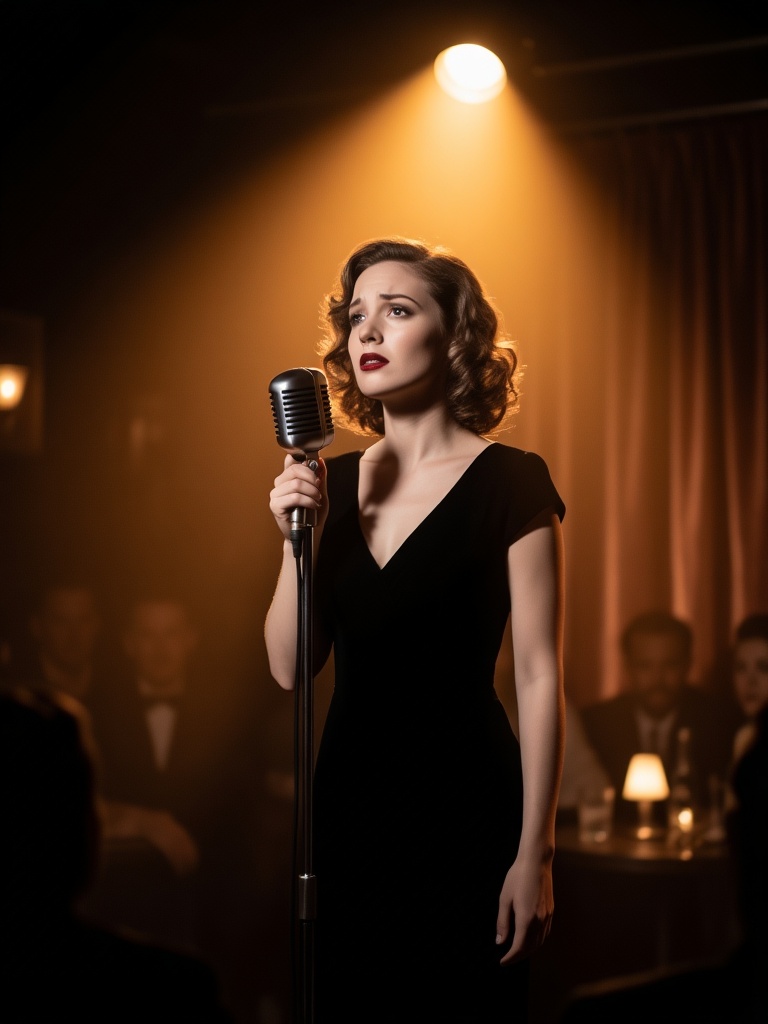
A foreign female jazz singer in a smoky vintage club, elegant black dress, classic microphone, warm amber spotlight, soft curls, emotional eyes, cinematic 1950s portrait, realistic film photography, shallow depth of field
Modelos relacionados



README
Boogu Image Text-to-Image
Boogu Image Text-to-Image generates high-quality images from detailed English or Chinese prompts. It supports common aspect ratio presets and standard output formats, making it simple to create images for creative, marketing, and content workflows.
Why Choose This?
-
Bilingual prompting
Write prompts in English or Chinese to describe the image you want to generate. -
Flexible aspect ratios
Choose square, portrait, or landscape ratios without manually setting custom width and height. -
Simple generation controls
Keep the workflow focused on prompt, aspect ratio, and output format. -
Standard image output
Generated images are returned as URLs in the standard WaveSpeed prediction response.
Parameters
| Parameter | Required | Description |
|---|---|---|
| prompt | Yes | Text prompt describing the image to generate. English and Chinese are supported. |
| image_size | No | Output aspect ratio preset. Supported values include 1:1, 16:9, 9:16, 4:3, and 3:4. Default: 1:1. |
| output_format | No | Output image format: jpeg or png. Default: jpeg. |
How to Use
- Write your prompt — Describe the subject, scene, style, lighting, mood, and composition.
- Choose aspect ratio — Select
1:1,16:9,9:16,4:3, or3:4based on your target layout. - Choose output format — Use
jpegfor general-purpose images orpngwhen you need PNG output. - Submit — Generate the final image and retrieve the output URL.
Price
| Aspect Ratio | Price |
|---|---|
| 1:1 | $0.06 |
| 16:9 | $0.04 |
| 9:16 | $0.04 |
| 4:3 | $0.05 |
| 3:4 | $0.05 |
Best Use Cases
- Creative image generation — Generate concept art, stylized scenes, illustrations, and visual ideas from text.
- Bilingual prompt workflows — Use English or Chinese prompts in the same API workflow.
- Marketing assets — Create campaign visuals, blog images, product graphics, and social media content.
- Prompt testing — Compare different prompt directions with a simple text-to-image interface.
- Layout-specific generation — Generate square, portrait, or landscape images for different content formats.
Pro Tips
- Use detailed prompts with subject, scene, lighting, style, mood, and composition.
- Use
1:1for balanced square images. - Use
9:16for vertical mobile content and16:9for widescreen layouts. - Use
4:3or3:4for poster-like or editorial compositions. - Keep prompts specific enough to guide the desired subject placement and visual style.
- Choose
jpegfor smaller general-purpose outputs andpngwhen PNG output is required.
Boogu Image Text To Image API — Quick start
Grab a WaveSpeedAI API key, then call POST https://api.wavespeed.ai/api/v3/wavespeed-ai/boogu-image/text-to-image with your input as JSON. The endpoint returns a prediction id; poll the prediction endpoint until status flips to completed, then read the output URL from data.outputs[0]. Examples for Boogu Image Text To Image below.
HTTP example
# Submit the prediction
curl -X POST "https://api.wavespeed.ai/api/v3/wavespeed-ai/boogu-image/text-to-image" \
  -H "Content-Type: application/json" \
  -H "Authorization: Bearer $WAVESPEED_API_KEY" \
  -d '{
    "prompt": "A cinematic shot of a city at sunset, soft golden light",
    "image_size": "1:1",
    "output_format": "jpeg"
}'

# Response includes a prediction id. Poll for the result:
curl -X GET "https://api.wavespeed.ai/api/v3/predictions/{request_id}/result" \
  -H "Authorization: Bearer $WAVESPEED_API_KEY"

# When status is "completed", read the output from data.outputs[0].
Node.js example
// npm install wavespeed
const WaveSpeed = require('wavespeed');

const client = new WaveSpeed(); // reads WAVESPEED_API_KEY from env

const result = await client.run("wavespeed-ai/boogu-image/text-to-image", {
        "prompt": "A cinematic shot of a city at sunset, soft golden light",
        "image_size": "1:1",
        "output_format": "jpeg"
});

console.log(result.outputs[0]); // → URL of the generated output
Python example
# pip install wavespeed
import wavespeed

output = wavespeed.run(
    "wavespeed-ai/boogu-image/text-to-image",
    {
    "prompt": "A cinematic shot of a city at sunset, soft golden light",
    "image_size": "1:1",
    "output_format": "jpeg"
}
)

print(output["outputs"][0])  # → URL of the generated output
Boogu Image Text To Image API — Frequently asked questions
What is the Boogu Image Text To Image API?
Boogu Image Text To Image is a WaveSpeedAI model for image generation, exposed as a REST API on WaveSpeedAI. Boogu Image Text to Image generates high-quality images from bilingual English and Chinese text prompts, supporting flexible text-to-image creation with strong prompt understanding. Ready-to-use REST inference API, best performance, no coldstarts, affordable pricing. You can call it programmatically or try it from the playground above.
How do I call the Boogu Image Text To Image API?
POST your input parameters to the model's REST endpoint (shown in the API tab of this playground) with your WaveSpeedAI API key in the Authorization header. Submission returns a prediction ID; poll the prediction endpoint until status flips to "completed", then read the output URL from the result. The playground generates a ready-to-paste code sample in Python, JavaScript, or cURL for whatever inputs you've set. Full request/response shape is documented at https://wavespeed.ai/docs/docs-api/wavespeed-ai/boogu-image-text-to-image.
How much does Boogu Image Text To Image cost per run?
Boogu Image Text To Image starts at $0.060 per run. That figure is the base price — the final charge scales with the parameters you set in the form (output size, length, count, references, or whatever knobs this model exposes), so a higher-quality or larger output costs more than a minimal one. The exact cost for your current input is shown live next to the Generate button before you submit, and the actual per-call charge is recorded on the prediction afterwards.
What inputs does Boogu Image Text To Image accept?
Key inputs: `prompt`, `image_size`, `output_format`. The full JSON schema (types, defaults, allowed values) is rendered above the Generate button and mirrored in the API reference at https://wavespeed.ai/docs/docs-api/wavespeed-ai/boogu-image-text-to-image.
How do I get started with the Boogu Image Text To Image API?
Sign up for a free WaveSpeedAI account to claim starter credits, copy your API key from /accesskey, then call the endpoint shown in the API tab of the playground. The playground also auto-generates a code sample in Python, JavaScript, or cURL for the parameters you've set.
Can I use Boogu Image Text To Image outputs commercially?
Commercial usage rights depend on the model's license, set by its provider (WaveSpeedAI). The license summary appears on the model card above; see WaveSpeedAI's Terms of Service for platform-level conditions.