Recraft-20B SVG generates fast, affordable SVG vector images ideal for scalable graphics and icons. Ready-to-use REST inference API, best performance, no coldstarts, affordable pricing.
Bereit

$0.044pro Durchlauf·~22 / $1
BeispieleAlle anzeigen
Oil-painted round icon of a forest elf girl, golden border, painterly brushwork, fantasy RPG UI design, decorative look

Young woman waking up in the morning sunlight, lying in bed with tousled hair, warm backlight, intimate and natural moment, realistic skin tones and fabric texture

Father holding his baby in a sunlit park, candid emotion, detailed facial features, colorful autumn background, bokeh effect, Leica look

Man with a starry night sky in place of his face, wearing a suit, standing in a desert with melting clocks, inspired by Dali

A woman with butterflies emerging from her hair, floating in a weightless dreamscape
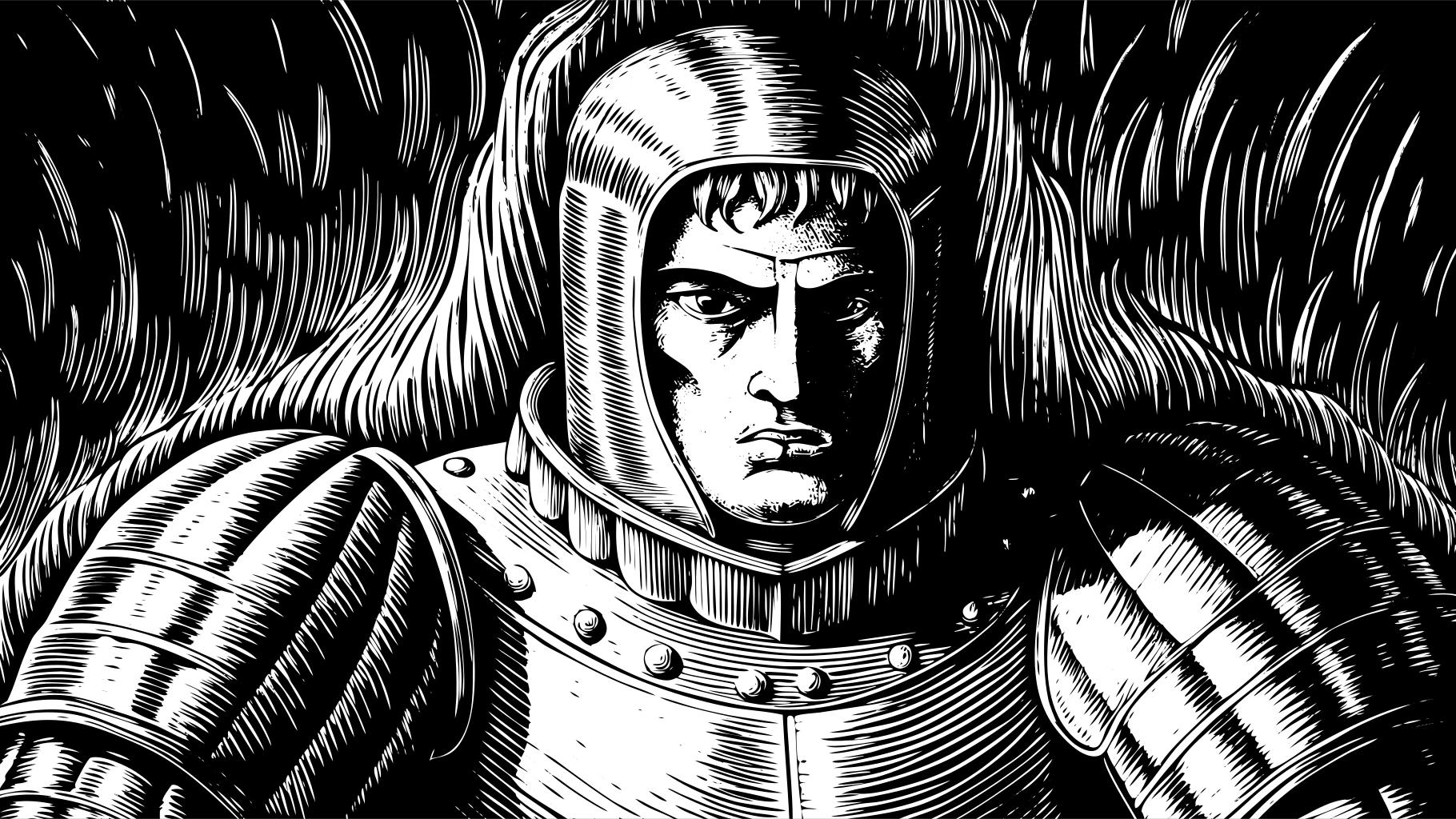
Woodcut-style portrait of a medieval knight, traditional linocut textures, strong black-and-white contrast, intricate lines, vintage book illustration

Traditional wood engraving of a woman in profile, botanical background, fine linework, 19th-century style, monochrome, rustic tone

Flat icon of a cyberpunk girl with pink hair and VR goggles, simple shapes, high contrast, modern UI design, clean vector look

Minimalist avatar icon of a samurai, red sun in background, stylized silhouette, vector-friendly, app design aesthetic

a minimalist glass perfume bottle with a golden cap
Ähnliche Modelle






README
Recraft 20B SVG
Generate scalable vector graphics (SVG) from text descriptions with Recraft 20B. This specialized model creates clean, production-ready vector illustrations across a wide range of styles — perfect for icons, logos, UI elements, and print-ready graphics that scale infinitely.
Why It Looks Great
- True vector output: Generates SVG files that scale to any size without quality loss.
- Extensive style library: 12+ specialized illustration styles from icons to detailed engravings.
- Production-ready: Clean paths and optimized output for immediate use.
- Icon specialization: Dedicated icon style for UI/UX and app design.
- Prompt Enhancer: Built-in tool to refine your descriptions automatically.
- Flexible aspect ratios: Multiple format options for any use case.
Parameters
| Parameter | Required | Description |
|---|---|---|
| prompt | Yes | Text description of the vector graphic you want to generate. |
| aspect_ratio | No | Output format: 1:1, 16:9, 9:16, 4:3, 3:4, etc. Default: 1:1. |
| style | No | Vector style preset (see Style Guide below). Default: icon. |
How to Use
- Write your prompt — describe the vector graphic you want to create.
- Use Prompt Enhancer (optional) — click to automatically enrich your description.
- Set aspect ratio — choose the format that fits your use case.
- Choose style — select from the extensive style library.
- Run — click the button to generate.
- Download — save your SVG file.
Pricing
Flat rate per image generation.
| Output | Cost |
|---|---|
| Per SVG | $0.044 |
Style Guide
| Style | Description | Best For |
|---|---|---|
| icon | Clean, simple iconography | App icons, UI elements, symbols |
| vector_illustration | General vector artwork | Versatile illustrations |
| vector_illustration/cartoon | Cartoon-style vectors | Fun, playful graphics |
| vector_illustration/doodle_line_art | Hand-drawn doodle aesthetic | Casual, sketchy designs |
| vector_illustration/engraving | Classic engraving style | Vintage, premium designs |
| vector_illustration/flat_2 | Modern flat design | UI, infographics, web |
| vector_illustration/kawaii | Cute Japanese style | Stickers, cute characters |
| vector_illustration/line_art | Clean line-based art | Minimalist illustrations |
| vector_illustration/line_circuit | Circuit board aesthetic | Tech, electronics themes |
| vector_illustration/linocut | Block print style | Artistic, textured look |
| vector_illustration/seamless | Tileable patterns | Backgrounds, textures |
Best Use Cases
- Icon Design — Create app icons, UI elements, and symbol sets.
- Logo Creation — Generate scalable logo concepts and brand marks.
- UI/UX Assets — Produce vector elements for interfaces and apps.
- Print Graphics — Create illustrations that print at any size.
- Pattern Design — Generate seamless tileable patterns.
- Game UI — Design RPG icons, badges, and decorative elements.
Example Prompts
- "Oil-painted round icon of a forest elf girl, golden border, painterly brushwork, fantasy RPG UI design, decorative look"
- "minimalist coffee cup icon, single color, simple shapes, app icon style"
- "vintage engraving of a sailing ship, detailed linework, nautical theme"
- "kawaii cat face sticker, cute expression, pastel colors, round design"
- "seamless geometric pattern, art deco style, gold and black"
- "flat illustration of a mountain landscape, modern minimal style, travel poster"
Pro Tips for Best Results
- Use the icon style for clean, simple graphics suitable for apps and UI.
- For detailed artwork, try engraving or line_art styles.
- Use seamless style for backgrounds and tileable patterns.
- Describe border styles and framing for RPG/game UI elements.
- Include color preferences in your prompt for better control.
- SVG output can be edited in tools like Illustrator, Figma, or Inkscape.
Notes
- Output is true SVG format — infinitely scalable vector graphics.
- SVG files can be further edited in any vector graphics software.
- Processing time may vary based on complexity.
- Some styles work better for certain subjects — experiment to find the best match.
Recraft 20b Svg API — Quick start
Grab a WaveSpeedAI API key, then call POST https://api.wavespeed.ai/api/v3/recraft-ai/recraft-20b-svg with your input as JSON. The endpoint returns a prediction id. Start polling the result endpoint around every 2 seconds, increase the interval for long-running tasks, and stop on any terminal status. On completed, read output values from data.outputs. Examples for Recraft 20b Svg below.
HTTP example
set -euo pipefail

: "${WAVESPEED_API_KEY:?Set WAVESPEED_API_KEY}"

REQUEST_BODY=$(cat <<'JSON'
{
    "prompt": "A cinematic shot of a city at sunset, soft golden light",
    "aspect_ratio": "1:1",
    "style": "vector_illustration"
}
JSON
)

# 1. Submit the prediction.
SUBMIT_RESPONSE=$(curl --silent --show-error --fail-with-body \
  -X POST "https://api.wavespeed.ai/api/v3/recraft-ai/recraft-20b-svg" \
  -H "Content-Type: application/json" \
  -H "Authorization: Bearer $WAVESPEED_API_KEY" \
  -d "$REQUEST_BODY")

TASK=$(printf '%s' "$SUBMIT_RESPONSE" | jq 'if has("data") then .data else . end')
PREDICTION_ID=$(printf '%s' "$TASK" | jq -r '.id')
if [ -z "$PREDICTION_ID" ] || [ "$PREDICTION_ID" = "null" ]; then
  printf 'Submission response did not contain a prediction id
' >&2
  exit 1
fi
RESULT_URL=$(printf '%s' "$TASK" | jq -r '.urls.get // empty')
if [ -z "$RESULT_URL" ]; then
  RESULT_URL="https://api.wavespeed.ai/api/v3/predictions/$PREDICTION_ID/result"
fi

# 2. Poll until the prediction finishes.
while true; do
  RESPONSE=$(curl --silent --show-error --fail-with-body "$RESULT_URL" \
    -H "Authorization: Bearer $WAVESPEED_API_KEY")
  RESULT=$(printf '%s' "$RESPONSE" | jq 'if has("data") then .data else . end')
  STATUS=$(printf '%s' "$RESULT" | jq -r '.status')
  case "$STATUS" in
    completed) printf '%s\n' "$RESULT" | jq '.outputs'; break ;;
    failed|cancelled|timeout) printf '%s\n' "$RESULT" | jq . >&2; exit 1 ;;
    created|processing) sleep 2 ;;
    *) printf 'Unexpected status: %s
' "$STATUS" >&2; exit 1 ;;
  esac
done
Node.js example
const submitUrl = "https://api.wavespeed.ai/api/v3/recraft-ai/recraft-20b-svg";
const apiKey = process.env.WAVESPEED_API_KEY;
if (!apiKey) throw new Error('Set WAVESPEED_API_KEY');

async function requestJson(url, options = {}) {
  const response = await fetch(url, options);
  if (!response.ok) throw new Error(await response.text());
  return response.json();
}

// 1. Submit the prediction.
const body = await requestJson(submitUrl, {
  method: "POST",
  headers: {
    "Authorization": `Bearer ${apiKey}`,
    "Content-Type": "application/json",
  },
  body: JSON.stringify({
        "prompt": "A cinematic shot of a city at sunset, soft golden light",
        "aspect_ratio": "1:1",
        "style": "vector_illustration"
}),
});
const task = body.data ?? body;
if (!task.id) throw new Error("Submission response did not contain a prediction id");
const resultUrl = task.urls?.get ||
  `https://api.wavespeed.ai/api/v3/predictions/${task.id}/result`;

// 2. Poll until the prediction finishes.
while (true) {
  const resultBody = await requestJson(resultUrl, {
    headers: { "Authorization": `Bearer ${apiKey}` },
  });
  const result = resultBody.data ?? resultBody;
  if (result.status === "completed") {
    console.log(result.outputs);
    break;
  }
  if (["failed", "cancelled", "timeout"].includes(result.status)) throw new Error(JSON.stringify(result));
  if (!["created", "processing"].includes(result.status)) throw new Error("Unexpected status: " + result.status);
  await new Promise(resolve => setTimeout(resolve, 2000));
}
Python example
import json
import os
import time
from urllib.request import Request, urlopen

api_key = os.environ["WAVESPEED_API_KEY"]
headers = {"Authorization": f"Bearer {api_key}", "Content-Type": "application/json"}
payload = {
    "prompt": "A cinematic shot of a city at sunset, soft golden light",
    "aspect_ratio": "1:1",
    "style": "vector_illustration"
}

def request_json(url, data=None):
    request = Request(url, data=data, headers=headers, method="POST" if data else "GET")
    with urlopen(request) as response:
        return json.load(response)

# 1. Submit the prediction.
body = request_json("https://api.wavespeed.ai/api/v3/recraft-ai/recraft-20b-svg", json.dumps(payload).encode())
task = body.get("data", body)
if not task.get("id"):
    raise RuntimeError("Submission response did not contain a prediction id")
result_url = task.get("urls", {}).get("get") or f"https://api.wavespeed.ai/api/v3/predictions/{task['id']}/result"

# 2. Poll until the prediction finishes.
while True:
    result_body = request_json(result_url)
    result = result_body.get("data", result_body)
    status = result.get("status")
    if status == "completed":
        print(result.get("outputs", []))
        break
    if status in {"failed", "cancelled", "timeout"}:
        raise RuntimeError(result)
    if status not in {"created", "processing"}:
        raise RuntimeError(f"Unexpected status: {status}")
    time.sleep(2)
Recraft 20b Svg API — Frequently asked questions
What is the Recraft 20b Svg API?
Recraft 20b Svg is a Recraft model for image generation, exposed as a REST API on WaveSpeedAI. Recraft-20B SVG generates fast, affordable SVG vector images ideal for scalable graphics and icons. Ready-to-use REST inference API, best performance, no coldstarts, affordable pricing. You can call it programmatically or try it from the playground above.
How do I call the Recraft 20b Svg API?
POST your input parameters to the model's REST endpoint (shown in the API tab of this playground) with your WaveSpeedAI API key in the Authorization header. Submission returns a prediction ID. Poll the result endpoint starting around every 2 seconds, increase the interval for long-running tasks, and stop on any terminal status. The playground generates production-oriented Python, JavaScript, and cURL examples with timeouts, transient-error handling, and safe GET retries. Full request/response shape is documented at https://wavespeed.ai/docs/docs-api/recraft-ai/recraft-ai-recraft-20b-svg.
How much does Recraft 20b Svg cost per run?
Recraft 20b Svg starts at $0.044 per run. That figure is the base price — the final charge scales with the parameters you set in the form (output size, length, count, references, or whatever knobs this model exposes), so a higher-quality or larger output costs more than a minimal one. The exact cost for your current input is shown live next to the Generate button before you submit, and the actual per-call charge is recorded on the prediction afterwards.
What inputs does Recraft 20b Svg accept?
Key inputs: `prompt`, `aspect_ratio`, `enable_base64_output`, `style`. The full JSON schema (types, defaults, allowed values) is rendered above the Generate button and mirrored in the API reference at https://wavespeed.ai/docs/docs-api/recraft-ai/recraft-ai-recraft-20b-svg.
How long does Recraft 20b Svg take to generate?
Median end-to-end generation time on WaveSpeedAI is around 11 seconds per request, based on recent successful runs. Queue time varies with global demand; live status is visible in the prediction record.
Can I use Recraft 20b Svg outputs commercially?
Commercial usage rights depend on the model's license, set by its provider (Recraft). The license summary appears on the model card above; see WaveSpeedAI's Terms of Service for platform-level conditions.