Z-Image CFG Setup Guide: Avoiding Over-Saturation and Overexposure Issues
The optimal setting for Z-Image-Base CFG (guidance_scale): The recommended range is 3.5 to 6. Excessive CFG leads to over-saturation issues. Different styles have different recommended values for CFG.
This week, I kept getting images that felt a bit… shouty. Colors were loud, highlights blew out, and the vibe didn’t match my prompt, even when the subject did. That small friction pushed me to sit down with coffee and run a quiet series of tests on Z-Image-Base, same prompts, same seeds, different CFG values, until the patterns felt obvious in my hands.
I’m Dora. This Z-Image CFG Setup Guide is the result of those runs, plus notes from past work with diffusion models. I’m not here to sell you a setting. I’m here to show you what shifted for me, why it likely happens, and where a small nudge can make work feel lighter instead of louder.
What is CFG
The influence of CFG on image generation
Classifier-Free Guidance (CFG) is the dial that decides how strongly the model should follow your prompt versus its own learned priors. Low CFG lets the model wander: high CFG pulls it closer to your words. In practice, it’s less mystical than it sounds. I think of it like a director giving notes: “Looser” or “stick to the script.”
When I swept CFG from 1 to 9 across identical prompts (“soft morning light, ceramic mug on a wooden desk, shallow depth of field”), the changes were consistent:
- Low CFG (1–3): moodier variance, softer contrast, more unexpected textures. Sometimes the mug became stoneware or the light leaned cooler. Not wrong, just interpretive.
- Mid CFG (3.5–6): images stabilized, composition held, and details matched the prompt without getting brittle. This is where my shoulders dropped.
- High CFG (7+): subject compliance stayed high, but color saturation and micro-contrast spiked. Highlights clipped more often. It looked punchy on first glance, then tiring.
If you want a formal anchor, the original Classifier-Free Guidance paper by Jonathan Ho and Tim Salimans explains the mechanism: CFG scales the difference between conditional and unconditional predictions to trade off sample fidelity and diversity.
The relationship between CFG value and prompt compliance
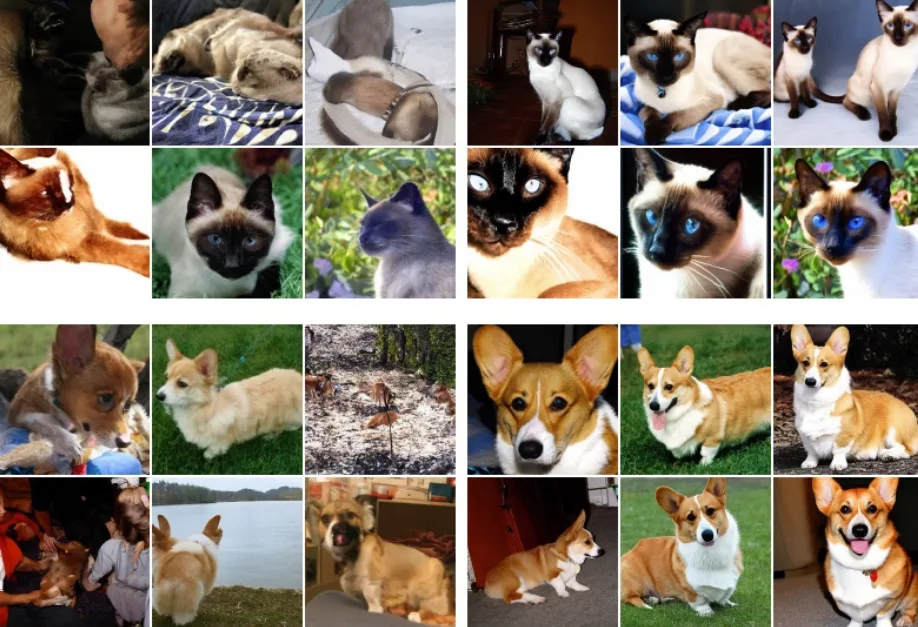
Higher CFG increases prompt compliance, but with trade-offs:
- It doesn’t fix vague prompts. A fuzzy prompt at CFG 8 is still fuzzy, just louder.
- It can force literalism that fights style. At high guidance, I saw “glossy” creep in even when I didn’t ask for it, like the model over-enunciating.
- It interacts with negative prompts. “No blown highlights, no oversaturation” slightly cushioned high CFG, but not as well as simply lowering the dial.
My takeaway: use CFG to “tune” a good prompt, not to rescue a thin one. The sweet spot is usually where compliance rises without color and lighting going theatrical.
Recommended range of Z-Image-Base CFG
Low CFG (1–3): More random, more creative
When I sat at CFG 2 on Z-Image-Base, I got pleasant, almost filmic softness. Edges were less strict, and small artifacts faded into grain instead of plastic sheen. This range helped for:
- Atmosphere-forward scenes: fog, dusk, bokeh, watercolor-ish renderings.
- Early ideation: I wanted possibilities, not precision. Low CFG gave me three believable directions from one seed.
Limits I hit:
- Composition drift: props wandered, framing shifted, hands grew wobbly.
- Prompt-specific details (brand, count of objects) slipped.
If you’re mood-boarding or exploring a visual language, low CFG is gentle and generative. If you’re on deadline to match a brief, it’s probably too loose.
Medium CFG (3.5–6): Balance point (recommended 4.5)
This was the most reliable zone in my tests. At 4.5, Z-Image-Base felt cooperative without getting glossy. A few field notes:
- Colors settled. Skin tones stopped leaning neon. Wood looked like wood, not lacquer.
- Lighting stayed expressive but didn’t blow out. White shirts kept texture.
- Prompts held form: if I asked for “two cups,” I got two cups most of the time.
Why I recommend 4.5 as a starting point:
- It captured the prompt’s intent while leaving room for style.
- It paired well with small negative prompts (e.g., “overly saturated, plastic gloss”).
- Across six seeds per prompt, variation remained useful, not chaotic.
Edge cases:
- Very technical product renders sometimes wanted a tick higher (5–5.5) to nail edges.
- Painterly textures looked fine here but sometimes bloomed better at 3.5–4.
High CFG (7+): Risk of oversaturation
I pushed 7–9 to see where things broke. They didn’t break, but they shouted.
- Saturation ramped up in a way that grabbed the thumbnail and then wore me out in context.
- Specular highlights turned harsh. Metallics were flashy, skin got waxy.
- Noise patterns surfaced in flat fields, like the model flexing too hard.
Are there uses for high CFG? A few:
- Thumbnail-first assets where pop matters more than nuance.
- Tight brand constraints, if you also tame color in post and watch exposure.
But if you’re getting “plastic effect” or bright spill you can’t grade away, step down before you bolt on fix-after-fix. In my runs, dropping from 7.5 to 5 solved more than any negative prompt list did.
Diagnosis of common problems
Image oversaturation / overly bright colors
What I saw: reds and teals punched through, gradients banded, and the whole image felt HDR-adjacent.
Likely cause: CFG pushing too hard, sometimes combined with contrast-leaning samplers.
What helped:
- Lower CFG by 1–2 points first. Simple wins.
- Add a light negative: “oversaturated, color clipping.” It nudged, but didn’t replace, the CFG change.
- If available, reduce contrast-y post-processing or switch to a sampler that preserves midtones better.
Tie back to work: assets started sitting better next to real photos on a page. I stopped fighting color in post.
Image overexposure / high light overflow
What I saw: white shirts lost weave: windows glowed like portals. Histograms bunched on the right.
Likely cause: high CFG plus “bright” or “sunlit” prompts without constraints.
What helped:
- Drop CFG to the 4–5 range.
- Be explicit: “soft diffused light,” “retain highlight detail,” or “no blown highlights.”
- Nudge exposure via prompt (“overcast” did more than I expected). If the tool lets you, slightly reduce exposure/contrast elsewhere rather than fighting with guidance alone.
Result: speculars stayed, but with texture. The image read more like a camera, less like a showroom render.
Loss of details / plastic effect
What I saw: skin looked waxy, fabric turned into smooth gradients, microtexture disappeared.
Likely cause: a combination of high CFG and style terms like “glossy,” “cinematic lighting,” or “ultra-detailed” that paradoxically flattens surfaces.
What helped:
- Lower CFG to ~4.5.
- Replace “ultra-detailed” with concrete texture cues: “fine linen weave,” “subtle pores,” “matte finish.”
- Add a negative like “plastic, waxy, airbrushed.”
In practice: this didn’t save me time on the first pass, but after a few images, I noticed it reduced mental effort. Fewer re-rolls. Fewer “why does this look fake?” moments.
Suggestions for different styles of CFG
Realistic photography: CFG 4–5
For photo-real prompts, 4–5 felt closest to a “set and forget.” I used this range on portraits, desk scenes, and simple food shots. At 4.5, skin texture held, shadows weren’t crushed, and lenses felt believable.
Helpful nudges:
- Ask for lighting like a human would: “window light, north-facing, overcast.”
- Use small negatives: “oversaturated, plastic skin.”
- Keep composition terms plain: “35mm, f/2.8, waist-up.” Overly ornate prompts pushed style too hard and fought realism.
Who this fits: marketers and creators who mix generated images with real photography. It slots into brand pages without screaming.
Illustration style: CFG 5–7
Illustration liked a bit more guidance. At 5.5–6.5, line work held together and palettes were intentional without turning neon.
Helpful nudges:
- Be specific about medium: “gouache wash,” “inked line,” “screenprint texture.” Guidance then locks to that idea.
- If colors shout, lower CFG and anchor palette cues (“muted earth tones,” “limited palette”).
- For concept sheets, dip as low as 3.5 to encourage variation across frames.
Who this fits: teams building consistent visual systems, apps, docs, or education materials, where style cohesion beats photoreal tricks.
Cooperation of CFG with other parameters
 CFG doesn’t work alone. A few interactions kept showing up for me:
- Sampler and steps: With more steps, high CFG artifacts sometimes softened, but not enough to justify the extra time. I got better returns from lowering CFG than from cranking steps.
- Resolution: Upsizing at high CFG exaggerated plastic sheen. When I needed large outputs, I kept CFG moderate (≈4.5) and let a separate upscaler handle detail.
- Negative prompts: They’re seasoning, not rescue. A small, targeted list worked best: “oversaturated, waxy skin, blown highlights.” Long laundry lists dulled the image.
- Style tokens: If you include strong style cues (“studio strobe, glossy magazine”), expect them to amplify high-CFG punch. Either soften the style language or drop CFG.
- Seeds and variation: Running three seeds at 4.5 gave me more usable options than one seed at 7. The former felt like choice: the latter felt like correction.
If you want the deeper why, the Classifier-Free Guidance method in diffusion models effectively scales the difference between conditional and unconditional predictions. Push it too far and you magnify not just signal but also noise and bias toward high-contrast representations. Good primers: the original paper on Classifier-Free Guidance and the guidance_scale notes in Diffusers. They line up with what I observed, use guidance to steer, not to force.
This all boils down to a small practice I now follow: I start at CFG 4.5, run two seeds, and only move the dial if I can name what’s wrong (too bright, too glossy, too vague). It’s quiet work, but it saves me from wrestling the model later. If you’re wiring this into a workflow or API pipeline, this short Z-Image-Base API guide shows where guidance_scale sits and how to pass it cleanly. For teams comparing different hosted generation options, a MiniMax H3 API workflow can also be useful when evaluating API-based image and video generation pipelines.
Related Articles
GPT Image 2.5 Review 2027: Quality, Editing, Speed, and Cost
GPT Image 2.5 vs GPT Image 2: Is It Worth Upgrading?

Grok Imagine Video Pricing and Cost per Clip
H3 Max Benchmark: Speed, Quality, and Prompt Tests
K2 Horizon Review 2027: What the Open Model Family Includes