
Best AI Video Face Swap Tools (2026)
We tested the leading AI video face swap tools in 2026. Here's what actually works, what fails, and how to pick based on your real requirements.
Hi, I’m Dora. Here’s something I keep noticing: almost every “best ai video face swap” roundup out there tests the exact same demo clip under ideal conditions, then declares a winner. That’s not how any of this actually gets used.*
I’ve spent the last several weeks running real test footage through a shortlist of tools, many of which are built on or inspired by modern AI video generation models like Seedance 2.0. — different lighting setups, different motion levels, different clip lengths. What I found wasn’t always what the marketing suggested. Some tools that look stunning in previews fall apart on export. Some that feel slow in the browser produce the most temporally stable output. And a few that are rarely mentioned turn out to be the most reliable choice for developers who need repeatable API behavior.
This guide covers how I evaluated these tools, what the comparison actually looks like, and which tool fits which situation. No affiliate rankings. No “all of these are great!” hedging.
How We Evaluated These Tools
Test Clips Used
I ran three source video categories through each tool:
Clip Type A — Controlled lighting, low motion: Talking-head footage shot under even, diffused light. Subjects facing camera, minimal head movement. This is the “easy mode” test — any halfway-decent tool should perform acceptably here.
Clip Type B — Mixed lighting, moderate motion: Handheld footage with a mix of natural window light and overhead fill. Subjects moving naturally — nodding, turning slightly. This is where temporal consistency issues start to surface.
Clip Type C — Dynamic motion, harsh or directional lighting: Fast head turns, animated expression, side-lit or backlit subjects. This is where most tools begin to struggle and where the real differences appear.
Clip lengths ranged from 8 seconds to 45 seconds. Source face: a single well-lit frontal portrait at 1080px face resolution.
Scoring Rubric
Each tool was scored across four dimensions:
| Dimension | What I Measured |
|---|---|
| Realism | Identity preservation, skin tone match, edge blending quality |
| Temporal Consistency | Frame-to-frame stability, flicker, drift under motion |
| Speed | Time from submission to downloadable output |
| Cost Efficiency | Price per minute of processed video, free tier generosity |
No single dimension wins by default — a reality that also appears in comparisons between leading AI video generation models, where speed, realism, and stability often trade off against each other. A tool that renders in 20 seconds but produces flickering output is not “fast” in any way that matters.
Understanding why temporal stability is hard to get right in video is worth a moment — it comes down to the challenge of maintaining consistent identity across sequential frames, which the research on GAN-based video synthesis from arXiv covers in useful depth if you want the technical grounding.
Test Date and Pricing Snapshot
All testing conducted February–March 2026. Pricing reflects current published rates at time of testing — these change frequently, so verify before committing.

Best AI Video Face Swap Tools
Best Overall Output Quality: DeepSwap
For pure output realism across all three clip types, DeepSwap consistently produced the most convincing results. Identity preservation was strong even on Clip Type C (dynamic motion, harsh lighting), where most competitors showed visible drift after the 15-second mark.
What stood out: the multi-engine approach. DeepSwap runs several AI models simultaneously and returns multiple output versions for comparison. For difficult swaps — unusual source angles, strong directional lighting — this matters enormously. One engine handles deep shadows better; another preserves fine facial detail like texture and asymmetry more accurately.
The tradeoff is complexity and speed. DeepSwap is not a one-click experience. And for straightforward talking-head swaps, the extra processing time doesn’t always justify the quality delta over simpler tools.
Best for: Production work, marketing content, anything where output will be viewed closely on large screens.
Pricing: Credit-based, pay-as-you-go. No permanent free tier.
Best for Developer API Integration: Magic Hour
If you’re building something rather than just generating content, Magic Hour is the most developer-friendly option I tested. The API is well-documented, returns predictable structured responses, and handles async job management cleanly — which matters a lot when you’re integrating face swap into a larger pipeline.
The underlying models are solid too. Temporal consistency on Clip Type B (moderate motion) was among the best I saw, and the output quality on talking-head clips was genuinely impressive. It’s also one of the few tools that integrates face swap with lip sync and image-to-video generation in a unified API surface — useful if your use case involves more than just face replacement.
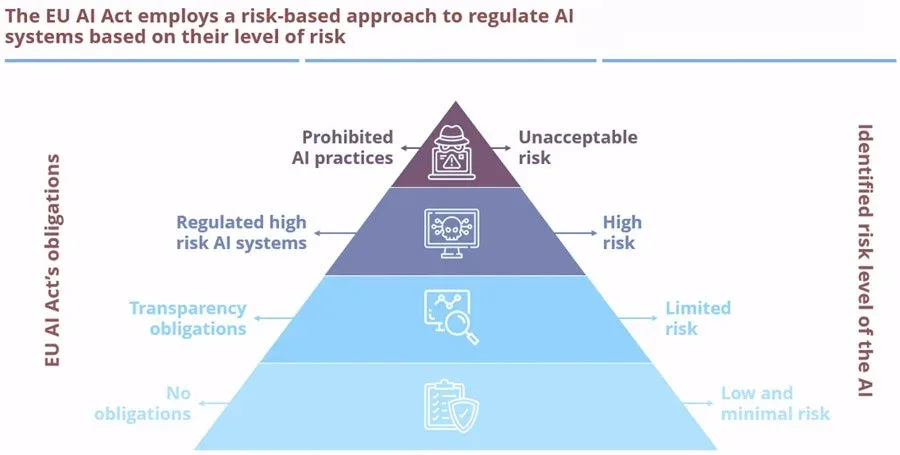
It’s worth noting that the regulatory environment around synthetic media is tightening. Under Article 50 of the EU AI Act, providers of AI systems generating synthetic audio, image, or video content must ensure that outputs are marked in a machine-readable format and detectable as artificially generated or manipulated. Magic Hour includes content watermarking by default, which makes compliance easier if you’re building products that will be distributed in regulated markets. For a broader overview of what these obligations mean in practice, the European Parliament’s summary of the EU AI Act is worth reading before you ship anything consumer-facing.
Best for: Developers building applications, batch automation workflows, teams that need API reliability over time.
Pricing: Subscription tiers with API access. Free trial available.
Best for Multi-Face Clips: Reface
Multi-face swapping is genuinely harder than single-face. The model needs to detect, assign, and independently process multiple faces per frame — and if face assignment goes wrong, the result is visually chaotic in a way that’s hard to explain to a client.
Reface handles multi-face scenarios more reliably than anything else I tested. Face assignment stayed correct across clips with two to three subjects, even when faces briefly overlapped in frame. The output won’t win awards for photorealism, but it’s consistent — and for group content intended for social media, consistency beats perfection.
The GAN architecture that powers most modern face swap tools — where a generator network and discriminator network compete iteratively to improve realism — is fundamentally the same across most of these platforms. What differentiates multi-face performance is usually how the tool handles face detection and tracking upstream of the generative step, not the generative model itself.
Best for: Group clips, ensemble footage, social-first content with multiple subjects.
Pricing: Subscription from $3.99/month. Free tier with watermark.
Best Free Option: FaceFusion
FaceFusion is open-source, runs locally, and produces output quality that has no business being free. It’s not a web app — setup requires some technical patience — but once it’s running, you get full control over model parameters, no watermarks, and no per-credit charges.
For privacy-conscious users, the local-first architecture means your source images and video never leave your machine. That’s a real differentiator for anyone working with footage of identifiable people, especially as data retention policies across cloud-based tools become more scrutinized.
The catch: it doesn’t hold hands. Error messages are terse. Processing parameters need manual tuning. And unlike cloud tools, it won’t scale horizontally if you need to process many clips in parallel.
Best for: Developers experimenting, privacy-conscious users, anyone willing to trade setup friction for zero ongoing cost.
Pricing: Free and open-source.

Comparison Table
| Tool | Realism | Temporal Consistency | Multi-Face | API Access | Starting Price |
|---|---|---|---|---|---|
| DeepSwap | ⭐⭐⭐⭐⭐ | ⭐⭐⭐⭐ | ✅ | Limited | Pay-per-use |
| Magic Hour | ⭐⭐⭐⭐ | ⭐⭐⭐⭐⭐ | ✅ | ✅ Full | Subscription |
| Reface | ⭐⭐⭐ | ⭐⭐⭐⭐ | ✅ Strong | ❌ | $3.99/mo |
| FaceFusion | ⭐⭐⭐⭐ | ⭐⭐⭐ | ✅ | Self-hosted | Free |
Scores reflect testing on Clip Type B (mixed lighting, moderate motion). Results vary by clip type.
What Most Reviews Miss
Preview Quality vs. Export Quality Gap
This is the one that got me first. Several tools show a high-quality preview in-browser that looks genuinely impressive. The exported file — at the resolution and bitrate you actually need — looks noticeably different.
The gap usually shows up in two ways: compression artifacts around the hairline and face edges, and a softness in the final output that wasn’t visible in preview. Always download and examine a full-resolution export before making a tool decision based on previews. What you see in a browser player at 720p is not what your audience will see.
Why Rendering Speed Alone Doesn’t Predict Realism
I’ve seen this claim repeatedly: “processes in under 10 seconds.” That’s either a very short clip, a very low-resolution output, or a very fast path to mediocre quality.
Temporal consistency — the thing that makes video face swaps look real across time— is closely related to issues discussed in guides on how creators fix flicker and jitter in AI-generated video. Not just in a single frame — requires the model to understand motion across frames. IBM’s technical overview of how GANs function explains why this iterative process takes computational effort: the generator and discriminator networks are effectively competing through many cycles to produce realistic output. Tools that deliver results in seconds on long clips are almost always sacrificing this temporal reasoning. Speed is a signal, not a feature. Fast processing on video longer than 15 seconds usually means something was skipped.
Recommendation by Use Case
Casual Creators
Go with Reface. It’s fast, mobile-friendly, handles group clips well, and the free tier is genuinely usable for short clips. You’re not going to get production-grade realism, but you’ll get shareable output in under a minute with minimal setup friction.
Developers Needing Repeatable API Output
Magic Hour. The API documentation is clean, the async handling is reliable, and the output is consistent enough to build user-facing products on. If your integration involves regulated markets, the built-in watermarking also simplifies your compliance posture under frameworks like the EU AI Act’s Article 50 transparency requirements.
Users Who Need Multi-Face Support
Reface for social content, DeepSwap for production work. If you’re doing quick group clips for social media, Reface’s speed and reliable face assignment wins. If you’re doing multi-face work for marketing or professional video where quality matters, DeepSwap’s multi-engine approach produces cleaner results, especially when the faces aren’t all front-lit and forward-facing.
So what’s actually the best AI video face swap tool in 2026? It depends on what you mean by best.
Best realism under difficult conditions: DeepSwap. Best API for building products: Magic Hour. Best for groups: Reface. Best for free: FaceFusion. Any roundup that picks one winner for everyone is optimizing for simplicity, not accuracy.
Test your actual clips. The tool that looks best on someone else’s footage won’t necessarily work on yours.
/filters:quality(82)/media/images/1790757954084144412_1AJT2bku.webp)
/filters:quality(82)/media/images/1790757509548436753_yzIR19zJ.webp)
/filters:quality(82)/media/images/1790760268656782522_xT4frCNY.webp)
/filters:quality(82)/media/images/1790758509393182709_xXaltBLV.webp)
/filters:quality(82)/media/images/1790759953031965921_TxT8L5xV.webp)
/filters:quality(82)/media/images/1790758722893740431_0EQ2bkuD.webp)