Qwen-Image-Edit is a 20B MMDiT image-to-image model offering precise bilingual (Chinese & English) text edits while preserving style. Ready-to-use REST inference API, best performance, no coldstarts, affordable pricing.
就绪

$0.02每次运行·~50 / $1
示例查看全部
Change the background to daytime.

Remove freckles from a woman's face.

Turn into comic style.

The girl walked in the rainy night, holding an umbrella.

Turn into Ghibli style.
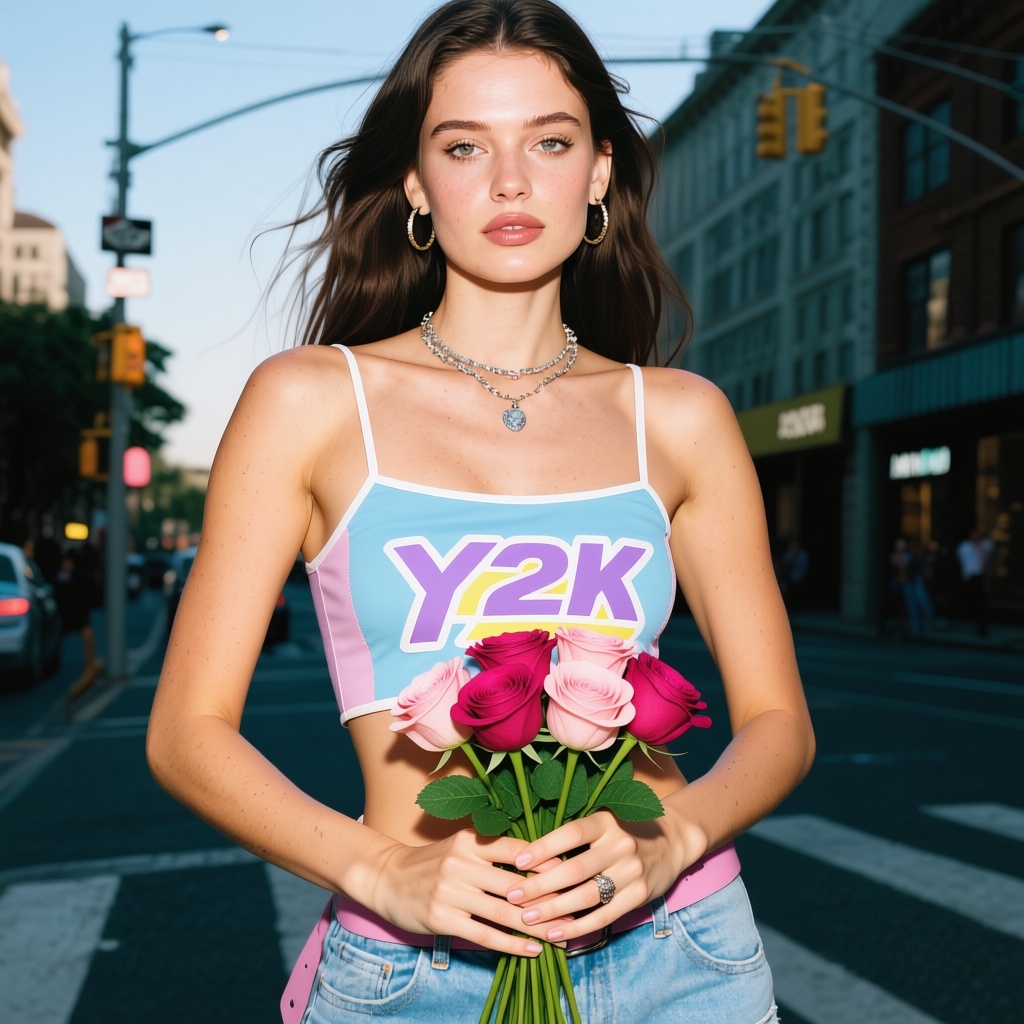
The girl holds a bouquet of roses.

Remove the boy's hat.

Turn into pixel style.
相关模型




README
Qwen-Image-Edit
A next-gen image editing model built on Qwen-Image 20B MMDiT. Qwen-Image-Edit delivers precise bilingual text editing (Chinese & English), supports both semantic and appearance-level edits, and preserves the original style — making it one of the most capable image editing models available.
Why It Looks Great
- Dual-mode editing: Supports both appearance-level edits (add/remove/modify elements while keeping other regions pixel-accurate) and semantic-level edits (IP creation, rotation, style transfer with global coherence).
- Precise text editing (CN/EN): Edit on-image text directly — add, delete, or replace while retaining the original font, size, kerning, and style.
- Style preservation: Maintains palette, lighting, brushwork, and overall look even under substantial edits.
- 20B parameter power: Built on the robust Qwen-Image foundation for superior understanding and generation.
- State-of-the-art performance: Achieves SOTA results across multiple public image editing benchmarks.
- Prompt Enhancer: Built-in tool to refine your editing instructions automatically.
Parameters
| Parameter | Required | Description |
|---|---|---|
| prompt | Yes | Text instruction describing the edit you want to make. |
| image | Yes | Source image to edit (upload or public URL). |
| size | No | Custom output dimensions with width and height controls. |
| width | No | Output width in pixels (e.g., 256). |
| height | No | Output height in pixels (e.g., 256). |
| seed | No | Random seed for reproducibility. Use -1 for random. |
| output_format | No | Output file format: jpeg or png. Default: jpeg. |
| enable_base64_output | No | API only: Returns base64 string instead of URL. |
| enable_sync_mode | No | API only: Waits for result and returns it directly in response. |
How to Use
- Write your edit instruction — describe what you want to change in the image.
- Use Prompt Enhancer (optional) — click to refine your editing instruction.
- Upload your image — drag and drop or paste a public URL.
- Set dimensions (optional) — adjust width and height for the output size.
- Set seed (optional) — use -1 for random, or a specific number to reproduce results.
- Choose output format — select jpeg or png.
- Run — click the button to apply the edit.
- Download — preview and save your edited image.
Pricing
Flat rate per edit.
| Output | Cost |
|---|---|
| Per image | $0.02 |
Best Use Cases
- Text Replacement — Change text on signs, labels, clothing, or any surface in images (supports Chinese & English).
- Element Modification — Add, remove, or swap objects while preserving untouched areas pixel-perfectly.
- Style Transfer — Apply new artistic styles while maintaining semantic content.
- IP Creation — Generate character variations and creative adaptations.
- Object Manipulation — Rotate, reposition, or transform objects within scenes.
- Product Customization — Create variations of product images with different details or branding.
Example Prompts
- "Change the background to daytime"
- "Replace the text on the sign to say 'Welcome'"
- "Remove the person on the left side of the image"
- "Change the dress color from red to blue"
- "Add sunglasses to the person"
Editing Modes Explained
| Mode | Description | Use When |
|---|---|---|
| Appearance Editing | Modifies specific elements while keeping all other regions pixel-accurate and unchanged | Adding/removing objects, color changes, localized edits |
| Semantic Editing | Allows global pixel updates while maintaining semantic intent and consistency | Style transfer, pose changes, IP creation, rotation |
Pro Tips for Best Results
- Be specific about what to change and what the result should be.
- For text editing, the model preserves original typography — just specify the new text content.
- Reference elements clearly: "the text on the shirt", "the background", "the person's hair".
- For appearance edits, unchanged areas remain pixel-perfect — focus only on what needs editing.
- Use Chinese prompts for editing Chinese text in images for best accuracy.
- The model understands context — describe the intent, not just the mechanical change.
Notes
- If using a URL for the image, ensure it is publicly accessible. A preview thumbnail confirms successful loading.
- The enable_base64_output and enable_sync_mode options are only available through the API.
- Complex edits may require more specific prompts for accurate results.
- For multiple edits to the same image, consider processing sequentially for better control.
Qwen Image Edit API — Quick start
Grab a WaveSpeedAI API key, then call POST https://api.wavespeed.ai/api/v3/wavespeed-ai/qwen-image/edit with your input as JSON. The endpoint returns a prediction id; poll the prediction endpoint until status flips to completed, then read the output URL from data.outputs[0]. Examples for Qwen Image Edit below.
HTTP example
# Submit the prediction
curl -X POST "https://api.wavespeed.ai/api/v3/wavespeed-ai/qwen-image/edit" \
  -H "Content-Type: application/json" \
  -H "Authorization: Bearer $WAVESPEED_API_KEY" \
  -d '{
    "prompt": "A cinematic shot of a city at sunset, soft golden light",
    "image": "https://example.com/your-input.jpg",
    "seed": -1,
    "output_format": "jpeg",
    "enable_base64_output": false,
    "enable_sync_mode": false
}'

# Response includes a prediction id. Poll for the result:
curl -X GET "https://api.wavespeed.ai/api/v3/predictions/{request_id}/result" \
  -H "Authorization: Bearer $WAVESPEED_API_KEY"

# When status is "completed", read the output from data.outputs[0].
Node.js example
// npm install wavespeed
const WaveSpeed = require('wavespeed');

const client = new WaveSpeed(); // reads WAVESPEED_API_KEY from env

const result = await client.run("wavespeed-ai/qwen-image/edit", {
        "prompt": "A cinematic shot of a city at sunset, soft golden light",
        "image": "https://example.com/your-input.jpg",
        "seed": -1,
        "output_format": "jpeg",
        "enable_base64_output": false,
        "enable_sync_mode": false
});

console.log(result.outputs[0]); // → URL of the generated output
Python example
# pip install wavespeed
import wavespeed

output = wavespeed.run(
    "wavespeed-ai/qwen-image/edit",
    {
    "prompt": "A cinematic shot of a city at sunset, soft golden light",
    "image": "https://example.com/your-input.jpg",
    "seed": -1,
    "output_format": "jpeg",
    "enable_base64_output": false,
    "enable_sync_mode": false
}
)

print(output["outputs"][0])  # → URL of the generated output
Qwen Image Edit API — Frequently asked questions
What is the Qwen Image Edit API?
Qwen Image Edit is a WaveSpeedAI model for image editing, exposed as a REST API on WaveSpeedAI. Qwen-Image-Edit is a 20B MMDiT image-to-image model offering precise bilingual (Chinese & English) text edits while preserving style. Ready-to-use REST inference API, best performance, no coldstarts, affordable pricing. You can call it programmatically or try it from the playground above.
How do I call the Qwen Image Edit API?
POST your input parameters to the model's REST endpoint (shown in the API tab of this playground) with your WaveSpeedAI API key in the Authorization header. Submission returns a prediction ID; poll the prediction endpoint until status flips to "completed", then read the output URL from the result. The playground generates a ready-to-paste code sample in Python, JavaScript, or cURL for whatever inputs you've set. Full request/response shape is documented at https://wavespeed.ai/docs/docs-api/wavespeed-ai/qwen-image-edit.
How much does Qwen Image Edit cost per run?
Qwen Image Edit starts at $0.020 per run. That figure is the base price — the final charge scales with the parameters you set in the form (output size, length, count, references, or whatever knobs this model exposes), so a higher-quality or larger output costs more than a minimal one. The exact cost for your current input is shown live next to the Generate button before you submit, and the actual per-call charge is recorded on the prediction afterwards.
What inputs does Qwen Image Edit accept?
Key inputs: `prompt`, `image`, `seed`, `enable_base64_output`, `enable_sync_mode`, `output_format`. The full JSON schema (types, defaults, allowed values) is rendered above the Generate button and mirrored in the API reference at https://wavespeed.ai/docs/docs-api/wavespeed-ai/qwen-image-edit.
How long does Qwen Image Edit take to generate?
Average end-to-end generation time on WaveSpeedAI is around 10 seconds per request — measured across recent runs. Queue time scales with global demand; live status is visible in the prediction record.
Can I use Qwen Image Edit outputs commercially?
Commercial usage rights depend on the model's license, set by its provider (WaveSpeedAI). The license summary appears on the model card above; see WaveSpeedAI's Terms of Service for platform-level conditions.