Seedream 5.0-Preview 完整指南:智能图像生成
掌握 Seedream 5.0-Preview 的智能图像生成功能,包括实时网络搜索、精确编辑控制和高级逻辑推理。了解如何在专业创意工作流中利用这些功能。
Seedream 5.0-Preview 为AI图像生成引入了三项变革性功能:实时网络搜索、精确编辑控制和智能逻辑推理。此预览版本优先考虑知识和智能而非纯粹美感——使其成为处理复杂、知识驱动型创意任务的最强大模型。
对于纯视觉美感和照片级真实感,Seedream 4.5仍然是推荐选择。完整的5.0版本将结合智能和美感。
关键亮点
| 功能 | 描述 |
|---|---|
| 实时网络搜索 | 基于时事、热门话题和真实世界知识生成图像 |
| 精确编辑控制 | 准确的指令跟随、特征转移和基于示例的编辑 |
| 智能推理 | 多步逻辑、空间理解和领域特定知识 |
| 分辨率 | 支持2K和4K输出 |
1. 实时网络搜索
Seedream 5.0-Preview是首个支持基于搜索的生成的图像生成模型。这使得创建与时事、名人露面、品牌身份和本地化内容相关的图像成为可能。
何时启用搜索
该模型根据您的提示智能判断是否进行搜索:
- 时间敏感词汇(最新产品发布、时事)
- 特定实体(名人、品牌、地点)
- 长尾查询(需要事实准确性的小众话题)
启用搜索并不保证会进行搜索——模型根据上下文决定。
使用案例
产品概念
Generate iPhone 17 Pro Max该模型搜索最新的设计传言和泄露信息,以创建合理的概念。
名人和文化参考
Jingdezhen Chicken Cutlet Guy at the beach at sunset,
film photography aesthetic portrait
识别地区网络人物并生成适当的图像。
品牌准确设计
Reference the Duolingo app interface, design a vocabulary
flashcard page with word and streak counter, incorporate
the green owl mascot
搜索当前品牌资产以保持视觉一致性。
特定事件内容
Generate a Nordic Winter Olympics poster: Norwegian aurora
background, skier in national uniform, include Olympic
elements and mascot
获取当前奥运品牌和国家队设计。
重要说明
- 搜索结果需要验证准确性和版权合规性
- 并非所有提示都会触发搜索——时间敏感或高度特定的词汇会增加可能性
- 最适用于具有强大网络影响力的公开文档主题
2. 精确编辑控制
指令跟随
5.0-Preview大幅缩小了您描述的内容与实际结果之间的差距。该模型准确解读空间关系、数量和具体细节。
空间关系
A bear and a donkey playing on a seesaw, the donkey is
much heavier than the bear
该模型理解重量分配,并正确显示跷跷板的倾斜。
精确细节
A metal alarm clock, the black thick hour hand points to 8,
the red thin minute hand points to 1
钟表指针准确显示,颜色和位置正确。
复杂构图
Based on the reference image, extract a fashion flat-lay
photo: include the outfit the person is wearing and the
props they're holding
图像合成
Combine Image 1 and Image 2 into a single imageGenerate waves approaching the bow of a cargo ship with
black and red hull, creating visible disturbance环境替换
Replace the overcast sky with a vivid sunset backdrop,
warm orange tones
特征转移
从参考图像中提取并应用特定的视觉特征:
色彩分级
Change Image 1's color tone to match Image 2's color tone妆容转移
Transfer the makeup from Image 2 onto the person in Image 1品牌风格应用
Apply Image 1's brand design style to the aromatherapy
product in Image 2, create a similar brand series
promotional image, include all modules from Image 1
设计语言转移
Identify the four cups in Image 2, reference the holographic
design in Image 1, create a similar style poster for Image 2
基于示例的编辑
该模型从之前/之后的示例中学习变换模式,并将其应用于新图像。
标准模式
Reference the change from Image 1 to Image 2, apply the
same operation to Image 3
应用:
- 发型变化:展示发型前后示例,应用于新肖像
- 场景变化:演示环境交换,在不同图像上复制
- 材质变化:展示纹理变换,应用于新对象
- 视角变化:演示视点移动,应用于相似构图
这消除了描述复杂变换的需要——只需展示您想要的内容。
3. 智能逻辑推理
多步推理
5.0-Preview处理需要理解上下文和做出决策的复杂操作。
分类和分配
Classify the flowers in Image 1 by variety, arrange them
separately in the three vases shown in Image 2
该模型识别花卉类型、逻辑分组并适当分配。
内容放置
Add Images 2, 3, 4, 5, and 6 to the white blank areas
in Image 1
理解空间限制并安排内容以适应。
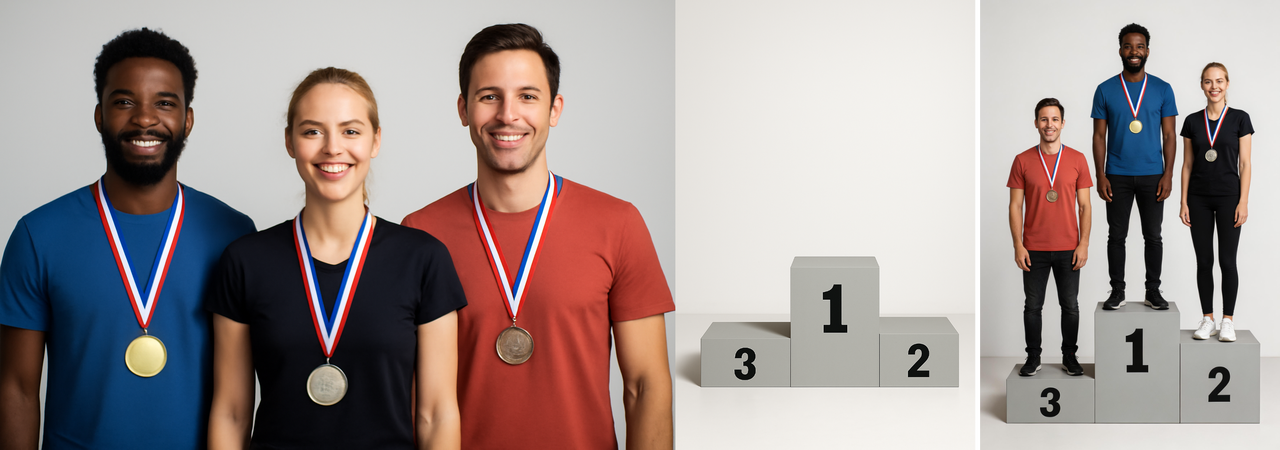
上下文定位
Place the three people from Image 1 into appropriate
positions in Image 2
分析场景并根据上下文确定逻辑位置。
对象操作
Melt all the ice around the two silver fish with red fins理解材料属性和物理变换。
生物推理
Generate what the two tadpoles in the image will look
like when they grow up
应用生物知识来预测发展。
设计扩展
Design a VI product suite around the logo, including IP
character, packaging, postcards, and 6 merchandise items
理解品牌设计原则并创建协调的系列。
物理世界知识
该模型理解现实约束并产生物理上合理的结果。
准确测量
Two stationery rulers, top is a 20cm plastic ruler,
bottom is a 10cm steel ruler
产生比例正确、材料恰当的对象。
3D理解
Generate the 3D assembled form based on the packaging
flat layout diagram
将2D模板转换为准确的3D表示。
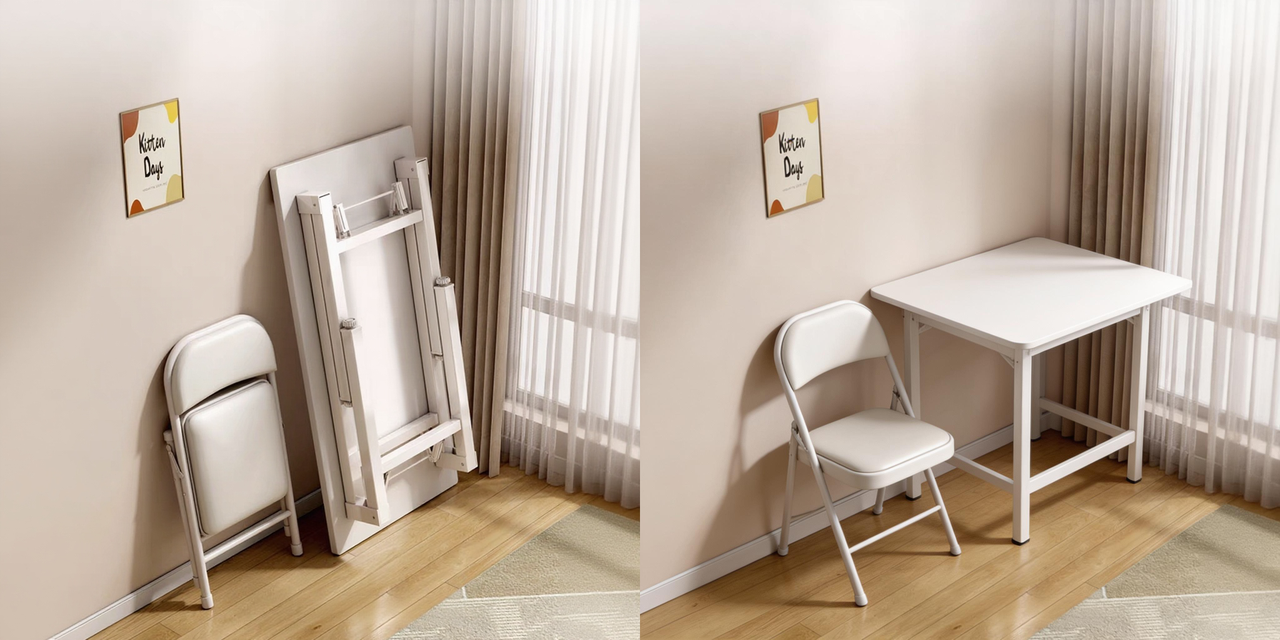
空间推理
Unfold and lay out the table and chairs flatAssemble a bicycle using all the images provided理解零件如何相关和组合。
领域特定知识
多个领域的内置专业知识:
建筑
Reference this set of CAD drawings, generate a realistic
building visualization
解读技术图纸并制作准确的建筑渲染。
科学插图
Create a "Photosynthesis Core Explanation" diagram with
left-right layout. Include core principles, material and
energy flow, and educational value
An English petroleum system infographic showing oil
drilling platform and geological layers地理和地标
Identify the landmark buildings in the image and annotate
relevant information on the image
健康和营养
Identify the food calories in the image and annotate the
information on the image
解剖学
Human respiratory system anterior view diagram showing:
nasal cavity, nostrils, oral cavity, pharynx, larynx,
trachea, left and right main bronchi, left and right
lungs, and diaphragm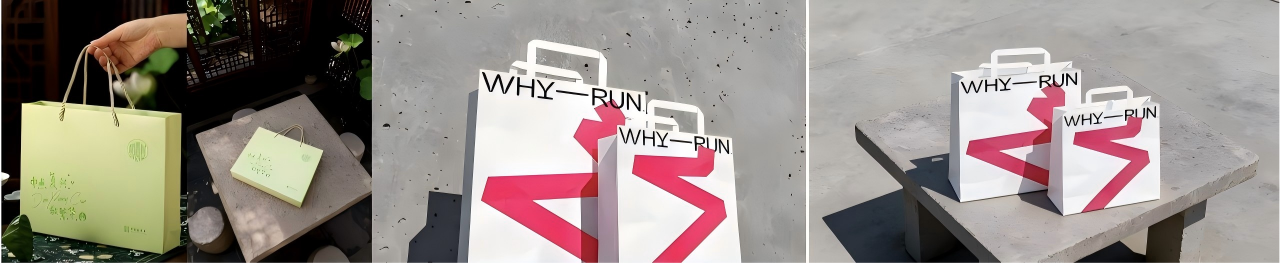

模型版本对比
为您的使用场景选择合适的Seedream版本:
| 版本 | 定位 | 最佳用于 | 文本转图像 | 编辑 | 多图像 | 网络搜索 |
|---|---|---|---|---|---|---|
| 5.0-Preview | 知识与推理 | 热门话题、信息识别、逻辑任务 | ✅ | ✅ | ✅ | ✅ |
| 4.5 | 深度编辑 | 肖像、美学、视觉美感、多图像生成 | ✅ | ✅ | ✅ | - |
| 4.0 | 高效率 | 快速迭代、成本优化、敏捷生产 | ✅ | ✅ | ✅ | - |
| 3.1 | 艺术美感 | 电影质感、专业摄影、精确风格化 | ✅ | - | - | - |
| 3.0 | 字体排版 | 海报设计、准确文本渲染、布局构图 | ✅ | - | - | - |
何时使用各版本
5.0-Preview
- 时事和热门话题
- 图像信息提取和标注
- 复杂逻辑推理任务
- 领域特定技术内容
局限性:某些AI生成外观、偶发比例问题、文本结构不稳定、图表/数据推理有限
4.5
- 肖像摄影和人物主题
- 广告和商业图像
- 产品摄影
- 高美学要求
局限性:偶发模糊或裁剪问题、成本和生成时间更高
4.0
- 故事板和连续内容
- 快速迭代和原型设计
- 风格转移和编辑
- 成本敏感的生产
局限性:小文本可能重复或降质、编辑准确度低于4.5
3.1
- 电影和艺术摄影
- 光影掌握
- 创意风格化
- 肖像美学
局限性:文本图像对齐度低于3.0、某些结构不稳定
3.0
- 海报和平面设计
- 准确文本渲染
- 专业字体排版
- 以布局为重点的构图
局限性:隐性逻辑推理有限、行业标准严格要求较弱
最佳实践
-
匹配模型与任务:使用5.0-Preview处理知识任务,使用4.5处理美感,使用4.0处理速度
-
搜索提示要具体:包含日期、专有名词和具体细节以提高搜索准确性
-
使用基于示例的编辑:对于复杂变换,展示前后示例比描述变换更有效
-
利用特征转移:提取特定属性(颜色、风格、妆容)而不是从零开始描述
-
分解复杂推理:对于多步操作,在提示中清晰描述每一步
-
验证搜索生成的内容:始终检查基于搜索的生成内容的事实准确性和版权合规性
下一步
Seedream 5.0-Preview代表了下一代图像生成的智能层。完整的5.0版本将结合这些推理功能与4.5的美学质量,在单一模型中同时提供智能和美感。
我们欢迎对预览版本的反馈——您的意见将塑造最终版本。