
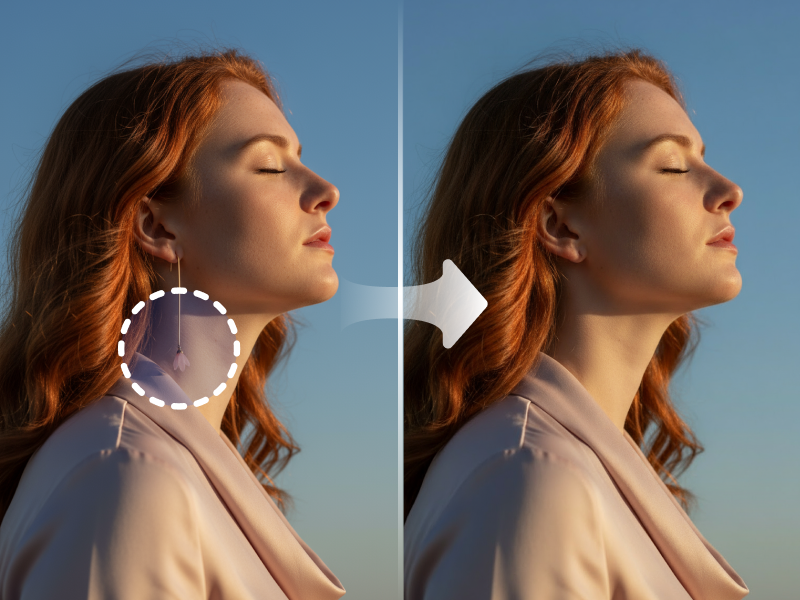
Manual Removal vs AI Eraser
Traditional Challenges
Unwanted objects ruin perfect shots
Manual removal requires Photoshop expertise
Content-aware fill often leaves artifacts
People or text in background distract
Wires, logos, blemishes need removal
WaveSpeedAI Solution
Remove anything with simple brush stroke
No Photoshop skills needed
Clean, natural-looking results
Perfect for product and portrait photos
AI fills removed areas intelligently
See the Magic
Real examples of object removal

Remove unwanted people from travel photos instantly

Erase text, logos, and watermarks seamlessly
What Can You Erase?
Our AI understands context to remove virtually anything
People & Crowds
- Tourists
- Passersby
- Photobombers
- Reflections
Text & Branding
- Watermarks
- Date Stamps
- Logos
- Captions
Unwanted Objects
- Trash Cans
- Power Lines
- Vehicles
- Debris
Product Photography
- Mannequins
- Hangers
- Price Tags
- Dust & Scratches
Blemishes
- Skin Imperfections
- Stains
- Wrinkles
- Sensor Dust
Try removing anything:
Real Success Stories
See how businesses are transforming their workflow with AI
Property Marketing
Real Estate Agency
Before
1 hr/image
After
30 sec/image
"We remove furniture, people, signs, and clutter from property photos instantly. Listings look pristine."
Product Photography
E-Commerce Seller
Before
Manual editing
After
One-click removal
"Removing distracting elements from product photos used to take hours. Now it takes seconds and looks perfect."
Powerful Features
Professional-grade object removal with AI-powered precision
Related AI Tools
Explore more powerful AI tools for e-commerce
Trusted by Professionals
See how our AI Eraser is saving time for businesses

"I used to spend hours in Photoshop cloning out cars and trash cans from property shots. Now it takes seconds."

"Perfect for removing mannequins and hangers from clothing photos. The AI fills the background perfectly."

"We use it to remove old watermarks and text overlays from our archive photos. It works like magic."

"Great for cleaning up travel photos by removing tourists from the background. Highly recommended!"
Frequently Asked Questions
Everything you need to know