
Introducing WaveSpeedAI Image Zoom Out on WaveSpeedAI
Try Wavespeed Ai Image Zoom Out for FREE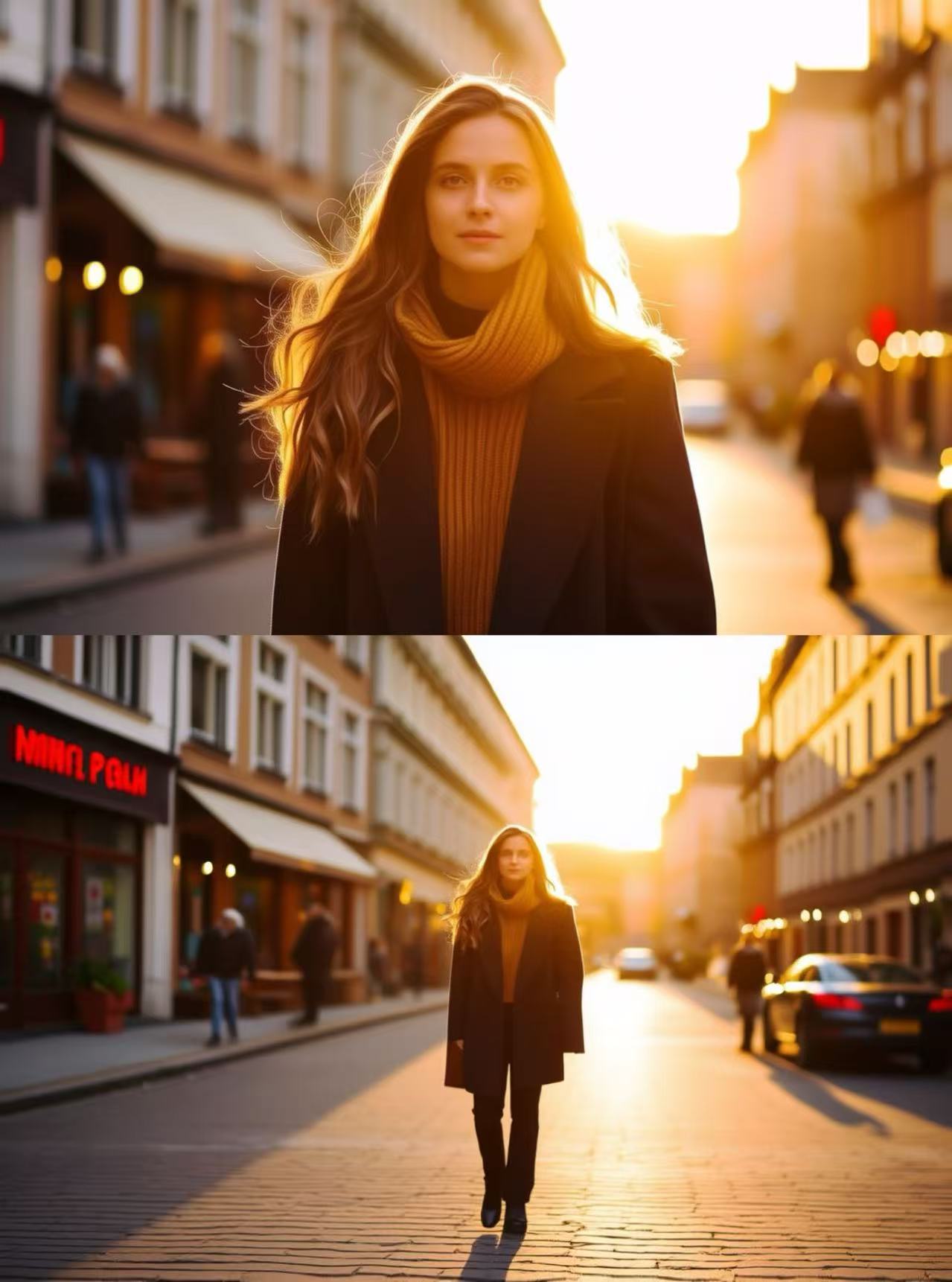
Introducing AI Image Zoom-Out on WaveSpeedAI: Expand Your Photos Beyond the Frame
Every photographer, designer, and content creator knows the frustration: you have the perfect shot, but it’s cropped too tight. The composition would be stunning if only you could see what lies beyond the edge of the frame. Traditional solutions meant either reshooting or accepting limitations. Now, with the AI Image Zoom-Out model on WaveSpeedAI, you can intelligently expand any image beyond its original boundaries with remarkable accuracy and realism.
What is AI Image Zoom-Out?
AI Image Zoom-Out is a professional-grade outpainting model that uses advanced diffusion technology to extend images beyond their original canvas. Unlike simple stretching or mirroring techniques that produce obvious artifacts, this model analyzes your image’s content, lighting, perspective, and artistic style to generate new areas that blend seamlessly with the original.
The technology works by understanding the context of your image—the patterns, colors, textures, and compositional elements at the boundaries—then intelligently predicts and generates what should logically appear beyond the frame. The result is an expanded image that looks as though it was captured that way from the start.
Key Features
-
Intelligent Outpainting: The model extends your canvas naturally with accurate context prediction. It doesn’t just fill in random pixels—it understands scene composition and generates content that makes visual sense.
-
High-Resolution Support: Handle outputs up to 4K resolution while maintaining detail coherence and smooth color gradients throughout the expanded areas.
-
Context-Aware Composition: Preserves perspective, object integrity, and visual storytelling. If your original image has a vanishing point, the extended areas respect that same perspective.
-
Multiple Aspect Ratio Options: Choose precisely how far to zoom out—from subtle framing adjustments to dramatic wide cinematic compositions. Transform a portrait-oriented photo into a landscape format without losing the subject.
-
Fast Inference: Optimized for WaveSpeedAI’s acceleration infrastructure, delivering rapid results without the artifacts that plague slower processing methods.
-
Flexible Output Formats: Save your expanded images in JPEG, PNG, or WEBP format depending on your workflow needs.
Real-World Use Cases
Content Creation and Social Media
Social media platforms each demand different aspect ratios. A stunning portrait shot for Instagram Stories suddenly needs to become a landscape header for Twitter/X. Rather than awkwardly cropping or adding plain borders, AI Image Zoom-Out expands your content naturally, giving you platform-ready assets from a single source image.
E-commerce and Product Photography
Product photos often need consistent framing and dimensions across a catalog. When an image is cropped too close to the subject, this model can extend the background to meet your specifications—whether that’s adding breathing room around a product or matching the aspect ratio of your template.
Digital Art and Creative Projects
Artists using AI image generators like FLUX, Stable Diffusion, or Midjourney frequently encounter compositions they love but wish were wider or taller. AI Image Zoom-Out serves as the perfect companion tool, taking those generated masterpieces and expanding them into panoramic wallpapers, poster-ready prints, or cinematic widescreen formats.
Photography Enhancement
Wedding photographers, real estate agents, and portrait photographers regularly encounter situations where the original framing doesn’t quite work for the final deliverable. This model lets you salvage shots that would otherwise be unusable due to tight cropping, transforming them into properly composed images.
Film and Video Production
Create cinematic storyboards and thumbnails by expanding reference images into widescreen formats. Pre-visualization and concept work becomes more efficient when you can take any reference photo and adapt it to your target aspect ratio.
Getting Started on WaveSpeedAI
Using AI Image Zoom-Out on WaveSpeedAI is straightforward:
-
Access the Model: Navigate to the AI Image Zoom-Out model page on WaveSpeedAI.
-
Upload Your Image: Provide the image you want to expand. For best results, use high-resolution source images with clear subject boundaries.
-
Configure Your Output: Select your desired expansion direction and aspect ratio. The model supports various configurations from subtle edge extensions to dramatic zoom-out effects.
-
Generate: Click to process your image. Thanks to WaveSpeedAI’s optimized infrastructure, you’ll receive your expanded image quickly—no cold starts, no waiting in queues.
-
Download: Save your result in your preferred format (JPEG, PNG, or WEBP).
For developers, WaveSpeedAI provides a REST API for programmatic access. Integrate image expansion directly into your applications, batch process entire image libraries, or build custom workflows that automatically adapt content for different platforms.
import wavespeed

output = wavespeed.run(
    "wavespeed-ai/image-zoom-out",
    {"image": "https://example.com/image.jpg"},
)

print(output["outputs"][0])  # Output URL
Why Choose WaveSpeedAI?
The AI image expansion market has grown crowded, with tools ranging from free web apps to enterprise solutions. WaveSpeedAI’s Image Zoom-Out model stands apart for several reasons:
No Cold Starts: Many AI platforms leave you waiting while models spin up. WaveSpeedAI’s always-warm infrastructure means your requests process immediately.
Consistent Quality: The high-fidelity diffusion engine produces reliable, artifact-free results. You won’t get random failures or wildly inconsistent outputs between runs.
Transparent Pricing: At just $0.016 per image, you know exactly what you’re paying. No subscriptions required—pay only for what you use.
API-First Design: Built for integration from the ground up. Whether you’re a solo creator using the web interface or an enterprise building automated pipelines, the same powerful model serves your needs.
Part of a Complete Ecosystem: WaveSpeedAI offers dozens of image and video models. Use Image Zoom-Out alongside the Ultimate Image Upscaler to expand and enhance in one workflow, or combine with the Image Eraser for flexible scene reconstruction.
Tips for Best Results
To maximize the quality of your expanded images:
-
Start with high-resolution sources: The model can only work with the information it’s given. Higher resolution inputs yield more detailed expansions.
-
Clear subject boundaries work best: Images where the subject is distinct from the background tend to produce the most seamless results.
-
Consider the context: Images with predictable content beyond the frame (landscapes, simple backgrounds, architectural scenes) generally expand more convincingly than complex multi-subject compositions.
-
Experiment with expansion amounts: Sometimes subtle extensions look more natural than dramatic zoom-outs. Try different configurations to find what works for your specific image.
Conclusion
AI Image Zoom-Out represents a practical solution to a common creative challenge. Whether you’re adapting content for different platforms, rescuing tightly-cropped photos, or expanding AI-generated art into larger formats, this model delivers professional results at an accessible price point.
Ready to expand your creative possibilities? Visit the AI Image Zoom-Out model page on WaveSpeedAI and start transforming your images today. With no cold starts, transparent per-image pricing, and API access for developers, there’s never been a better time to add intelligent outpainting to your creative toolkit.
Related Articles

daVinci-MagiHuman: The Open-Source Model That Just Crushed Every Digital Human Generator

Introducing Google Lyria 3 Clip on WaveSpeedAI

Introducing Google Lyria 3 Pro on WaveSpeedAI

Best Free AI Image Generator Online in 2026: 10+ Models, One Click, Zero Hassle

Best Free AI Video Generator Online in 2026: Sora, Kling, Veo, Seedance — All in One Place
