
What Is TranslateGemma? Open AI Translation Model Explained
Hey, everybody! I’m Dora. That day, I was editing a bilingual newsletter and kept bouncing between drafts, screen captures, and Google Translate tabs. None of it was terrible. It was just… noisy. You know the kind. I wanted something quiet that could sit inside my workflow, not next to it.
So earlier this week (January 2026), I tried TranslateGemma. I didn’t expect much at first, another “open” model with a shiny name. But after a few runs inside a notebook and then a small internal tool, I noticed something subtle: the mental load dropped. I wasn’t fiddling with tabs. I wasn’t babysitting the phrasing as much. It felt like a translator I could keep on my desk, not across the room.
What Is TranslateGemma
 TranslateGemma is a family of open translation models built on Google’s Gemma architecture. In plain terms: it’s a set of language models tuned specifically for translation tasks, with sizes you can actually run locally or scale in the cloud.
A few things stood out while I was actually using it:
- It’s purpose-tuned for translation. You don’t have to wrangle a general LLM into behaving. Prompts stay lean.
- It handles context better than a simple sentence-by-sentence API. Paragraphs with idioms, product names, and light tone cues came through with fewer “flat” patches.
- It’s calm. Output isn’t showy or paraphrase-happy. For work docs, that’s a relief.
On paper, TranslateGemma sits between full-on generative assistants and classic phrase-based translators. In practice, it’s a translator that respects source meaning while still smoothing the target language. When I fed it a short launch note with a mix of UI labels and conversational lines, it kept the labels intact and still made the copy read naturally. That balance is what made me keep testing.
Licensing is in the Gemma family: permissive for many commercial uses with responsible-AI restrictions. If you’re embedding it into a product, read the license in the official repo or Model Garden entry. It’s the boring part, but it matters.
Model Sizes: 4B, 12B, and 27B
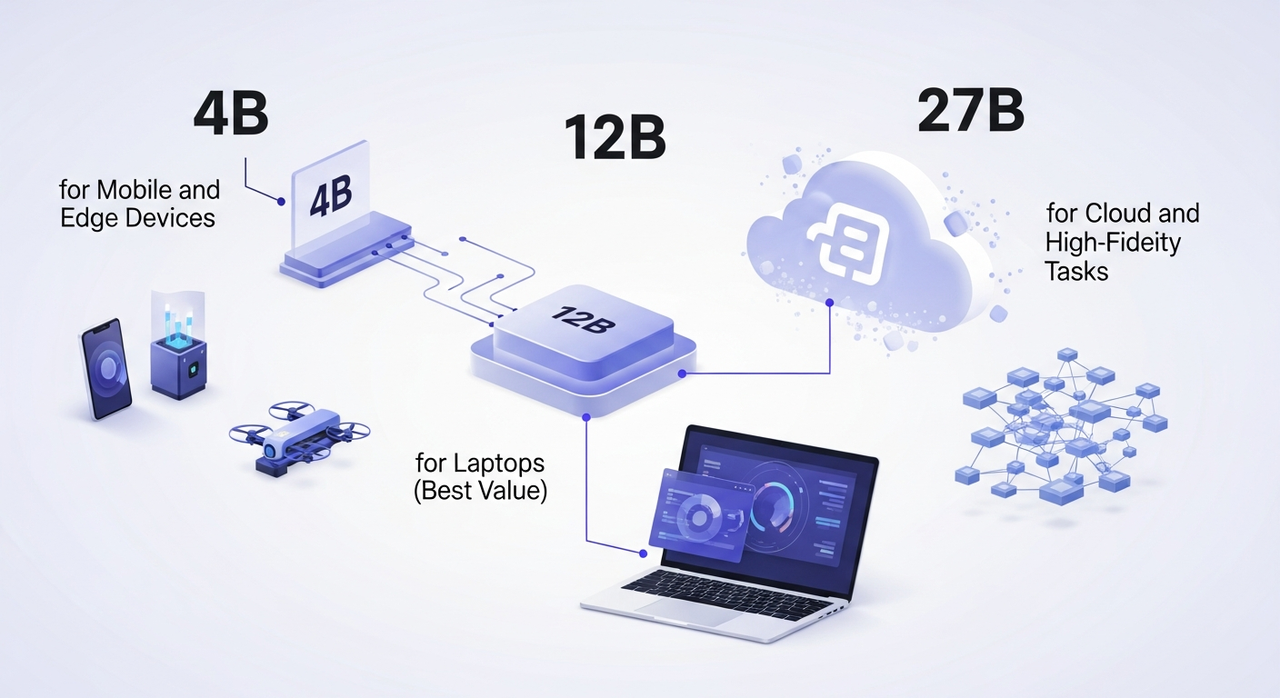 TranslateGemma comes in three sizes. Same family, different trade-offs. I ran small tests on each over two days, a few product pages, an email sequence, and a research abstract in Spanish, French, and Japanese.
4B for Mobile and Edge Devices
I tried a 4-bit quantized 4B build on a recent Android phone and a Raspberry Pi 5 (just to see). Latency on the phone was acceptable for short sentences (under a second per line), and the outputs were clean for straightforward copy: UI strings, help text, short captions. Anything with layered tone or nested clauses started to wobble. That was my cue to stop pushing it.
What worked:
- On-device translation of app strings without shipping data to a server.
- Quick drafts for social captions in a second language.
Limits I hit:
- Longer paragraphs picked up stiffness. It kept meaning, lost music.
- Code-mixed text (EN + a second language) sometimes got over-normalized.
If you need translation at the edge, kiosks, offline apps, privacy-sensitive workflows, 4B is the small hammer that fits in your pocket. For everyday writing, I’d treat it as a first pass, not the final draft.
12B for Laptops (Best Value)
This is the one I kept coming back to. On my laptop (32GB RAM, consumer GPU), the 12B model in 4–8 bit ran comfortably with paragraph-level prompts. Average latency: 1–2 seconds for a few sentences, maybe 5–8 seconds for a dense paragraph. That’s in the “doesn’t interrupt thinking” range.
Quality felt balanced: less literal than 4B, less ornamental than bigger LLMs that love to rephrase. When I translated a small case study from French to English, it preserved structure and mirrored sentence emphasis without clumping everything into one tone. Names, product terms, and citations stayed put.
Where it shines:
- Marketing emails that need tone but not poetry.
- Documentation, release notes, and UX copy where clarity beats flourish.
- Batch jobs on a laptop: 50–200 paragraphs at a time without a cloud bill.
Where I still nudge it:
- Poetry-adjacent lines (taglines, slogans) sometimes read safe. A quick pass fixes it.
- Highly technical papers can drift literal. Adding “keep formal academic register” in the prompt helped.
27B for Cloud and High-Fidelity Tasks
I spun the 27B model on a single A100 in the cloud. It’s the option for teams who care about nuance and can justify infrastructure. Latency was fine for interactive use but obviously not mobile-friendly.
What I noticed:
- It kept stylistic cues across longer sections. In Japanese-to-English legal text, it maintained formality without sounding stilted.
- It handled ambiguous pronouns better. Fewer mismatched referents across paragraphs.
- For low-resource language pairs, it didn’t perform miracles, but it failed more gracefully, fewer hallucinated terms.
To be honest, if you’re translating long-form content for publication, or you need consistency across thousands of segments, 27B earns its keep. For small teams, I’d only reach for it when tone fidelity is non-negotiable or you need to standardize results at scale.
TranslateGemma vs Google Translate
 I’m not here to replace Google Translate in a hurry. It’s fast, it’s everywhere, and for quick lookups it’s still the fastest path from “what does this mean?” to “got it.” But the trade-offs are different.
Where TranslateGemma felt better in my runs:
- Context windows: I could drop a whole paragraph or two and keep tone and references intact. Google Translate often nails meaning but flattens style when context is messy.
- Customization: A one-line instruction like “preserve product names, keep contractions” reliably shaped the output. With Google Translate, you get what you get.
- Privacy/control: Running locally (4B/12B) or in a private cloud reduces data exposure. No tab-hopping, no external calls if you don’t want them.
Where Google Translate still wins:
- Breadth and convenience: 100+ languages, instant web access, OCR, mobile camera input. It’s the utility knife.
- Speed at scale for casual use: If I only need a quick sentence, TranslateGemma is overkill unless it’s already baked into my editor.
- Low-friction collaboration: It’s easy to link someone a Google Translate page and say “is this close?”
Cost-wise, TranslateGemma shifts the spend from per-request API fees to compute. If you already have a decent GPU or a modest cloud setup, it can be cheaper for sustained use. If you don’t, Google Translate’s free tier is hard to argue with.
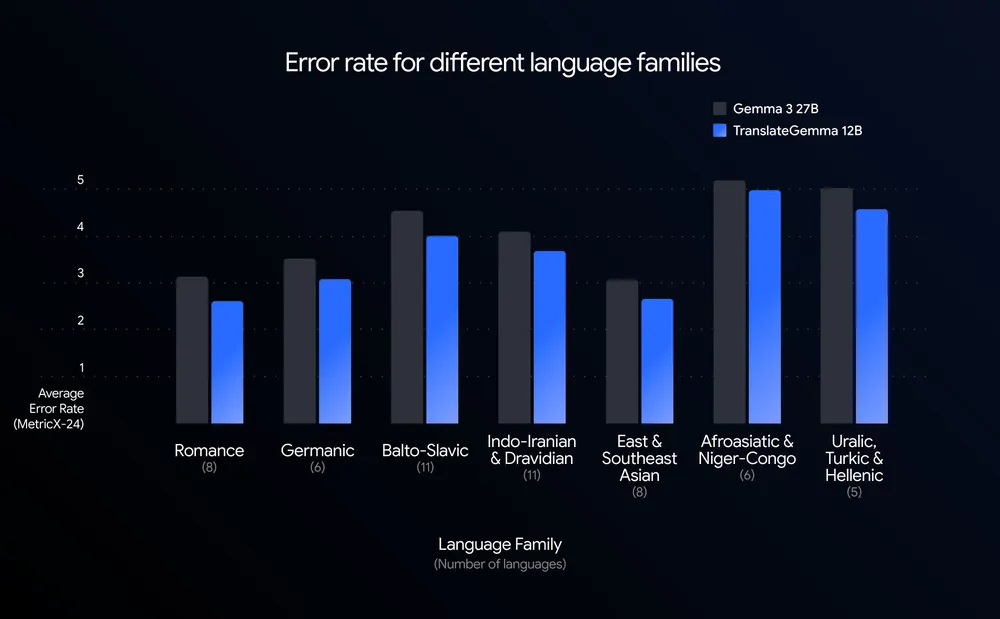
Quality is closer than I expected. TranslateGemma was less literal in a good way, modest, not showy. Google Translate has improved tone handling, but it still reads like a dictionary that went to finishing school. If you write for people, that gap matters.
My rule of thumb after a week: I still reach for Google Translate to sanity-check a line in a language I barely know. I reach for TranslateGemma when I care how it sounds, not just what it says.
Once I decided TranslateGemma was the right fit, the next question was where to actually run it without turning setup into a project of its own.
That’s exactly why we built WaveSpeed. Our team uses it to spin up clean GPU environments, run batch translation jobs, and move on — without babysitting drivers, queues, or temporary scripts.
Where to Get TranslateGemma
I pulled models from the usual places:
- Hugging Face: Easiest for quick tests with Transformers or Text Generation Inference. Search for “TranslateGemma” and check the card for license and quantized variants.
- Google’s Model Garden (Vertex AI): Managed deployment, autoscaling, private endpoints. If your team already lives in GCP, it’s the smoothest path.
- Kaggle Models: Handy for one-click notebooks and quick benchmarking if you don’t want to wire up infra yet.
- GitHub + Colab: Community scaffolds pop up fast, loaders, prompt templates, and basic eval scripts.
Setup notes from my run:
- Quantization helps. 4–8 bit made the 12B model comfortable on a consumer GPU without mangling output. I didn’t miss the extra bits.
- Prompts stay short. “Translate to English. Preserve product names. Keep contractions.” That’s enough most of the time.
- Batch with care. Chunk by paragraphs or bullet groups. Sentence-by-sentence works, but you lose the tone glue.
If you need guardrails or glossary control, layer a light pre/post-processing step:
- Pre-mark product names with tags (e.g., ) and ask the model to preserve them.
- Post-check with a glossary matcher to catch drift on terms like “Sign in” vs “Log in.”
Who I think will like TranslateGemma
- Writers and marketers who want local, decent-quality drafts without flipping tools.
- Product teams adding translation quietly inside an app, not outsourcing to yet another service.
- Researchers who care about long paragraphs and references staying intact.
Who probably won’t
- Anyone who needs instant camera translation on vacation, use Google Translate.
- Teams that don’t want to manage any compute. A paid API with SLAs may be calmer.
I didn’t expect to keep it around. But it’s lived in my workflow all week because it asks less of me: fewer tabs, fewer reminders, fewer small decisions. That’s usually my tell. And the small surprise? I trust it with the tone of a paragraph, not just the words. Your mileage may vary—but if you’re feeling the noise of too many tools, this one stays quiet. That’s why it stayed with me.
Related Articles

GPT-5.4 for Developers: What the Leaked Signals Mean for AI Workflows

SkyReels V4 Use Cases: 6 Ways Creators Can Use It Right Now

GPT-5.4 Release Date: What the Signals Say

GPT-5.4 vs GPT-5.3: What Might Actually Change
