WaveSpeed API Authentication & Error Handling: Fix 401, 429, 5xx Like a Pro
Hi, I’m Dora—I break APIs for fun so you don’t have to.
I kept getting 401 errors last week. Not the mysterious kind—the stupid kind, where you know something’s wrong but can’t see it. Turned out I’d been using X-API-Key in my headers. WaveSpeed wants Authorization: Bearer. Small difference. Two wasted hours.
That’s the thing about API authentication—it works silently when it’s right, and fails loudly when it’s not. And WaveSpeed, like most modern APIs, doesn’t give you much wiggle room. It’s what I learned from using WaveSpeed’s API for image and video generation over the past few months—and what actually helped when things broke.
How WaveSpeed API Authentication Actually Works
WaveSpeed uses Bearer token authentication. Every request needs:
Authorization: Bearer <YOUR_API_KEY>Content-Type: application/json
The format is straightforward:
Authorization: Bearer your_api_key_here
Content-Type: application/json
I’ve seen people try X-API-Key, Api-Key, or wrap it in quotes. WaveSpeed’s official docs and examples consistently show Bearer token format. That’s it. No variations.
Getting Your API Key
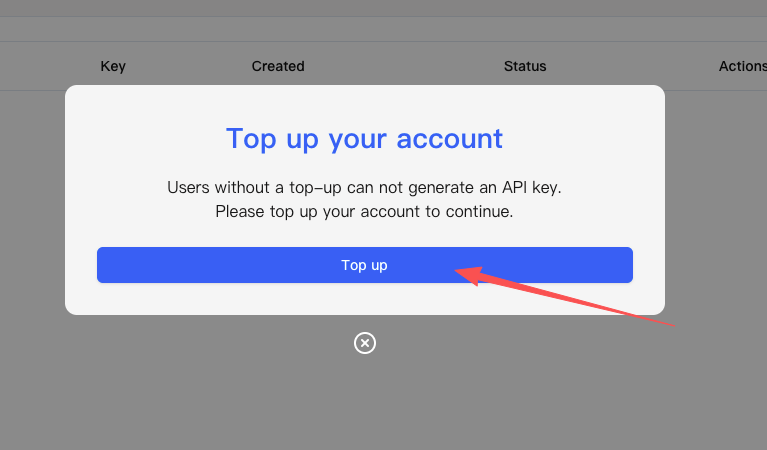
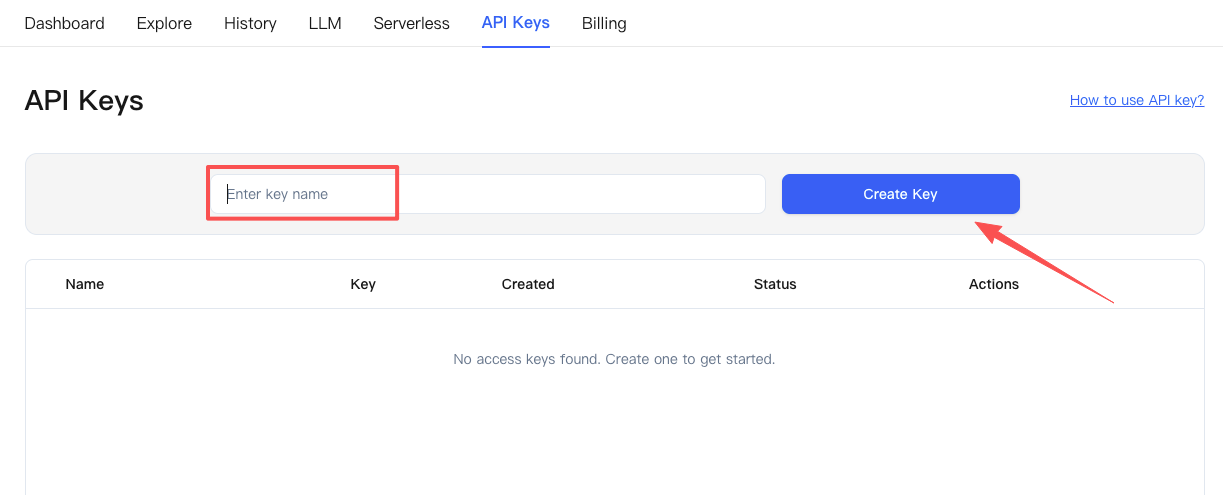 Your API key lives in the WaveSpeed dashboard at wavespeed.ai/accesskey. You need to top up your account before you can generate one—there’s no key for free-tier users.
 When you copy the key, watch for extra whitespace. I’ve done it twice—grabbed a space at the end and spent 20 minutes debugging before I noticed.
Authentication Flow for WaveSpeed API
There’s no token refresh, no OAuth, no intermediate steps. You send the Bearer token, WaveSpeed validates it, your request either proceeds or gets rejected with a 401.
If authentication fails, you get a 401 response immediately. The error typically says “invalid authentication” and tells you to verify your key.
Handling 401 Unauthorized Errors
A 401 from WaveSpeed means it looked at your Authorization header and said “I don’t recognize this.”
Common causes checklist
The usual suspects:
- Wrong header format (not using Authorization: Bearer)
- API key copied with trailing spaces or line breaks
- Key regenerated in dashboard but old key still in code
- Environment variable not loading
- No account top-up—keys won’t generate without adding credits first
Quick Fixes
When I hit a 401, I start here:
First, log the exact header. Not what I think I’m sending—what’s actually in the HTTP request. Often the Bearer token is malformed or the header name is slightly off.
Second, copy the key fresh from the dashboard. Test it immediately with curl before putting it in code:
curl -X POST "https://api.wavespeed.ai/api/v3/wavespeed-ai/flux-dev" \
  -H "Authorization: Bearer YOUR_KEY" \
  -H "Content-Type: application/json" \
  -d '{"prompt": "test"}'
If curl works, the problem is in my application code. If curl fails, the key itself is wrong.
Third, check account balance. WaveSpeed operates on a credit-based model—if your balance hits zero, API calls might fail.
Managing 429 Rate Limit Responses
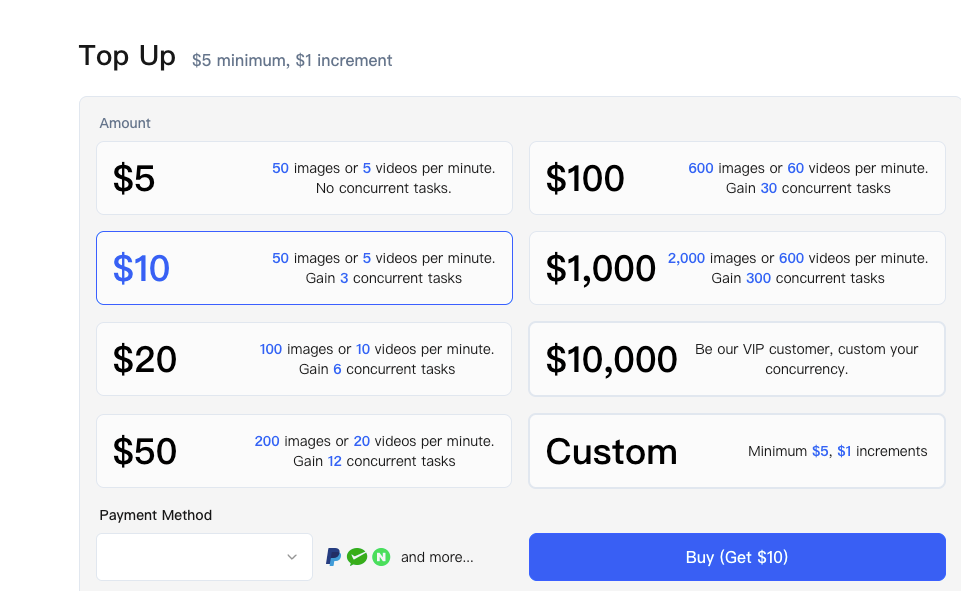
WaveSpeed’s rate limits are tiered: Bronze (basic limits, $100 top-up), Silver (higher concurrency, $1,000 top-up), and Gold (custom, $10,000+). Each tier has different throughput and concurrent task limits.
The specifics aren’t publicly documented in exact numbers, but the pattern is clear: send too many requests too fast, get a 429.
Understanding Rate Limits
According to the FAQ, example limits include Bronze at 10 images / 5 videos per minute with max 3 concurrent tasks, Silver at 500 images / 60 videos per minute with max 100 concurrent, and **Gold at 2000 images / 120 videos per minute with max 200 concurrent.
If you’re getting “Too Many Requests” errors, you’re likely hitting your tier limit. To prevent throttling, consider upgrading your plan.
Exponential backoff strategy for retries
When I hit a 429, I wait before retrying. Not immediately—that just gets me another 429. I use exponential backoff:
- First retry: wait 1 second
- Second retry: wait 2 seconds
- Third retry: wait 4 seconds
- After three attempts, stop and log the failure
Many APIs include a Retry-After header that tells you exactly how long to wait. Check for it and use that value when available.
Designing a client-side request queue
For bulk operations—like generating 100 images in a batch job—I added a queue that respects my tier limits:
- Track how many requests I’ve sent in the current time window
- Once I approach the limit (say, 90% of my tier’s throughput), pause new requests
- Resume when the time window resets
This prevents most 429s before they happen. I still hit them occasionally when multiple processes run simultaneously, but the retry logic handles those.
Dealing with 5xx Server Errors
Server errors are different. A 401 or 429 is me doing something wrong. A 500 or 503 from WaveSpeed means something broke on their end.
Safe Retry Patterns
For 5xx errors, it’s safe to retry—most server errors resolve within seconds. A good pattern from Microsoft’s documentation is to retry immediately once in case it’s a transient error, then fall back to exponential backoff if it persists.
My approach:
- Retry immediately once (maybe it was a hiccup)
- If that fails, use the same exponential backoff as 429s
- Cap at three retries total
- Log the failure and move on
For GET requests (checking generation status), retrying is always safe.
For POST requests (starting a new generation), I’m more cautious—I don’t want to accidentally start the same job twice.
Configuring timeouts effectively
I set two timeouts:
- Connection timeout: 5 seconds
- Read timeout: 30 seconds
WaveSpeed targets “under 2 seconds” for images and “around 2 minutes” for video, though actual times depend on model, resolution, and load.
Most image generations finish in under 5 seconds. Video takes longer—sometimes 60–90 seconds. But I’ve seen occasional spikes to 20+ seconds even for images.
Without timeouts, a slow request could hang indefinitely. With them, I get a clean error and can retry.
Logging & Observability in WaveSpeed API
 Once authentication and error handling worked, I needed to know they were staying working.
What to Log
For every WaveSpeed API call, I log:
- The model endpoint being called
- HTTP status code
- Response time in milliseconds
- Whether it was a retry, and which attempt number
When contacting WaveSpeed support about failed requests, they ask for job IDs and timestamps. Keep these in your logs for debugging.
Alerting Thresholds
I set alerts for:
- 401 error rate above 1% (authentication is broken)
- 429 error rate above 5% (hitting rate limits consistently)
- Any 5xx errors (should be rare)
- Average response time above 10 seconds (potential performance issues)
These aren’t universal thresholds—they’re what made sense for my usage. The important thing is having some threshold that triggers investigation before users notice.
WaveSpeed API Authentication Production Checklist
Before going live:
- API keys stored in environment variables, not code
- Using Authorization: Bearer format correctly
- Content-Type header set to
application/json - Retry logic with exponential backoff for 429 and 5xx
- Timeouts configured (5s connection, 30s read)
- Logging includes status codes, response times, job IDs
- Alerts set up for error rate spikes
- Rate limiting client-side to stay within tier limits
- Balance monitoring integrated to track credit usage
I still get 429s occasionally during traffic spikes. And I saw a few 5xx errors when WaveSpeed had brief issues last month. But with this setup, those errors don’t cascade.
Authentication mostly works by just working. The effort goes into handling the times it doesn’t—cleanly, predictably, without waking me up at 2am because the credit balance hit zero.
💡 Facing an issue?
Post the error code + request ID in the comments, and we’ll walk you through the troubleshooting checklist to help identify the root cause.
**Tip: Most errors are client-side and controllable (headers, API key, rate limits), but this process also helps you spot issues that need WaveSpeed support.
Related Articles
GLM-4.7-Flash API: Chat Completions & Streaming Quick Start
GLM-4.7-Flash vs GLM-4.7: Which One Fits Your Project?
GLM-4.7-Flash: Release Date, Free Tier & Key Features (2026)
Train a Z-Image Turbo LoRA on WaveSpeed: Dataset, Steps, and Common Mistakes
Z-Image Turbo Image-to-Image: Best Denoise/Strength Values for Consistent Results