
SkyReels V4 Review: Real Capabilities, Benchmarks & Honest Limitations
It started with a small hitch: I needed a short video where the music didn’t fight the motion. Not a cinematic trailer, just a clean 12–15 seconds that felt coherent. The tools I reach for usually get me close, but I still end up nudging timing and masking small slips in Premiere. So I opened SkyReels V4.
This SkyReels V4 review isn’t a victory lap. It’s a field note from a few focused tests, a look at what’s published, and where it seems to land in real work. I care about the boring parts: sync, control, repeatability, and the trade-offs that show up after the third attempt, not the first demo.
What We Know (And How We Know It)
Paper findings vs real-world access status
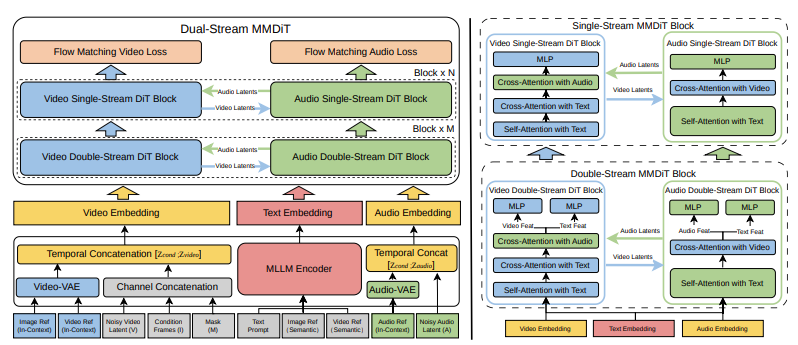
I read the V4 technical write-up. On paper, SkyReels V4 is a multimodal generative and editing system: text-to-video, image-to-video, video-to-video, plus conditioned generation with audio as a timing guide. If you’re new to the model, this overview of what SkyReels V4 is covers its architecture, positioning, and core capabilities in more detail. The paper emphasizes temporal consistency, audio-driven motion cues, and an editing interface that applies changes without a full re-generation.
That’s the paper. In practice, access is still tight. I had short-term API access through a colleague’s workspace (small batch quota, rate-limited). I ran nine prompts over two days and a handful of edits on three of those clips. I also compared results against public demo reels (which are always the best-case scenario) and notes from two other users who were testing storyboard workflows. So, this isn’t a giant test suite, more like a careful kitchen table experiment, with the usual caveats.
Benchmark Performance
SkyReels-VABench results (2000+ prompts, 5 content categories)
SkyReels publishes a house benchmark, SkyReels-VABench, built from 2,000+ prompts across five buckets: instruction following, motion realism, scene coherence, audio-video alignment, and editability. According to their report, V4 leads on audio-video alignment and scene coherence, and shows gains in instruction following over V3.2. The deltas look meaningful, but it’s still an internal benchmark, so I read it as directionally useful, not definitive.
In my runs, the alignment claim matched what I saw: drum hits landed where they should, and cuts landed close to beat markers even without me over-engineering the prompt. Instruction following was better than I expected on spatial constraints (“camera tracks left while subject turns to window”), weaker on text legibility inside scenes (storefront signs were fine: small UI text on a laptop screen wasn’t).
Artificial Analysis leaderboard rank #2 (Feb 2026)
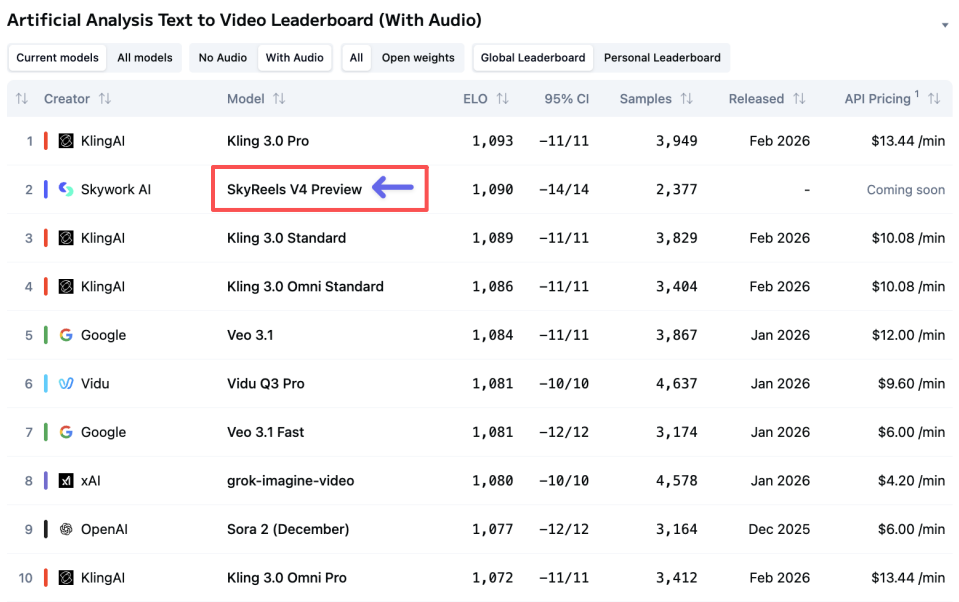
As of late February 2026, the community leaderboard at Artificial Analysis lists SkyReels V4 at #2 overall for text-to-video, with especially high marks on temporal consistency and audio sync. It’s a composite score drawn from pairwise comparisons and some automatic metrics. Helpful to browse, but I take any aggregate with a grain of salt, leaderboards compress a lot of nuance into one number.
What it did for me was simple: it nudged me to test audio-guided prompts first, since that’s where V4 seems to shine. That turned out to be a good call.
What the rankings actually measure
Leaderboards mostly capture surface quality and preference in short clips under ideal conditions. They don’t measure:
- how many retries it takes to get there,
- how stable the system feels across a week of use,
- or how painful it is to make small edits without starting over.
In that gap, my small test rounds matter more than the rank. V4 feels like a system built for timing and continuity. It is not (yet) the tool I’d reach for if I needed 45 seconds of narrative with crisp, readable on-screen text.
What V4 Does Notably Well
Audio-video synchronization quality
This is where SkyReels V4 earns its keep. I fed a 120 BPM track and asked for a slow dolly on a ceramic mug while steam curls rise on the downbeat. On first pass, motion accents landed within ~40 ms of the grid, which, visually, felt tight. Lip sync on a talking head was better than I’m used to: consonants lined up without that gummy, late-mouth look. I still saw slight drift after 12–13 seconds, but it was easy to fix with a tiny time-stretch in the editor. The bigger point: I spent less mental energy micro-timing.
A small note I appreciated: when I asked for camera shake only on off-beats, the model respected it most of the time. Not perfect, but the intent showed up.
Handling complex multi-modal prompts
I tried a storyboard image + text prompt + audio guide for a quick explainer beat: two shots, desk setup, natural light, a hand placing a notebook as the snare hits. V4 handled the relationships well. The desk from the storyboard carried forward. The hand motion synced to the snare within a frame or two. I didn’t need to enumerate every constraint. That reduction in prompt verbosity is… peaceful.
It also followed spatial instructions better than I expected: I asked for the subject to enter from frame right while the camera pushes left. The parallax felt grounded, not floaty. When I pushed it with a more abstract prompt (“city lights ripple in sync with hi-hats, but foreground stays steady”), V4 kept foreground stability and treated the bokeh as the modulated layer. That’s the kind of control I want.
Editing without retraining
The editing flow isn’t magic, but it’s practical. I could:
- lock the first 6 seconds and regenerate only the final beat,
- mask the mug and change glaze color without repainting the background,
- nudge motion intensity on a scale instead of rewriting the prompt.
These are small things, but they keep you from the typical re-roll spiral. I still hit one snag: when I asked for a new focal rack mid-shot, the regeneration touched more of the frame than I expected and softened some texture. The workaround was to split the shot and edit segments. Not elegant, but fast enough.
Honest Limitations
15-second max duration vs Sora 2 / Veo
As of my tests, SkyReels V4 capped generations at 15 seconds. That’s fine for hooks, bumpers, or motion logos. It’s limiting for narrative or explainer pieces. Sora 2 previews and Veo let you push longer, up to 60 seconds in the versions I’ve tried, so if you need a single, sustained shot, V4 asks you to stitch.
Stitching works, but you pay a coherence tax: color shifts across cuts, background drift, micro changes in subject detail. If you’re comfortable managing those in post, no big deal. If you want a clean, out-of-the-box 45 seconds, this cap will feel like a wall.
Access and deployment maturity
Access is invite-heavy. The web UI feels stable: the API feels early. I saw queueing during peak hours and one timeout that required a fresh job. The docs cover the basics, but advanced control parameters lag behind the paper. SDKs exist: type hints are patchy. Watermarking is on by default (good): toggles weren’t exposed to me.
From a team perspective: I don’t yet see enterprise guardrails spelled out (review workflows, content policy hooks, logging depth). If you’re shipping features to end users, that matters. If you’re an individual creator, you’ll likely be fine living inside the web UI and exporting.
Hardware requirements for self-hosting
I didn’t find a production-ready self-hosting option for V4. If on-prem is on your roadmap, plan accordingly. Even if weights were licensed for local use down the line, models at this size typically want multi-GPU setups (think high-VRAM A100/H100 class) to run at decent speeds. For most teams, that means cloud inference or managed hosting for now.
Who Should Use SkyReels V4?
If you care about timing, continuity, and small, reliable edits, SkyReels V4 is worth your attention. It didn’t wow me with spectacle: it lowered the number of times I had to start over. That’s its quiet strength.
Who will probably like it:
- creators who build 6–15 second segments with musical structure,
- marketers who need consistent brand motion across variants without babysitting every render,
- product teams prototyping short interactions or hero loops where audio sync matters.
Who might not:
- folks who need 30–60 second narrative shots in one go,
- anyone who relies on crisp, readable UI text inside scenes,
- teams that require mature deployment controls today (audit trails, fine-grained roles, strict SLAs).
Why this matters to me: tools that respect edits and keep rhythm reduce decision fatigue. After three passes, I had a clip that felt done enough, no extra wrestling. Your mileage may vary, of course. If you’ve been stitching audio to video by hand and you’re tired of the small slips, this is worth a look.
A last, small observation: the best clip I got wasn’t the flashiest one. It was the mug, the steam, and the downbeat landing cleanly. Nothing to show off. Everything in place.
Related Articles

Introducing Bria Embed Product on WaveSpeedAI

Introducing Google Nano Banana 2 Edit Fast on WaveSpeedAI
