
SkyReels V4 Features Explained: Video + Audio Generation, Inpainting & Editing
Have you ever encountered the same problem as me?
I’m Dora. At that time, I was creating a short explanatory video, but I ran into a common issue: the voiceover and the visuals always got out of sync during the editing process. The situation wasn’t serious, it just made it feel a bit rough. I often see people mention “synchronized audio” and new editing workflows,so last week (end of February to early March 2026) I carefully tried out SkyReels V4.
The following content is not a review, but rather my firsthand account of the features of SkyReels V4 that actually changed my daily work. If you are also troubled by these problems, keep reading!

Feature 1 — Joint Video + Audio Generation
What “synchronized audio” actually means in practice
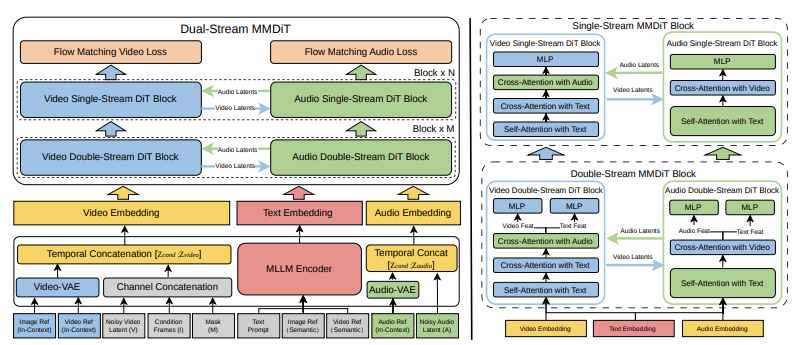
I thought this would be a buzzword. It wasn’t. SkyReels V4 adopts a dual-stream Multimodal Diffusion Transformer (MMDiT) architecture, where one branch synthesizes video and the other generates temporally aligned audio, while sharing a powerful text encoder based on Multimodal Large Language Models (MMLM). When SkyReels generates video and audio together, the timing feels baked in, not glued on later. In a 20-second demo reel, the on-screen hand movement hit the small percussive beats without me nudging keyframes. It wasn’t perfect lip sync (don’t expect a dubbed film), but it did reduce the micro-edits I usually do to hide mismatch.
The real change: fewer timeline hops. Normally I bounce between a DAW and a video editor to shave milliseconds. With joint generation, I only did one round of trims. This didn’t save time the first run, learning the prompts took a bit, but by the third clip, I noticed my mental load dropped. Less fretting about “is the audio slightly early here?” and more attention on pacing and text overlays.
Audio reference input, how it works
Feeding an audio reference felt like giving the model a metronome and mood board at once. I used a soft lo-fi track as the guide and asked for muted city visuals with slow pans. The output respected the tempo, cuts landed near downbeats, and the ambience echoed the reference without copying it. Good: it kept the energy curve. Limitation: if the reference had a busy midsection, the visuals sometimes over-cut there. I learned to pick simpler references or mark the segment I cared about.
In practical terms, I’d use audio references when I have a soundtrack locked early (client brand track, podcast bumper) and want visuals that converse with it. If you like to pick music last, this feature matters less.
Feature 2 — Multi-Modal Input Support
Text-to-video
Text prompts worked as the fast sketch. I wrote: “overhead desk shot, notebook pages turning, warm morning light.” The first pass was decent framing but generic props. After a couple tweaks, mentioning paper grain and a slow shutter feel, the motion improved and the highlights calmed down. It’s not a prop stylist: it’s a mood setter. I treat it like thumbnails: good for direction, not details.
Image-to-video
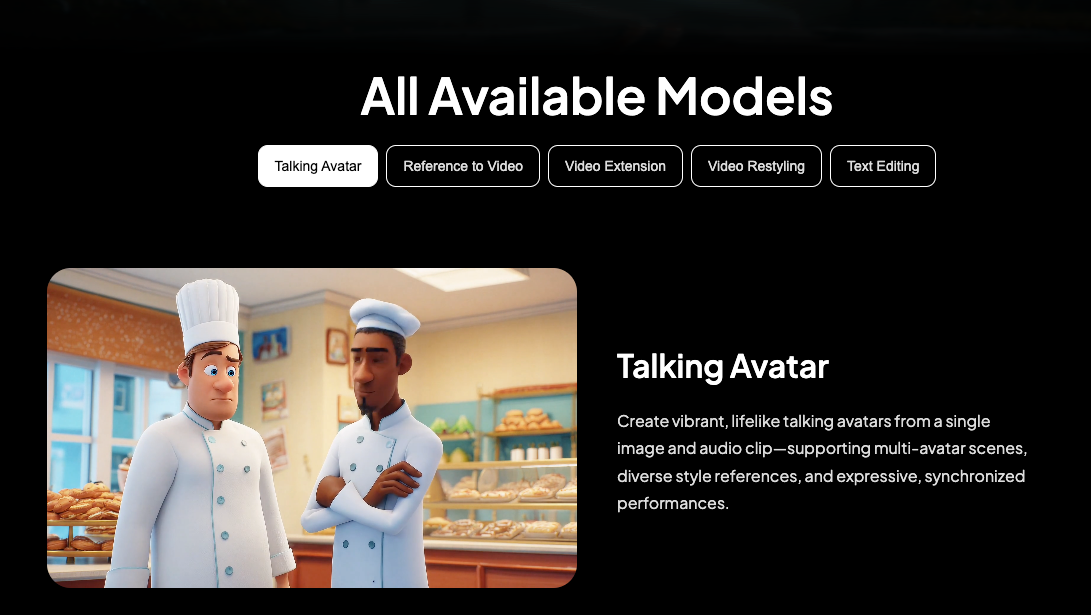
SkyReels V4 accepts rich multi-modal instructions, including text, images, video clips, masks, and audio references, enabling fine-grained visual guidance under complex conditioning. Image-to-video was where SkyReels V4 surprised me. I dropped a still of my actual desk. The model extended it into a few seconds of believable camera drift, with shadows that matched my lamp angle. I noticed minor warping around a coffee mug on take one. Re-running with “keep object rigidity” helped. If you’re trying to animate product stills or social posts without rebuilding a 3D scene, this hits a sweet spot.
Video-to-video (extension & editing)
Video-to-video felt like a time-saver for continuity. I extended a 7-second clip to 12 seconds while keeping the same tone curve. Edits like stabilizing a shaky pan or softening harsh highlights worked well with short, clear instructions. When I asked for too many things at once, new motion, different time of day, and color grade change, the result wobbled. My note to self: one intention per run. Think “extend,” then “grade,” then “cleanup,” in that order.
Feature 3 — Unified Inpainting & Editing Interface
What channel concatenation means for creators (non-technical)
On the video side, SkyReels V4 adopts a channel concatenation formulation that unifies a wide range of inpainting-style tasks—such as image-to-video, video extension, and video editing—under a single interface, and naturally extends to vision-referenced inpainting and editing via multi-modal prompts. Behind the scenes, SkyReels treats the edit inputs, masks, text, audio cues, as one shared conversation instead of siloed steps. For me, that meant I could paint out a stray cable, nudge the motion hint, and keep the same prompt context without reloading assets. Less context loss, fewer export–reimport loops. It sounds small, but skipping two or three roundtrips per clip adds up.
Vision-referenced inpainting explained
I tested inpainting on a product shot where a label edge looked crooked. I painted a quick mask and pointed the prompt to “use the existing label texture as the source.” The fill respected lighting and grain better than the clone-stamp feel I sometimes get in other tools. On finer text, it occasionally softened micro-details: running a second pass with “preserve typography edges” helped. I wouldn’t rely on it for forensic fixes, but for background cleanup and small prop tweaks, it blended faster than my manual workflow.
Feature 4 — Cinematic Output Quality
1080p / 32FPS / 15 seconds
Specs don’t tell the whole story, but they matter. 1080p at 32FPS for up to 15 seconds gave me enough runway for short explainers and teasers. Motion felt smooth without the soap-opera sheen. I pushed a dense city scene and saw minor temporal blur on quick lateral moves: adding “slower camera” and a touch of motion blur improved it. If you need longer sequences, you’ll still be stitching shots.
Multi-shot capability
Multi-shot was my quiet favorite. I storyboarded three beats, establishing, detail, resolve, and generated them as siblings with shared style cues. Cuts matched more cleanly than when I generate scenes separately. It’s not a full editor: think “coherent set of shots,” not a timeline. For social sequences or landing page loops, this was enough. For documentaries or ads with spoken lines, I’d still move to a traditional NLE for fine control.
Feature 5 — Efficiency at Scale
Low-res + keyframe two-stage strategy explained simply
The engine seems to sketch first, beautify second. It drafts a low-res motion plan, then sharpens keyframes and interpolates. I noticed this when early previews looked rough but the finals cleaned up nicely. Practically, it let me make decisions sooner. I could reject a take in under a minute if the motion felt wrong, instead of waiting for a full render. On a morning batch of six variations, that shaved about 20–25 minutes for me.
What Features Are Still Missing?
A few gaps stood out:
- Longer form control. The 15-second ceiling nudges you into modular thinking. Fine for social, tricky for narratives.
- Granular audio edits post-generation. Joint audio is great, but I still wanted per-clip volume envelopes and beat-level nudges inside the tool.
- Version traceability. I kept my own notes because linking outputs to prompt changes isn’t as clear as it could be.
- Hard constraints on continuity. When extending a clip, I’d like to “lock” certain objects or colors so they can’t drift.
Why this matters: SkyReels V4 features lowered my cognitive overhead on short-form pieces. If you already juggle DAWs, color grading, and motion tools, this consolidates the messy middle. If you need pixel-perfect brand control or long scripted content, you’ll still pair it with a stronger editor.
This worked for my pace, your mileage may vary. I’ll likely keep using it for 10–30 second explainers and product loops. The small, steady win for me was attention: fewer timeline acrobatics, a bit more time choosing what actually matters on screen. And that’s enough to keep me here, at least for now.
So I’m curious —
In your editing workflow, what costs you more energy: syncing audio and visuals, or polishing the tiny mismatches afterward?
If you’ve tried tools that promise “synchronized audio,” did they actually reduce friction — or just move it?
I’m still testing where this fits in my stack. What’s the one bottleneck you’d remove first in yours?
Related Articles

Introducing Bria Embed Product on WaveSpeedAI

Introducing Google Nano Banana 2 Edit Fast on WaveSpeedAI
