LTX-2.3 API Guide: 7 Endpoints, Access Options & Production Use
Hey, I’m Dora. A small thing nudged me into the LTX-2.3 API last week: I kept rebuilding the same 6–10s explainer shots by hand. Nothing dramatic — just the drag of doing it again and again. I’d seen mentions of “fast” variants and “retake” endpoints floating around, so I set aside a few mornings in March 2026 to try the ltx-2.3 API in real work. No fanfare. Just a handful of prompts, some product mockups, and a podcast intro I’ve been too precious about.
What follows isn’t a tour of features. It’s how the ltx-2.3 API endpoints behaved for me, what sped things up, and where the edges still show.
LTX-2.3’s 7 Endpoints at a Glance
Here’s the mental map I ended up using after a week of trial runs. The key thing I noticed: these aren’t separate “features” — they’re knobs in a sequence. I’d often sketch with fast text-to-video, lock prompts, then switch to standard, or seed an image-to-video clip and extend it for timing. The platform surfaces all of these through a standard REST API design, which kept the workflow from fragmenting across tabs.
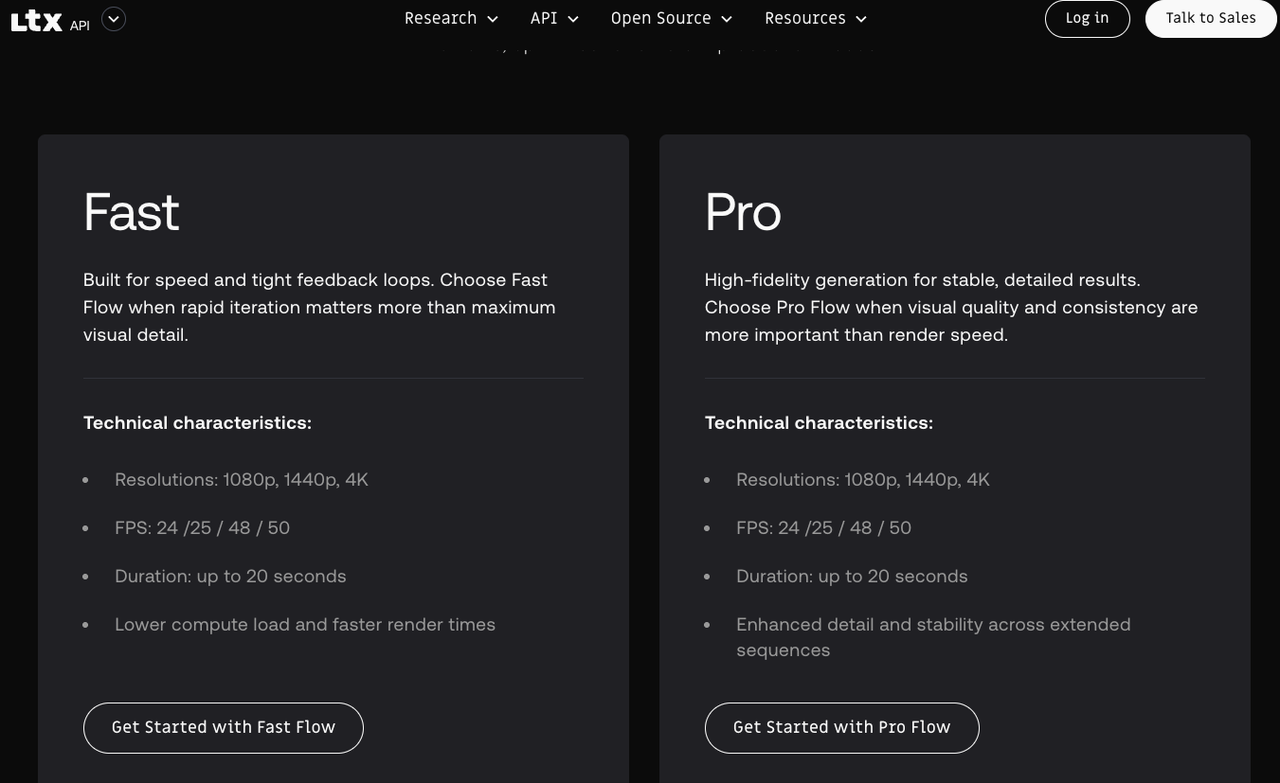
- Text-to-Video (standard): the quality pass. Slower, better motion consistency, cleaner textures. I reached for this when the shot mattered and I could wait.
- Text-to-Video (fast): the scout. Quick reads on framing and motion ideas, useful for prompt shaping and batch ideation.
- Image-to-Video: animates a single frame. If I wanted a logo bump or a mockup to “breathe” on screen, this did enough without drifting too far.
- Audio-to-Video: condition motion with an audio track. Not lip-sync magic — more like giving the model a metronome.
- Extend-Video: tacks on more seconds to the tail. Continuity is decent if prompts and seeds are stable.
- Retake-Video: regenerates a segment with constraints intact. Helpful for fixing a jittery hand or odd camera move without starting over.
- System/Utility: job polling. Not glamorous, but necessary.
Text-to-Video: Standard vs Fast Variant Trade-offs
I kept bouncing between the two. The split is simple on paper — speed vs quality — but it shows up in specifics that matter when you’re shipping.
- Fast ran 2–4× quicker per clip on managed hosts. Great for sketches and picking a direction — not great for fine textures or small typography.
- Standard reduced “melty edges” on hands and micro-motion shimmer, and held lighting direction more consistently across frames.
- On busy prompts (crowds, water, foliage), standard handled temporal noise better. Fast sometimes looked fine on first watch, then felt “busy” when cut next to real footage.
The boring truth: I saved more time by switching variants at the right moment than by cranking any single setting.
Key Parameters and Prompt Guidance
A few parameters actually moved the needle:
- Duration and frames: Shorter is kinder. 4–8s at 16–24 fps was the sweet spot for stable motion and reasonable queue times.
- Seed: Fix it once a direction feels right. Seeds made retakes and extensions far less chaotic.
- Guidance/CFG: Lower (4–6) let the model breathe; higher (7–9) clamped style but increased sameness frame-to-frame.
- Negative cues: Point them at movement, not just visuals — “avoid fast zooms,” “no spinning camera,” “steady tripod.” This curbed whiplash more than describing objects.
Prompt shape that worked reliably: one sentence for scene and subject, one for camera and motion, one for light and texture. I stopped over-stuffing adjectives once I noticed they fight each other.
Image-to-Video: Input Specs and Artifact Risks
I used this mostly to animate stills — UI mockups, product hero frames, simple marks. The input liked clean sources: sharp PNGs, no compression mud. Square or near-square behaved best.
- Gentle camera notes (“subtle parallax, slight handheld sway”) created life without tearing the image apart.
- Keep text layers big — small UI labels turned to soup in motion. I baked critical text as overlays in post instead.
- Fine line art flickered at edges. Slight blur pre-processing helped.
- Logos stayed readable if I avoided fast rotations. For reveals, I let the model do a 10–15° tilt, then cut.
If an artifact appears at frame 1–2, it usually persists. Regenerate with a new seed before trying to fix it in post.
Audio-to-Video: How Conditioning Actually Works
I went in hoping for lip-sync. That’s not what this endpoint is. Think pacing, energy, and broad motion cues instead. With drum tracks, the model caught downbeats as gentle camera nudges. With ambient audio, it slowed down — less twitch, more drift.
In practice, I treated audio like a tempo map. For a 20s ambient bed, I cut two 8s clips and one 4s, each conditioned on the same track, then picked the best for continuity. Even low-frequency rumbles shaped motion — if you don’t want the camera to “breathe” on every bass hit, add “no rhythmic camera pulsing” as a negative prompt.
Where it helped: foley beds, music pacing for b-roll, tone matching. Where it didn’t: lip-sync, precise beat edits, or dialog scenes.
Extend and Retake: Building Longer or Corrected Sequences
These two are quiet wins. I chained two 6s clips into a 12s shot by extending the first clip’s tail with the same prompt, seed, and camera notes. The handoff wasn’t perfect, but the cut point hid fine under a breath in the soundtrack. If the first frame of your extension looks off — stop there. Bad starts rarely recover.
Retake fixed a fast pan that slipped into the last 2s of an otherwise good clip. I kept the negative guidance about motion, not content, and needed 1–3 tries on average. Both endpoints benefit from discipline: lock seed, duration, and camera language before chasing micro-fixes.
Self-Hosted vs Managed API: Trade-offs
I tried one managed host (fal.ai-style interface) and a local box for a day. Managed API wins when you need ten variants fast and don’t want to babysit drivers — but rate limits and per-minute costs add up on longer runs. Self-hosting offers lower marginal cost and full batching control, at the price of setup friction and driver headaches.
A simple heuristic: a dozen short exploratory clips — managed wins. Hundreds of seconds with locked prompts — self-hosting starts to pay for itself.
For hardware, 24 GB VRAM was the comfortable floor for 8–10s clips at 768p in March 2026. The CUDA 12.x toolkit documentation covers the driver requirements if you’re setting up a local inference box — I pinned drivers to avoid surprise slowdowns.
Common API Errors and How to Fix Them
- Mismatched dimensions: Some endpoints require dimensions divisible by 16. If a job fails instantly, step down to the nearest multiple of 16.
- Over-long prompts: Managed hosts clip or time out on very long JSON payloads. Move style lists to shorter phrases; use negatives sparingly.
- Seed drift across endpoints: Switching from text-to-video to extend-video sometimes ignored seed if I forgot to pass it through. Log seed and cfg with every request.
- Rate-limit bursts: Stagger batch submissions by 200–300 ms or use provider-recommended concurrency headers.
FAQ
What’s the max clip length per single API call?
Most managed hosts cap at 4–10s at common frame rates to keep queues sane. Self-hosting, I pushed to ~12–16s before quality dipped. For anything longer, chain extensions with shared seeds.
How much does quality differ between fast and standard variants?
Noticeable, not night-and-day. Fast gets you 70–80% of the look in a fraction of the time. If a clip will live next to live-action footage, finish on standard.
Can LoRA adapters be applied via managed API?
It depends on the host. Some expose model presets or style adapters; others keep them stock. The Hugging Face model hub is the best place to cross-reference available adapter slots and community fine-tunes before committing to a provider. Locally, you have more freedom — but also more ways to break things.
What about running multiple modalities from a single API key?
Most multi-model platforms bill per-credit and cover image and video endpoints under the same key. It’s worth checking the provider’s pricing page before you start — the OpenAPI Specification is a useful reference for understanding how well-structured API documentation should present endpoint coverage and billing behavior.
A Note on Video Quality Standards
One thing worth keeping in mind: “high quality” means different things in different contexts. For b-roll destined for social, fast mode is often good enough. For anything cut against broadcast or cinema material, it helps to understand what codecs and color science the final delivery requires. The SMPTE standards library is dry reading, but the baseline specs for frame rate, bit depth, and color space are relevant if you’re handing clips to a colorist or a post house.
I’ll end with a small note: the more I treated these endpoints as parts of a system — seed discipline, short runs, steady camera language — the less I wrestled with them later. It’s not magic. But a few small rules made the work feel lighter.
Previous Posts:
- Get a step-by-step quickstart for integrating WAN 2.7 into your API workflow
- Compare WAN 2.7 vs WAN 2.6 to understand real upgrade trade-offs
- Learn how instruction-based video editing works in real production pipelines
- See how first and last frame control improves video generation consistency
- Explore how AI video upscalers improve output quality after generation
Related Articles
LTX-2.3: What's New in Lightricks' 22B Video Model (2026)

WaveSpeedAI vs Media.io Watermark Remover: Which One Actually Delivers?

Goodbye Sora: Top 5 Best Sora Alternatives for Making AI Videos in 2026

Google Veo 4: What We Might See From Google's Next AI Video Model

Introducing AI Photo Colorizer on WaveSpeedAI