
Introducing Kuaishou Kling Image O3 Edit on WaveSpeedAI
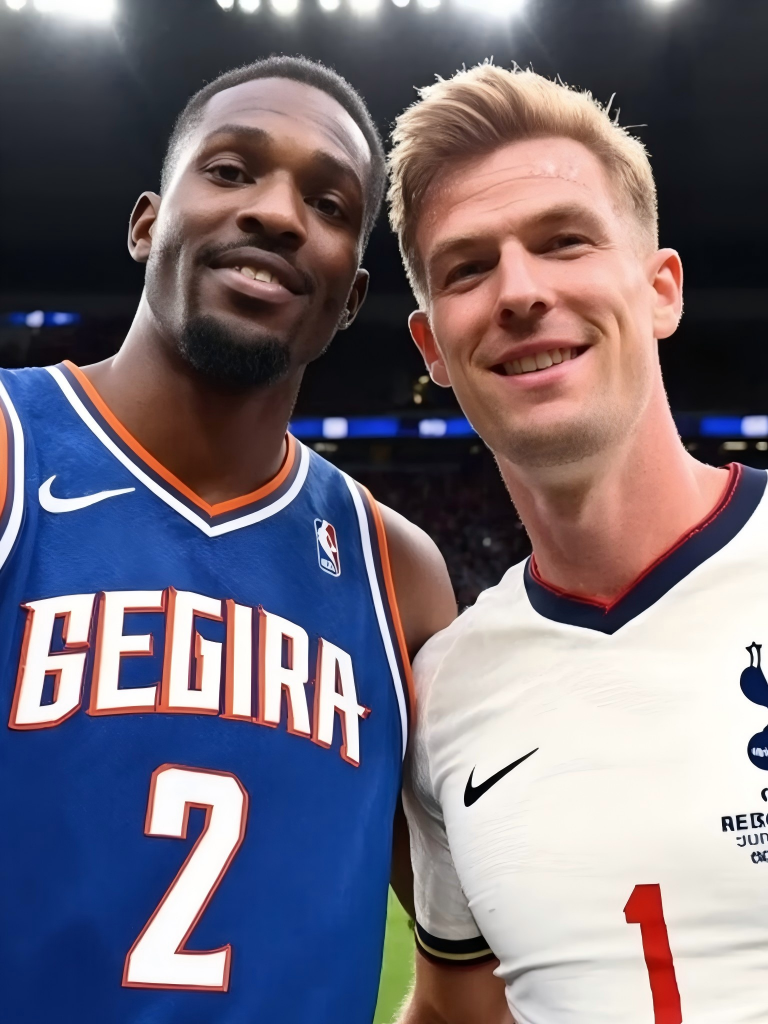
Introducing Kling Image O3 Edit: Multi-Reference Image Composition Powered by Kuaishou’s Omni Architecture
The gap between what AI image generators can create and what they can edit has been narrowing fast. But compositing—intelligently combining elements from multiple source images into a single coherent scene—has remained one of the field’s hardest problems. Kuaishou’s Kling Image O3 Edit closes that gap with a model built specifically for multi-reference image composition and editing, powered by the O3 (Omni 3) architecture and capable of generating results at up to 4K resolution. It’s now available on WaveSpeedAI.
What is Kling Image O3 Edit?
Kling Image O3 Edit is the latest image editing model from Kuaishou, built on the O3 architecture—the same unified multimodal foundation behind Kling’s top-tier video and image generation models. While previous Kling editing models worked with a single reference image, O3 Edit accepts up to 10 reference images simultaneously, enabling an entirely new category of creative workflows.
Upload a set of photos containing the people, objects, styles, or environments you want to combine, then describe in natural language how they should come together. The model interprets your instructions, blends elements from each reference, and generates a new image that respects the identity, lighting, and style of your source material. No manual masking, no layer management, no Photoshop expertise required.
Under the hood, the O3 architecture introduces a Visual Chain-of-Thought (vCoT) reasoning process—borrowed from how large language models “think step by step.” Before rendering a single pixel, the model performs implicit scene decomposition and causal reasoning, planning how to arrange subjects, resolve lighting conflicts between references, and handle occlusion. This is why Kling Image O3 Edit produces compositions that feel deliberate rather than pasted-together, even when combining elements from vastly different source photos.
Key Features
-
Multi-Reference Composition (Up to 10 Images): Feed the model up to 10 reference images and refer to them by number in your prompt—“Have the person in picture 1 wearing the outfit from picture 3, standing in the environment from picture 5.” The model maintains distinct identity and style from each reference.
-
Text-Guided Editing: All edits are driven by natural language. Describe what you want conversationally, and the model determines how to execute it. Complex compositions that would take hours in traditional editing software reduce to a single sentence.
-
Native 4K Resolution: Generate images at 1K, 2K, or 4K resolution directly from the inference pipeline. The 4K output delivers physically accurate micro-textures—skin pores, fabric weaves, material surfaces—at a level suitable for commercial print and large-format display.
-
Flexible Aspect Ratios: Auto-detect based on your references, or manually select from 1:1, 3:4, 4:3, 9:16, 16:9, and more. Adapt output for any platform or format without cropping after the fact.
-
Batch Generation: Generate multiple variations from a single request. Submit one composition prompt and receive several interpretations to compare, letting you explore creative directions without repeated API calls.
-
Character Identity Preservation: Thanks to the O3 architecture’s advanced 3D reconstruction technology, faces and character features remain faithful to their reference images even when placed in entirely new contexts, poses, or lighting conditions.
Real-World Use Cases
Character Composition and Social Content
The most distinctive capability of O3 Edit is combining people from separate photos into a shared scene. Place friends who’ve never met side by side, create group photos from individual portraits, or generate imaginative scenarios featuring people from different contexts. Content creators can produce engaging social media posts that would be physically impossible to photograph.
Marketing and Advertising
Creative teams can composite products with models, environments, and lifestyle elements sourced from different shoots. Build campaign visuals that combine your product, a specific location, and a particular model—each from separate photo libraries—into a single polished scene. At $0.028 per image at standard resolution, iterating on dozens of composition variations costs less than a single stock photo license.
Style Transfer and Creative Mashups
Upload style reference images alongside content references to generate images that blend the visual aesthetic of one source with the subjects of another. Translate a product photo into the style of a watercolor painting, apply the color palette of a sunset to a portrait, or merge artistic references into something entirely new.
E-Commerce and Product Visualization
Generate product-in-context images at scale without physical photo shoots. Combine product images with different background environments, complementary items, or lifestyle scenes. A furniture company can place their sofa in dozens of different room settings, each from a different reference photo, generating an entire catalog’s worth of lifestyle imagery from a handful of source images.
Storyboarding and Narrative Design
Maintain consistent characters across a sequence of scenes by using the same reference images with different prompts. O3 Edit’s identity preservation ensures that a character looks the same whether they’re in scene one or scene twenty, making it practical for comic creation, storyboarding, and visual narrative work.
Getting Started on WaveSpeedAI
WaveSpeedAI delivers Kling Image O3 Edit with the infrastructure advantages that production workflows demand:
No Cold Starts: Every request executes immediately. No model loading delays, no queuing—just instant inference, which matters when you’re iterating in real time or serving end users who expect immediate results.
Fast Inference: WaveSpeedAI’s optimized infrastructure keeps composition and editing workflows responsive, even at 4K resolution.
Affordable Pricing: Standard and 2K images cost just $0.028 each. 4K images are $0.056 each. Generate 100 professional-quality compositions for under $3 at standard resolution.
Quick Start with the API
import wavespeed

output = wavespeed.run(
    "kwaivgi/kling-image-o3/edit",
    {
        "prompt": "Have the person in picture 1 and the person in picture 2 take a selfie together in a coffee shop",
        "images": [
            "https://example.com/person1.png",
            "https://example.com/person2.png",
        ],
    },
)

print(output["outputs"][0])
Tips for Best Results
- Reference specific images by number in your prompt. “The person in picture 1 wearing the outfit from picture 3” is far more effective than vague descriptions.
- Use high-quality, well-lit reference images. Clear subjects with good lighting produce the best compositions. The model preserves what’s already in your references, so quality in equals quality out.
- Generate multiple variations by setting
num_imagesabove 1 to explore different interpretations of your composition. - Choose resolution deliberately. Use 1K or 2K for rapid iteration and previewing, then switch to 4K for your final output when you need print-quality detail.
- Auto aspect ratio works well when your references share similar proportions. Switch to manual selection when targeting specific platforms like Instagram Stories (9:16) or YouTube thumbnails (16:9).
The Kling O3 Ecosystem on WaveSpeedAI
Kling Image O3 Edit is part of Kuaishou’s expanding O3 model family on WaveSpeedAI. Generate base images with Kling Image O3 Text-to-Image, compose and refine them with O3 Edit, then bring your results to life with Kling Video O3 Pro Image-to-Video. Together, they form a complete creative pipeline—text to image to edited composite to video—all through a unified API with consistent pricing and zero cold starts.
Start Composing Today
Kling Image O3 Edit represents a genuine leap in what’s possible with AI-driven image editing. Multi-reference composition at this level of quality—with character identity preservation, native 4K output, and natural language control—opens creative workflows that simply didn’t exist before. Whether you’re building creative tools, scaling content production, or exploring new forms of visual storytelling, O3 Edit gives you a practical way to combine any set of visual elements into exactly the image you have in mind.
Related Articles

Introducing Bria Embed Product on WaveSpeedAI

Introducing Google Nano Banana 2 Edit Fast on WaveSpeedAI
