
GLM-4.7-Flash: Release Date, Free Tier & Key Features (2026)
Hey guys, I’m Dora.
Recently, GLM-4.7-Flash kept showing up in threads from people I trust, usually mentioned with a small shrug: “fast enough to get out of the way.” That line stuck. I’m not chasing shiny models right now: I’m chasing tools that make everyday work feel lighter. You feel me?
So I gave GLM-4.7-Flash a few days in my stack (Jan 20–21, 2026). Short prompts, small API scripts, a couple of batch jobs. Nothing dramatic. The question I held onto was simple: is this a practical addition, or another model name passing through the timeline?
What Is GLM-4.7-Flash?
GLM-4.7-Flash is a speed-focused variant of Zhipu AI’s GLM-4.7 family. Think of it as the one you reach for when you want responsive, low-latency generations without heavy reasoning overhead. It’s not trying to win long-form benchmarks or debate philosophy: it’s aiming to return decent answers quickly and cheaply.
Who Made It (Zhipu AI / Z.ai)
 Zhipu AI (also seen as Z.ai) is the team behind the GLM series. If you’ve tried earlier GLM models, the naming will feel familiar: the number reflects the generation, and the suffix (Flash, Standard, etc.) hints at the trade-offs. Their docs are straightforward and regularly updated: if you’re integrating, bookmark the official API docs on Zhipu’s developer portal.
I’ve used Zhipu models off and on for the past year when I needed multilingual coverage and stable, predictable outputs. GLM-4.7-Flash continues that pattern, just with more attention on speed and throughput.
Flash vs Standard, Positioning
Here’s how I felt the differences in practice:
- Flash: optimized for speed, lower compute per request, great for high-volume endpoints, UI assistants, and batch classification or tagging. I noticed it was happiest with concise prompts and clear structure.
- Standard (non-Flash): slower but steadier on reasoning-heavy tasks. If I threw multi-step analysis at Flash, it tried, but I could see it compressing steps to keep latency low.
If you’re choosing between them, a gentle rule: if latency and cost shape your day-to-day, start with Flash. If correctness on multi-hop reasoning is your primary constraint, Standard (or a larger reasoning-tuned sibling) will likely land better. You know, pick your fighter.
Official Launch: January 19, 2026
Zhipu AI announced GLM-4.7-Flash on January 19, 2026. I started testing the next day. Version context matters with these models: early days often come with fast iteration. If you’re reading this later, check the release notes in the official docs to confirm any changes to limits or behavior.
Architecture at a Glance
I don’t need to know a model’s internals to use it, but certain details help me estimate costs and where it’ll excel.
30B MoE, 3B Active Parameters
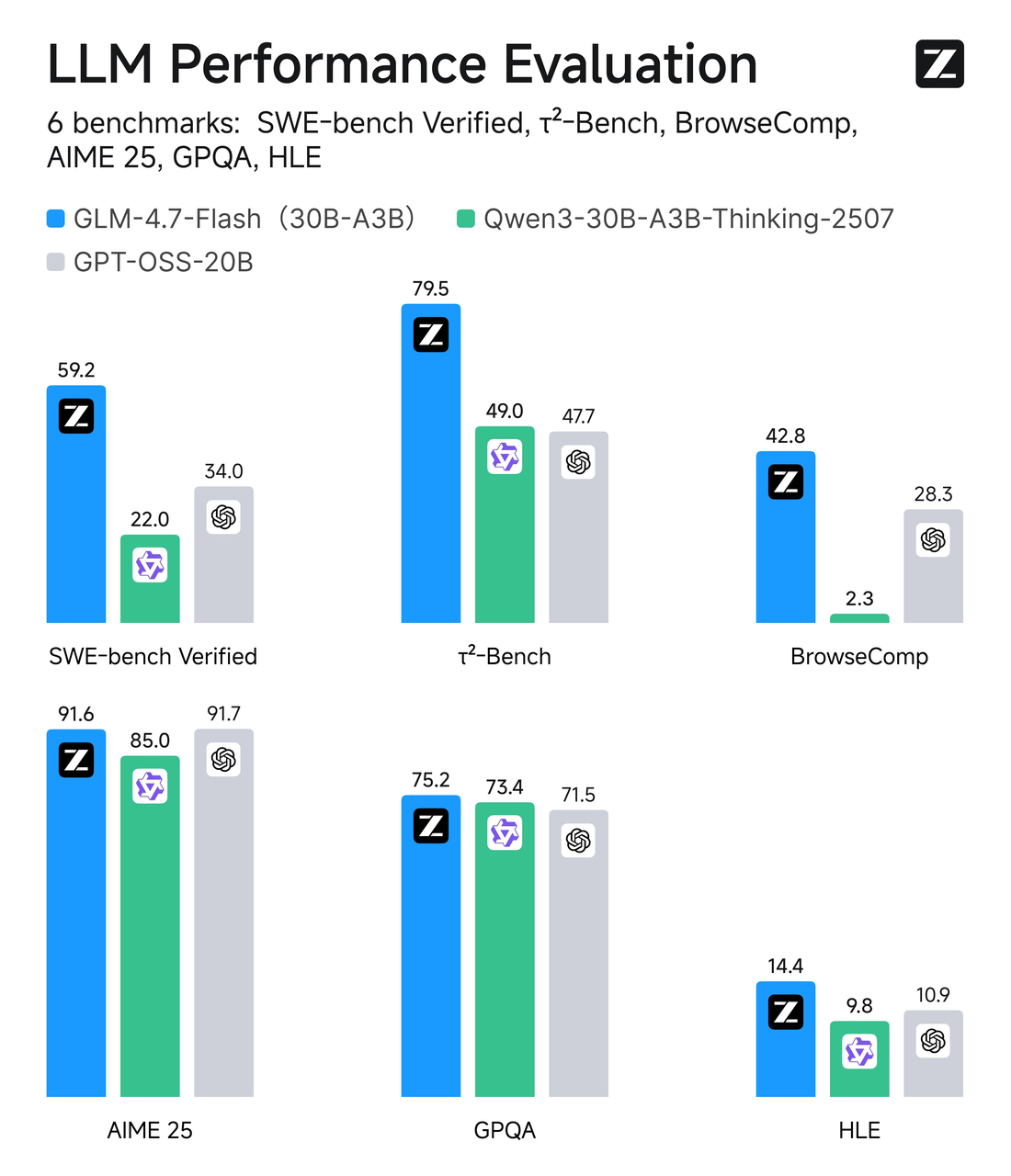 GLM-4.7-Flash uses a Mixture-of-Experts (MoE) design with a total parameter count around 30B, but only ~3B experts are active per token. In plain terms: it’s a wide model with selective routing. Most of the time, only a small slice of the network works on your token, which keeps inference lean.
In practice, MoE often gives you a “larger brain when needed” feel without always paying the full compute price. During my tests, that translated to responsive outputs even under load, and more consistent latency than dense models of similar reported scale. It’s not magic, just a smart way to balance capacity and speed.
MLA (Multi-Headed Latent Attention)
The docs mention MLA (Multi-Headed Latent Attention). My takeaway as a user: it’s an attention strategy aimed at being more efficient than classic full self-attention, especially under longer contexts. I didn’t push long-context limits here: my runs were mostly under a few thousand tokens. Still, the memory footprint stayed reasonable, and I didn’t see the usual slow slide in latency as prompts grew from “short” to “medium.”
If you’re planning retrieval-heavy workflows or agent loops, MLA plus MoE is a helpful signal: this model’s designed to keep throughput up rather than chasing maximal single-shot reasoning depth.
Free API — What’s Included
The free access stood out. I’m careful here because free tiers shift, sometimes weekly. What I’m sharing is what I observed on Jan 20–21, 2026, and what Zhipu’s docs suggested at launch. Always double-check limits before you wire this into production.
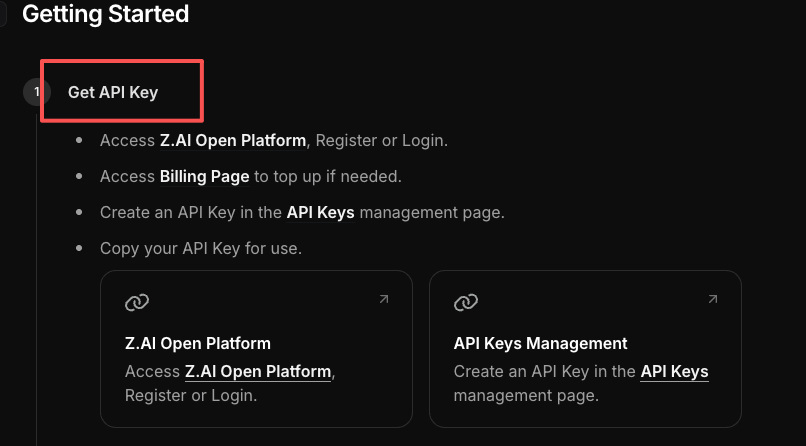 In short: the free API let me make real requests with sane defaults. I ran small jobs without hitting a paywall mid-test. That lowered the friction to try it in a live script rather than from a playground.
Rate Limits & Concurrency
What I saw:
- Concurrency: I could comfortably run multiple parallel requests from a small worker without tripping errors. In my tests, 5–10 concurrent calls stayed stable. When I spiked higher, I started seeing throttling, which is expected on a free tier.
- Throughput: Short prompts (classification, small transforms) returned in the sub-second to low-seconds range. On average, I saw 300–900 ms for very short responses and 1.5–3 s for modest outputs. Network variance applies.
- Safety: The API responded with clear error codes when I exceeded limits. That alone saved me time, I didn’t have to guess what went wrong.
I didn’t chase exact TPS ceilings: my goal was to see if small pipelines could run without babysitting. They did. Feels like freedom, honestly. If you’re planning spiky workloads, test with realistic concurrency and build simple retry/backoff. Free tiers are generous until they aren’t.
FlashX Paid Tier
Zhipu mentions a “FlashX” paid option aimed at higher throughput and more predictable performance. I didn’t move my tests to FlashX during this run, but here’s what typically changes when you upgrade tiers with providers like this:
- Higher and guaranteed rate limits with fewer throttles.
- More concurrent requests per key, useful for batched jobs and user-facing assistants.
- Priority routing (lower tail latency). This matters when you care about the worst 5% of requests, not just the median.
If you’re shipping a customer-facing feature, FlashX is the safer route. If you’re tinkering, the free tier is good enough to get a feel for stability and integration work. Your mileage will depend on your latency budget and how often you batch.
Best Use Cases
I tried a handful of real tasks. Nothing glamorous, just what shows up in my week.
- Interface assistants where lag kills the mood. Think: inline rewrites, small clarifications, short follow-ups. GLM-4.7-Flash kept the UI feeling immediate.
- Batch text transforms. I ran a small CSV (couple thousand rows) for tone adjustments and category tags. The model stayed consistent and didn’t drift halfway through.
- Drafting scaffolds. Outlines, point-by-point expansions, simple briefs. It handled structure well when I gave it crisp instructions. Like having a mini-helper you don’t have to bribe.
- Retrieval summaries with short context windows. When I piped in 2–4 snippets, it responded cleanly without hallucinating weird bridges. With long, messy context, it tried to be helpful but sometimes compressed too aggressively.
- “First pass” code comments or docstrings. Not deep refactors. Just clarifying intent and naming, fast and useful.
Where I wouldn’t use it:
- Multi-hop analysis with edge cases where precision matters more than speed. I’d reach for a heavier reasoning model.
- Long-form generation where you need steady tone and deep factual stitching over thousands of tokens. Flash can do it, but it feels out of character.
Why this matters: fast models that don’t bulldoze your budget open up features you’d otherwise cut. If your product needs dozens of tiny model calls per session, shaved latency and lower compute per call add up. Little wins, big payoff.
💡 To make running models like GLM-4.7-Flash easier and more reliable in real workflows, I use WaveSpeed — our own platform that handles API requests, concurrency, and batch jobs smoothly, so you can focus on results instead of babysitting scripts.
Try WaveSpeed →
 One small note from the trenches: my first hour wasn’t faster. I fiddled with prompt structure, temperature, and max tokens. After a few runs, I found a pattern, short system prompt, explicit output format, clear constraints. That reduced both time and mental effort. It wasn’t magic: it was setup.
Who else started a “quick 10-minute test” of GLM-4.7-Flash (or any Flash model) and blinked to find the clock saying midnight? Drop your personal record—and the one prompt tweak that finally made it behave—in the comments.
Related Articles

GPT-5.4 for Developers: What the Leaked Signals Mean for AI Workflows

SkyReels V4 Use Cases: 6 Ways Creators Can Use It Right Now

GPT-5.4 Release Date: What the Signals Say

GPT-5.4 vs GPT-5.3: What Might Actually Change
