
WaveSpeed API vs Web App: When Each Makes Sense (Speed, Limits, Cost)
I didn’t plan to compare WaveSpeed’s API and web app. I tripped into it. One morning in January 2026, I was exporting a batch of audio clips and the web app progress bar stalled at 92%. It wasn’t broken: it was just busy. I caught myself staring, waiting. That tiny pause is what pushed me to try the API again. Not because “developers should,” but because I wanted the work to move while I made coffee.
Here’s what I noticed after a week of switching back and forth: where the web app feels easy, and where the API quietly makes the day feel lighter. Honestly, it was a bit of a surprise.
What you get with Web
I reach for the web app when I want clarity. It’s the place where things look like what they are. Buttons have names. Previews look and sound like the output. I don’t have to remember parameters, I can see them.
A few practical wins stood out:
- Fast orientation. If you’re new to WaveSpeed, the web makes the capabilities obvious. I can test a setting, listen, nudge a slider, and get feedback in a loop that feels human.
- Guardrails. The app blocks impossible combos and warns me before I do something silly. That matters on days when attention is low.
- Good defaults. I rarely start from a blank slate. Presets and saved settings let me reuse the last thing that worked.
Small frictions showed up too:
- Throughput caps. The UI keeps me honest, but it also keeps me serial. I can’t run ten jobs in parallel without dancing between tabs.
- Waiting in the foreground. If I’m in the browser, I’m watching it. That attention tax is small, but it adds up. Not gonna lie, it’s a tiny pain.
- Export choreography. Downloads, renames, folders, it’s fine for a few files, fussy for fifty.
If I’m producing a single asset, testing a new workflow, or sharing something with a teammate who doesn’t code, the web app is the calm choice. It’s also a good “source of truth” when the API output looks off, I can replicate a setting visually and see if it’s me or the system.
What you get with API
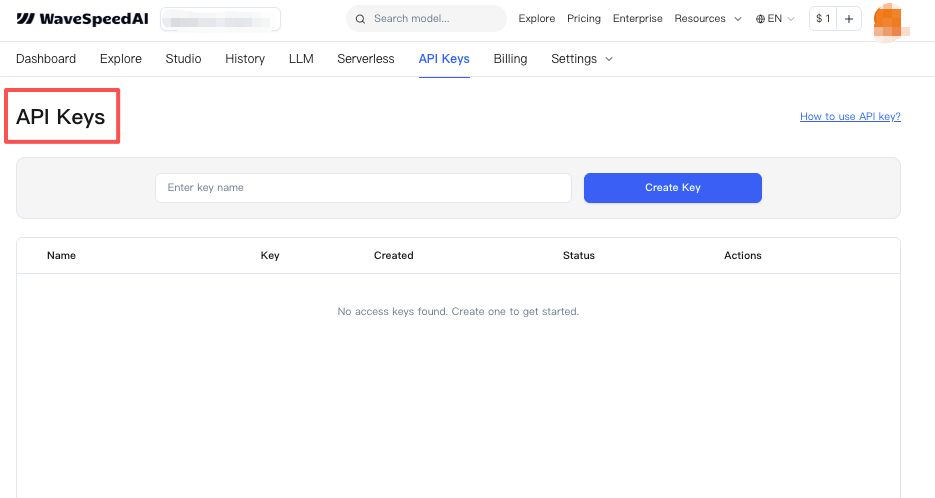 The API didn’t wow me at first. I sent a request, got a response, shrugged. The value showed up on the third and fourth run, when I realized I hadn’t clicked anything and still got clean outputs sitting in a folder with predictable names.
Here’s where the API earned a spot in my routine:
- Parallelism. I can queue multiple jobs without babysitting them. Even modest concurrency trims hours off a week.
- Repeatability. Scripts don’t forget. If a client asks for the same processing next month, I run the same code with a different input list.
- Composability. I can chain WaveSpeed with other tools, transcription, tagging, cloud storage, and treat it as one step in a larger system.
- Headless reliability. Retries, backoff, and idempotency keys take the edge off network hiccups.
There’s a different kind of friction too:
- Setup time. I spent 45 minutes the first day just wiring auth, reading pagination notes, and deciding where to store outputs.
- Parameter drift. Web presets feel anchored. With the API, I version my own settings or risk “almost the same” outputs from run to run.
- Observability. Logs are honest but not friendly. I added lightweight monitoring so I’d know when a queue stalled without staring at a spinner.
If your work repeats, even a little, the API turns that repetition into a background task. It’s not more “powerful” in a flashy sense—honestly, it just frees your hands.
Latency / limits / queues
I tested both paths over a few days (Jan 8–12, 2026), using batches of 10–50 items. These are observations, not lab numbers.
- Latency felt similar per item. The API didn’t make a single job magically faster. The win came from running multiple jobs side by side.
- Web queues smoothed traffic. At busy times, the web app placed me in a gentle line. The upside: fewer failed jobs. The downside: foreground waiting.
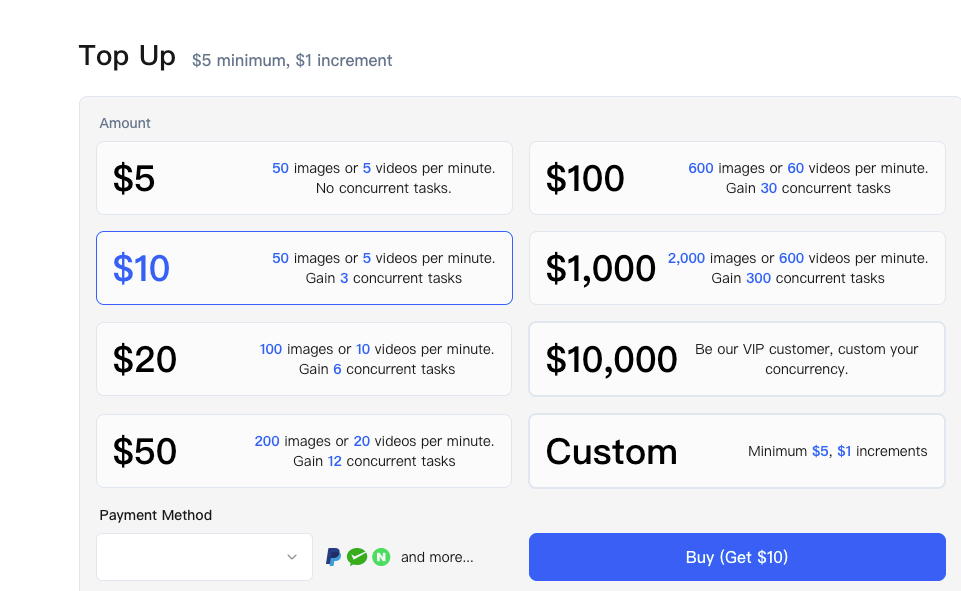
- API rate limits were predictable. Once I understood the per-minute and per-concurrency caps in the docs, I set my script to pace itself. That removed the “why did this 429” mystery.
- Cold starts matter, sometimes. Running my worker on serverless functions added a few seconds here and there. Not a big deal, but I noticed it on small jobs.
- File sizes change the story. Larger media amplified everything. Upload and download time dwarfed processing, which pushed me to process closer to storage.
If you work live in the browser and need quick feedback, the web is pleasant, even with a queue. If you’re okay with delayed gratification and you value throughput over “feels fast,” the API with a modest queue worker wins.
Cost & billing differences
 I try to look at cost in terms of decisions I can control.
- Web app costs tend to be simple: a plan with limits. Great for clear budgets. Less great when you spike for a week and pay in time rather than money.
- API pricing usually maps to usage. You pay for what you run. That’s fair, but it asks you to watch rate limits, retries, and storage egress. Small inefficiencies become line items.
What actually mattered for me:
- Batch economics. The API let me process at night when I didn’t care about perceived speed. That meant I could throttle to a cheaper tier on my infra.
- Re-runs. Bad inputs cost more with the API because I trigger them, not the UI. Validation up front saved me a few dollars and some regret.
- Storage and transfer. Moving media twice is expensive in both time and money. Pushing outputs directly to cloud storage cut the hidden costs.
If you’re testing or shipping occasional work, the web plan keeps thinking to a minimum. If you’re running steady workloads, the API pays for itself by removing manual labor, and then asks you to be a decent ops person. Fair trade, in my view.
Best for creators vs devs
Labels are messy, but here’s how it shook out for me.
- Creators who live in timelines, drafts, and one-offs: the web app fits your pace. You see what you’re making, you tweak, you ship. Collaboration is also easier, you can share a screen and decide together.
- Developers (or creator–dev hybrids) who run the same play often: the API feels like delegation. You write the rule once and let it run in the background.
There’s overlap:
- Non-coders with repeat tasks can still win with the API by using no-code runners or simple scripts someone shares with them.
- Devs who prototype benefits from the web first. I use the app to find a good baseline, then I capture those parameters in code.
If your week looks different every day, stay with the web. If your week rhymes, reach for the API.
If you want to automate repetitive runs and focus on creativity rather than clicking around, use our WaveSpeed to batch jobs via API or refine settings in the web app without babysitting queues.

Security notes
I’m not here to audit WaveSpeed, and I won’t pretend to. I’ll just share what I check before I put real data through any tool.
- Data handling. I look for retention windows, processing locations, and whether I can request deletion. Web and API should match: sometimes they don’t.
- Authentication. The API key scope matters. Least privilege beats a master key in every environment. Rotate keys on a schedule you’ll actually keep.
- Transport and storage. TLS in flight is table stakes. At rest encryption is normal now, but confirm how outputs are stored, especially if they sit in a vendor bucket.
- Logging. Web UIs hide logs from you. APIs make you create your own. Be careful not to log sensitive inputs by accident when debugging requests.
- Access paths. With the web, sharing often means account access. With the API, it’s usually service roles. Both carry risk. Use org roles and SSO when available.
If compliance matters to you, read the official docs and trust but verify. Ask support specific questions (retention, subprocessor list, breach notification windows). Boring questions tend to be the right ones.
Migration checklist
I moved one recurring workflow from the web app to the API over two evenings. By the way, here’s the checklist I wish I had taped to my monitor.
- Define the repeatable unit. One input in, one output out. Name it. Don’t migrate the entire world at once.
- Freeze good parameters. Use the web to find a setting you like. Write those values down. Call them v1.
- Read the API auth section slowly. Generate a scoped key. Store it in your secret manager, not in the script.
- Start with a single happy-path request. Get a 200 once before you touch loops.
- Add input validation. Fail early on bad file types, lengths, or sizes.
- Plan for rate limits. Respect the headers. Add exponential backoff. Cache completed jobs so retries are idempotent.
- Decide on concurrency. Pick a small number first (3–5). Measure memory and I/O, then adjust.
- Streamline I/O. Upload once, process once, write once. Avoid copying files across regions if you can.
- Version your settings. v1, v2, etc. Commit them. Future you will forget what changed.
- Add lightweight monitoring. A simple dashboard or even a daily summary email is enough to know if the queue is healthy.
- Keep a manual escape hatch. If the API stumbles, be able to finish a job via the web app without drama.
- Review costs after a week. Look at requests, retries, transfer. Trim the waste.
After doing this, the work felt… quieter. I didn’t move everything. I moved the parts that repeat.
One last note: WaveSpeed API vs Web App isn’t really a duel. It’s a pairing. I still prototype in the web, then codify in the API. On days when I’m tired, I let the UI keep me honest. On days when I’m steady, I let the queue run while I do something else.
 I don’t have a grand conclusion here. Only this: the tools felt better when I stopped asking which is “right” and started asking which one gives me back the next hour. How about you?
Related Articles

GPT-5.4 for Developers: What the Leaked Signals Mean for AI Workflows

SkyReels V4 Use Cases: 6 Ways Creators Can Use It Right Now

GPT-5.4 Release Date: What the Signals Say

GPT-5.4 vs GPT-5.3: What Might Actually Change
