
WaveSpeed API Pricing: How Credits Work + A Simple Cost Calculator
Hello, remember me? I’m Dora.
I didn’t set out to think about pricing. I just wanted a quiet afternoon test. But halfway through wiring a small prototype (Jan 2026), my notes started drifting from “does this work?” to “what will this cost if it actually ships?” That’s usually the moment I pause. WaveSpeed API pricing isn’t flashy. It’s the kind that hides in the edges, context size, retries, data size. None of it is dramatic, but it adds up. Here’s how I’ve been sizing it, with real numbers where I can and plain estimates where I can’t. If you work like I do, shipping small experiments that might grow, this may help you plan without guessing.
How pricing is measured
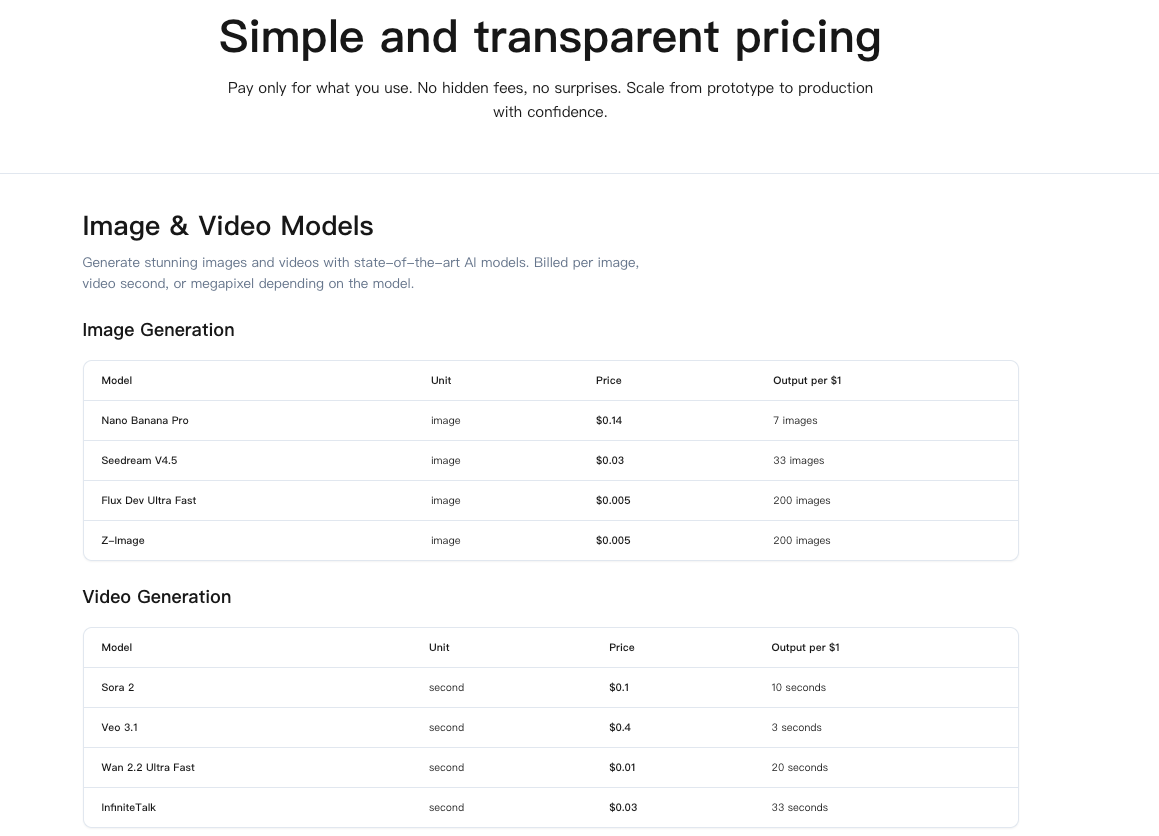
I couldn’t find a single number that captured WaveSpeed API pricing cleanly. So I treat it as three buckets:
- Base call: the fee to hit an endpoint once. Think of it as the “door charge.”
- Variable workload: the part that grows with what you send and ask for, tokens, file size, model tier, tools used, context length.
- Extras: storage, data egress, and anything that persists or moves data out.
For planning, I use a simple formula:
Estimated cost = (runs × base_per_call) + (input_volume × rate_in) + (output_volume × rate_out) + (data_stored × storage_rate × months) + (egress_GB × egress_rate)
It’s boring, which is why it works. I keep rates in a small sheet and adjust as the docs change. If you’re doing this too, bookmark the official pricing and limits pages: they move often, and small changes there ripple through everything else.
Factors that multiply cost
A few things quietly push totals higher. None of them are “gotchas” on their own. Together, they’re the reason budgets drift.
- Long prompts and generous outputs: Every extra 1k tokens shows up on the bill. I cap max output tokens unless there’s a reason not to.
- Retries and fallbacks: Solid for reliability, rough on cost if left wide open. I use exponential backoff with a firm ceiling.
- Big files: Transcription, vision, or PDF parsing gets expensive when you throw large assets at it. I downsample or chunk.
- Tooling chains: One user action can fan out to multiple API calls. It’s easy to forget that each tool step is another billable run.
- Concurrency: Parallelism is great for latency, but it multiplies costs during load tests. I turn it up late, not early.
- Logging and captures: Helpful for debugging. Pricey if you store everything forever. I keep structured logs thin and rotate aggressively.
If you measure nothing else, measure tokens, file sizes, and retry counts. Those three explain most surprises for me.
3 real scenarios (10 / 50 / 100 runs)
These aren’t official numbers. They’re my planning estimates from a January 2026 prototype. Swap in your own rates: the shape should hold.
Assumed placeholder rates (for math only):
- Base per call: $0.002
- Input tokens: $0.50 per 1M tokens ($0.0005 per 1k)
- Output tokens: $1.00 per 1M tokens ($0.001 per 1k)
- Storage: $0.02 per GB-month
- Egress: $0.09 per GB
Scenario A: short prompt → short answer
- Average input: 600 tokens: output: 200 tokens: no files.
- Per run: base $0.002 + input (0.6k × $0.0005 = $0.0003) + output (0.2k × $0.001 = $0.0002) = $0.0025
- 10 runs ≈ $0.025: 50 runs ≈ $0.125: 100 runs ≈ $0.25
How it felt: basically free until retries kicked in. When I allowed 3 retries, costs almost doubled during a flaky hour. I capped at 1 retry and queued the rest.
Scenario B: summary of a medium PDF
- Average input: 6,000 tokens from chunked text: output: 1,000 tokens.
- Per run: base $0.002 + input (6k × $0.0005 = $0.003) + output (1k × $0.001 = $0.001) = $0.006
- 10 runs ≈ $0.06: 50 runs ≈ $0.30: 100 runs ≈ $0.60
Note: the hidden cost here was extraction. When I sent full PDFs instead of clean text chunks, the prep step added time and sometimes a second call. Text-first was cheaper and more predictable.
Scenario C: light vision + summary + export
- Image: 1.5 MB average: input 2,000 tokens: output 500 tokens: store result for 1 month: export 0.5 GB total across runs.
- Per run (API): base $0.002 + input (2k × $0.0005 = $0.001) + output (0.5k × $0.001 = $0.0005) = $0.0035
- Storage: if each result adds ~200 KB of artifacts, 100 runs ≈ 20 MB = 0.02 GB × $0.02 ≈ $0.0004/month (negligible)
- Egress: 0.5 GB × $0.09 = $0.045 total across the batch
- 10 runs ≈ $0.035 + tiny storage: 50 runs ≈ $0.175 + egress if you export: 100 runs ≈ $0.35 + ~$0.045 egress
What surprised me: egress was the only line item I felt. Not huge, but noticeable when I exported media for clients.
At some point, I stopped wanting to estimate and just wanted things to stay predictable.
That’s why we built WaveSpeed — to run experiments like these without constantly watching token counts, retries, or surprise egress lines.
If you’re stress-testing ideas that might scale, have a try.
Cost calculator table
I keep a tiny worksheet. It’s not fancy, just honest math. If you want a quick sketch, drop your numbers into this pattern.
| Runs | Base/call ($) | Input tokens/run | Output tokens/run | Rate in ($/1k) | Rate out ($/1k) | Egress (GB) | Egress $/GB | Est. total ($) |
|---|---|---|---|---|---|---|---|---|
| 10 | 0.002 | 600 | 200 | 0.0005 | 0.001 | 0 | 0.09 | (10×0.002) + (10×0.6×0.0005) + (10×0.2×0.001) + (0×0.09) |
| 50 | 0.002 | 6000 | 1000 | 0.0005 | 0.001 | 0 | 0.09 | (50×0.002) + (50×6×0.0005) + (50×1×0.001) |
| 100 | 0.002 | 2000 | 500 | 0.0005 | 0.001 | 0.5 | 0.09 | (100×0.002) + (100×2×0.0005) + (100×0.5×0.001) + (0.5×0.09) |
Note: Replace the placeholder rates with the current numbers from WaveSpeed’s pricing page. I keep versions in the sheet, just a date column, so I remember what changed and when.
How to cut waste
What helped me most wasn’t magic, just guardrails that stuck:
- Set max output tokens. Long answers are nice: predictable bills are nicer.
- Trim prompts. Reuse system prompts and reference IDs instead of pasting walls of text.
- Cache intermediate results. Don’t re-embed or re-summarize unchanged content.
- Batch where it’s safe. Ten small calls can be cheaper than one giant one, or the opposite. Test both.
- Right-size files. Downsample images, extract text from PDFs before sending.
- Cap retries and timeouts. Reliability is good: infinite loops are not.
- Log sparsely. Keep hashes and IDs: drop raw payloads unless you truly need them.
Team billing tips
 I’ve tripped on team costs more than once. A few habits saved me:
- Separate keys per environment and project. Makes attribution obvious.
- Tag requests with user or feature IDs. Post-hoc cost per feature is gold during planning.
- Shared dashboard with weekly snapshots. No one reads daily noise.
- Soft budgets at the project level. When 80% is reached, features slow down or switch to a cheaper path.
- One person owns pricing updates. Not to gatekeep, just to reduce drift.
- Keep a runbook: what to throttle first when costs spike (output tokens, concurrency, or optional tools).
Budget guardrails
Here’s what I put in place before anything faces real users:
- Preflight estimator: a small function that computes estimated cost per action and adds it to logs.
- Per-action ceilings: if a single run projects above $X, it refuses politely.
- Daily and monthly caps with alerts. Alerts go to a quiet channel that someone actually watches.
- Slow mode: a flag that halves concurrency under budget pressure.
- Feature flags for heavy paths: turn off vision or long-context features without redeploying.
- Review cadence: 15 minutes every other Friday to update rates from the official pricing page.
 Honestly, none of this is glamorous. But WaveSpeed API pricing behaves when you do. The funny thing is, once the guardrails are in, the tool fades into the background again, exactly where I like it.
I still catch myself checking the token counts out of habit, then closing the tab when the numbers look reasonable. Old habits. Small reliefs. I’ll take it.
Related Articles

GPT-5.4 for Developers: What the Leaked Signals Mean for AI Workflows

SkyReels V4 Use Cases: 6 Ways Creators Can Use It Right Now

GPT-5.4 Release Date: What the Signals Say

GPT-5.4 vs GPT-5.3: What Might Actually Change
