Best Free Video Converter in 2026: Convert MP4, MOV, AVI, WebM Without Watermarks
Best Free Video Converter in 2026: No Watermarks, No Uploads, No Limits
Video conversion is one of those tasks that should be simple but rarely is. Online converters slap watermarks on your output. Desktop tools hide essential features behind paywalls. Open-source options require a PhD in command-line ffmpeg. And almost every “free” solution has a catch — file size limits, format restrictions, or degraded quality.
WaveSpeed Desktop cuts through all of that. It’s a genuinely free video converter that runs locally on your computer, supports all major formats, produces watermark-free output, and handles files of any size. No uploads, no subscriptions, no surprises.
Why Free Video Converters Usually Aren’t Free
The typical “free” video converter experience:
- Watermarks on output unless you upgrade ($30-80/year)
- File size caps at 500MB or 1GB on free tiers
- Format restrictions — common formats only, no ProRes or MKV
- Upload wait times — a 2GB video takes minutes to upload before conversion even starts
- Quality degradation — aggressive compression to save server resources
- Daily limits — 2-3 conversions per day on free plans
WaveSpeed Desktop: Video Conversion Done Right
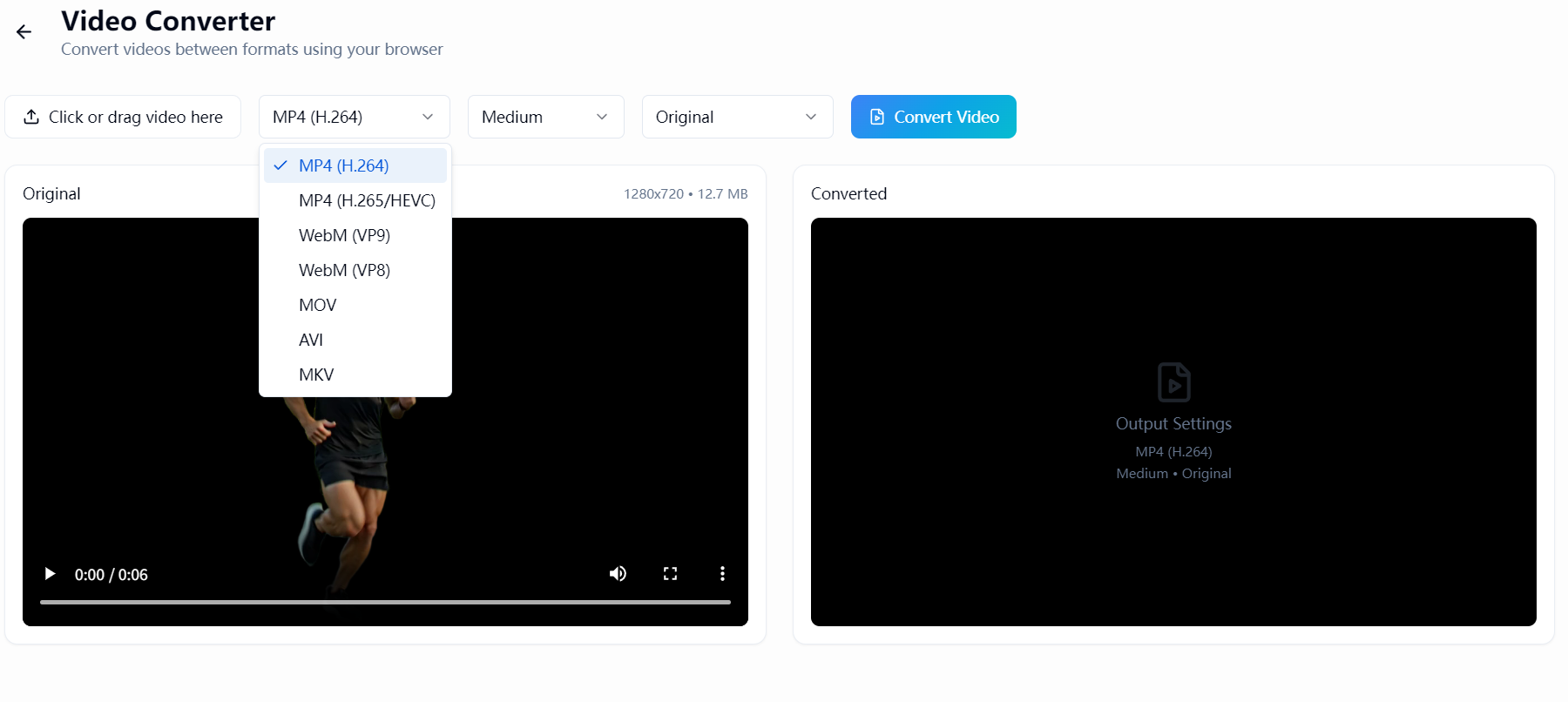
WaveSpeed Desktop converts videos on your own hardware. No cloud, no queue, no compromise.
Supported Formats
- MP4 — Universal video format (H.264/H.265)
- MOV — Apple QuickTime format
- AVI — Legacy Windows format
- WebM — Web-optimized video
- MKV — Container for any codec
- And more — comprehensive codec and container support
The Real Comparison
| Feature | HandBrake | Online Converters | Paid Software | WaveSpeed Desktop |
|---|---|---|---|---|
| Price | Free | Free tier limited | $30-80/yr | Free |
| Watermarks | No | Common | No | No |
| Ease of use | Complex | Simple | Simple | Simple |
| File size limit | None | 500MB-1GB | None | None |
| Privacy | Local | Cloud upload | Local | Local |
| AI tools included | No | No | Some | Yes |
| Batch conversion | Yes | Limited | Yes | Yes |
Common Use Cases
Social Media Optimization
Convert videos to the optimal format and resolution for each platform. MP4 for Instagram, WebM for web, MOV for Final Cut Pro — all from one source file.
Cross-Platform Compatibility
Convert MOV files from Mac to MP4 for universal playback. Convert MKV to MP4 for devices that don’t support it. Fix “format not supported” errors instantly.
File Size Reduction
Re-encode large video files to smaller sizes without visible quality loss. Perfect for email attachments, messaging apps, or limited storage.
Archive and Backup
Convert aging AVI and WMV files to modern H.265/HEVC for dramatic space savings while preserving quality. Future-proof your video library.
Professional Workflow
Convert between editing formats — ProRes for Final Cut, DNxHR for DaVinci Resolve, H.264 for delivery — without leaving your workstation.
A Complete Creative Toolkit
WaveSpeed Desktop goes beyond format conversion:
- Free audio conversion — MP3, WAV, FLAC, AAC
- Free image conversion — PNG, JPG, WebP, HEIC
- AI video tools — generate, enhance, and transform video with AI models
- AI image tools — generate, edit, and upscale images
- All local — your files stay on your machine
Get Converting in 30 Seconds
- Download WaveSpeed Desktop — free, no account required
- Drop in your video file (any size)
- Choose format, codec, and quality settings
- Convert — fast local processing, no watermarks
Related Articles

Best Fotor Alternative in 2026: WaveSpeedAI for AI Image Generation & Editing
Best Free Audio Converter in 2026: Convert MP3, WAV, FLAC, AAC Instantly
Best Free Image Converter in 2026: Convert PNG, JPG, WebP, HEIC Locally

Best Janitor AI Alternative in 2026: Why Creators Are Switching to WaveSpeedAI
Best Media.io Alternative in 2026: WaveSpeedAI for AI Video, Image & Audio Tools