Best Free Image Converter in 2026: Convert PNG, JPG, WebP, HEIC Locally
Best Free Image Converter in 2026: Private, Fast, and Completely Free
Need to convert a HEIC photo from your iPhone to JPG? Batch convert WebP images to PNG for a presentation? Resize and convert product photos to multiple formats for your website? Most online image converters make you upload files, wait in line, and accept compromises on quality or privacy.
WaveSpeed Desktop converts images locally on your computer — instantly, privately, and with no limits on file size or number of conversions. It’s free, and your images never leave your machine.
The Problem With Online Image Converters
Every time you upload an image to an online converter, you’re:
- Sharing your files with an unknown server (privacy risk for personal or business images)
- Waiting for uploads — large files or slow connections make this painful
- Hitting limits — most free tiers restrict file size, batch count, or daily conversions
- Losing quality — some services over-compress output to save bandwidth
- Seeing ads — aggressive advertising and upsells on every page
WaveSpeed Desktop: Image Conversion Without Compromise
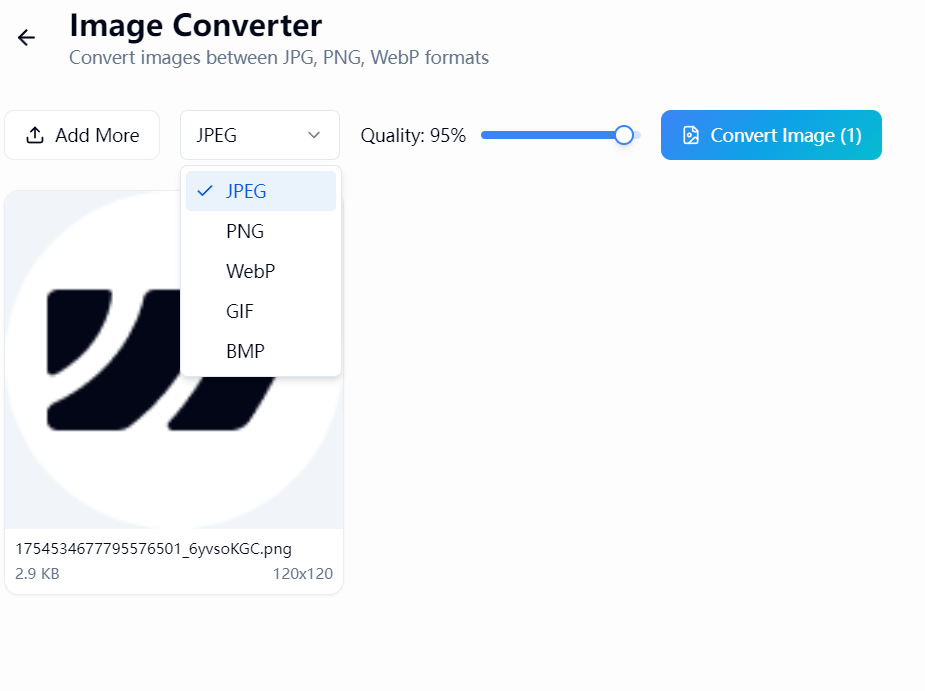
WaveSpeed Desktop processes everything on your local machine. No server, no upload, no waiting.
Supported Formats
- JPG/JPEG — Universal photo format
- PNG — Lossless with transparency support
- WebP — Modern format for web optimization
- HEIC/HEIF — iPhone and Apple default format
- BMP — Bitmap format
- TIFF — Print and publishing standard
- And more — comprehensive format coverage
Online vs. Desktop: The Real Comparison
| Feature | Online Converters | WaveSpeed Desktop |
|---|---|---|
| Privacy | Files leave your computer | 100% local |
| File size limit | Typically 5-25MB | Unlimited |
| Batch conversion | Limited or paid | Free and unlimited |
| Speed | Depends on internet | Instant |
| Quality control | Often over-compressed | Full control |
| HEIC support | Hit or miss | Built-in |
| Cost | Free tier limited | Completely free |
Common Use Cases
iPhone HEIC to JPG
Apple’s HEIC format isn’t universally supported. Convert iPhone photos to JPG or PNG for sharing, uploading, or editing in any software.
Web Optimization
Convert images to WebP for faster website loading. Batch process entire image directories for e-commerce sites, blogs, or portfolios.
Print Preparation
Convert web-optimized JPGs to high-quality TIFF or PNG for print production. Maintain quality when moving from screen to print.
Social Media
Quickly convert and resize images for different platform requirements. Instagram, LinkedIn, Twitter — each has different optimal formats and dimensions.
Photography Workflow
Batch convert RAW exports, resize for different deliverables, and output in multiple formats from a single source — all without uploading anything.
Beyond Image Conversion
WaveSpeed Desktop is a full creative suite that also includes:
- Free audio conversion — MP3, WAV, FLAC, AAC, and more
- Free video conversion — all major video formats
- AI creative tools — image generation, style transfer, upscaling, and more
- Everything runs locally — private and fast
Start Converting in Seconds
- Download WaveSpeed Desktop — free, no account needed
- Drop in your images (single or batch)
- Select output format and quality
- Convert — instant results
Related Articles

Best Fotor Alternative in 2026: WaveSpeedAI for AI Image Generation & Editing
Best Free Audio Converter in 2026: Convert MP3, WAV, FLAC, AAC Instantly
Best Free Video Converter in 2026: Convert MP4, MOV, AVI, WebM Without Watermarks

Best Janitor AI Alternative in 2026: Why Creators Are Switching to WaveSpeedAI

Best Media.io Alternative in 2026: WaveSpeedAI for AI Video, Image & Audio Tools