Best Free Audio Converter in 2026: Convert MP3, WAV, FLAC, AAC Instantly
Best Free Audio Converter in 2026: No Uploads, No Limits, No Catch
Converting audio files shouldn’t require uploading your music to a random website, waiting in a queue, or paying for a subscription. Yet that’s exactly what most “free” audio converters force you to do — upload limits, watermarked output, slow processing, and aggressive upsells.
WaveSpeed Desktop takes a completely different approach. It’s a free desktop application that converts audio files locally on your computer — no uploads, no file size limits, no watermarks, and no internet connection required. Your files never leave your machine.
Why Most Online Audio Converters Fall Short
Online audio converters have fundamental problems:
- Privacy risk: You’re uploading your audio files to someone else’s server
- File size limits: Most free tiers cap at 50-100MB per file
- Queue waiting: Popular services throttle free users during peak hours
- Watermarks: Some services add audio watermarks to free conversions
- Format limitations: Many only support a handful of common formats
- Speed: Upload time + processing time + download time adds up fast
WaveSpeed Desktop: Free Audio Conversion That Just Works
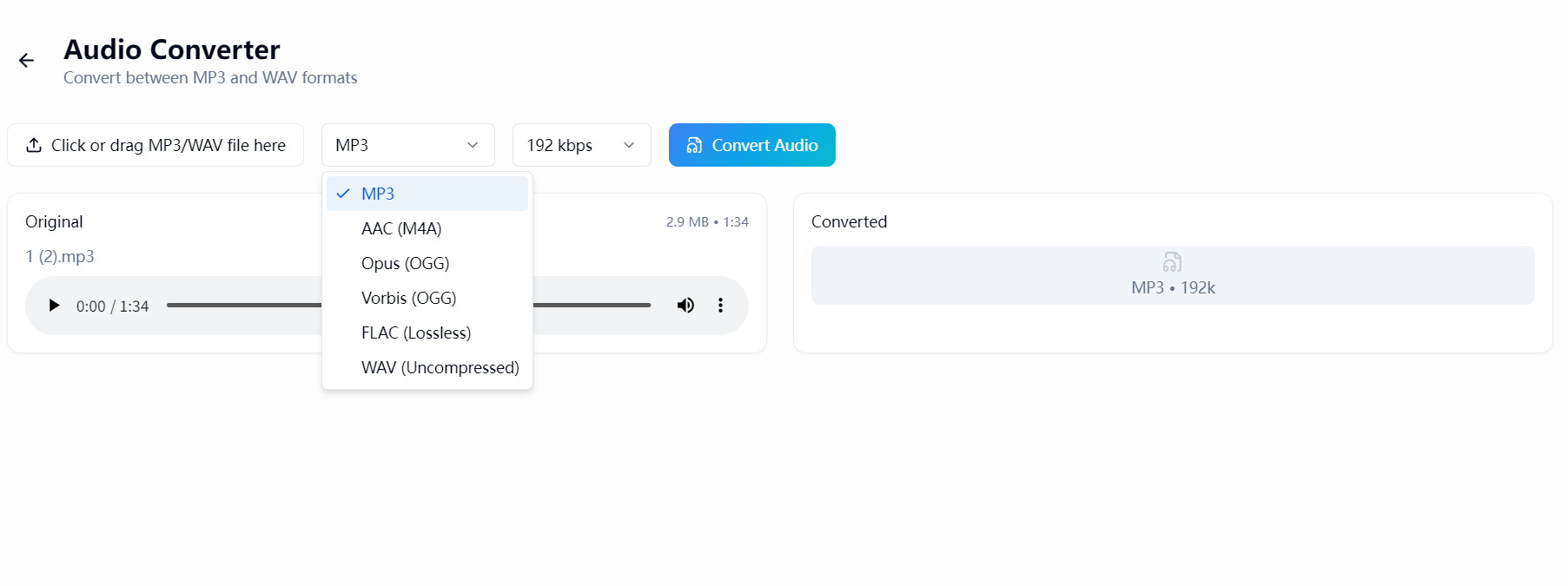
WaveSpeed Desktop runs entirely on your computer. Drop in an audio file, pick your output format, and get your converted file in seconds. Here’s what makes it different:
Supported Formats
Convert freely between all major audio formats:
- MP3 — Universal compatibility
- WAV — Lossless, studio quality
- FLAC — Lossless compression
- AAC — High quality at small file sizes
- OGG — Open-source format
- And more — comprehensive format support
Why It’s Better Than Online Converters
| Feature | Online Converters | WaveSpeed Desktop |
|---|---|---|
| Privacy | Files uploaded to cloud | 100% local processing |
| File size limit | 50-100MB typical | No limit |
| Speed | Upload + process + download | Instant local conversion |
| Watermarks | Common on free tiers | Never |
| Internet required | Yes | No |
| Batch conversion | Usually paid | Free |
| Cost | Free tier limited | Completely free |
No Compromise on Quality
WaveSpeed Desktop preserves audio quality during conversion. When converting between lossless formats (WAV, FLAC), there’s zero quality loss. When converting to lossy formats (MP3, AAC), you get the best possible output at your chosen bitrate.
Common Use Cases
Music Production
Convert stems and samples between formats for DAW compatibility. WAV to FLAC for archiving, FLAC to MP3 for sharing — all without leaving your workstation.
Podcast Production
Convert raw recordings to distribution-ready formats. WAV from your mic to MP3 for podcast hosting platforms, with full control over bitrate and quality.
Audio Archiving
Batch convert an entire music library from one format to another. MP3 to FLAC for archival, or FLAC to AAC for mobile devices.
Cross-Platform Compatibility
Convert audio files that won’t play on certain devices or software. Apple’s AAC to universal MP3, or OGG to WAV for broader compatibility.
More Than Just Audio
WaveSpeed Desktop isn’t just an audio converter — it’s a complete creative toolkit that also includes:
- Free video conversion between all major formats
- Free image conversion with format and quality control
- AI-powered creative tools — image generation, video generation, and more
- All running locally on your machine
Get Started in 30 Seconds
- Download WaveSpeed Desktop — free, no account required
- Drop in your audio file
- Choose your output format
- Convert — done in seconds
No uploads. No watermarks. No limits. No subscriptions. Just fast, private audio conversion that works.
Related Articles

Best Fotor Alternative in 2026: WaveSpeedAI for AI Image Generation & Editing
Best Free Image Converter in 2026: Convert PNG, JPG, WebP, HEIC Locally
Best Free Video Converter in 2026: Convert MP4, MOV, AVI, WebM Without Watermarks

Best Janitor AI Alternative in 2026: Why Creators Are Switching to WaveSpeedAI
Best Media.io Alternative in 2026: WaveSpeedAI for AI Video, Image & Audio Tools